I bought one of these for my oldest son in March 2017 for homework and light gaming. It came with a 1TB HDD then. It did well for him to start, but once he started playing more advanced games, I needed to upgrade it a bit.
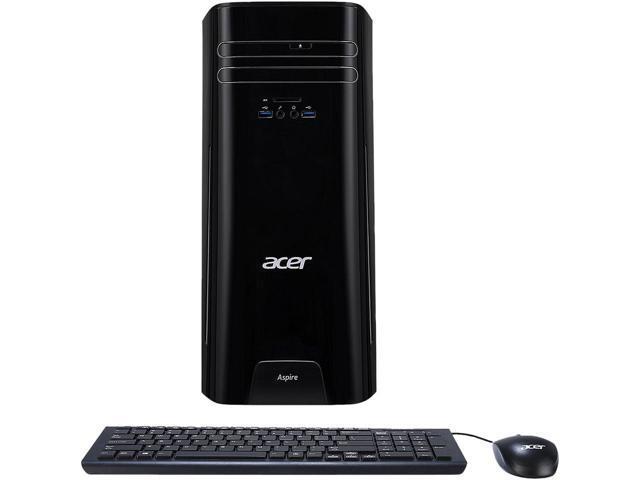
It is a small case, but I was able to fit an ASUS GTX1060 in the case. Since the power supply did not have 6 pin power connectors, I upgraded to an EVGA G3 650 Gold (the stock power supply is a standard ATX form factor. I also swapped out to a 2.5 SSD and added another 8GB RAM. It has an m.2 slot in it, but from what I have read, it is limited to a SATA m.2, not an nvme.
All in all a good little computer, but the 8th gen intel processors have been out a while, so this is running older technology.
Anyway, it's a solid deal for what you get and should be plenty of computer for browsing, email, light video editing, some video games...If you want to upgrade it on the cheap for more serious gaming and stuff, then there is plenty of info out there to help get you started.
It has it's problems though.
One of the biggest being it only two sata connections and both are being used (one by the hdd and the other by the optical drive)..
Installing a M.2 ssd into the open M.2 slot and using the hdd for storage isn't as cut and dry on this machine as it should be. Apparently changing the boot order is a bit of a challenge, one that I'm trying to get help with myself.
Don't know if this is specific to mine because of some programs I installed but Internet Explorer 11 would constantly freeze and lock up. I disabled add-ons, anti virus, did the repair.... and nothing worked., I prefer Chrome anyway but just found it odd. My crazy theory is that they want you to use Microsoft Edge so they sabotage IE11.
Sign up for a Slickdeals account to remove this ad.
This comment has been rated as unhelpful by Slickdeals users
I bought one of these for my oldest son in March 2017 for homework and light gaming. It came with a 1TB HDD then. It did well for him to start, but once he started playing more advanced games, I needed to upgrade it a bit.
It is a small case, but I was able to fit an ASUS GTX1060 in the case. Since the power supply did not have 6 pin power connectors, I upgraded to an EVGA G3 650 Gold (the stock power supply is a standard ATX form factor. I also swapped out to a 2.5 SSD and added another 8GB RAM. It has an m.2 slot in it, but from what I have read, it is limited to a SATA m.2, not an nvme.
All in all a good little computer, but the 8th gen intel processors have been out a while, so this is running older technology.
Anyway, it's a solid deal for what you get and should be plenty of computer for browsing, email, light video editing, some video games...If you want to upgrade it on the cheap for more serious gaming and stuff, then there is plenty of info out there to help get you started.
It has it's problems though.
One of the biggest being it only two sata connections and both are being used (one by the hdd and the other by the optical drive)..
Installing a M.2 ssd into the open M.2 slot and using the hdd for storage isn't as cut and dry on this machine as it should be. Apparently changing the boot order is a bit of a challenge, one that I'm trying to get help with myself.
Don't know if this is specific to mine because of some programs I installed but Internet Explorer 11 would constantly freeze and lock up. I disabled add-ons, anti virus, did the repair.... and nothing worked., I prefer Chrome anyway but just found it odd. My crazy theory is that they want you to use Microsoft Edge so they sabotage IE11.
I bought one of these for my oldest son in March 2017 for homework and light gaming. It came with a 1TB HDD then. It did well for him to start, but once he started playing more advanced games, I needed to upgrade it a bit.
It is a small case, but I was able to fit an ASUS GTX1060 in the case. Since the power supply did not have 6 pin power connectors, I upgraded to an EVGA G3 650 Gold (the stock power supply is a standard ATX form factor. I also swapped out to a 2.5 SSD and added another 8GB RAM. It has an m.2 slot in it, but from what I have read, it is limited to a SATA m.2, not an nvme.
+++++++++++++++++++++++++++++
no PCIe M.2 gen 3 x4 NVME is a big turnoff deal breaker !
If you are adding a new PSU and GPU you might as well just build yourself. I bet your 1060 also has cooling issues in that case.
Anyway, it's a solid deal for what you get and should be plenty of computer for browsing, email, light video editing, some video games...If you want to upgrade it on the cheap for more serious gaming and stuff, then there is plenty of info out there to help get you started.
It has it's problems though.
One of the biggest being it only two sata connections and both are being used (one by the hdd and the other by the optical drive)..
Installing a M.2 ssd into the open M.2 slot and using the hdd for storage isn't as cut and dry on this machine as it should be. Apparently changing the boot order is a bit of a challenge, one that I'm trying to get help with myself.
Don't know if this is specific to mine because of some programs I installed but Internet Explorer 11 would constantly freeze and lock up. I disabled add-ons, anti virus, did the repair.... and nothing worked., I prefer Chrome anyway but just found it odd. My crazy theory is that they want you to use Microsoft Edge so they sabotage IE11.
For the boot order issue. Remove 2.5inch SSD. Install m.2 and install Windows on it. Boot the computer. Then shut it down and install the 2.5inch( make sure it is fully formatted first) and set it up on boot as your data drive in partition manager.
Windows 10 installs multiple partitions and they become marked as active primary partition. Without a full wipe on the 2.5 it will get confused.
I wouldn't pay 200 for this, slickdeals has gone soft
Just, don't thread crap without backing it up with alternative 350 dollar pc that you think would be much, much better ... , then you will have my respect.



49 Comments
Your comment cannot be blank.
Featured Comments
It is a small case, but I was able to fit an ASUS GTX1060 in the case. Since the power supply did not have 6 pin power connectors, I upgraded to an EVGA G3 650 Gold (the stock power supply is a standard ATX form factor. I also swapped out to a 2.5 SSD and added another 8GB RAM. It has an m.2 slot in it, but from what I have read, it is limited to a SATA m.2, not an nvme.
All in all a good little computer, but the 8th gen intel processors have been out a while, so this is running older technology.
Even posted the deal but didn't get any love. https://slickdeals.net/f/11676011-acer-desktop-aspire-tc-780-amzki5-core-i5-7400-8gb-ddr4-2tb-hdd-320-newegg-via-ebay?v=1
Anyway, it's a solid deal for what you get and should be plenty of computer for browsing, email, light video editing, some video games...If you want to upgrade it on the cheap for more serious gaming and stuff, then there is plenty of info out there to help get you started.
It has it's problems though.
One of the biggest being it only two sata connections and both are being used (one by the hdd and the other by the optical drive)..
Installing a M.2 ssd into the open M.2 slot and using the hdd for storage isn't as cut and dry on this machine as it should be. Apparently changing the boot order is a bit of a challenge, one that I'm trying to get help with myself.
Don't know if this is specific to mine because of some programs I installed but Internet Explorer 11 would constantly freeze and lock up. I disabled add-ons, anti virus, did the repair.... and nothing worked., I prefer Chrome anyway but just found it odd. My crazy theory is that they want you to use Microsoft Edge so they sabotage IE11.
Sign up for a Slickdeals account to remove this ad.
It is a small case, but I was able to fit an ASUS GTX1060 in the case. Since the power supply did not have 6 pin power connectors, I upgraded to an EVGA G3 650 Gold (the stock power supply is a standard ATX form factor. I also swapped out to a 2.5 SSD and added another 8GB RAM. It has an m.2 slot in it, but from what I have read, it is limited to a SATA m.2, not an nvme.
All in all a good little computer, but the 8th gen intel processors have been out a while, so this is running older technology.
Even posted the deal but didn't get any love. https://slickdeals.net/f/11676011-acer-desktop-aspire-tc-780-amzki5-core-i5-7400-8gb-ddr4-2tb-hdd-320-newegg-via-ebay?v=1
Anyway, it's a solid deal for what you get and should be plenty of computer for browsing, email, light video editing, some video games...If you want to upgrade it on the cheap for more serious gaming and stuff, then there is plenty of info out there to help get you started.
It has it's problems though.
One of the biggest being it only two sata connections and both are being used (one by the hdd and the other by the optical drive)..
Installing a M.2 ssd into the open M.2 slot and using the hdd for storage isn't as cut and dry on this machine as it should be. Apparently changing the boot order is a bit of a challenge, one that I'm trying to get help with myself.
Don't know if this is specific to mine because of some programs I installed but Internet Explorer 11 would constantly freeze and lock up. I disabled add-ons, anti virus, did the repair.... and nothing worked., I prefer Chrome anyway but just found it odd. My crazy theory is that they want you to use Microsoft Edge so they sabotage IE11.
It is a small case, but I was able to fit an ASUS GTX1060 in the case. Since the power supply did not have 6 pin power connectors, I upgraded to an EVGA G3 650 Gold (the stock power supply is a standard ATX form factor. I also swapped out to a 2.5 SSD and added another 8GB RAM. It has an m.2 slot in it, but from what I have read, it is limited to a SATA m.2, not an nvme.
+++++++++++++++++++++++++++++
no PCIe M.2 gen 3 x4 NVME is a big turnoff deal breaker !
Even posted the deal but didn't get any love. https://slickdeals.net/f/11676011-acer-desktop-aspire-tc-780-amzki5-core-i5-7400-8gb-ddr4-2tb-hdd-320-newegg-via-ebay?v=1
Anyway, it's a solid deal for what you get and should be plenty of computer for browsing, email, light video editing, some video games...If you want to upgrade it on the cheap for more serious gaming and stuff, then there is plenty of info out there to help get you started.
It has it's problems though.
One of the biggest being it only two sata connections and both are being used (one by the hdd and the other by the optical drive)..
Installing a M.2 ssd into the open M.2 slot and using the hdd for storage isn't as cut and dry on this machine as it should be. Apparently changing the boot order is a bit of a challenge, one that I'm trying to get help with myself.
Don't know if this is specific to mine because of some programs I installed but Internet Explorer 11 would constantly freeze and lock up. I disabled add-ons, anti virus, did the repair.... and nothing worked., I prefer Chrome anyway but just found it odd. My crazy theory is that they want you to use Microsoft Edge so they sabotage IE11.
For the boot order issue. Remove 2.5inch SSD. Install m.2 and install Windows on it. Boot the computer. Then shut it down and install the 2.5inch( make sure it is fully formatted first) and set it up on boot as your data drive in partition manager.
Windows 10 installs multiple partitions and they become marked as active primary partition. Without a full wipe on the 2.5 it will get confused.
Sign up for a Slickdeals account to remove this ad.
You do know anyone can post right slickdeals dont control it
Don't be a drive by TROLL! Please share your choice in the 350 price range. And if it is better, I'll applaud you.