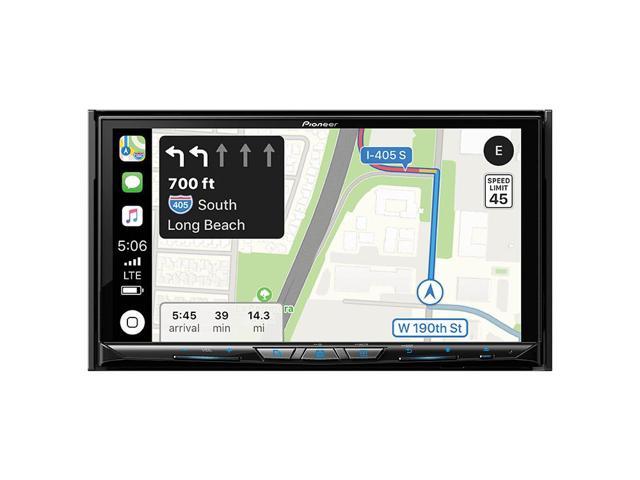
Drive In Autosound via NeweggFlash is offering select Pioneer Navigation DVD/CD 7" Touchscreen Receivers on sale listed below. Shipping is free. Thanks iconian
Note, must apply the listed promo code to receive discount. Item must be sold by Drive In Autosound.
Parking brake bypass instruction with FW 1.01 installed for Pioneer AVH-W4400NEX.
Make sure you get a screen which says OFF then press and hold a lower left cover for 5-7 second until you see "Set ON".
That's all you need.
Does the 4400NEX come with a USB adapter for the back? I know it is wireless CarPlay, I was just wondering if I should order a USB plug for my 4Runner to install it, or if there is no need to run a USB from the back of the head unit.
There are two USB ports on the back - one CarPlay, one android auto. It comes with a ~6ft usb extension cable. I'm using the AA port for my wireless charger, and I ran the CarPlay port extension under the center console but I have yet to plug into it.
There are two USB ports on the back - one CarPlay, one android auto. It comes with a ~6ft usb extension cable. I'm using the AA port for my wireless charger, and I ran the CarPlay port extension under the center console but I have yet to plug into it.
Let me tell you people...... If you have buggy problems with either AA or car play, the first thing you should do is SWITCH TO A HIGH QUALITY USB CABLE, ideally the one that came with your phone. This will solve 90% of the issues encountered.
I've had this installed for about a month now and have been super happy with the unit. I use primarily Apple CarPlay wirelessly so can't speak much to the other features on the unit, but it works great for that. Syncs to my iPhone automatically when I get in the car and typically my phone never leaves my pocket now.
I'm still happy with my choice of capacitive display and have not had any regrets there, I never feel like my inputs aren't being registered properly, thinking the tech for this one is better than previous versions that left such a sour taste in peoples mouths. Daytime visibility is the biggest drawback of the unit (and other similar units) with glare/reflections and I've heard that is even worse on the Resistive units like the 8400NEX and feel like that would make a bigger real world difference than the difference in Capacitive vs Resistive.
Here were my thoughts in the last thread vs it's bigger brother the W8400NEX:
"Kicking myself for not pulling the trigger on the W4400NEX. I have been in the market for a wireless CarPlay head-unit and saw this thread yesterday on my lunch. Reading reviews online I was convinced I needed a capacitive display rather than a resistive. I was also concerned about the flip out display feeling a bit cheap, as I don't personally need a DVD/CD drive.
I stopped by Best Buy on my way home to actually try a few of these units out and found the difference resistive to capacitive to not be nearly what some make it out to be. The build quality on the W4400NEX was quite nice as well, and I didn't feel the flip out display felt cheap at all. I would give the nod to capacitive both in screen quality and responsiveness, but the resistive display in the W4400NEX would have been more than adequate for my needs.
By time I realized this the deal was dead. Congratulations to those who were able to take advantage, being under $400 for a wireless CarPlay headunit is a hell of a deal. Should have trusted my gut of "buy first ask questions later".
I really regretted missing out on this last time, and my recommendation for those of you on the fence would be to buy before this deal goes away."
"I've heard that is even worse on the Resistive units like the 8400NEX"
8400 is capacitive, not resistive.
It's one of the 5W magnetic vent clip chargers Amazon sells. It was enough to mostly maintain a charge while running gps and music before I had CarPlay, and it seems to charge better with CarPlay and the screen off (although I haven't taken any long trips yet).
I bought the 4400 on the last Crutchfield deal. Install was a little complicated with the idatalink and massive bundle of wires, but the idatalink also made it simpler in some ways. EX: The OBD2 connection triggers the backup camera as opposed to having to run a remote wire back to a brake light.
I also bought a brake bypass on eBay and it "works" in that I didn't have to run the wire to the brake pedal, but as soon as the car is moving, the warning screen comes up. As soon as I slow at a stoplight or something, it will go away and the bypass works again. I've read some about some of these units having a gyro or something in them to detect motion. HAS ANYONE SUCCESSFULLY INSTALLED A BRAKE BYPASS ON THIS???
Note: I installed this in a 2009 4Runner. This DOES NOT come with a backup camera. I bought a generic license plate camera on Amazon and it works well. I would suggest buying a more heavy-duty usb cable versus the one that comes with the unit. I bought a heavy duty 8ft extension cable, HDMI cable, and aux cable, and routed all under the console and into the bottom of the console. This way I can plug a regular usb-c cable into the USB extension and if the usb-c end ever gets messed up, I don't have to re-run the whole cable.
for those of you worried whether abt or drive in autosound are authorized and if pioneer will honor the rebate:
Drive in autosound is legit I purchased a unit from newegg via them. Also, do not get resistive period! I have it and the frustration of trying to input sucks! Do not get suckered in by buying it because of price because you will hate it!
I didnt get the 8400 because my toyota rav4 2018 intune nav already have a builtin mic which can not be used with 8400.
Drive in autosound is legit I purchased a unit from newegg via them. Also, do not get resistive period! I have it and the frustration of trying to input sucks! Do not get suckered in by buying it because of price because you will hate it!
I didnt get the 8400 because my toyota rav4 2018 intune nav already have a builtin mic which can be used with 8400.
I have a 4200 that I bought last year from newegg and drive in autosound, and you are right, the touch screen sucks on that thing.
supposedly the new one in the 4400 is much improved, but still resistive.
videos on youtube demonstrating the 4400 show that it seems to be very responsive to touch inputs.
I have a 4200 that I bought last year from newegg and drive in autosound, and you are right, the touch screen sucks on that thing.
supposedly the new one in the 4400 is much improved, but still resistive.
videos on youtube demonstrating the 4400 show that it seems to be very responsive to touch inputs.
Like I said, it is fine when it works but man will never again buy resistive. Resistive is fine for copiers but not when everyone is so used to capacitive on their android and apple devices.
iDatalink Maestro, a car harness, antenna adapter, and dash kit.
Thanks. This is very helpful. This tells me that I would have to go for something similar to the $200 option in Crutchfield since the iDatalink Maestro itself comes to $115.I see these slightly cheaper on Amazon. So that may be the way to go...
Any idea how complicated it is to set this up? While I'm not a novice (assembled several home pc from barebones parts), I've never done any custom mod in a car
I bought the 4400 on the last Crutchfield deal. Install was a little complicated with the idatalink and massive bundle of wires, but the idatalink also made it simpler in some ways. EX: The OBD2 connection triggers the backup camera as opposed to having to run a remote wire back to a brake light.
I also bought a brake bypass on eBay and it "works" in that I didn't have to run the wire to the brake pedal, but as soon as the car is moving, the warning screen comes up. As soon as I slow at a stoplight or something, it will go away and the bypass works again. I've read some about some of these units having a gyro or something in them to detect motion. HAS ANYONE SUCCESSFULLY INSTALLED A BRAKE BYPASS ON THIS???
Note: I installed this in a 2009 4Runner. This DOES NOT come with a backup camera. I bought a generic license plate camera on Amazon and it works well. I would suggest buying a more heavy-duty usb cable versus the one that comes with the unit. I bought a heavy duty 8ft extension cable, HDMI cable, and aux cable, and routed all under the console and into the bottom of the console. This way I can plug a regular usb-c cable into the USB extension and if the usb-c end ever gets messed up, I don't have to re-run the whole cable.
Could I have your email? I am going to be installing this is an 03 4Runner and was wondering if I could reach out to you for some questions.



182 Comments
Your comment cannot be blank.
Sign up for a Slickdeals account to remove this ad.
There are two USB ports on the back - one CarPlay, one android auto. It comes with a ~6ft usb extension cable. I'm using the AA port for my wireless charger, and I ran the CarPlay port extension under the center console but I have yet to plug into it.
I haven't checked the website but I received an email a couple of days ago. I sent it in probably 2 weeks ago.
I'm still happy with my choice of capacitive display and have not had any regrets there, I never feel like my inputs aren't being registered properly, thinking the tech for this one is better than previous versions that left such a sour taste in peoples mouths. Daytime visibility is the biggest drawback of the unit (and other similar units) with glare/reflections and I've heard that is even worse on the Resistive units like the 8400NEX and feel like that would make a bigger real world difference than the difference in Capacitive vs Resistive.
This is the parking brake bypass I bought and installed, works great: https://www.amazon.com/gp/product...UTF8&
Here were my thoughts in the last thread vs it's bigger brother the W8400NEX:
"Kicking myself for not pulling the trigger on the W4400NEX. I have been in the market for a wireless CarPlay head-unit and saw this thread yesterday on my lunch. Reading reviews online I was convinced I needed a capacitive display rather than a resistive. I was also concerned about the flip out display feeling a bit cheap, as I don't personally need a DVD/CD drive.
I stopped by Best Buy on my way home to actually try a few of these units out and found the difference resistive to capacitive to not be nearly what some make it out to be. The build quality on the W4400NEX was quite nice as well, and I didn't feel the flip out display felt cheap at all. I would give the nod to capacitive both in screen quality and responsiveness, but the resistive display in the W4400NEX would have been more than adequate for my needs.
By time I realized this the deal was dead. Congratulations to those who were able to take advantage, being under $400 for a wireless CarPlay headunit is a hell of a deal. Should have trusted my gut of "buy first ask questions later".
I really regretted missing out on this last time, and my recommendation for those of you on the fence would be to buy before this deal goes away."
8400 is capacitive, not resistive.
I want something that has:
GPS
Ability to connect a backup camera
CD/DVD Player
AM/FM Radio
I got a hunch these are both overkill. Anyone know a good model number that includes the above? Thanks
4400 vs 8400 quick comparison
If there's no cell signal where they are going then they are SOL with 4400. Go with 8400.
Otherwise the $595 final after tax at Newegg wins.
Sign up for a Slickdeals account to remove this ad.
It's one of the 5W magnetic vent clip chargers Amazon sells. It was enough to mostly maintain a charge while running gps and music before I had CarPlay, and it seems to charge better with CarPlay and the screen off (although I haven't taken any long trips yet).
I also bought a brake bypass on eBay and it "works" in that I didn't have to run the wire to the brake pedal, but as soon as the car is moving, the warning screen comes up. As soon as I slow at a stoplight or something, it will go away and the bypass works again. I've read some about some of these units having a gyro or something in them to detect motion. HAS ANYONE SUCCESSFULLY INSTALLED A BRAKE BYPASS ON THIS???
Note: I installed this in a 2009 4Runner. This DOES NOT come with a backup camera. I bought a generic license plate camera on Amazon and it works well. I would suggest buying a more heavy-duty usb cable versus the one that comes with the unit. I bought a heavy duty 8ft extension cable, HDMI cable, and aux cable, and routed all under the console and into the bottom of the console. This way I can plug a regular usb-c cable into the USB extension and if the usb-c end ever gets messed up, I don't have to re-run the whole cable.
Drive in autosound is legit I purchased a unit from newegg via them. Also, do not get resistive period! I have it and the frustration of trying to input sucks! Do not get suckered in by buying it because of price because you will hate it!
I didnt get the 8400 because my toyota rav4 2018 intune nav already have a builtin mic which can not be used with 8400.
I didnt get the 8400 because my toyota rav4 2018 intune nav already have a builtin mic which can be used with 8400.
supposedly the new one in the 4400 is much improved, but still resistive.
videos on youtube demonstrating the 4400 show that it seems to be very responsive to touch inputs.
supposedly the new one in the 4400 is much improved, but still resistive.
videos on youtube demonstrating the 4400 show that it seems to be very responsive to touch inputs.
Like I said, it is fine when it works but man will never again buy resistive. Resistive is fine for copiers but not when everyone is so used to capacitive on their android and apple devices.
Any idea how complicated it is to set this up? While I'm not a novice (assembled several home pc from barebones parts), I've never done any custom mod in a car
Sign up for a Slickdeals account to remove this ad.
I also bought a brake bypass on eBay and it "works" in that I didn't have to run the wire to the brake pedal, but as soon as the car is moving, the warning screen comes up. As soon as I slow at a stoplight or something, it will go away and the bypass works again. I've read some about some of these units having a gyro or something in them to detect motion. HAS ANYONE SUCCESSFULLY INSTALLED A BRAKE BYPASS ON THIS???
Note: I installed this in a 2009 4Runner. This DOES NOT come with a backup camera. I bought a generic license plate camera on Amazon and it works well. I would suggest buying a more heavy-duty usb cable versus the one that comes with the unit. I bought a heavy duty 8ft extension cable, HDMI cable, and aux cable, and routed all under the console and into the bottom of the console. This way I can plug a regular usb-c cable into the USB extension and if the usb-c end ever gets messed up, I don't have to re-run the whole cable.