Slickdeals is community-supported.  We may get paid by brands for deals, including promoted items.

Black Friday Bananza is just 4 days awayBlack Friday Bananza is just 4 days away

View Deals
Missed This Deal? Get alerts when similar deals are posted.
expired
fmorris72 46.5K Views
Oct 29, 2025 1:30 AM

Bambu Lab P1S 3D Printer AMS 2 Pro Combo: w/ Buffer $599, w/ Hub

$619

$1,148

46% off
+ Free Shippingat Bambu Lab
Visit Bambu Lab
Good Deal?
105Comments
Save
Share
Deal Details
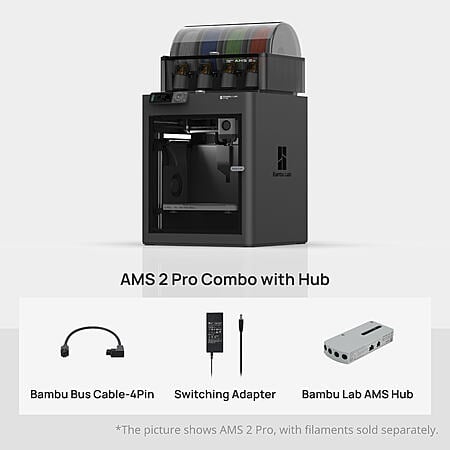
Bambu Lab has Bambu Lab P1S 3D Printer AMS 2 Pro Combo w/ Hub for $619. Shipping is free.

Bambu Lab has Bambu Lab P1S 3D Printer AMS 2 Pro Combo w/ Buffer for $599. Shipping is free.

Thanks to Community Members fmorris72 & nodashipl for sharing this deal.

Features:
  • Works right out of the box, set up in 15 minutes
  • Enclosed-body for high-temperature filament printing
  • Up to 16-color printing with AMS
  • Up to 20000 mm/s² acceleration, prints a benchy in 18min
  • Built-in camera for remote monitoring and timelapse
  • The AMS 2 Pro is compatible with X1/P1 series printers for multi-material printing.

Editor's Notes

Written by StrawMan86 | Staff

Original Post

Written by fmorris72
Community Notes
About the Poster
Deal Details
Community Notes
About the Poster
Bambu Lab has Bambu Lab P1S 3D Printer AMS 2 Pro Combo w/ Hub for $619. Shipping is free.

Bambu Lab has Bambu Lab P1S 3D Printer AMS 2 Pro Combo w/ Buffer for $599. Shipping is free.

Thanks to Community Members fmorris72 & nodashipl for sharing this deal.

Features:
  • Works right out of the box, set up in 15 minutes
  • Enclosed-body for high-temperature filament printing
  • Up to 16-color printing with AMS
  • Up to 20000 mm/s² acceleration, prints a benchy in 18min
  • Built-in camera for remote monitoring and timelapse
  • The AMS 2 Pro is compatible with X1/P1 series printers for multi-material printing.

Editor's Notes

Written by StrawMan86 | Staff

Original Post

Written by fmorris72

Community Voting

Deal Score
+83
Good Deal
Bad Deal

Top Comments

Community Reviews

The P1S AMS 2 Pro combo is praised as a fast, dependable enclosed printer that works well out of the box, especially for PLA, PETG, ABS, and kid-friendly beginner use. The AMS 2 adds active drying, faster feeding, and easier maintenance, and the buffer version is enough for the single included AMS while the hub is mainly for expanding to more units later. The main drawbacks are the messy multi-box shipping and missing connection parts, plus some buyers question whether the AMS 2 upgrade is worth the extra cost. It is a strong fit if you want a low-fuss Bambu setup and may expand into more demanding filaments later.

  • New 3D printing hobbyists who want a printer that works with minimal tuning, because generic filament profiles and plug-and-play setup keep prints reliable.

  • Print farms running multiple AMS units, because the hub supports up to four AMS units and the AMS2 is easier to service for clogs.

  • Users printing abrasive or glow-in-the-dark filaments, because the hardened nozzle and extruder help with wear-prone materials.

  • Parents or teachers introducing kids to 3D printing, because the machine is easy to run and can handle school projects with little downtime.

  • People who want a fully seamless out-of-box setup, because the AMS 2 Pro combo can arrive in separate boxes with missing connection parts and delayed accessories.

  • Shoppers who need immediate multi-AMS expansion, because the included buffer is for one AMS and the hub is a separate add-on for more units.

  • Users who expect drying to be hands-off, because the AMS 2 Pro drying process requires moving filament back onto the spool.

  • People who want to print only basic PLA and PETG on an open-bed machine, because the P1S enclosure is mainly useful when you need ABS, ASA, or other more demanding materials.

Common Questions (5)

Join The Conversation

Share your experience with the Slickdeals community

Share information with the community. Please follow our Community Guidelines and be kind!

105 Comments

Sign up for a Slickdeals account to remove this ad.

Oct 29, 2025 4:47 PM
115 Comments
Joined Jul 2019
Eugene1980Oct 29, 2025 4:47 PM
115 Comments
ill bet they are trying to clean house before the vortek announcment.
Oct 29, 2025 6:43 PM
10.7K Comments
Joined Nov 2006
CTRFK8Oct 29, 2025 6:43 PM
10.7K Comments
Quote from flangomango View quoted comment :
OK, drumb sucks we all agree.But there's no way the p2s is released cheaper than the p1s. Where's the evidence?
who is drumb?
2
2
Oct 29, 2025 8:27 PM
5 Comments
Joined Jan 2019
allensokoOct 29, 2025 8:27 PM
5 Comments
I have a question before I buy one for myself. Can I set up the ams to continue the print automatically if one spool runs empty? I only print in black petg
Oct 29, 2025 9:33 PM
162 Comments
Joined Dec 2008
zim2diveOct 29, 2025 9:33 PM
162 Comments
I decided to step down (in cost) to the A1 combo... still a step up from my Mini+ (50% larger prints, multi-color, and should be faster), and seemingly almost as good vs P1S (for the materials I use.. 99% PLA/PETG)... and less of a risk if Bambu goes full-on with en$hitification.
Oct 29, 2025 10:15 PM
1.5K Comments
Joined Apr 2006
jesterfxOct 29, 2025 10:15 PM
1.5K Comments
Quote from allensoko View quoted comment :
I have a question before I buy one for myself. Can I set up the ams to continue the print automatically if one spool runs empty? I only print in black petg
Yes, arguably the best feature of having an ams. Multi color prints are cool and usually look great but with the added print times and color change filament wastes I most often just print separate color plates rather than ams print more often. So the backup spools of the same color for continuous printing is what really stands out for me.
Oct 29, 2025 10:58 PM
1 Comments
Joined Jan 2019
StrongStep7955Oct 29, 2025 10:58 PM
1 Comments
Quote from nodashipl View quoted comment :
Its 599 if you go with the buffer instead of the hub. Hub is for 2+ AMS, buffer is for 1 AMS (but you can modify it to work wih multiple AMS's)
Using a 4 to 1 adapter with the buffer is the only jam-free configuration I've tried, the hub isn't necessary at all.
Oct 30, 2025 1:26 AM
27 Comments
Joined Dec 2013
stunyaOct 30, 2025 1:26 AM
27 Comments
Quote from zim2dive View quoted comment :
I decided to step down (in cost) to the A1 combo... still a step up from my Mini+ (50% larger prints, multi-color, and should be faster), and seemingly almost as good vs P1S (for the materials I use.. 99% PLA/PETG)... and less of a risk if Bambu goes full-on with en$hitification.
I am leaning this way myself. Wish we had release date and US price for P2S!

Sign up for a Slickdeals account to remove this ad.

Oct 30, 2025 5:25 AM
10.7K Comments
Joined Nov 2006
CTRFK8Oct 30, 2025 5:25 AM
10.7K Comments
Will have to wait for the p2s ,looks like tarriff situation was negotiated this evening with china.
Original Poster
Oct 30, 2025 10:09 AM
61 Comments
Joined May 2008
fmorris72
Original Poster
Oct 30, 2025 10:09 AM
61 Comments
Quote from basscow View quoted comment :
I finally pulled the trigger and got my first 3D printer the P1S combo with ams2 pro. My question is how hard/easy is it to learn the slicing software? Im sure there is more to it than just uploading a stl file.
Not too hard. I just got my first 3D printer last year. Was an ender 3 v3 se. Since your first printer is a Bambu, I expect your experience will be even better. For me, I played around with the creality slicer and then found Orca slicer which in my opinion is way better. However, Makerworld has a whole world of content that in many cases has profiles for your very printer. This is great for beginners as it takes the guess work out of which settings to choose in the slicer before you print and those setting will be based on your very printer in many cases. I do suggest however that you maybe watch some youtube vidoes on the P1S and the Bambu slicer so that you learn the basics but the P1S really just works.
Good Luck!
Oct 30, 2025 10:54 AM
444 Comments
Joined Dec 2008
basscowOct 30, 2025 10:54 AM
444 Comments
Quote from fmorris72 View quoted comment :
Not too hard. I just got my first 3D printer last year. Was an ender 3 v3 se. Since your first printer is a Bambu, I expect your experience will be even better. For me, I played around with the creality slicer and then found Orca slicer which in my opinion is way better. However, Makerworld has a whole world of content that in many cases has profiles for your very printer. This is great for beginners as it takes the guess work out of which settings to choose in the slicer before you print and those setting will be based on your very printer in many cases. I do suggest however that you maybe watch some youtube vidoes on the P1S and the Bambu slicer so that you learn the basics but the P1S really just works.Good Luck!
Thank you! They shipped quick and I'll have it by tomorrow
Oct 30, 2025 12:03 PM
38 Comments
Joined Dec 2006
robmanOct 30, 2025 12:03 PM
38 Comments
Quote from CleatusT View quoted comment :
My Bambu textured plates started having issues at about 200 hrs. Face down finishes were dull. Things didn't stick nearly as well. I hand wash them every other print. IPA between hand washes. I buy a new plate every two months.
Do you use a metal scraper? Do you pull off your prints before the plate fully cools? I got an extra plate from AliX for the nice carbon weave design but the added benefit is letting one plate cool while starting the next print. 200hrs and no noticeable degradation on the OG textured plate and I only use a single side.
Oct 30, 2025 12:07 PM
38 Comments
Joined Dec 2006
robmanOct 30, 2025 12:07 PM
38 Comments
Quote from konfirm View quoted comment :
For someone who is new to this, can someone recommend add-ons? There was a Bambu thread some time ago that someone made some recommendations, but I can't find it now.
0.2mm nozzle if you want to do fine detail work like a business card with qr code or complex mini figures. A 2nd plate is nice but not necessary. I dont print with anything that needs a hardened nozzle but you might want one. In general you have what you need for 95%+ of your prints out of the box if you have the right color filament.
Oct 30, 2025 7:49 PM
10.7K Comments
Joined Nov 2006
CTRFK8Oct 30, 2025 7:49 PM
10.7K Comments
After practically watching every review on the p2s coming within 15 days i will have to wait ,

I was informed there was a problem with shipping on the Saturday before launch, and given an expected price point of $549 USD for the standalone machine and $799 for the P2S Combo


the unit is amazingly alot better than the p1s

Also Tarriffs have been cut in half so it could be even cheaper by christmas

i am still playing with my flash forge adventure 5m i paid 180 for after tax delivered to the door. recent slickdeal
It is pretty amazing for the price.
Last edited by CTRFK8 October 30, 2025 at 01:52 PM.
1
Oct 30, 2025 9:32 PM
17 Comments
Joined Jul 2024
LivelyFang8868Oct 30, 2025 9:32 PM
17 Comments
Quote from DesertSilver View quoted comment :
What's the difference between the hub and buffer when choosing the AMS2?
I'm unsure about this too, can anyone speak to this?

Sign up for a Slickdeals account to remove this ad.

Oct 30, 2025 11:14 PM
91 Comments
Joined Nov 2013
kcstromOct 30, 2025 11:14 PM
91 Comments
Quote from CleatusT View quoted comment :
My Bambu textured plates started having issues at about 200 hrs. Face down finishes were dull. Things didn't stick nearly as well.
I hand wash them every other print. IPA between hand washes.
I buy a new plate every two months.
That's strange. I have about 1500 hours on my P1S and the PEI textured build plate that came with it still works quite well. I mainly print PLA, PETG, and TPU. Just be careful when removing things.

Join The Conversation

Share your experience with the Slickdeals community

Share information with the community. Please follow our Community Guidelines and be kind!