Bambu Lab has
Bambu Lab P1S 3D Printer AMS 2 Pro Combo w/ Hub for
$619.
Shipping is free.
Bambu Lab has
Bambu Lab P1S 3D Printer AMS 2 Pro Combo w/ Buffer for
$599.
Shipping is free.
Thanks to Community Members
fmorris72 &
nodashipl for sharing this deal.
Features:- Works right out of the box, set up in 15 minutes
- Enclosed-body for high-temperature filament printing
- Up to 16-color printing with AMS
- Up to 20000 mm/s² acceleration, prints a benchy in 18min
- Built-in camera for remote monitoring and timelapse
- The AMS 2 Pro is compatible with X1/P1 series printers for multi-material printing.


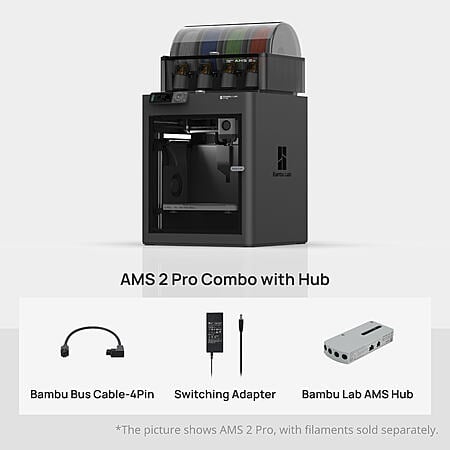

 + Free Shippingat Bambu Lab


Top Comments
--- I was originally going to buy the AMS1 combo + another AMS1 because I figured it would be cheaper. Turns out, in my case the price difference is really small because I wanted 2, and I went for 2xAMS2. I don't remember exactly how much, but to upgrade both of them was less than $100 difference because you have to buy the AMS hub separately ($40) if you go the AMS1 route.
--- The AMS2 combo comes with a wall power adapter for the AMS2, which you need if you're drying filament with the P1S. If you buy a second AMS2, it doesn't come with one, and you need to buy it separately (like $35)
--- If you plan to get bambu filament at some point, buy it at the same time as the printer. They gave me an "add-on" discount on all of them which I think is equal to the maximum bulk discount on filament, but just a la carte. So every filament was discounted 45%, which made PLA/PETG/ABS with spool included like $12.50/ea, regardless of how many I ordered.
P2S is available everywhere except USA. You have one specific person to thank for that problem.
Community Reviews
The P1S AMS 2 Pro combo is praised as a fast, dependable enclosed printer that works well out of the box, especially for PLA, PETG, ABS, and kid-friendly beginner use. The AMS 2 adds active drying, faster feeding, and easier maintenance, and the buffer version is enough for the single included AMS while the hub is mainly for expanding to more units later. The main drawbacks are the messy multi-box shipping and missing connection parts, plus some buyers question whether the AMS 2 upgrade is worth the extra cost. It is a strong fit if you want a low-fuss Bambu setup and may expand into more demanding filaments later.
Common Questions (5)
The combo can arrive in separate packages, and some buyers initially receive the printer and AMS 2 before the PTFE coupler, 4-pin cable, power supply, buffer/hub, or anti-vibration feet. Those parts may show up in later shipments, so the printer may not be usable immediately after the first box arrives.
The P1S is the cheaper buy-now option, and several comments frame it as a strong deal if you need a printer now. The tradeoff is that the P2S is expected to be a better machine overall, so waiting makes sense only if you can delay the purchase.
The buffer is the right choice for a single AMS, while the hub is for 2 or more AMS units. The hub can also be bought later if you decide to expand beyond one AMS.
AMS 2 Pro adds active drying up to 65°C, faster feeding, and tool-free maintenance access, which matters most for moisture-sensitive filaments and faster, more reliable multi-color printing. If you only need basic multi-color and don't care about drying or speed, the original AMS still works well.
No, the drying function requires moving the filament back onto the spool. That makes drying more awkward than expected, even though the setup is intended to keep softer filament from sticking in the tubes.
AI-generated summary based on comments from the community. Updated ago
Join The Conversation
Share your experience with the Slickdeals community
Share information with the community. Please follow our Community Guidelines and be kind!
105 Comments
Sign up for a Slickdeals account to remove this ad.
Got the P1S first, and setup without problem (though the quick start guide is not clear on few stuff which I have to search online).
Then got the AMS 2 in a separate package. Unboxed it but can't setup as the upgrade kit is not there.
I'm still waiting for my third package, hopefully everything else (upgrade kit which include PTFE, 4-pin connector, Power supply, Frame buffer etc) is there.
In your case, does it show a package with tracking number still in transit?
It is weird that the drying function requires me to store the filament back to the spool but anyway.
It is weird that the drying function requires me to store the filament back to the spool but anyway.
the printer came first for me. the ams 2 pro came in another box. the vibration feet, the hub, power adapter, and 4 pin cable cable in a 3rd box, and the ptfe coupler is finally in transit expected for the 10th (almost 2 weeks after the printer!)
thank goodness i found a ptfe coupler print on maker world to connect the ams 2 to the printer that has been working perfectly until the couplers get here but it's been an annoying process overall.
In your case, does it show a package with tracking number still in transit?
I'm just reporting what I'm seeing with my own eyes, the consumer report seems to be reporting on items I'm not even buying. The only thing I see sky high are insurance prices, housing prices, and medical prices.
Sign up for a Slickdeals account to remove this ad.
Join The Conversation
Share your experience with the Slickdeals community
Share information with the community. Please follow our Community Guidelines and be kind!