This collaborative space allows users to contribute additional information, tips, and insights to enhance the original deal post. Feel free to share your knowledge and help fellow shoppers make informed decisions.
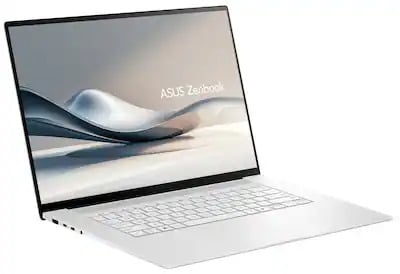
This open box Zenbook S16 stands out as a premium 16 inch OLED laptop with strong everyday speed, a huge touchpad, sturdy aluminum build, and very good Linux support. The 3K 120 hertz panel is praised for avoiding the rainbow effect seen on smaller OLEDs, and the machine can run quietly while staying fast for normal use. Thermals are generally manageable, though it can get warm and later BIOS updates may trade some performance for cooler operation. The main caution is open box variability, since missing accessories, camera issues, and warranty limits have all shown up. It feels like a great value when the unit is clean and fully working.
Linux laptop users who want a bright 16-inch OLED, because it runs Linux smoothly and the 3K panel is comfortable for text without the rainbow effect seen on smaller OLEDs.
Mobile productivity workers who keep many tabs open, because silent mode stays fast, runs cool enough for lap use, and the battery should last a long time.
People who need long-term warranty certainty, because open-box and refurb coverage can be limited to 90 days and later service may require a deductible.
Some open-box units arrive with pristine presentation details like plastic film and original packaging, and they can boot successfully before leaving the store.
Condition is highly YMMV: some units arrive in original packaging with unused chargers and plastic film still on the lid and screen, while others can be missing the charger or have a broken camera. Checking battery cycles, SSD health, unsafe shutdowns, and booting it in-store helps catch bad units early.
It runs Linux well and feels very fast for normal use, with silent mode still handling browsing, Netflix, and multitasking smoothly. The 16-inch 3K OLED is praised for avoiding the rainbow effect seen on the 14-inch 1900x1200 panel, though the glossy screen can be unforgiving outdoors and the chassis can get warm under load.
Open-box and refurb units are covered by ASUS for 90 days, not a full year. If the laptop is still under ASUS coverage, registration can sometimes transfer or restore the remaining warranty; otherwise Best Buy service may require a deductible, around $79, for repairs.
The keyboard has an F10 camera toggle with an orange LED when the camera is off, so it can be disabled without Device Manager. If the camera is actually faulty, Best Buy can send it to ASUS for repair, and one replacement open-box unit was swapped out with a working camera.
I have the Zenbook 14 UM3406HA, and wanted to try the 16" version.
I am enjoying the 16" form factor much better.
the 3k resolution is I think ideal for OLED. The 1900x1200 OLED in the 14 had too noticeable rainbow effect especially around text. It's dark now but, it gets blindingly bright in the darkness. However, the glossy screen I am sure will be very unforgiving in sunlight, regardless of brightness.
The touchpad is yuge, and is pleasant to use, similar to the 14, but the size increase is more pleasant.
For Asus laptops, I use G-Helper which is very nice to switch power profiles and disable in one click the Asus bloatware services that run in the background. I can instantly switch between 60hz to 120hz as well depending on how much battery life I'd like.
I run it in "silent mode" for normal usage, which right now, I am watching netflix, have several tabs open on firefox while typing this review sitting on the couch with this in my lap.
Silent mode is still very powerful and it is very fast for normal usage. I am sure battery life will be quite long.
It's very pleasant, and it's not very warm or discomforting.
If I switch it to balanced, it does get a little warm, but not terrible.
The speakers are decent quality, again improved from the 14.
The SSD is a Samsung MZVL81T0HELB, no complaints.
The wifi solution is a Mediatek MT7925. I'll have to test it with some bluetooth speakers. The Mediatek in the 14 has MISERABLE latency and huge bluetooth sound delays connected to some Edifiers, so I'll have to try it later and see if this mediatek model has that fixed.
On WiFi, I get 673.58mbps down which is the max my cheap router will output, upload is weak though at 130mbps. Compare to my wired desktop at 946down/806up.
I haven't played any games on it yet, but it will do much better than my 14, which played minecraft and civ 6 fine, does anyone need to be playing anything else?
I always go through and clear out any microsoft or vendor/asus related bloat on a new install. I don't like vendor software, but I will give it to Asus, MyAsus app makes it easy to install new bios and even SSD firmware.
I really don't like that the front facing camera doesn't have a privacy cover though, so best you can do is disable it in the device manager and/or use a little piece of tape.
The aluminum frame is very sturdy feeling, and reminds me of my ancient Zenbook UX31 back in 2012, which was an absolute tank. it's sturdier (no flexing) compared to the 14.
Overall, I think this is my favorite laptop I've owned. At this price, it's phenomenal value.
My unit at excellent condition did not come with the original packaging, just the AC adapter and laptop, but it is in perfect condition. Open box condition is highly YMMV based on who in store is grading them.
Thank you for this thorugh review... I bought one and was having second thoughts about this. But I appreciate it.
I have the Zenbook 14 UM3406HA, and wanted to try the 16" version.
I am enjoying the 16" form factor much better.
the 3k resolution is I think ideal for OLED. The 1900x1200 OLED in the 14 had too noticeable rainbow effect especially around text. It's dark now but, it gets blindingly bright in the darkness. However, the glossy screen I am sure will be very unforgiving in sunlight, regardless of brightness.
The touchpad is yuge, and is pleasant to use, similar to the 14, but the size increase is more pleasant.
For Asus laptops, I use G-Helper which is very nice to switch power profiles and disable in one click the Asus bloatware services that run in the background. I can instantly switch between 60hz to 120hz as well depending on how much battery life I'd like.
I run it in "silent mode" for normal usage, which right now, I am watching netflix, have several tabs open on firefox while typing this review sitting on the couch with this in my lap.
Silent mode is still very powerful and it is very fast for normal usage. I am sure battery life will be quite long.
It's very pleasant, and it's not very warm or discomforting.
If I switch it to balanced, it does get a little warm, but not terrible.
The speakers are decent quality, again improved from the 14.
The SSD is a Samsung MZVL81T0HELB, no complaints.
The wifi solution is a Mediatek MT7925. I'll have to test it with some bluetooth speakers. The Mediatek in the 14 has MISERABLE latency and huge bluetooth sound delays connected to some Edifiers, so I'll have to try it later and see if this mediatek model has that fixed.
On WiFi, I get 673.58mbps down which is the max my cheap router will output, upload is weak though at 130mbps. Compare to my wired desktop at 946down/806up.
I haven't played any games on it yet, but it will do much better than my 14, which played minecraft and civ 6 fine, does anyone need to be playing anything else?
I always go through and clear out any microsoft or vendor/asus related bloat on a new install. I don't like vendor software, but I will give it to Asus, MyAsus app makes it easy to install new bios and even SSD firmware.
I really don't like that the front facing camera doesn't have a privacy cover though, so best you can do is disable it in the device manager and/or use a little piece of tape.
The aluminum frame is very sturdy feeling, and reminds me of my ancient Zenbook UX31 back in 2012, which was an absolute tank. it's sturdier (no flexing) compared to the 14.
Overall, I think this is my favorite laptop I've owned. At this price, it's phenomenal value.
My unit at excellent condition did not come with the original packaging, just the AC adapter and laptop, but it is in perfect condition. Open box condition is highly YMMV based on who in store is grading them.
Thanks for sharing your thoughts. I noticed as I was setting up my open-box yesterday that there wasn't much software from ASUS listed in control panel / Programs, despite MyAsus being installed, it wasn't listed. Now that I have everything setup and have done all the updates from Windows Update and the MyASUS updates, there are two items -- GlideX and StoryCube. I don't know what StoryCube does, but I'll surely be uninstalling that.
With regards to the camera, did you see the F10 key on the keyboard is your camera switch? When you press it to disable the camera, the key has an orange LED that lights to show the camera is off. Not quite the same sense of security as a physical shutter over the lens, but it beats having to use Device Manager!
Whoever had my laptop before they returned it took really good care. Despite being graded as "Good", it looks pristine and even had the plastic protection sheets on the lid and screen! I did check the stats using HWINFO, and battery cycles was 2 -- unreal! And the SSD had very little read and written. Power on hours was about 500 and a really odd stat -- Power Cycles -- was over 8000! I'm not sure if that stat is accurate or not as I can't imagine what someone would be doing to have to many off/on cycles? Unsafe shutdowns was only 2, which is good -- that means it was flakey or freezing or shutting down abnormally.
I had one back in April (also an open box) and my experience then was good, but different compared to now. I remember the fans running more, and the system running warmer. It seems over time, ASUS may have fine-tuned the software and BIOS better to alleviate that.
Just FOMOing on a better deal, I'm the type of person that does a lot of research to spend and then research some more after completing the purchase.
I guess it depends what you're prioritizing -- cost or specs -- but this laptop which lives most it's life around $1500 at BestBuy, is below $600. I truly think it checks both boxes on cost and specs as you're saving $900 and this laptop is full-featured, looks fantastic (screen) and is sexy as heck (ultra-thin and light for a 16"). Is there another model you're eyeing?
Thanks for sharing your thoughts. I noticed as I was setting up my open-box yesterday that there wasn't much software from ASUS listed in control panel / Programs, despite MyAsus being installed, it wasn't listed. Now that I have everything setup and have done all the updates from Windows Update and the MyASUS updates, there are two items -- GlideX and StoryCube. I don't know what StoryCube does, but I'll surely be uninstalling that.
With regards to the camera, did you see the F10 key on the keyboard is your camera switch? When you press it to disable the camera, the key has an orange LED that lights to show the camera is off. Not quite the same sense of security as a physical shutter over the lens, but it beats having to use Device Manager!
Whoever had my laptop before they returned it took really good care. Despite being graded as "Good", it looks pristine and even had the plastic protection sheets on the lid and screen! I did check the stats using HWINFO, and battery cycles was 2 -- unreal! And the SSD had very little read and written. Power on hours was about 500 and a really odd stat -- Power Cycles -- was over 8000! I'm not sure if that stat is accurate or not as I can't imagine what someone would be doing to have to many off/on cycles? Unsafe shutdowns was only 2, which is good -- that means it was flakey or freezing or shutting down abnormally.
I had one back in April (also an open box) and my experience then was good, but different compared to now. I remember the fans running more, and the system running warmer. It seems over time, ASUS may have fine-tuned the software and BIOS better to alleviate that.
I hear that they dropped the tdp on later bios updates to control the heat issues. Less performance but better thermals. I am ok with that.
Also, there are more asus services/processes that run in the background that arent listed as applications. There were like... 7 on mine
Like
Helpful
Funny
Not helpful
Sign up for a Slickdeals account to remove this ad.
I guess it depends what you're prioritizing -- cost or specs -- but this laptop which lives most it's life around $1500 at BestBuy, is below $600. I truly think it checks both boxes on cost and specs as you're saving $900 and this laptop is full-featured, looks fantastic (screen) and is sexy as heck (ultra-thin and light for a 16"). Is there another model you're eyeing?
Based on your comments i feel better about my choice, I appreciate your imput, my only other choice was the zenbook 14 with 32gb
I guess I am fomoing over 8 gb of ram
Based on your comments i feel better about my choice, I appreciate your imput, my only other choice was the zenbook 14 with 32gb
I guess I am fomoing over 8 gb of ram
A little research I found the differences between the AMD Ryzen AI 9 and the Intel Ultra 7 258V. The Intel GPU is better than the 880M and uses less power than the AMD so battery life may be longer on the Zenbook S 14, but you're talking about $500 more for the Intel advantage, and so it's up to you how important battery life is.
Here's a great review of the S 16 by my favorite reviewer on YT: https://youtu.be/UXpvUruY4Ik?si=zxUSPZjeeZEkTD0B
Since you bought it at the ultra low price, I can't imagine not wanting to keep it. Have you checked it out and used it yet?
A little research I found the differences between the AMD Ryzen AI 9 and the Intel Ultra 7 258V. The Intel GPU is better than the 880M and uses less power than the AMD so battery life may be longer on the Zenbook S 14, but you're talking about $500 more for the Intel advantage, and so it's up to you how important battery life is.
Here's a great review of the S 16 by my favorite reviewer on YT: https://youtu.be/UXpvUruY4Ik?si=zxUSPZjeeZEkTD0B
Since you bought it at the ultra low price, I can't imagine not wanting to keep it. Have you checked it out and used it yet?
I am getting it on 12/26 As I am traveling to the location I bought it at and will report back, I think I will love it. I currently use a surface pro 7. Thank you kindly for the video. I will check it out now.
I guess it depends what you're prioritizing -- cost or specs -- but this laptop which lives most it's life around $1500 at BestBuy, is below $600. I truly think it checks both boxes on cost and specs as you're saving $900 and this laptop is full-featured, looks fantastic (screen) and is sexy as heck (ultra-thin and light for a 16"). Is there another model you're eyeing?
This is not the best deal. I'm taking your recommendation to wait for a fire sale. Thank you.
It's not exposed so can't see it, but charges when plugged in. Haha just kidding, it's an AI processor so it should last at least one day. A reviewer said he only charges it every other day.
A little research I found the differences between the AMD Ryzen AI 9 and the Intel Ultra 7 258V. The Intel GPU is better than the 880M and uses less power than the AMD so battery life may be longer on the Zenbook S 14, but you're talking about $500 more for the Intel advantage, and so it's up to you how important battery life is.
Here's a great review of the S 16 by my favorite reviewer on YT: https://youtu.be/UXpvUruY4Ik?si=zxUSPZjeeZEkTD0B
Since you bought it at the ultra low price, I can't imagine not wanting to keep it. Have you checked it out and used it yet?
Quote
from winston.almonte22
:
I am getting it on 12/26 As I am traveling to the location I bought it at and will report back, I think I will love it. I currently use a surface pro 7. Thank you kindly for the video. I will check it out now.
I would disagree with the intel being a superior platform. Multi core performance on the AMD is double what the intel solution is. So if you're doing productivity work, like blender, you're cutting your run time in half.
Power efficiency is within a couple watts. The power usage is going to mostly be in the 16" screen, not the CPU. They are both throttled to a specific TDP, so they both operate in similar runtimes outside of the screen usage. The only caveat is idling usage, which intel idles at 1w, and that's quite impressive.
Graphics wise, the intel is a little slower than the 890m, and the 880m is about 10-15% slower than the 890, so yes. the intel solution would be a bit faster, but if you are playing games on the laptop, and the game supports FSR, then the 880m is significanlty better. Otherwise, the differences are going to be negligible for a standard user.
The comparable Zenbook S 14 with 32gb with the 258V is also almost a thousand dollars more than the sale price, so they're not even remotely in the same budget.
Note the Non-S line, the Zenbook 14 32gb UX3405CA, is not as "premium" as the S series, but does come a little cheaper, but still significantly more expensive
So, if it helps your FOMO, you didn't miss out on the great sale - open box is now 900 dollars instead.
The biggest question I would ask you, is which form factor do you prefer? The 14" or the 16" ? It's highly personal preference and based on your intended use. the 14 is definitely more portable.
I'd suggest test drive the 14, as well, and see what you think. There are many versions of the 14. so if you like the size better, then there's gonna be a price that will be attractive enough for you to switch over.
Like
Helpful
Funny
Not helpful
Sign up for a Slickdeals account to remove this ad.



 Best Buy


Community Reviews
This open box Zenbook S16 stands out as a premium 16 inch OLED laptop with strong everyday speed, a huge touchpad, sturdy aluminum build, and very good Linux support. The 3K 120 hertz panel is praised for avoiding the rainbow effect seen on smaller OLEDs, and the machine can run quietly while staying fast for normal use. Thermals are generally manageable, though it can get warm and later BIOS updates may trade some performance for cooler operation. The main caution is open box variability, since missing accessories, camera issues, and warranty limits have all shown up. It feels like a great value when the unit is clean and fully working.
Common Questions (5)
Condition is highly YMMV: some units arrive in original packaging with unused chargers and plastic film still on the lid and screen, while others can be missing the charger or have a broken camera. Checking battery cycles, SSD health, unsafe shutdowns, and booting it in-store helps catch bad units early.
It runs Linux well and feels very fast for normal use, with silent mode still handling browsing, Netflix, and multitasking smoothly. The 16-inch 3K OLED is praised for avoiding the rainbow effect seen on the 14-inch 1900x1200 panel, though the glossy screen can be unforgiving outdoors and the chassis can get warm under load.
Open-box and refurb units are covered by ASUS for 90 days, not a full year. If the laptop is still under ASUS coverage, registration can sometimes transfer or restore the remaining warranty; otherwise Best Buy service may require a deductible, around $79, for repairs.
The keyboard has an F10 camera toggle with an orange LED when the camera is off, so it can be disabled without Device Manager. If the camera is actually faulty, Best Buy can send it to ASUS for repair, and one replacement open-box unit was swapped out with a working camera.
No. Models listed with LPDDR5 or LPDDR5X use soldered memory, so the 24GB RAM in this deal is not user-upgradeable.
AI-generated summary based on comments from the community. Updated ago
Join The Conversation
Share your experience with the Slickdeals community
Share information with the community. Please follow our Community Guidelines and be kind!
45 Comments
Sign up for a Slickdeals account to remove this ad.
I am enjoying the 16" form factor much better.
the 3k resolution is I think ideal for OLED. The 1900x1200 OLED in the 14 had too noticeable rainbow effect especially around text. It's dark now but, it gets blindingly bright in the darkness. However, the glossy screen I am sure will be very unforgiving in sunlight, regardless of brightness.
The touchpad is yuge, and is pleasant to use, similar to the 14, but the size increase is more pleasant.
For Asus laptops, I use G-Helper which is very nice to switch power profiles and disable in one click the Asus bloatware services that run in the background. I can instantly switch between 60hz to 120hz as well depending on how much battery life I'd like.
I run it in "silent mode" for normal usage, which right now, I am watching netflix, have several tabs open on firefox while typing this review sitting on the couch with this in my lap.
Silent mode is still very powerful and it is very fast for normal usage. I am sure battery life will be quite long.
It's very pleasant, and it's not very warm or discomforting.
If I switch it to balanced, it does get a little warm, but not terrible.
The speakers are decent quality, again improved from the 14.
The SSD is a Samsung MZVL81T0HELB, no complaints.
The wifi solution is a Mediatek MT7925. I'll have to test it with some bluetooth speakers. The Mediatek in the 14 has MISERABLE latency and huge bluetooth sound delays connected to some Edifiers, so I'll have to try it later and see if this mediatek model has that fixed.
On WiFi, I get 673.58mbps down which is the max my cheap router will output, upload is weak though at 130mbps. Compare to my wired desktop at 946down/806up.
I haven't played any games on it yet, but it will do much better than my 14, which played minecraft and civ 6 fine, does anyone need to be playing anything else?
I always go through and clear out any microsoft or vendor/asus related bloat on a new install. I don't like vendor software, but I will give it to Asus, MyAsus app makes it easy to install new bios and even SSD firmware.
I really don't like that the front facing camera doesn't have a privacy cover though, so best you can do is disable it in the device manager and/or use a little piece of tape.
The aluminum frame is very sturdy feeling, and reminds me of my ancient Zenbook UX31 back in 2012, which was an absolute tank. it's sturdier (no flexing) compared to the 14.
Overall, I think this is my favorite laptop I've owned. At this price, it's phenomenal value.
My unit at excellent condition did not come with the original packaging, just the AC adapter and laptop, but it is in perfect condition. Open box condition is highly YMMV based on who in store is grading them.
I am enjoying the 16" form factor much better.
the 3k resolution is I think ideal for OLED. The 1900x1200 OLED in the 14 had too noticeable rainbow effect especially around text. It's dark now but, it gets blindingly bright in the darkness. However, the glossy screen I am sure will be very unforgiving in sunlight, regardless of brightness.
The touchpad is yuge, and is pleasant to use, similar to the 14, but the size increase is more pleasant.
For Asus laptops, I use G-Helper which is very nice to switch power profiles and disable in one click the Asus bloatware services that run in the background. I can instantly switch between 60hz to 120hz as well depending on how much battery life I'd like.
I run it in "silent mode" for normal usage, which right now, I am watching netflix, have several tabs open on firefox while typing this review sitting on the couch with this in my lap.
Silent mode is still very powerful and it is very fast for normal usage. I am sure battery life will be quite long.
It's very pleasant, and it's not very warm or discomforting.
If I switch it to balanced, it does get a little warm, but not terrible.
The speakers are decent quality, again improved from the 14.
The SSD is a Samsung MZVL81T0HELB, no complaints.
The wifi solution is a Mediatek MT7925. I'll have to test it with some bluetooth speakers. The Mediatek in the 14 has MISERABLE latency and huge bluetooth sound delays connected to some Edifiers, so I'll have to try it later and see if this mediatek model has that fixed.
On WiFi, I get 673.58mbps down which is the max my cheap router will output, upload is weak though at 130mbps. Compare to my wired desktop at 946down/806up.
I haven't played any games on it yet, but it will do much better than my 14, which played minecraft and civ 6 fine, does anyone need to be playing anything else?
I always go through and clear out any microsoft or vendor/asus related bloat on a new install. I don't like vendor software, but I will give it to Asus, MyAsus app makes it easy to install new bios and even SSD firmware.
I really don't like that the front facing camera doesn't have a privacy cover though, so best you can do is disable it in the device manager and/or use a little piece of tape.
The aluminum frame is very sturdy feeling, and reminds me of my ancient Zenbook UX31 back in 2012, which was an absolute tank. it's sturdier (no flexing) compared to the 14.
Overall, I think this is my favorite laptop I've owned. At this price, it's phenomenal value.
My unit at excellent condition did not come with the original packaging, just the AC adapter and laptop, but it is in perfect condition. Open box condition is highly YMMV based on who in store is grading them.
With regards to the camera, did you see the F10 key on the keyboard is your camera switch? When you press it to disable the camera, the key has an orange LED that lights to show the camera is off. Not quite the same sense of security as a physical shutter over the lens, but it beats having to use Device Manager!
Whoever had my laptop before they returned it took really good care. Despite being graded as "Good", it looks pristine and even had the plastic protection sheets on the lid and screen! I did check the stats using HWINFO, and battery cycles was 2 -- unreal! And the SSD had very little read and written. Power on hours was about 500 and a really odd stat -- Power Cycles -- was over 8000! I'm not sure if that stat is accurate or not as I can't imagine what someone would be doing to have to many off/on cycles? Unsafe shutdowns was only 2, which is good -- that means it was flakey or freezing or shutting down abnormally.
I had one back in April (also an open box) and my experience then was good, but different compared to now. I remember the fans running more, and the system running warmer. It seems over time, ASUS may have fine-tuned the software and BIOS better to alleviate that.
With regards to the camera, did you see the F10 key on the keyboard is your camera switch? When you press it to disable the camera, the key has an orange LED that lights to show the camera is off. Not quite the same sense of security as a physical shutter over the lens, but it beats having to use Device Manager!
Whoever had my laptop before they returned it took really good care. Despite being graded as "Good", it looks pristine and even had the plastic protection sheets on the lid and screen! I did check the stats using HWINFO, and battery cycles was 2 -- unreal! And the SSD had very little read and written. Power on hours was about 500 and a really odd stat -- Power Cycles -- was over 8000! I'm not sure if that stat is accurate or not as I can't imagine what someone would be doing to have to many off/on cycles? Unsafe shutdowns was only 2, which is good -- that means it was flakey or freezing or shutting down abnormally.
I had one back in April (also an open box) and my experience then was good, but different compared to now. I remember the fans running more, and the system running warmer. It seems over time, ASUS may have fine-tuned the software and BIOS better to alleviate that.
Also, there are more asus services/processes that run in the background that arent listed as applications. There were like... 7 on mine
Sign up for a Slickdeals account to remove this ad.
If I could've matched the OP's deal, I would've snagged it immediately. Unfortunately, the open box prices (at least in my area) are much higher...
I guess I am fomoing over 8 gb of ram
I guess I am fomoing over 8 gb of ram
Here's a great review of the S 16 by my favorite reviewer on YT: https://youtu.be/UXpvUruY4Ik?si=
Since you bought it at the ultra low price, I can't imagine not wanting to keep it. Have you checked it out and used it yet?
Here's a great review of the S 16 by my favorite reviewer on YT: https://youtu.be/UXpvUruY4Ik?si=
Since you bought it at the ultra low price, I can't imagine not wanting to keep it. Have you checked it out and used it yet?
Here's a great review of the S 16 by my favorite reviewer on YT: https://youtu.be/UXpvUruY4Ik?si=
Since you bought it at the ultra low price, I can't imagine not wanting to keep it. Have you checked it out and used it yet?
Power efficiency is within a couple watts. The power usage is going to mostly be in the 16" screen, not the CPU. They are both throttled to a specific TDP, so they both operate in similar runtimes outside of the screen usage. The only caveat is idling usage, which intel idles at 1w, and that's quite impressive.
Graphics wise, the intel is a little slower than the 890m, and the 880m is about 10-15% slower than the 890, so yes. the intel solution would be a bit faster, but if you are playing games on the laptop, and the game supports FSR, then the 880m is significanlty better. Otherwise, the differences are going to be negligible for a standard user.
The comparable Zenbook S 14 with 32gb with the 258V is also almost a thousand dollars more than the sale price, so they're not even remotely in the same budget.
Note the Non-S line, the Zenbook 14 32gb UX3405CA, is not as "premium" as the S series, but does come a little cheaper, but still significantly more expensive
So, if it helps your FOMO, you didn't miss out on the great sale - open box is now 900 dollars instead.
The biggest question I would ask you, is which form factor do you prefer? The 14" or the 16" ? It's highly personal preference and based on your intended use. the 14 is definitely more portable.
I'd suggest test drive the 14, as well, and see what you think. There are many versions of the 14. so if you like the size better, then there's gonna be a price that will be attractive enough for you to switch over.
Sign up for a Slickdeals account to remove this ad.
Join The Conversation
Share your experience with the Slickdeals community
Share information with the community. Please follow our Community Guidelines and be kind!