This collaborative space allows users to contribute additional information, tips, and insights to enhance the original deal post. Feel free to share your knowledge and help fellow shoppers make informed decisions.
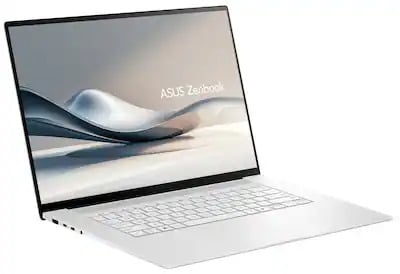
This open box Zenbook S16 stands out as a premium 16 inch OLED laptop with strong everyday speed, a huge touchpad, sturdy aluminum build, and very good Linux support. The 3K 120 hertz panel is praised for avoiding the rainbow effect seen on smaller OLEDs, and the machine can run quietly while staying fast for normal use. Thermals are generally manageable, though it can get warm and later BIOS updates may trade some performance for cooler operation. The main caution is open box variability, since missing accessories, camera issues, and warranty limits have all shown up. It feels like a great value when the unit is clean and fully working.
Linux laptop users who want a bright 16-inch OLED, because it runs Linux smoothly and the 3K panel is comfortable for text without the rainbow effect seen on smaller OLEDs.
Mobile productivity workers who keep many tabs open, because silent mode stays fast, runs cool enough for lap use, and the battery should last a long time.
People who need long-term warranty certainty, because open-box and refurb coverage can be limited to 90 days and later service may require a deductible.
Some open-box units arrive with pristine presentation details like plastic film and original packaging, and they can boot successfully before leaving the store.
Condition is highly YMMV: some units arrive in original packaging with unused chargers and plastic film still on the lid and screen, while others can be missing the charger or have a broken camera. Checking battery cycles, SSD health, unsafe shutdowns, and booting it in-store helps catch bad units early.
It runs Linux well and feels very fast for normal use, with silent mode still handling browsing, Netflix, and multitasking smoothly. The 16-inch 3K OLED is praised for avoiding the rainbow effect seen on the 14-inch 1900x1200 panel, though the glossy screen can be unforgiving outdoors and the chassis can get warm under load.
Open-box and refurb units are covered by ASUS for 90 days, not a full year. If the laptop is still under ASUS coverage, registration can sometimes transfer or restore the remaining warranty; otherwise Best Buy service may require a deductible, around $79, for repairs.
The keyboard has an F10 camera toggle with an orange LED when the camera is off, so it can be disabled without Device Manager. If the camera is actually faulty, Best Buy can send it to ASUS for repair, and one replacement open-box unit was swapped out with a working camera.
I would disagree with the intel being a superior platform. Multi core performance on the AMD is double what the intel solution is. So if you're doing productivity work, like blender, you're cutting your run time in half.
Power efficiency is within a couple watts. The power usage is going to mostly be in the 16" screen, not the CPU. They are both throttled to a specific TDP, so they both operate in similar runtimes outside of the screen usage. The only caveat is idling usage, which intel idles at 1w, and that's quite impressive.
Graphics wise, the intel is a little slower than the 890m, and the 880m is about 10-15% slower than the 890, so yes. the intel solution would be a bit faster, but if you are playing games on the laptop, and the game supports FSR, then the 880m is significanlty better. Otherwise, the differences are going to be negligible for a standard user.
The comparable Zenbook S 14 with 32gb with the 258V is also almost a thousand dollars more than the sale price, so they're not even remotely in the same budget.
Note the Non-S line, the Zenbook 14 32gb UX3405CA, is not as "premium" as the S series, but does come a little cheaper, but still significantly more expensive
So, if it helps your FOMO, you didn't miss out on the great sale - open box is now 900 dollars instead.
The biggest question I would ask you, is which form factor do you prefer? The 14" or the 16" ? It's highly personal preference and based on your intended use. the 14 is definitely more portable.
I'd suggest test drive the 14, as well, and see what you think. There are many versions of the 14. so if you like the size better, then there's gonna be a price that will be attractive enough for you to switch over.
I'm not sure where you read that I said the Intel platform was superior? I purposefully did not include any information on the CPU single and multicore performance, I spoke of the GPU performance in the Intel CPU vs the 880M GPU. I think most would agree the 258V is a more energy efficient chip than the Ryzen set. I believe I read the 258V idles at a lower power than the AMD does. In any case, I didn't claim one platform is better than another.
So I went for the open box fair given that I recently bought a zenbook 14 that was fair and it was like brand new. I took my chances on this one and it was only available at a store an hour away. They say open boxes are usually a hit or miss and in this case it was a miss for me. I didn't get the charger with the laptop and also found out later that the camera doesn't work. Tried everything like driver reinstall ,etc. but nope. Guess the price was too good to be true. However the 16" screen is gorgeous and the performance is super snappy. For my use the laptop doesn't really heat up at all. I loved this laptop but I'll probably return this if I can't get the cam fixed and just stick with the zenbook 14.
So I went for the open box fair given that I recently bought a zenbook 14 that was fair and it was like brand new. I took my chances on this one and it was only available at a store an hour away. They say open boxes are usually a hit or miss and in this case it was a miss for me. I didn't get the charger with the laptop and also found out later that the camera doesn't work. Tried everything like driver reinstall ,etc. but nope. Guess the price was too good to be true. However the 16" screen is gorgeous and the performance is super snappy. For my use the laptop doesn't really heat up at all. I loved this laptop but I'll probably return this if I can't get the cam fixed and just stick with the zenbook 14.
If, except for the camera, you love it, get it fixed! Take it to BB, and they'll send it off to ASUS. Takes about 2 weeks including shipping so not too bad. Check everything else out so it can be addressed while at ASUS repair. When you get it back, you'll have a fully functioning laptop. For this price, and if you love it in every other way, it's worth it. I highly doubt this model will be this low again for a long time.
1
Like
Helpful
Funny
Not helpful
Sign up for a Slickdeals account to remove this ad.
Got it today, it has 2526 power on hours and 21355 power on count, prob a display model, is that too bad?
A display model will typically have a large number of power on hours, but few power cycles and not much data written to the disk. It's just "on" all the time, usually running a demo or such. I think BB leaves them on, even when the store is closed as it takes too much time to shut down a hundred display laptops and then power them all on the next morning. That power on count is extraordinary. I'm not sure what someone could have been doing to have such a high count. Doesn't seem like a possible statistic. Are you a Total member? Maybe some sort of extended warranty would be wise if you really like it.
If, except for the camera, you love it, get it fixed! Take it to BB, and they'll send it off to ASUS. Takes about 2 weeks including shipping so not too bad. Check everything else out so it can be addressed while at ASUS repair. When you get it back, you'll have a fully functioning laptop. For this price, and if you love it in every other way, it's worth it. I highly doubt this model will be this low again for a long time.
BB actually gave me another open box which had a working camera. So it's all good now!
BB actually gave me another open box which had a working camera. So it's all good now!
That's pretty amazing considering the open box price now is way higher than when this deal was active! Did they give you another "Fair" or did you get a better condition unit? How are the stats on the replacement (power on hours, disk stats and battery health)?
A display model will typically have a large number of power on hours, but few power cycles and not much data written to the disk. It's just "on" all the time, usually running a demo or such. I think BB leaves them on, even when the store is closed as it takes too much time to shut down a hundred display laptops and then power them all on the next morning. That power on count is extraordinary. I'm not sure what someone could have been doing to have such a high count. Doesn't seem like a possible statistic. Are you a Total member? Maybe some sort of extended warranty would be wise if you really like it.
No extended warranty or total member on my end, i have 15 days to return it. I need your wisdom
That's pretty amazing considering the open box price now is way higher than when this deal was active! Did they give you another "Fair" or did you get a better condition unit? How are the stats on the replacement (power on hours, disk stats and battery health)?
They just gave me another open box which am sure is better than the previous one I had. Stats are good so far. No complaints.
No extended warranty or total member on my end, i have 15 days to return it. I need your wisdom
I would try to register it with Asus: https://www.asus.com/us/support/faq/1010378/
Create an account and try registering it with the serial number. It will most likely show it's already registered, but if it was a display model, maybe not! If it shows previously registered, submit a support ticket to transfer the registration/warranty to you. It's takes them a day or two to respond, but ultimately they will get it transferred to you and you will also see how much warranty is left. The one I bought two weeks ago expires in June 2026. Even though you have 1 year through BB, if it's not under ASUS warranty any longer but under a year, you have to pay BB a service charge (deductible), roughly $79 for this price laptop.
If the laptop was never registered, I would imagine you can register it and you should get the full year ASUS warranty and can get repairs for free.
Curious what utility you're using to determine the Power On Count?
I would try to register it with Asus: https://www.asus.com/us/support/faq/1010378/Create an account and try registering it with the serial number. It will most likely show it's already registered, but if it was a display model, maybe not! If it shows previously registered, submit a support ticket to transfer the registration/warranty to you. It's takes them a day or two to respond, but ultimately they will get it transferred to you and you will also see how much warranty is left. The one I bought two weeks ago expires in June 2026. Even though you have 1 year through BB, if it's not under ASUS warranty any longer but under a year, you have to pay BB a service charge (deductible), roughly $79 for this price laptop. If the laptop was never registered, I would imagine you can register it and you should get the full year ASUS warranty and can get repairs for free.Curious what utility you're using to determine the Power On Count?
An app called "crystaldiskinfo"
Like
Helpful
Funny
Not helpful
Sign up for a Slickdeals account to remove this ad.
Got it today, it has 2526 power on hours and 21355 power on count, prob a display model, is that too bad?
Crystaldiskinfo reads the hard drive's SMART statistics, so power on count will be reported through any tool that reads SMART data, like hwmonitor for example.
Power on count isn't that helpful of a metric, because laptops often suffer from insomnia, and constantly wake up from sleep for one reason or another. Each time it wakes up, it records a power on count.
The metric you want to look at is the SMART 0xAE, Unsafe Shutdowns, or in crystaldiskinfo, ID 0D. That will indicate crashes. So for example, in my particularly cursed P41 drive, I have `E023` unsafe shutdowns, so you can easily just pop that in a search hex to int, which comes out to 57379 unsafe shutdowns.
This drive has 4752 power on hours, 117643 power on count.
Another note is that there have been some issues with fairly recent but older AMD drivers on their laptop platforms having unexpected restarts, so if you haven't, make sure you update both the Adrenalin and the chipset drivers. I have not had any issues with odd restarts since I've been on 12.1, even with the cursed P41.
Also note that Asus Warranty policy is 90 days for open box or refurb units, regardless of purchase date. their 1 year warranty only applies to new units. They are extremely strict (and sometimes a bit devious) when it comes to warranty coverage.
Like
Helpful
Funny
Not helpful
Join The Conversation
Share your experience with the Slickdeals community
Share information with the community. Please follow our Community Guidelines and be kind!



 Best Buy


Community Reviews
This open box Zenbook S16 stands out as a premium 16 inch OLED laptop with strong everyday speed, a huge touchpad, sturdy aluminum build, and very good Linux support. The 3K 120 hertz panel is praised for avoiding the rainbow effect seen on smaller OLEDs, and the machine can run quietly while staying fast for normal use. Thermals are generally manageable, though it can get warm and later BIOS updates may trade some performance for cooler operation. The main caution is open box variability, since missing accessories, camera issues, and warranty limits have all shown up. It feels like a great value when the unit is clean and fully working.
The OLED touch display can reach very high brightness in dark scenes, which improves viewing impact.
The laptop can run Linux smoothly and stays fast for normal multitasking workloads.
Some open-box units arrive with pristine presentation details like plastic film and original packaging, and they can boot successfully before leaving the store.
G-Helper can switch between 60Hz and 120Hz quickly while disabling Asus background bloat services.
ASUS warranty coverage for open-box or refurb units can be limited to about 90 days, and Best Buy may charge a deductible for repairs afterward.
Open-box units can have missing accessories or hardware faults, including a missing charger and a non-working camera despite troubleshooting.
The front camera may lack a physical privacy cover, so disabling it may rely on software controls or tape.
Open-box pricing can spike after the initial deal, making the purchase less attractive at current store prices.
Common Questions (5)
AI-generated summary based on comments from the community. Updated ago
Join The Conversation
Share your experience with the Slickdeals community
Share information with the community. Please follow our Community Guidelines and be kind!
45 Comments
Sign up for a Slickdeals account to remove this ad.
I would disagree with the intel being a superior platform. Multi core performance on the AMD is double what the intel solution is. So if you're doing productivity work, like blender, you're cutting your run time in half.
Power efficiency is within a couple watts. The power usage is going to mostly be in the 16" screen, not the CPU. They are both throttled to a specific TDP, so they both operate in similar runtimes outside of the screen usage. The only caveat is idling usage, which intel idles at 1w, and that's quite impressive.
Graphics wise, the intel is a little slower than the 890m, and the 880m is about 10-15% slower than the 890, so yes. the intel solution would be a bit faster, but if you are playing games on the laptop, and the game supports FSR, then the 880m is significanlty better. Otherwise, the differences are going to be negligible for a standard user.
The comparable Zenbook S 14 with 32gb with the 258V is also almost a thousand dollars more than the sale price, so they're not even remotely in the same budget.
Note the Non-S line, the Zenbook 14 32gb UX3405CA, is not as "premium" as the S series, but does come a little cheaper, but still significantly more expensive
So, if it helps your FOMO, you didn't miss out on the great sale - open box is now 900 dollars instead.
The biggest question I would ask you, is which form factor do you prefer? The 14" or the 16" ? It's highly personal preference and based on your intended use. the 14 is definitely more portable.
I'd suggest test drive the 14, as well, and see what you think. There are many versions of the 14. so if you like the size better, then there's gonna be a price that will be attractive enough for you to switch over.
Sign up for a Slickdeals account to remove this ad.
Create an account and try registering it with the serial number. It will most likely show it's already registered, but if it was a display model, maybe not! If it shows previously registered, submit a support ticket to transfer the registration/warranty to you. It's takes them a day or two to respond, but ultimately they will get it transferred to you and you will also see how much warranty is left. The one I bought two weeks ago expires in June 2026. Even though you have 1 year through BB, if it's not under ASUS warranty any longer but under a year, you have to pay BB a service charge (deductible), roughly $79 for this price laptop.
If the laptop was never registered, I would imagine you can register it and you should get the full year ASUS warranty and can get repairs for free.
Curious what utility you're using to determine the Power On Count?
Sign up for a Slickdeals account to remove this ad.
Power on count isn't that helpful of a metric, because laptops often suffer from insomnia, and constantly wake up from sleep for one reason or another. Each time it wakes up, it records a power on count.
The metric you want to look at is the SMART 0xAE, Unsafe Shutdowns, or in crystaldiskinfo, ID 0D. That will indicate crashes. So for example, in my particularly cursed P41 drive, I have `E023` unsafe shutdowns, so you can easily just pop that in a search hex to int, which comes out to 57379 unsafe shutdowns.
This drive has 4752 power on hours, 117643 power on count.
Another note is that there have been some issues with fairly recent but older AMD drivers on their laptop platforms having unexpected restarts, so if you haven't, make sure you update both the Adrenalin and the chipset drivers. I have not had any issues with odd restarts since I've been on 12.1, even with the cursed P41.
Also note that Asus Warranty policy is 90 days for open box or refurb units, regardless of purchase date. their 1 year warranty only applies to new units. They are extremely strict (and sometimes a bit devious) when it comes to warranty coverage.
Join The Conversation
Share your experience with the Slickdeals community
Share information with the community. Please follow our Community Guidelines and be kind!