AnkerDirect via Amazon has
Anker Wired Vertical Ergonomic 5-Button Optical Mouse (Black, AK-98ANWVM-BA) on sale for
$16.99.
Shipping is free with Prime or on $35+ orders.
Thanks to Community Member
Immortalsolitude for sharing this deal.
Details:
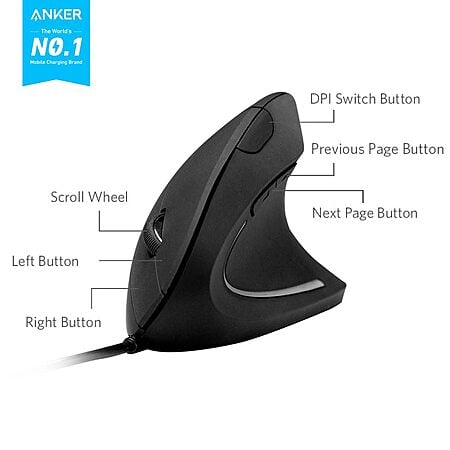
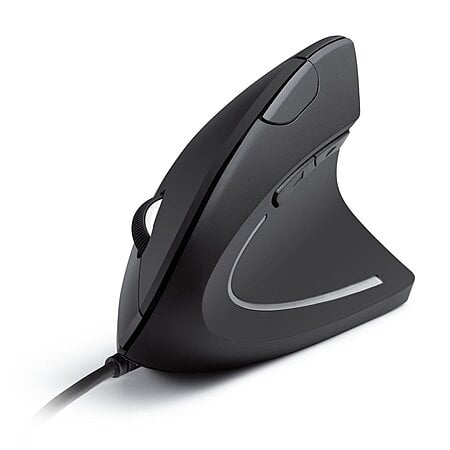
- Ergonomic design: Supports natural "handshake" wrist/arm position to reduce strain during extended use
- Enhanced precision: 1000/1600 DPI optical tracking for smooth, accurate cursor movement on various surfaces
- Extra navigation buttons: Built-in next/previous buttons for effortless webpage browsing, ideal for work, gaming, or surfing
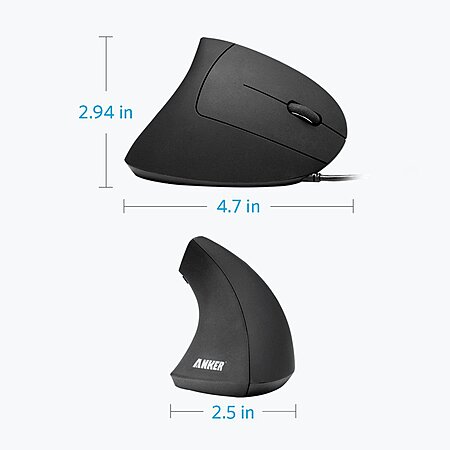
- Compact & lightweight: Measures 120 × 62.8 × 74.8 mm, weighs only 5.3 oz, with 1.5m/4.9ft USB cable for convenience


 Amazon


Top Comments
Community Reviews
Anker's wired vertical mouse is a compact, affordable ergonomic option that can ease wrist strain and feels better than a standard mouse for long daily use. The slim shape fits the hand well, the cord avoids battery swaps, and the light body makes it easy to use at a desk. The main drawback is durability, especially the scroll wheel, which can stutter, register the wrong direction, or fail after months or years. The matte coating can also peel, and the size may feel small for larger hands, making it a practical starter vertical mouse.
Common Questions (5)
Many units last for years of daily use, with some still working after 5 to 8+ years. The most common failure point is the scroll wheel, and the matte coating can peel or the plastic can become sticky over time.
It is comfortable for some hands, but it is also described as small and slimmer than Logitech vertical models. If you have a larger hand, the narrower shape may leave less palm support and can feel less comfortable than expected.
The wired version avoids battery swaps and interference, while the wireless version can feel more comfortable but may lag in some environments and feel hollow or less solid. If you want the simplest setup and a responsive cord, the wired model is the safer pick.
Yes. The vertical shape can reduce wrist, finger, and hand numbness compared with a flat mouse, and several users found it more comfortable for long daily use. It may take some getting used to, but it is a low-cost way to see whether a vertical mouse helps your ergonomics.
Yes, the scroll wheel is the main weak point. Reports include wrong-direction scrolling, stuttering after months of use, and the rubber wheel cover separating from the plastic body; cleaning the wheel mechanism can temporarily restore it.
AI-generated summary based on comments from the community. Updated ago
Join The Conversation
Share your experience with the Slickdeals community
Share information with the community. Please follow our Community Guidelines and be kind!
35 Comments
Sign up for a Slickdeals account to remove this ad.
To fix it, just open it up, blow the dust out, and then spray contact cleaner over and into the little pressure switch that the indents on the mouse wheel roll over. It'll be obvious what I mean once you see it.
To open it up, pry the plastic slider feet off with a sharp blade, like an Exacto or utility knife. They're stuck on over the case screws. Open it up, then unscrew the PCB inside that holds up the wheel and buttons. Clean as above. Reassemble and stick the slider feet back on. You're good for another year or two.
Or you can spend $90+ and buy an Evoluent, which will last forever. But if you're not sure whether a vertical mouse will feel better or fix your problems, this is a much cheaper way to find out.
Hope this helps!
Join The Conversation
Share your experience with the Slickdeals community
Share information with the community. Please follow our Community Guidelines and be kind!