Our research indicates that this offer is $24.11 lower (40% savings) than the next best available price from a reputable merchant with prices starting from $59.99
About this store:
Don't have Amazon Prime? Students can get a free 6-Month Amazon Prime trial with free 2-day shipping, unlimited video streaming & more.
This collaborative space allows users to contribute additional information, tips, and insights to enhance the original deal post. Feel free to share your knowledge and help fellow shoppers make informed decisions.
Our research indicates that this offer is $24.11 lower (40% savings) than the next best available price from a reputable merchant with prices starting from $59.99
About this store:
Don't have Amazon Prime? Students can get a free 6-Month Amazon Prime trial with free 2-day shipping, unlimited video streaming & more.
Keep in mind that you don't have to upgrade your router, or your whole network to support 2.5G speeds. You could plug two 2.5G devices into these two ports, and they could talk to each other at 2.5G, and the rest of the network at 1G. My internet is 1G, so I really only need to connect to my server at 2.5G.
The ugreen 2.5 posted the other day is a better deal. Sure, it only has 5 ports but all 5 ports are 2.5Gbe for $34. Just got it in and replaced an old 1Gbe switch.
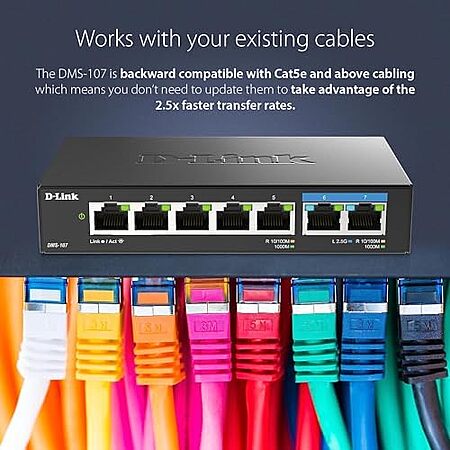
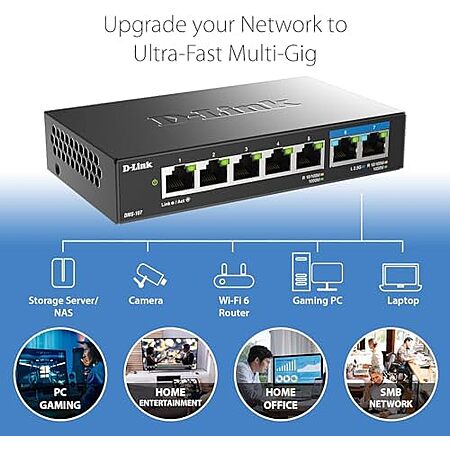
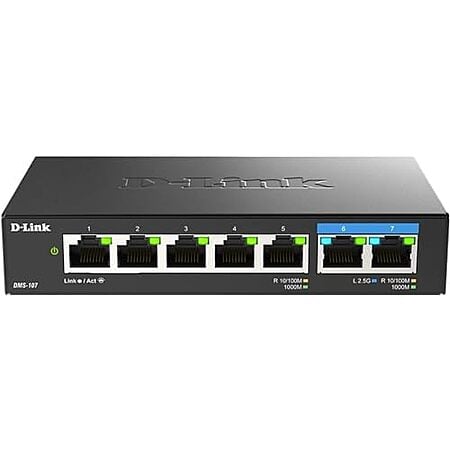
This D-Link switch is a low-cost way to add a small 2.5GbE segment to a mostly gigabit network. The two 2.5GbE ports can link a server or other fast device at 2.5G while the five remaining ports stay at 1G, and Cat5e can still handle 2.5G. The main drawback is the port mix, since one 2.5GbE port is effectively needed for uplink, leaving only one usable multi-gig port. It fits best when you only need a modest speed boost rather than a full multi-gig switch.
Home lab builders connecting one server to a main workstation, because the 2.5G ports can carry fast device-to-device traffic while the rest of the network stays at gigabit.
Homelab owners planning to expand into more multi-gig devices, because one 2.5G port is effectively consumed by uplink and leaves very little headroom.
Users expecting plug-and-play 2.5G performance on every setup, because 2.5G can be sensitive to cable quality, drivers, firmware, and Energy-Efficient Ethernet settings.
It is limited if you want several multi-gig endpoints, because one 2.5GbE port is typically consumed by the uplink. If you want all ports at 2.5GbE, a different switch such as a 5-port all-2.5GbE model may be a better fit.
Yes. It is a 7-port unmanaged switch with 2 x 2.5GbE ports and 5 x 1GbE ports, so only two devices can connect at multi-gig speed. One of those 2.5GbE ports is often used as the uplink, leaving just one 2.5GbE port for a local device.
Yes, but it is usually overkill for streaming alone. Typical 4K streaming uses far less than 1GbE, so the switch is more useful for moving files between a server and a workstation or for other local multi-gig transfers.
Yes. Cat5e can carry 2.5GbE, so existing Cat5e runs may work without rewiring. For more demanding 10GbE gear, higher-quality Cat6a or Cat7 cables are recommended because signal noise becomes more of an issue.
No. You can connect just two 2.5GbE devices to the switch and they can talk to each other at 2.5GbE while the rest of the network stays at 1GbE. That makes it useful as a small multi-gig upgrade for a server, workstation, or a few high-speed devices.
Anyone have a recommendation for a good/reasonably priced 10g switch?
I got these a year ago.
No complaints, getting 50-75% real world performance on 10Gb ports, 2.5 are unused.
$80
4x2.5Gb + 2x10Gb https://www.amazon.com/dp/B0DS4KC7Y3?th=1
This is a two-port 2.5Gb switch with five 1Gb add-on ports.
Really it's a 2.5g backbone (you have to use one port for the 2.5g uplink) for your 1g ports and effectively a pass-through for the single, usable 2.5g port.
Our community has rated this post as helpful. If you agree, why not thank
The ugreen 2.5 posted the other day is a better deal. Sure, it only has 5 ports but all 5 ports are 2.5Gbe for $34. Just got it in and replaced an old 1Gbe switch.
damn. this would be like a half step in the direction i want to go. its price is good, but only 2 multi-gig ports. i can see myself with buyers regret fairly soon if i get my other projects off the ground and want that added speed for more devices in my homelab. sure i can get by on this for now, but its like buying to the limits of my current setup. and even leaves me only 1 free port after everything else is plugged in.
I agree. Not sure why this has only 2 ports. One will be in and one out. That's it. I would wait for more 2.5 ports.
I bout a 5port and 8port off brand. They were trash. Had to constantly power cycle them. Switched to ubiquity 2.5gb switches and no more issues.
Proceed with caution with off brand 2.5gb switches.
Not this one but I got a cheap 2.5x5 one off Amazon for $22 and I haven't had any issues.
1
Like
Helpful
Funny
Not helpful
Sign up for a Slickdeals account to remove this ad.
Keep in mind that you don't have to upgrade your router, or your whole network to support 2.5G speeds. You could plug two 2.5G devices into these two ports, and they could talk to each other at 2.5G, and the rest of the network at 1G. My internet is 1G, so I really only need to connect to my server at 2.5G.
I didn't know this until a few months ago, got a cheap 5 port, and went from 105Mbps to 190Mbps.
I got these a year ago.
No complaints, getting 50-75% real world performance on 10Gb ports, 2.5 are unused.
$80
4x2.5Gb + 2x10Gb https://www.amazon.com/dp/B0DS4KC7Y3?th=1
I would recommend Realtek 8127 over AQC113. About $35 on AliExpress. I had an AQC113 and it would randomly stop working until I disabled/enabled the interface (also it would be a bit slow to start up from boot/wake), and if you Google around, there's a lot of other reports of the same issue.
I started with something like the above, and although I eventually upgraded to the Klein tool (I ended up running physical Ethernet to every room in the house) the cheap tool is enough to do basic diagnostics.
I bout a 5port and 8port off brand. They were trash. Had to constantly power cycle them. Switched to ubiquity 2.5gb switches and no more issues.
Proceed with caution with off brand 2.5gb switches.
Was just going to recommend the Ubiquiti Flex 2.5 also. B&H for one still has them at $49 with free shipping. They are also manageable if that is of interest.
I would recommend Realtek 8127 over AQC113. About $35 on AliExpress. I had an AQC113 and it would randomly stop working until I disabled/enabled the interface (also it would be a bit slow to start up from boot/wake), and if you Google around, there's a lot of other reports of the same issue.
Common Fixes:
Disable EEE: In Device Manager, set "Energy-Efficient Ethernet" to "Disabled".
Update Drivers: Use the latest drivers from Marvell/Aquantia or your motherboard manufacturer (e.g., ASUS).
Update Firmware: Check for newer firmware, particularly for ASUS Z790/X870 boards.
Cable Check: Use high-quality Cat6a or Cat7 cables, as 10G is sensitive to signal noise.
1
Like
Helpful
Funny
Not helpful
Sign up for a Slickdeals account to remove this ad.
Disable EEE: In Device Manager, set "Energy-Efficient Ethernet" to "Disabled".
Update Drivers: Use the latest drivers from Marvell/Aquantia or your motherboard manufacturer (e.g., ASUS).
Update Firmware: Check for newer firmware, particularly for ASUS Z790/X870 boards.
Cable Check: Use high-quality Cat6a or Cat7 cables, as 10G is sensitive to signal noise.
Thanks ChatGPT, but I should have said that I tried all the common fixes. I even designed and 3D printed a fan mount for it just in case it was overheating. I wouldn't be surprised if it's some obtuse combination of hardware/software that causes it to stop working randomly, though. It did seem like it was better in Linux, but it did crash a few times but seemingly not as often. And it would still take a minute to start up.
1
1
Like
Helpful
Funny
Not helpful
Join The Conversation
Share your experience with the Slickdeals community
Share information with the community. Please follow our Community Guidelines and be kind!


 + Free S&Hat Amazon


Top Comments
Community Reviews
This D-Link switch is a low-cost way to add a small 2.5GbE segment to a mostly gigabit network. The two 2.5GbE ports can link a server or other fast device at 2.5G while the five remaining ports stay at 1G, and Cat5e can still handle 2.5G. The main drawback is the port mix, since one 2.5GbE port is effectively needed for uplink, leaving only one usable multi-gig port. It fits best when you only need a modest speed boost rather than a full multi-gig switch.
The switch can support two 2.5Gb devices while the rest of the network stays at 1Gb, which fits a 1Gb internet setup.
Cat5E cabling can still achieve 2.5Gb speed on the 2.5Gb ports, which lowers upgrade friction.
The 10Gb ports can deliver real-world throughput around 50-75% on the 10Gb links, based on a year of use.
The port mix can still be useful for gigabit-limited devices like TVs, set-top boxes, and smart hubs without wasting higher-speed ports.
The switch design limits 2.5Gb usage because one 2.5Gb port must be used for the uplink, leaving only one usable 2.5Gb port.
Off-brand 2.5Gb switches have reportedly required frequent power cycling, and switching to Ubiquiti 2.5Gb resolved those issues.
The switch has reportedly stopped working randomly even after common fixes, and it could take about a minute to start up.
Using the 10Gb/SFP-related ports requires buying SFP-to-RJ45 transceivers, which adds extra cost and setup steps.
Common Questions (5)
AI-generated summary based on comments from the community. Updated ago
Join The Conversation
Share your experience with the Slickdeals community
Share information with the community. Please follow our Community Guidelines and be kind!
38 Comments
Sign up for a Slickdeals account to remove this ad.
Our community has rated this post as helpful. If you agree, why not thank
No complaints, getting 50-75% real world performance on 10Gb ports, 2.5 are unused.
$80
4x2.5Gb + 2x10Gb
https://www.amazon.com/dp/B0DS4KC7Y3?th=1
2x $63
Marvel AQC113 controller NICs for low power
https://www.amazon.com/10G-PCI-e4...0FM2DH49B/
I also got Cat8 cables because why not it's $7. Ok, $14 for two.
https://www.amazon.com/dp/B08PL1P53C?th=1
Our community has rated this post as helpful. If you agree, why not thank
Our community has rated this post as helpful. If you agree, why not thank
Proceed with caution with off brand 2.5gb switches.
Sign up for a Slickdeals account to remove this ad.
No complaints, getting 50-75% real world performance on 10Gb ports, 2.5 are unused.
$80
4x2.5Gb + 2x10Gb
https://www.amazon.com/dp/B0DS4KC7Y3?th=1
2x $63
Marvel AQC113 controller NICs for low power
https://www.amazon.com/10G-PCI-e4...0FM2DH49B/
I also got Cat8 cables because why not it's $7. Ok, $14 for two.
https://www.amazon.com/dp/B08PL1P53C?th=1
https://www.amazon.com/Ethernet-C...0925826M2/
If they're busted, you can usually just chop the ends off and redo them, assuming you have enough slack and a crimper tool.
https://www.amazon.com/Optimal-Sh...B072LJYHKP
I started with something like the above, and although I eventually upgraded to the Klein tool (I ended up running physical Ethernet to every room in the house) the cheap tool is enough to do basic diagnostics.
Proceed with caution with off brand 2.5gb switches.
Sign up for a Slickdeals account to remove this ad.
Join The Conversation
Share your experience with the Slickdeals community
Share information with the community. Please follow our Community Guidelines and be kind!