Slickdeals is community-supported.  We may get paid by brands for deals, including promoted items.
frontpage
DesertGardener | Staff 32.2K Views
Sep 24, 2026 5:05 AM

Refurb: 3-Pk ASUS ZenWiFi BD5 Dual-Band WiFi 7 Mesh Routers (5000 Mbps, 6800 sq. ft)

$150

$350

57% off
+ Free S&Hat eBay
Get Deal at eBay

Why are you downvoting this deal?

Good Deal?
54Comments
Save
Share
Deal Details
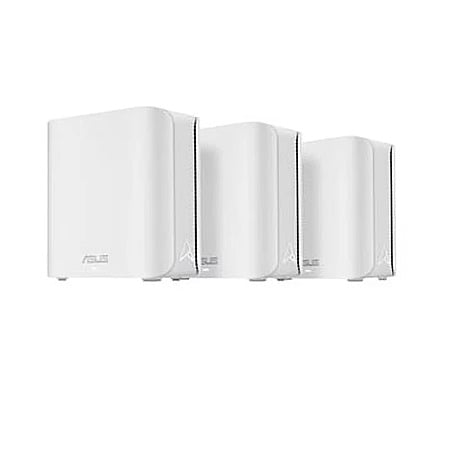
PrimeTimeBuys via eBay has Refurbished - Excellent: 3-Pack ASUS ZenWiFi BD5 Dual-Band WiFi 7 Mesh Router System (BD5 W-3-PK) w/ 1-Year Allstate Warranty on sale for $149.99. Shipping is free.

Thanks to SD staff member DesertGardener for finding this deal.


Excellent - Refurbished Details:
  • Appearance: Looks brand new, no dents or visible scratches.
  • Performance: Fully functional. Works like new.
  • Warranty: One-year warranty serviced by Allstate.
  • Packaging: Comes in new, generic packaging with original or new accessories (if applicable).
  • Return Policy: 30-day free returns (seller pays for return shipping)
Product Details:
  • Dual-band WiFi 7 speeds up to 5000 Mbps with MLO and 4K-QAM
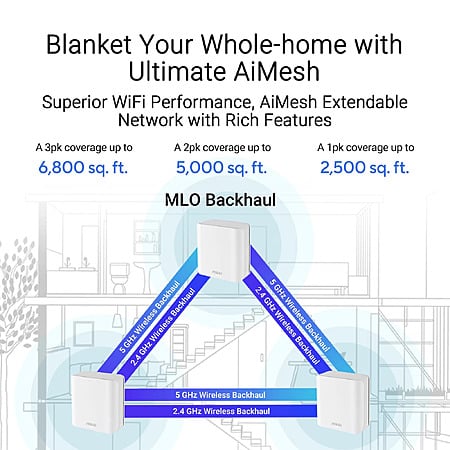
  • ASUS AiMesh technology boosts coverage up to 6,800 sq. ft. and easy extendibility with compatible ASUS routers for seamless and secure whole home WiFi
  • Four internal antennas and four high-power front-end modules eliminate WiFi dead zones
  • 24/7 end-to-end protection with commercial-grade AiProtection Pro and advanced VPNs
  • IoT Network, parental controls & VPN easy setup on multiple devices with Smart Home Master SSIDs
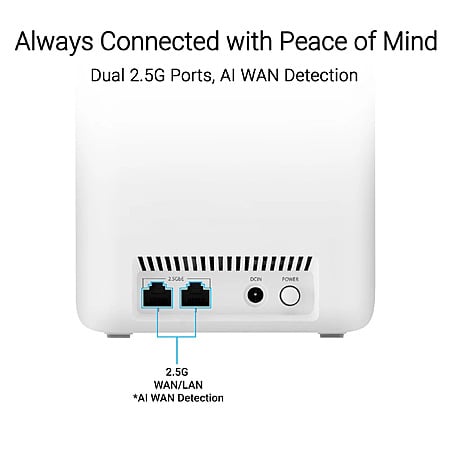
  • Dual 2.5G Ethernet ports with auto detection
  • Quad-core 1.5 GHz CPU and robust cooling

Editor's Notes

Written by RevOne | Staff
  • Our research indicates that this deal is $30 less (16% savings) than the next best available price from a reputable merchant with prices starting from $179.99 at the time of this post.
  • eBay Seller Info:
    • PrimeTimeBuys (18,379) feedback rating)
    • 99.6% Positive feedback
  • Return Policy:
    • Free 30 day returns (seller pays for return shipping).

Original Post

Community Notes
About the Poster
Deal Details
Community Notes
About the Poster
PrimeTimeBuys via eBay has Refurbished - Excellent: 3-Pack ASUS ZenWiFi BD5 Dual-Band WiFi 7 Mesh Router System (BD5 W-3-PK) w/ 1-Year Allstate Warranty on sale for $149.99. Shipping is free.

Thanks to SD staff member DesertGardener for finding this deal.


Excellent - Refurbished Details:
  • Appearance: Looks brand new, no dents or visible scratches.
  • Performance: Fully functional. Works like new.
  • Warranty: One-year warranty serviced by Allstate.
  • Packaging: Comes in new, generic packaging with original or new accessories (if applicable).
  • Return Policy: 30-day free returns (seller pays for return shipping)
Product Details:
  • Dual-band WiFi 7 speeds up to 5000 Mbps with MLO and 4K-QAM
  • ASUS AiMesh technology boosts coverage up to 6,800 sq. ft. and easy extendibility with compatible ASUS routers for seamless and secure whole home WiFi
  • Four internal antennas and four high-power front-end modules eliminate WiFi dead zones
  • 24/7 end-to-end protection with commercial-grade AiProtection Pro and advanced VPNs
  • IoT Network, parental controls & VPN easy setup on multiple devices with Smart Home Master SSIDs
  • Dual 2.5G Ethernet ports with auto detection
  • Quad-core 1.5 GHz CPU and robust cooling
Editor's Notes

Written by RevOne | Staff
  • Our research indicates that this deal is $30 less (16% savings) than the next best available price from a reputable merchant with prices starting from $179.99 at the time of this post.
  • eBay Seller Info:
    • PrimeTimeBuys (18,379) feedback rating)
    • 99.6% Positive feedback
  • Return Policy:
    • Free 30 day returns (seller pays for return shipping).

Original Post

Community Voting

Deal Score
+64
Good Deal
Bad Deal

Why are you downvoting this deal?

Top Comments

Community Reviews

This refurbished ASUS ZenWiFi BD5 3 pack is a low cost WiFi 7 mesh kit aimed at whole home coverage, with strong value versus buying new. The dual 2.5G Ethernet ports and free lifetime security features add flexibility, and the price is especially compelling for three nodes. The main tradeoffs are that it is dual band, has no 6 GHz radio, and only two ports per node, so wireless backhaul and wired device plans need to fit that design. It looks best for simpler homes or fully wired setups where the savings matter most.

  • Households needing three mesh nodes for wireless coverage, because 6 GHz can be faster in dense city congestion and the kit is positioned as a strong value at this price.

  • Homes using wired backhaul or access-point mode, because the dual-band design avoids wireless backhaul congestion and works fine when Ethernet carries the mesh traffic.

  • Buyers replacing weak far-end coverage in a medium-to-large house, because the nodes can be placed as access points and keep one Wi-Fi name with centralized management.

  • Wireless mesh users with lots of client traffic, because dual-band backhaul shares airtime with devices and can add latency and congestion as the network grows.

  • Homes that need many Ethernet ports on each node, because each unit only has two 2.5G ports and wired backhaul can leave no spare ports without adding a switch.

  • Owners mixing older ASUS mesh hardware, because firmware versions can split guest Wi-Fi behavior and leave IoT devices stuck on the main network.

  • People who rely on the ASUS app for smooth setup and remote management, because it can be slow, fail to save settings, and struggle to connect outside the LAN.

Common Questions (5)

Join The Conversation

Share your experience with the Slickdeals community

Share information with the community. Please follow our Community Guidelines and be kind!

54 Comments

Sign up for a Slickdeals account to remove this ad.

Sep 28, 2026 7:10 PM
60 Comments
Joined Jun 2019
MugamboKushSep 28, 2026 7:10 PM
60 Comments
How is this when compared to the costco one.
Deco tp link wifi 7 BE13000?

I got this recently and havent opened the box yet
Sep 28, 2026 8:52 PM
47 Comments
Joined Apr 2011
OCGuySep 28, 2026 8:52 PM
47 Comments

Our community has rated this post as helpful. If you agree, why not thank

FWIW, if you're looking to mix this set with any older ASUS AiMesh routers (I have an older XT8 + other routers as mesh units that I was hoping to upgrade for better coverage of IoT devices like outdoor cameras, etc.) check the firmware. These BD5 and most newer ASUS routers units are on 3.0.0.6.* which distributes the guest wifi network across all units on the same firmware but if you throw in anything on the older 3.0.0.4* firmware only our MAIN wifi network will broadcast through the AiMesh units. I had to place my IoT network on the MAIN network in order to segment another SSID into a VLAN. Not really ideal because some IoT devices will only connect to a single 2.4GhZ band (no mixing) and my 2.4+5 primary bands are now on the "guest" network so it is only broadcasting from the main router. I'll eventually just upgrade everything but just a heads up that ASUS is not upgrading their older WiFi 6+6E routers to the "current" firmware.
3
Sep 29, 2026 3:33 AM
818 Comments
Joined Jul 2017
Nintendo1474Sep 29, 2026 3:33 AM
818 Comments
Quote from OCGuy View quoted comment :
FWIW, if you're looking to mix this set with any older ASUS AiMesh routers (I have an older XT8 + other routers as mesh units that I was hoping to upgrade for better coverage of IoT devices like outdoor cameras, etc.) check the firmware. These BD5 and most newer ASUS routers units are on 3.0.0.6.* which distributes the guest wifi network across all units on the same firmware but if you throw in anything on the older 3.0.0.4* firmware only our MAIN wifi network will broadcast through the AiMesh units. I had to place my IoT network on the MAIN network in order to segment another SSID into a VLAN. Not really ideal because some IoT devices will only connect to a single 2.4GhZ band (no mixing) and my 2.4+5 primary bands are now on the "guest" network so it is only broadcasting from the main router. I'll eventually just upgrade everything but just a heads up that ASUS is not upgrading their older WiFi 6+6E routers to the "current" firmware.
On the older firmwares, only the first guest wifi is broadcast across all nodes. Is that one not working either?
Sep 29, 2026 2:12 PM
47 Comments
Joined Apr 2011
OCGuySep 29, 2026 2:12 PM
47 Comments
Quote from Nintendo1474 View quoted comment :
On the older firmwares, only the first guest wifi is broadcast across all nodes. Is that one not working either?
Correct, only the Main network is broadcast across all nodes on 3.0.0.4.*. The current firmware broadcasts the FIRST guest network only
Sep 29, 2026 9:12 PM
952 Comments
Joined Jul 2008
fantasylinSep 29, 2026 9:12 PM
952 Comments
Why these mesh units don't have USB ports like regular routers do
Sep 29, 2026 9:19 PM
818 Comments
Joined Jul 2017
Nintendo1474Sep 29, 2026 9:19 PM
818 Comments
Quote from fantasylin View quoted comment :
Why these mesh units don't have USB ports like regular routers do
Because they're designed to be as cheap as possible so that they can bundle multiple nodes into a kit without losing money.
1
Sep 30, 2026 3:46 AM
8.9K Comments
Joined Mar 2004
carbonfiberSep 30, 2026 3:46 AM
8.9K Comments
Dual band WiFi7 is such a scam

Sign up for a Slickdeals account to remove this ad.

Sep 30, 2026 4:53 AM
483 Comments
Joined Oct 2012
Mibdragon82Sep 30, 2026 4:53 AM
483 Comments
Quote from tropicalb View quoted comment :
I have the prior generation mesh set (ASUS XT8 ; WiFi 6). Each mesh unit (including mesh router) has 1-2.5GB port and 3-1.0GB ports (4 ports total). I use the 2.5GB port on the satellite (mesh) unit to connect via ethernet (using MoCA - cable TV coax) to a 2.5GB switch that is hooked up to the main XT8 router.With this setup I get 2.5GB on my local LAN on all wired devices that are (1) connected to the 2.5GB switch and (2) have a 2.5GB network interface card (NIC) in them. The nice thing about having more ports on the mesh units is when using in a wired backhaul setup, you can hook more devices up via ethernet without having to buy a separate switch. Of course if you need to hook up tons of devices then three 1.0GB ports on a mesh node won't work, you might have to get a 8- or 16-port switch if you have massive networking demands.Really annoyed ASUS is reducing the number of ethernet ports. For this reason I will probably skip WiFI 7 and wait for WiFi 8.
This is the way. I have a similar setup with et8. Use the custom Merlin firmware. Not sure if this model supports it. Use 2.5 back haul with moca due to wiring currently, but got a fiesta router for migration to 2.5 with switches.
1
Sep 30, 2026 5:35 AM
818 Comments
Joined Jul 2017
Nintendo1474Sep 30, 2026 5:35 AM
818 Comments
Quote from carbonfiber View quoted comment :
Dual band WiFi7 is such a scam
How so? What are you missing out on?
Sep 30, 2026 6:36 AM
8.9K Comments
Joined Mar 2004
carbonfiberSep 30, 2026 6:36 AM
8.9K Comments
Quote from Nintendo1474 View quoted comment :
How so? What are you missing out on?
the main difference of WiFi7 from WiFi6 is the 6Ghz band, without it they might as well just call it Wifi6
Sep 30, 2026 7:17 AM
818 Comments
Joined Jul 2017
Nintendo1474Sep 30, 2026 7:17 AM
818 Comments
Quote from carbonfiber View quoted comment :
the main difference of WiFi7 from WiFi6 is the 6Ghz band, without it they might as well just call it Wifi6
It's not, who told you that? We already had 6 GHz in WiFi 6, it's called 6E. And it still doesn't provide any noticeable benefit to the majority of people.

The big features of WiFi 7 are seamless band switching and simultaneous dual or tri-band usage with MLO, and Preamble Puncturing, which allows the router to cut off parts of channels with lots of interference without giving up the whole channel.

As you can tell, 6 GHz is optional. The majority of client devices that even support it rarely do things that would benefit from it. How often are you transmitting more than a gigabit per second on your smartphone?
1
Sep 30, 2026 7:23 AM
8.9K Comments
Joined Mar 2004
carbonfiberSep 30, 2026 7:23 AM
8.9K Comments
Quote from Nintendo1474 View quoted comment :
It's not, who told you that? We already had 6 GHz in WiFi 6, it's called 6E. And it still doesn't provide any noticeable benefit to the majority of people.The big features of WiFi 7 are seamless band switching and simultaneous dual or tri-band usage with MLO, and Preamble Puncturing, which allows the router to cut off parts of channels with lots of interference without giving up the whole channel.As you can tell, 6 GHz is optional. The majority of client devices that even support it rarely do things that would benefit from it. How often are you transmitting more than a gigabit per second on your smartphone?
Wifi6E is the mid change over to wifi7, and yes I agree with you, Wifi6e pretty much all have 6Ghz
so when you go to wifi7 and take the 6Ghz out that's a step backwards
Sep 30, 2026 9:15 AM
818 Comments
Joined Jul 2017
Nintendo1474Sep 30, 2026 9:15 AM
818 Comments
Quote from carbonfiber View quoted comment :
Wifi6E is the mid change over to wifi7, and yes I agree with you, Wifi6e pretty much all have 6Ghz
so when you go to wifi7 and take the 6Ghz out that's a step backwards
Again, what are you using the 6 GHz for? There's a reason they made it optional.
Sep 30, 2026 11:57 AM
1.2K Comments
Joined Apr 2009
Hotpuck6Sep 30, 2026 11:57 AM
1.2K Comments
Quote from Nintendo1474 View quoted comment :
Again, what are you using the 6 GHz for? There's a reason they made it optional.
Tell me you don't live in an area with high wifi congestion without telling me. 6 ghz may have lower range, but it's perfectly suited for this use case and if you have to rely on wireless backhaul, its a great fit for a mesh network.

Sign up for a Slickdeals account to remove this ad.

Sep 30, 2026 1:27 PM
37 Comments
Joined Sep 2018
AmusedFang4558Sep 30, 2026 1:27 PM
37 Comments
If you haven't used an ASUS mesh system before, be aware that their app is absolutely terrible. They update it frequently, but it hasn't improved over time. It's slow, it doesn't save settings, sometimes settings just erase themselves, it sometimes won't connect when you are on your own LAN, and it very frequently won't connect when you are outside of your LAN, even if you've configured it correctly for remove access.

ASUS mesh systems don't handle IPv6 very well at all (I just had to disable it).

One more thing that's particularly annoying regarding their parental controls: if you add any device to a group (so that internet access can be switched on and off according to a schedule), even if you specifically don't apply any DNS filtering, it still somehow applies the filtering and results in either no internet access or restricted access.

I'll never buy an ASUS mesh system again.

Join The Conversation

Share your experience with the Slickdeals community

Share information with the community. Please follow our Community Guidelines and be kind!