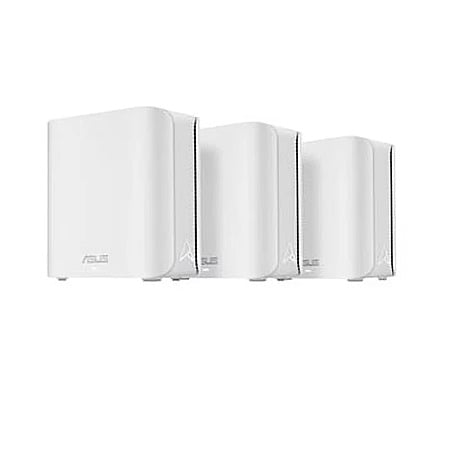
Primetimebuys via Ebay[ebay.com] has Refurbished: 3-Pack ASUS ZenWiFi BD5 Dual-Band WiFi 7 Mesh Routers on sale for $149.99. Shipping is free.
Condition: Excellent - Refurbished
One-year Allstate warranty
About:
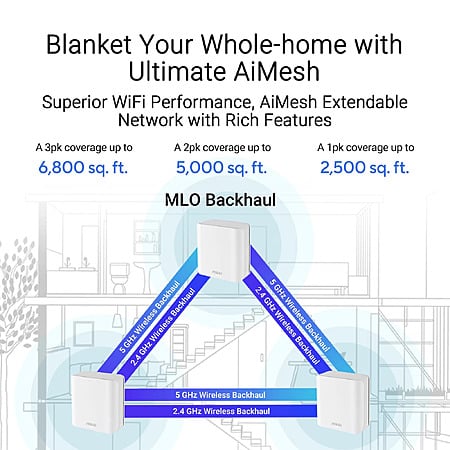
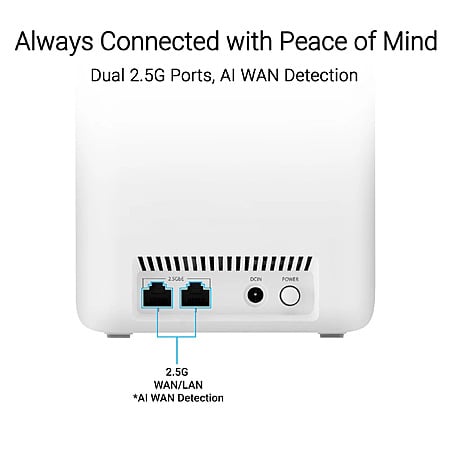
Dual-band WiFi 7 (802.11be) AiMesh Extendable Router, 5000 Mbps, Coverage up to 6800 sq. ft. (3pk), Dual 2.5G Ports, Up to 3 SSIDs for IoT Devices, Parental Controls & VPNs, Advanced Network Security.
Dual-band WiFi 7 speeds up to 5000 Mbps with MLO and 4K-QAM
Four internal antennas and four high-power front-end modules eliminate WiFi dead zones
Dual 2.5G Ethernet ports with auto detection
Quad-core 1.5 GHz CPU and robust cooling
24/7 end-to-end protection with commercial-grade AiProtection Pro and advanced VPNs
Community Notes
This collaborative space allows users to contribute additional information, tips, and insights to enhance the original deal post. Feel free to share your knowledge and help fellow shoppers make informed decisions.
Our community has rated this post as helpful. If you agree, why not thank
Pros
Massive savings versus new units
Whole-home WiFi 7 mesh
Dual 2.5G Ethernet ports
Free lifetime security features
Reputable high-volume eBay seller
Cons
Refurbished not brand-new units
No 6 GHz WiFi band
Mixed customer stability reviews
One-year Allstate third-party warranty
Only two ports per node
Can I ask why 6ghz wifi band a big deal and why are manufacturers removing the ethernet ports from their routers, other than space saving?
Removing 6 GHz isn't a big deal, as most devices can't even use it and it has horrible range compared to 5 GHz. It's just advertised as a big part of WiFi 7, being able to seamlessly switch between 3 bands, so nerds get angy when it's missing.
They don't bother spending the extra few cents to add the rest of the Ethernet ports because this is marketed as a wireless mesh kit, so having lots of wires going to each one ruins the look. The 3 pack has 6 ports between all nodes compared to 5 on a standalone router, so technically it has more. It's just going to kill wireless performance if you actually try and use the ports on the wireless ones.
Removing 6 GHz isn't a big deal, as most devices can't even use it and it has horrible range compared to 5 GHz. It's just advertised as a big part of WiFi 7, being able to seamlessly switch between 3 bands, so nerds get angy when it's missing.They don't bother spending the extra few cents to add the rest of the Ethernet ports because this is marketed as a wireless mesh kit, so having lots of wires going to each one ruins the look. The 3 pack has 6 ports between all nodes compared to 5 on a standalone router, so technically it has more. It's just going to kill wireless performance if you actually try and use the ports on the wireless ones.
I don't understand. Why would using the wired ports hurt? Doesn't it help backhaul? Thanks for your explanation
I don't understand. Why would using the wired ports hurt? Doesn't it help backhaul? Thanks for your explanation
The whole kit has a max speed of 5000 Mbps, that's what the number means. Although that's upload and download combined, usually. That means that fully utilizing a single 2.5G port will use all the WiFi bandwidth for the whole kit if you keep them fully wireless like they advertise.
Setting them up to use wired backhaul would require an Ethernet switch and result in no spare ports available at the main unit. And 2.5G switches are not cheap yet, so that would eliminate any value proposition this had unless you bottleneck it with 1G backhaul. There's always going to be a compromise.
The whole kit has a max speed of 5000 Mbps, that's what the number means. Although that's upload and download combined, usually. That means that fully utilizing a single 2.5G port will use all the WiFi bandwidth for the whole kit if you keep them fully wireless like they advertise.
Setting them up to use wired backhaul would require an Ethernet switch and result in no spare ports available at the main unit. And 2.5G switches are not cheap yet, so that would eliminate any value proposition this had unless you bottleneck it with 1G backhaul. There's always going to be a compromise.
Wireless backhauls are going to be much slower and add airtime congestion, wired APs are best even @ 1 gb
Last edited by Hefewe1zen September 27, 2026 at 11:09 AM.
Removing 6 GHz isn't a big deal, as most devices can't even use it and it has horrible range compared to 5 GHz. It's just advertised as a big part of WiFi 7, being able to seamlessly switch between 3 bands, so nerds get angy when it's missing.
They don't bother spending the extra few cents to add the rest of the Ethernet ports because this is marketed as a wireless mesh kit, so having lots of wires going to each one ruins the look. The 3 pack has 6 ports between all nodes compared to 5 on a standalone router, so technically it has more. It's just going to kill wireless performance if you actually try and use the ports on the wireless ones.
I have the prior generation mesh set (ASUS XT8 ; WiFi 6). Each mesh unit (including mesh router) has 1-2.5GB port and 3-1.0GB ports (4 ports total). I use the 2.5GB port on the satellite (mesh) unit to connect via ethernet (using MoCA - cable TV coax) to a 2.5GB switch that is hooked up to the main XT8 router.
With this setup I get 2.5GB on my local LAN on all wired devices that are (1) connected to the 2.5GB switch and (2) have a 2.5GB network interface card (NIC) in them. The nice thing about having more ports on the mesh units is when using in a wired backhaul setup, you can hook more devices up via ethernet without having to buy a separate switch. Of course if you need to hook up tons of devices then three 1.0GB ports on a mesh node won't work, you might have to get a 8- or 16-port switch if you have massive networking demands.
Really annoyed ASUS is reducing the number of ethernet ports. For this reason I will probably skip WiFI 7 and wait for WiFi 8.
I have the prior generation mesh set (ASUS XT8 ; WiFi 6). Each mesh unit (including mesh router) has 1-2.5GB port and 3-1.0GB ports (4 ports total). I use the 2.5GB port on the satellite (mesh) unit to connect via ethernet (using MoCA - cable TV coax) to a 2.5GB switch that is hooked up to the main XT8 router.
With this setup I get 2.5GB on my local LAN on all wired devices that are (1) connected to the 2.5GB switch and (2) have a 2.5GB network interface card (NIC) in them. The nice thing about having more ports on the mesh units is when using in a wired backhaul setup, you can hook more devices up via ethernet without having to buy a separate switch. Of course if you need to hook up tons of devices then three 1.0GB ports on a mesh node won't work, you might have to get a 8- or 16-port switch if you have massive networking demands.
Really annoyed ASUS is reducing the number of ethernet ports. For this reason I will probably skip WiFI 7 and wait for WiFi 8.
This is a lower performance level kit than what you got. They have a BT8 available as well, which is the WiFi 7 version of your WiFi 6 kit. It has 2 2.5G ports and 2 1G ports per node.
Again, this is intended to be used more wirelessly or for less intensive scenarios. That's why it's only 150 bucks, when single router units of similar performance can cost as much or more.
This is a lower performance level kit than what you got. They have a BT8 available as well, which is the WiFi 7 version of your WiFi 6 kit. It has 2 2.5G ports and 2 1G ports per node.
Again, this is intended to be used more wirelessly or for less intensive scenarios. That's why it's only 150 bucks, when single router units of similar performance can cost as much or more.
Correct, the BD5 is lower performance level. XT8 = Tri-band WiFi 6, with one of the two 5ghz bands available for dedicated wireless mesh backhaul.
Wireless backhauls are going to be much slower and add airtime congestion, wired APs are best even @ 1 gb
If your peak internet speed is under 500 Mbps and the sole purpose of your WiFi network is to supply internet to your devices, then this kit can handle it fully wirelessly.
Like
Helpful
Funny
Not helpful
Join The Conversation
Share your experience with the Slickdeals community
Share information with the community. Please follow our Community Guidelines and be kind!



 eBay
eBay


Join The Conversation
Share your experience with the Slickdeals community
Share information with the community. Please follow our Community Guidelines and be kind!
18 Comments
Sign up for a Slickdeals account to remove this ad.
Our community has rated this post as helpful. If you agree, why not thank
Massive savings versus new units
Whole-home WiFi 7 mesh
Dual 2.5G Ethernet ports
Free lifetime security features
Reputable high-volume eBay seller
Cons
Refurbished not brand-new units
No 6 GHz WiFi band
Mixed customer stability reviews
One-year Allstate third-party warranty
Only two ports per node
Can I ask why 6ghz wifi band a big deal and why are manufacturers removing the ethernet ports from their routers, other than space saving?
Can I ask why 6ghz wifi band a big deal and why are manufacturers removing the ethernet ports from their routers, other than space saving?
They don't bother spending the extra few cents to add the rest of the Ethernet ports because this is marketed as a wireless mesh kit, so having lots of wires going to each one ruins the look. The 3 pack has 6 ports between all nodes compared to 5 on a standalone router, so technically it has more. It's just going to kill wireless performance if you actually try and use the ports on the wireless ones.
Sign up for a Slickdeals account to remove this ad.
Setting them up to use wired backhaul would require an Ethernet switch and result in no spare ports available at the main unit. And 2.5G switches are not cheap yet, so that would eliminate any value proposition this had unless you bottleneck it with 1G backhaul. There's always going to be a compromise.
Setting them up to use wired backhaul would require an Ethernet switch and result in no spare ports available at the main unit. And 2.5G switches are not cheap yet, so that would eliminate any value proposition this had unless you bottleneck it with 1G backhaul. There's always going to be a compromise.
They don't bother spending the extra few cents to add the rest of the Ethernet ports because this is marketed as a wireless mesh kit, so having lots of wires going to each one ruins the look. The 3 pack has 6 ports between all nodes compared to 5 on a standalone router, so technically it has more. It's just going to kill wireless performance if you actually try and use the ports on the wireless ones.
With this setup I get 2.5GB on my local LAN on all wired devices that are (1) connected to the 2.5GB switch and (2) have a 2.5GB network interface card (NIC) in them. The nice thing about having more ports on the mesh units is when using in a wired backhaul setup, you can hook more devices up via ethernet without having to buy a separate switch. Of course if you need to hook up tons of devices then three 1.0GB ports on a mesh node won't work, you might have to get a 8- or 16-port switch if you have massive networking demands.
Really annoyed ASUS is reducing the number of ethernet ports. For this reason I will probably skip WiFI 7 and wait for WiFi 8.
With this setup I get 2.5GB on my local LAN on all wired devices that are (1) connected to the 2.5GB switch and (2) have a 2.5GB network interface card (NIC) in them. The nice thing about having more ports on the mesh units is when using in a wired backhaul setup, you can hook more devices up via ethernet without having to buy a separate switch. Of course if you need to hook up tons of devices then three 1.0GB ports on a mesh node won't work, you might have to get a 8- or 16-port switch if you have massive networking demands.
Really annoyed ASUS is reducing the number of ethernet ports. For this reason I will probably skip WiFI 7 and wait for WiFi 8.
Again, this is intended to be used more wirelessly or for less intensive scenarios. That's why it's only 150 bucks, when single router units of similar performance can cost as much or more.
Again, this is intended to be used more wirelessly or for less intensive scenarios. That's why it's only 150 bucks, when single router units of similar performance can cost as much or more.
Sign up for a Slickdeals account to remove this ad.
Join The Conversation
Share your experience with the Slickdeals community
Share information with the community. Please follow our Community Guidelines and be kind!