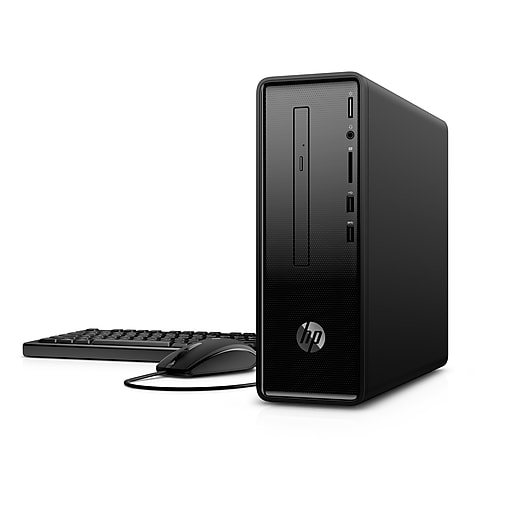
HP Slimline i3-8100 (4 cores, 3.6 GHz, 8 GB RAM) @ $349.99 (regularly $449.99) [staples.com]
HP Slimline i5-8400 (6 cores, 4.0 GHz turbo, 8 GB RAM) @ $399.99 (regularly $499.99) [staples.com] [$50 more than the i3]
ALTERNATE SLICKDEAL:
HP Pavilion i5-8400 (6 cores, 4.0 GHz turbo, 12 GB RAM, 310W power) @ $449.99 (regularly $599.99) [Worth the $50-100 more for power users and light gamers.]
FREE SHIPPING, with free next-day delivery. Also available for Store Pickup.
Sale continuing thru July 28 per the latest ad.- LINK NOT WORKING? Go to Staples.com and search for "hp slim 290". Some users are reporting issues with the link, especially over mobile.
- PRICE WRONG AT CHECKOUT? Order via chat with Staples [staples.com], calling (800) 333-3330, or purchase in-store. They will honor the advertised price, which is in their weekly ad. Staples keeps having problems with the sale price working in cart and checkout.
- These are excellent value, non-gaming desktop PCs. Good for anyone looking for an inexpensive, mid-range desktop that's small form factor, quiet, and also considered more reliable than the recent Acer desktop deals. The 8GB RAM is plenty for most users. See the "Urgent Community Requests" question below about possibility of adding more RAM.
- Should you get the i3 8100 or spend $50 more on the i5 8400? Both are great deals. Depends on how much you value the $50. Casual users will not notice a difference in their web surfing and word processing between the i3 8100 and i5 8400. Power users doing things like video editing, photo editing, music composition, programming, and complex calculations will definitely notice a difference.
- Don't fall for i3/i5 7th Generation deals, which have fewer CPU cores (i3: two instead of four, i5: four instead of six.) The minimum I recommend for a modern desktop is four cores. Two cores is really not enough for responsive web browsing, multi-tasking, or even casual gaming. Four cores are plenty. Six cores are more than many users need.
- Not for serious gaming. The built-in Intel UHD 630 graphics should do 1080P for casual games at ~30fps, likely on medium/low settings. Being a slimline PC, this will only handle the lowest powered graphics cards. The power supply is only 180W, so even a low-profile 1050Ti may require too much power (nVidia recommends 300W, with the card needing 65W.) Disconnecting the 1TB hard drive will save up to 25W. An SSD (2.5" or M.2) will use <5W.
- Highly recommended to add an SSD deal (2.5" or M.2 NVMe), as the 1TB hard drive should only be used for extra storage. [UPDATE: The less expensive M.2 SATA are not supported. Therefore, recommend going with a 2.5" SATA and putting the 1 TB hard drive in an external enclosure or disconnecting the DVD-RW.] SSDs are blazing fast in comparison to hard drives and should be considered mandatory as your main disk drive. M.2 NVMe is generally much more expensive and less reliable (due to heat) than SATA M.2, but can perform noticeably faster in certain situations. There are only 2 SATA ports, so the options are as follows:
- If you go with a 2.5" SSD, you will need to free up a SATA port by disconnecting the DVD-RW drive or (recommended) the noisy, power hungry 1TB hard drive. You can always put the hard drive in an external enclosure as a backup drive!
- If you go with an M.2 NVMe SSD, to access the M.2 slot you will need to temporarily remove the front cover (via clips) and DVD-RW drive cage (via Torx T15 star screws.) See the HP Upgrading/Servicing Guide (PDF). [hp.com] Multi-bit screwdriver sets with Torx bits can be found for as low as $10 online or at your local hardware store.
- Most SSDs (like Samsung, Crucial, and Intel) let you download free software to clone the hard drive. The process is: install the SSD, boot off the HD, run the software to easily clone the HD to the SSD, and finally change default boot to the SSD.
- Samsung SSDs are generally considered the most reliable.
- There are often great monitor deals on Slickdeals. More deals will come as we get closer to Back to School. Still available is a 23" Dell 1080p IPS monitor for $90. Be sure to connect any monitor via an HDMI cable, which is digital and has much better picture quality than VGA, which is analog. Most monitors do not come with an HDMI cable, but it's the same kind that comes with your TV / cable box. Well-reviewed HDMI cables are only $5-10 on Amazon.
- Excellent for HTPC digital/streaming. Not for playing Blu-Ray, but can play/burn DVDs and HD video burned to DVDs. It has plenty of CPU and GPU decoding capability. Sound can apparently be output up to 7.1 channels via either HDMI or the configurable analog jacks. Please note the following potential limitations:
- No Blu-Ray drive. The DVD-RW drive it comes with is not a typical size and I was not able to locate a Blu-Ray drive that would fit.
- No confirmation of the HDMI output version. The product says it supports 4K, but that may not include HDR. It also may not support 4K@60Hz; which is not needed for watching video, but is very desirable if generally using a TV as a computer monitor. The Intel UHD Graphics 630 (built-in) supports 4K@60Hz, HDR, and 4K Netflix streaming; however, this may be limited by the version of the physical HDMI output.
- Check your postal mail and email for Staples technology coupons. I didn't have luck finding any this month (online or offline), probably because they prepared for these Cyber Week deals. Most Staples coupons can't be used on technology anyways, and many are in-store only. The $10 first-time email list sign-up coupon apparently takes two days to receive and may not allow technology. The $5 SMS (text message) sign-up coupon I received was in-store only and did not work online.
- Windows 10 Home can be upgraded to Windows 10 Pro, possibly for free. The main benefits are more control over updates and being able to join a Windows domain (with Group Policy and Active Directory authentication), like in an office environment. Options:
- Upgrade to Windows 10 Pro for FREE if you have an old Windows 7 Pro/Ultimate or Windows 8/8.1 Pro key. [zdnet.com]
- Upgrade to Windows 10 Pro for ~$99 via purchase. May be cheaper through the Microsoft Store app within Windows 10.
- - - - - - - - - - - - - - - - - - - - - - - - - - - - - - - - - - - - - - - - - - - - - - - - - - - - - - - - - - - -
i3 8100 (HP Slimline 290-P0046): Staples Product Page [staples.com]
i5 8400 (HP Slimline 290-P0056): Staples Product Page [staples.com]
- - - - - - - - - - - - - - - - - - - - - - - - - - - - - - - - - - - - - - - - - - - - - - - - - - - - - - - - - - - -
i3 HP Support Page [hp.com]
i3 Product Specifications (with photos) [hp.com]
i3 Motherboard Details [hp.com]
i3 Upgrade/Servicing Guide (PDF Download) [hp.com] [Couldn't find a Youtube video. It's a new model.]
i3 User Guide (PDF Download) [hp.com]
- - - - - - - - - - - - - - - - - - - - - - - - - - - - - - - - - - - - - - - - - - - - - - - - - - - - - - - - - - - -
i5 HP Support Page [hp.com]
i5 Product Specifications (with photos) [hp.com]
i5 Motherboard Details [hp.com]
i5 Upgrade/Servicing Guide (PDF Download) [hp.com] [Couldn't find a Youtube video. It's a new model.]
i5 User Guide (PDF Download) [hp.com]
- - - - - - - - - - - - - - - - - - - - - - - - - - - - - - - - - - - - - - - - - - - - - - - - - - - - - - - - - - - -
i3 8100 (8th Generation, Coffee Lake) [intel.com]: 4 cores, 4 threads, 3.6 GHz, No Turbo Boost, 6MB cache, 14nm, 65W
i5 8400 (8th Generation, Coffee Lake) [intel.com]: 6 cores, 6 threads, 4.0 GHz w/Turbo Boost, 9MB cache, 14nm, 65W
Intel UHD Graphics 630 (i3 @ 1.1 GHz max, i5 @ 1.05 GHz max) [HDMI out (v?.??), VGA out]
8 GB SDRAM memory (i3 @ DDR4-2400, i5 @ DDR4-2666)
1 TB 7200RPM SATA hard drive
DVD-Writer (8x)
Wireless LAN 802.11a/b/g/n/ac (1x1), Bluetooth® 4.2 M.2, Gigabit Ethernet [Realtek RTL8111HSH]
5.1 surround sound with configurable audio jacks [Realtek ALC3601]
USB wired keyboard with volume control
Optical mouse
Front I/O: 2xUSB 3.1 Gen 1 (Type A), Headphone/Microphone, 3-in-1 Memory card reader
Rear I/O: 2xUSB 3.1 Gen 1 (Type A), 2xUSB 2.0 (Type A), Ethernet LAN, HDMI out, VGA out, Audio, Serial port
M.2 Socket, 2280 type for SSD [M.2 NVMe only]
M.2 Socket, 2230 type for built-in WLAN [occupied]
2xDDR4 DIMM RAM slots [one available]
PCI-E x16 slot [available]
PCI-E x1 slot [available]
LGA1151 CPU socket
180W power supply (Gold Efficiency @ 90%)
Windows 10 Home
UPDATE: User reported one RAM stick, leaving a slot free. Another user reported 12GB total after adding a 4GB stick to the empty slot.
Disclaimer:
I am not a moderator. I am not affiliated with HP, Staples, or Slickdeals. I'm just a long-time Slickdeals user that did a lot of research on a great deal (for non-gamers) and wanted to share it. Given the lack of information published by HP, it's become quite the challenge.



122 Comments
Your comment cannot be blank.
Sign up for a Slickdeals account to remove this ad.
Anyway, I have seen NVMe SSDs with one "key notch" and two notches. Are either compatible with this? Additionally, what size/type of screw did you need to purchase?
** Edit: HP says it "should be NVMe" per photo **
Has anyone tried an M.2 SATA SSD?
Anyway, I have seen NVMe SSDs with one "key notch" and two notches. Are either compatible with this? Additionally, what size/type of screw did you need to purchase?
I'm no expert so someone please correct me if I'm wrong. At the moment I have no SSD installed. Need to make another trip to return the SATA M.2 I bought and I set a deal alert for an NVMe one. It looks like prices are dropping so I'll probably wait a while for a great deal before getting one. The computer runs well enough for me without the SSD, tbh.
Anyway, I have seen NVMe SSDs with one "key notch" and two notches. Are either compatible with this? Additionally, what size/type of screw did you need to purchase?
** Edit: HP says it "should be NVMe" per photo **
Sign up for a Slickdeals account to remove this ad.
Have also contacted Staples support to correct this misleading error on their website description (it says expandable to 32GB) that helped me to purchase the machine. They will "submit it to be reviewed as needed."
Disappointing.
Have also contacted Staples support to correct this misleading error on their website description (it says expandable to 32GB) that helped me to purchase the machine. They will "submit it to be reviewed as needed."
Disappointing.
Have also contacted Staples support to correct this misleading error on their website description (it says expandable to 32GB) that helped me to purchase the machine. They will "submit it to be reviewed as needed."
Disappointing.
Now my problem is that the computer won't recognize/identify two monitors, one HDMI (to DVI adapter) on one monitor, and VGA to another. So for now I'm rocking one monitor until I have time to figure that out.
Good luck!
https://www.bestbuy.com/site/hp-s...Id=6261170
Microcenter has an AMD mobile version (A6-9225) for $280 - Note this one has a 65W power adapter, significantly less than the other versions, so not sure if you can get away with a dedicated GPU. But CPU is a mobile version, so will also use less (15W vs 65W). More comparable to the U chips intel puts out. At this performance level, you can probably find a much smaller form factor though.
http://www.microcenter
Currently fighting an occasional "A required device isn't connected or can't be accessed" BSOD on boot and the SSD is running super hot. Bit I did follow steps in the thread and got a clean Windows 10 installation on the SSD now too. Onward...
Sign up for a Slickdeals account to remove this ad.
Currently fighting an occasional "A required device isn't connected or can't be accessed" BSOD on boot and the SSD is running super hot. Bit I did follow steps in the thread and got a clean Windows 10 installation on the SSD now too. Onward...
Did the clean Windows install fix your intermittent BSOD issues? Some NVMe are known to run too hot and malfunction, either as a defect or not being engineered with thermal management. I'd recommend putting it through some benchmarks / tests and lots of boots, returning it (possibly for a standard 2.5" SATA) if there are any errors whatsoever.