Slickdeals is community-supported.  We may get paid by brands for deals, including promoted items.
Sorry, this deal has expired. Get notified of deals like this in the future. Add Deal Alert for this Item
Frontpage

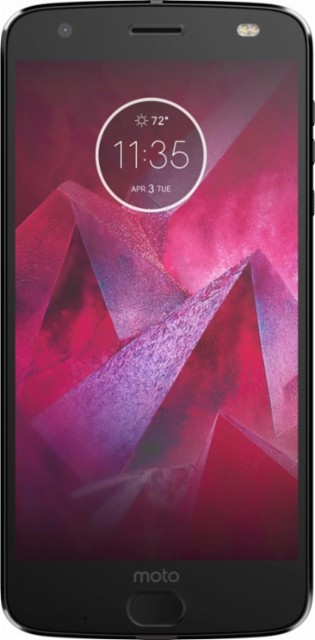
64GB Motorola Moto Z2 Force Edition Smartphone for Sprint (Black) Expired

$160
+ Free Store Pickup
+164 Deal Score
306,634 Views
Best Buy has 64GB Motorola Moto Z2 Force Edition Smartphone for Sprint (Super Black, MOT1789BKKIT) for $159.99 (select Activate Later). Store pickup is free if stock permits. Thanks CertifiedFlipper

Note, refer to the product page for additional purchasing options.

Specs
  • 5.5" 2560x1440 Quad HD P-OLED Shatterproof Touchscreen Display ("ShatterShield")
  • Qualcomm Snapdragon 835 Octa-Core processor
  • 4GB RAM
  • 64GB Internal Storage
  • MicroSD Card slot (up to 256GB) w/ Adoptable Storage support
  • Fingerprint Sensor (front)
  • Moto Mod support
  • Cameras: Dual 12MP rear + 5MP front
  • USB Type C port w/ TurboPower (Quick Charge)
  • 2730mAh battery (non-removable)
  • Android 7.1.1 Nougat (upgradable to 8.0 Oreo)

Editor's Notes & Price Research

Written by
Head over to TechRadar or Tom's Guide for a full review. -johnny_miller

Original Post

Written by
Edited September 7, 2018 at 08:18 AM by
https://www.bestbuy.com/site/moto...Id=5947345

Qualcomm Snapdragon 835 processor
Octa-core 2.35GHz processor and 4GB of RAM deliver outstanding overall performance for opening and running applications, flipping through menus, running home screens and more.

Android 7 Nougat OS
Offers a fresh, fast platform to help you stay connected and productive while you're on the go.

4G LTE speed
Provides fast Web connection for downloading apps, streaming content and staying connected with social media.

5.5" Quad HD POLED touch screen display
Extra-large screen is matched with a slim body to comfortably fit in your hand. Offers 16:9 cinema-like screen ratio that's perfect for viewing of videos, photos and games.

Dual 12 MP rear-facing cameras for pictures and 4K videos
Capture clearer pics with laser autofocus and optical image stabilization. Also includes a front-facing 5.0MP camera for self-portraits and video.

64GB internal memory plus microSD slot
Provides plenty of storage space for your contacts, music, apps and more. Expand storage up to 2TB by adding a microSD card (sold separately).

Moto Mods connector
Turn your phone into a movie projector, boombox, battery powerhouse, and more, in a snap (additional accessories required, sold separately).

Your fingerprint keeps your phone secure
Swipe your finger on the sensor panel to unlock your phone.

Guaranteed shatterproof display
Your screen is guaranteed not to crack or shatter.*

*The display and embedded lens are warranted against shattering and cracking for four (4) years from the original date of purchase.

*All other warranty exclusions, including scratches and other cosmetic damage, intentional damage or abuse, normal wear and tear and other limitations apply; visit Motorola.com for details and warranty coverage.
If you purchase something through a post on our site, Slickdeals may get a small share of the sale.
Deal
Score
+164
306,634 Views

Community Wiki

Last Edited by schmante March 14, 2019 at 11:21 PM
***** Soft unlock method (Thank you dslatlast) *****
1) Open the box and turn the phone on for first time with the Sprint sim inside
2) Let the phone boot up all the way until you see "Let's go" screen (after the Moto splash animation).
3) Remove the Sprint sim at this point and install the T-mobile Sim (or Verizon/AT&T sim) and wait for 10 seconds
4) Power the phone off
5) Remove the T-Mobile/Verizon/AT&T sim
6) Power on the phone with no sim inside.
7) Connect to Wi-Fi
8) Complete the phone set-up
9) Update the software all the way to Oreo (all the way to July 2018 release)
10) Power off the phone and install the T-Mobile/Verizon/AT&T sim
11) Power on the phone

The phone should now be unlocked. You should see the carrier name and signal at the top of the screen.


===== Below instructions need more involvement and are for those who have some technical skills and are willing to take risks ===============================
Since nobody thought of making this easier I am noting down the steps for sim unlocking it for free so that the phone can be used for any carrier.
  1. Fist of all, when you receive the phone, take the sim card out before booting it up.
  2. Now boot and go through the setup steps, don't add pin or any kind of screen lock, just connect wifi and sign in with your google account.
  3. Take the OTA update to get Android Oreo. (Yes the sim unlocking steps works on Oreo and if you dont update before unlocking you will have to do a lot of steps to return the rooted, twrp, superuser/magisk installed phone to stock before you can update to Android Oreo. (note from user:golf247, I had multiple updates, about 10 that took a few hours to cycle through and get to Oreo).
  4. Once updated to Oreo, factory reset the phone.
  5. Now follow the steps here to install adb tools and unlock the bootloader.
    https://motorola-global-portal.cu...-device-a/

    download these and install:
    Motorola device drivers [motorola.com]
    ADB installer [xda-developers.com]
  6. Once the bootloader in unlocked you boot to temp TRWP to flash superuser/magisk. Please dont flash the TWRP.zip file which will replace the stock bootloader with TWRP and you wont be able to install any OTA.

    For magisk you have activate SU by going to settings in magisk manager
    Follow the steps here
    https://forum.xda-developers.com/...2-t3756669

    download these:
    https://twrp.me/motorola/motorola...force.html
    https://github-production-release...tet-stream (COPY TO PHONE)
  7. Now final steps for sim unlocking

    - Enable Developer Options (Go to Settings,About Phone, Build Number and keep tapping build number until you see the message Developer Options are enabled, now back out one step to Settings and Select Developer Options)
    - Enable USB Debugging
    - Enable OEM Unlock
    - Connect to PC and run ADB
    - Follow the commands below:

    adb shell su -c "chmod 0000 /persist/rfs/msm/mpss/datablock/id_00"
    adb reboot-bootloader
    fastboot erase modemst1
    fastboot erase modemst2
    fastboot reboot
  8. Sim unlock done.
    Now if you were like me and performed the steps on 7.1.1 and installed the TWRP,zip you need to return the phone to stock by following step E from this thread
    https://forum.xda-developers.com/...t-t3805737

    but only use the zipall file downloaded from here https://mirrors.lolinet.com/firmw...al/Sprint/

Give me reps for accumulating and putting this in the wiki.


(but who are you?)
Wiki history shows user as aviseqdas entering the details - found by jockovonred

[GUIDE][Z2 FORCE XT1789-05] Bootloader/TWRP/Custom ROMs/Root/Dirty flashing/Unbrick
https://forum.xda-developers.com/...t-t3805737

This Definitely works with TELLO out of the box. also updated to Android 8.0

Screen peeling report:
http://piunikaweb.com/2018/02/06/moto-z2-force-shattershield-screen-peeling-off-for-many/ [piunikaweb.com]


For those who are interested in flashing a retail stock rom to replace the sprint stock rom, refer to https://slickdeals.net/forums/showpost.php?p=119438931&postcount=790
I flashed the retail ROM successfully. and get call and LTE working properly.
Here are the steps:
1. download latest retail ROM and sprint ROM from https://mirrors.lolinet.com/firmw...al/RETAIL/
https://mirrors.lolinet.com/firmw...al/Sprint/

2. delete the NON-HLOS.bin in the retail rom and replaced it with the one in sprint ROM.

3. flash the retail ROM.

Then you will have a clean retail stock rom with no sprint bloatware. I put in a Cricket sim, the call and LTE are working properly.

COMMON CASES & SCREEN PROTECTORS

[3-PACK]-Mr Shield For "Moto Z2 Force [amazon.com]" Edition [Japan Tempered Glass]

Adding another way to get this phone working on T-Mobile since the soft unlock didn't work for me (at least after rebooting). Anyway, I found this method of combining Sprint and T-Mobiles roms and flashing all via adb worked the best for me.
https://forum.xda-developers.com/...e-t3834765

1,547 Comments

Your comment cannot be blank.

Featured Comments

Same guts as an S8 and you can use Moto Mods and very close to pure Android.
HOW TO SIM UNLOCK (WINDOWS)

1. Unlock Bootloader

https://motorola-global-portal.cu...-device-a/

download these and install:

https://support.motorola.com/us/e...on/MS88481
https://forum.xda-developers.com/...?t=2588979


2. Install TWRP and Root

https://forum.xda-developers.com/...2-t3756669

download these:

https://dl.twrp.me/nash/twrp-3.2....h.img.html (IMG FILE)

https://github.com/topjohnwu/Magi...-v16.0.zip (COPY TO PHONE)


3.SIM Unlock

- Enable Developer Options
- Enable USB Debugging
- Enable OEM Unlock (Not sure if needed but I did this)
- Connect to PC and run ADB
- Follow the commands below:

adb shell su -c "chmod 0000 /persist/rfs/msm/mpss/datablock/id_00"
adb reboot-bootloader
fastboot erase modemst1
fastboot erase modemst2
fastboot reboot

After reboot try to put a different sim and see if the unlock worked! These instructions are not exactly for beginners, you are responsible if you break your phone!
It was just announced a few days ago that this model will in fact be getting the Android Pie update.

https://www.theverge.com/circuitb...smartphone

Sign up for a Slickdeals account to remove this ad.

Joined Mar 2016
L3: Novice
> bubble2 233 Posts
310 Reputation
planet1earth
08-21-2018 at 01:49 PM.
Unlockable?
Reply
Joined Aug 2007
Temporally unavailable
> bubble2 37,299 Posts
4,561 Reputation
fyu
08-21-2018 at 02:00 PM.
Joined Feb 2005
Cybersecurity Guru
> bubble2 368 Posts
153 Reputation
tedya
08-21-2018 at 02:04 PM.
Will Sprint give the SIM unlock PIN since I would hypothetically own it outright?
Reply
Joined Nov 2013
Happy Member
> bubble2 7,889 Posts
906 Reputation
WuyiL
08-21-2018 at 02:06 PM.
Does it look a price mistake?
Reply
Joined Jul 2016
L3: Novice
> bubble2 156 Posts
175 Reputation
7Guru7
08-21-2018 at 02:34 PM.
What's your take on the $120 activate today option? Isn't it unlockable?
Reply
Joined Apr 2006
World dominator and rebel
> bubble2 41,601 Posts
4,445 Reputation
SDRebel
08-21-2018 at 02:35 PM.
Quote from tedya :
Will Sprint give the SIM unlock PIN since I would hypothetically own it outright?
Don't think so
Reply
Joined Apr 2014
L6: Expert
> bubble2 1,747 Posts
182 Reputation
TravisT7776
08-21-2018 at 02:35 PM.
Haven't done much research on this phone... How is it
Reply

Sign up for a Slickdeals account to remove this ad.

Joined Apr 2006
World dominator and rebel
> bubble2 41,601 Posts
4,445 Reputation
SDRebel
08-21-2018 at 02:35 PM.
Quote from 7Guru7 :
What's your take on the $120 activate today option? Isn't it unlockable?
Needs sprint service
Reply
Joined Oct 2011
L4: Apprentice
> bubble2 363 Posts
224 Reputation
bkichu
08-21-2018 at 02:41 PM.
Wish the unlocked/tmobile one was around this price! I have the same phone and I'm happy with it.. Got the tmobile one for 300$ with the projector mod...
Reply
Joined Apr 2014
L5: Journeyman
> bubble2 840 Posts
49 Reputation
AlexA4876
08-21-2018 at 02:49 PM.
Can this be used on Cricket?
Reply
Joined Aug 2015
L3: Novice
> bubble2 118 Posts
18 Reputation
rest.ing
08-21-2018 at 02:54 PM.
Besides being locked to Sprint, how does this phone compare to the Essential Phone?
Reply
Joined Apr 2006
World dominator and rebel
> bubble2 41,601 Posts
4,445 Reputation
SDRebel
08-21-2018 at 02:57 PM.
Quote from bkichu :
Wish the unlocked/tmobile one was around this price! ..
Dont we all
Reply
Page 1 of 104
Start the Conversation
 

More Best Buy Deals

More Motorola Deals

Link Copied

The link has been copied to the clipboard.