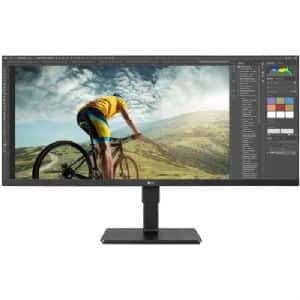
Please correct me if I'm wrong but isn't 34in a lot of real estate for 1080p? Pixels might be more noticeable but then again if it's being used for WFH this would more than suffice.
Please correct me if I'm wrong but isn't 34in a lot of real estate for 1080p? Pixels might be more noticeable but then again if it's being used for WFH this would more than suffice.
Please correct me if I'm wrong but isn't 34in a lot of real estate for 1080p? Pixels might be more noticeable but then again if it's being used for WFH this would more than suffice.
I have a 27" 1080p and I can see pixels hardcore. It was supplied to me by a client so I didn't have much option, but I'm glad I didn't buy it. I am on 1440p or better these days for anything else.
Fantastic for Ultrawide gaming if you can't pony up for the highest end video cards. If you can and are willing to spend mroe than 500 bucks for a video card you probably want a 3440x1440 monitor.
Personally, I wish I would have stayed at 2560x1080. Chasing frames with money has sucked.
I had (likely an earlier version of) this monitor years ago and it was perfectly good and useful for multitasking and work (I'm a programmer). And then I started using a 27" 2k monitor at work, and suddenly I could see every individual pixel on my 34" monitor at home. The fonts in my code editor started looking blurry and indistinct. So if you've only ever used 1080p then you might be fine with it, but it could be painful coming from a higher resolution monitor.
Also, I remember when I first got it, one of my first thoughts was that it was *too* wide. I wasn't used to having to move my head around so much to see various things on the screen, and I remember speculating that it would have actually been much easier with a curved monitor. But I did eventually get used to it and I do miss that monitor.
Pixel density calculator says it's 81 pixels per inch (ie - very bad and pixelated and can lead to eye strains when using it for productivity work). Should be okay-ish for movies though cuz you get that ultrawide movie aspect ratio. I say okay-ish because the problem with IPS is that when watching dark scenes in a movie, the blacks usually appears grayish instead of the deep blacks that VA-panels are able to display. A typical 22" 1080p computer monitor is 100 ppi.


30 Comments
Your comment cannot be blank.
Sign up for a Slickdeals account to remove this ad.
Is there a code?
Can you screenshot your information?
Our community has rated this post as helpful. If you agree, why not thank HermanMunchther
Sign up for a Slickdeals account to remove this ad.
Our community has rated this post as helpful. If you agree, why not thank DreamerbyDesign
Personally, I wish I would have stayed at 2560x1080. Chasing frames with money has sucked.
Also, I remember when I first got it, one of my first thoughts was that it was *too* wide. I wasn't used to having to move my head around so much to see various things on the screen, and I remember speculating that it would have actually been much easier with a curved monitor. But I did eventually get used to it and I do miss that monitor.