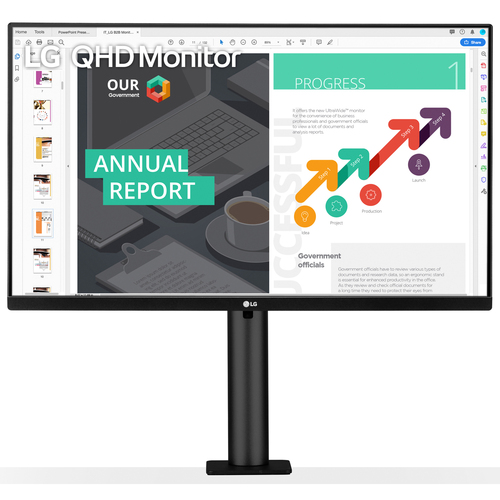
27” LG 27QN880-B 2560x1440 IPS HDR10 USB-C w/ PD & Thin Bezel Monitor + Ergo Stand
Expired
$329
$446.99
+ Free Shipping
+35Deal Score
33,723 Views
BuyDig.com has 27" LG 27QN880-B QHD 2560x1440 IPS HDR10 USB-C w/ PD & Thin Bezel Monitor + Ergo Stand for $446.99 - $117.99 w/ promo code AAS24 = $329. Shipping is free.
Thanks to Deal Editor iconian for finding this deal.
Specs
Resolution: 2560 x 1440 (Quad HD)
Refresh Rate: 75Hz
Response Time: 5ms
Viewing Angles: 178° V x 178° H
Brightness: 350 cd/m²
AMD FreeSync support
99% sRGB color gamut
Integrated speakers (5W x 2)
Ports
2x HDMI
1x DisplayPort
1x USB-C
2x USB Down-stream
Editor's Notes & Price Research
Written by
About this deal:
Our research indicates that this 27" LG 27QN880-B QHD 2560x1440 IPS HDR10 USB-C w/ PD & Thin Bezel Monitor + Ergo Stand is $68 lower (17% savings) than the next best available price from a reputable merchant with prices starting at $397 at the time of this posting.
This one has usb c with power delivery, dell doesn't. This one is $130 cheaper than dell. Also dell uses panels from lg and other companies.
I would say amazing. I bought a LG monitor from them that did 40w and quickly found it could not keep up with my 2018 15" MacBook Pro. They took it back no questions asked and paid for return shipping.
FWIW I ended up with a different LG monitor that does 60 watts and while under load the battery will drain I don't believe I have ever gotten below 80%. To get 90w of output you're probably looking at a $600 Dell. For me the few hundred dollars is worth not always having a 100% full battery.
Generally speaking, you're correct. But just to add to your points:
*Actually saves you an extra cable ("use one instead of three"), since USB-C gives you:
1) Power-delivery
2) Video/Display output
3) USB upstream (using the downstream USB ports on the monitor would allow you to skip a docking station if things like ethernet aren't necessary and you only need basic USB devices).
*Additional benefit is that if you own a new macbook *air* for example, your only output are two thunderbolt ports (backwards compatible with USB-C), which means that if your monitor isn't USB-C, then you need to buy a seperate docking station OR a thunderbolt-to-HDMI adapter (which is the worst case, because that only leaves the remaining thunderbolt port for power delivery from a charging cable, and now you can't utilize any other USB devices/connections). So in short, having a USB-C enabled monitor in the case of a macbook potentially saves you from having to purchase a docking station, expansion hub, and/or HDMI adapters. Aside from the benefits stated above
Sign up for a Slickdeals account to remove this ad.
I understand MacBook Pro needs 61 watts. So will this not charge a mbp?
How is buy dig return policy?
I would say amazing. I bought a LG monitor from them that did 40w and quickly found it could not keep up with my 2018 15" MacBook Pro. They took it back no questions asked and paid for return shipping.
FWIW I ended up with a different LG monitor that does 60 watts and while under load the battery will drain I don't believe I have ever gotten below 80%. To get 90w of output you're probably looking at a $600 Dell. For me the few hundred dollars is worth not always having a 100% full battery.
I would say amazing. I bought a LG monitor from them that did 40w and quickly found it could not keep up with my 2018 15" MacBook Pro. They took it back no questions asked and paid for return shipping.
FWIW I ended up with a different LG monitor that does 60 watts and while under load the battery will drain I don't believe I have ever gotten below 80%. To get 90w of output you're probably looking at a $600 Dell. For me the few hundred dollars is worth not always having a 100% full battery.
Are the built in speakers halfway decent?
Any idea if a pair of these can be daisy-chained?
Wouldn't mind upgrading my dual U2717D setup.
Are the built in speakers halfway decent?
Any idea if a pair of these can be daisy-chained?
Wouldn't mind upgrading my dual U2717D setup.
I have LG 27UK850-W 27, which I believe has the same panel as this upgraded model with 3840 X 2160 display (27UN880-B – 27" UHD (3840 x 2160) Ergo).
The speakers ARE there, but it's not something you'd WANT to use. Really bad sound, with a ton of echo, if you don't have speakers, you'd probably have to get something cheap for around 20 bucks (like Logitech or creative pebble 2), which would be one million times better than built-in ones!
I understand MacBook Pro needs 61 watts. So will this not charge a mbp?
How is buy dig return policy?
60 watts is enough to charge a 16 inch Macbook pro. Under load your battery will drain but you should be good as long as your MBP isn't underload for a day straight.
Keep in mind that this monitor isn't bright enough to meet the lowest of VESA DisplayHDR standards (DisplayHDR 400) nor does it support a Wide Color Gamut (>>100% of sRGB). DisplayHDR 400 requires at least 400 nits and even then is considered FakeHDR. It doesn't require Wide Color Gamut or enhanced contrast of the other DisplayHDR standards. (DisplayHDR 400 isn't HDR if you ask me)
This display should allow you to put you PC into HDR mode so that you could stream HDR content to another display using a Shield or with Moonlight.


49 Comments
Your comment cannot be blank.
Featured Comments
FWIW I ended up with a different LG monitor that does 60 watts and while under load the battery will drain I don't believe I have ever gotten below 80%. To get 90w of output you're probably looking at a $600 Dell. For me the few hundred dollars is worth not always having a 100% full battery.
*Actually saves you an extra cable ("use one instead of three"), since USB-C gives you:
1) Power-delivery
2) Video/Display output
3) USB upstream (using the downstream USB ports on the monitor would allow you to skip a docking station if things like ethernet aren't necessary and you only need basic USB devices).
*Additional benefit is that if you own a new macbook *air* for example, your only output are two thunderbolt ports (backwards compatible with USB-C), which means that if your monitor isn't USB-C, then you need to buy a seperate docking station OR a thunderbolt-to-HDMI adapter (which is the worst case, because that only leaves the remaining thunderbolt port for power delivery from a charging cable, and now you can't utilize any other USB devices/connections). So in short, having a USB-C enabled monitor in the case of a macbook potentially saves you from having to purchase a docking station, expansion hub, and/or HDMI adapters. Aside from the benefits stated above
Sign up for a Slickdeals account to remove this ad.
How is buy dig return policy?
How is buy dig return policy?
I would say amazing. I bought a LG monitor from them that did 40w and quickly found it could not keep up with my 2018 15" MacBook Pro. They took it back no questions asked and paid for return shipping.
FWIW I ended up with a different LG monitor that does 60 watts and while under load the battery will drain I don't believe I have ever gotten below 80%. To get 90w of output you're probably looking at a $600 Dell. For me the few hundred dollars is worth not always having a 100% full battery.
Sign up for a Slickdeals account to remove this ad.
FWIW I ended up with a different LG monitor that does 60 watts and while under load the battery will drain I don't believe I have ever gotten below 80%. To get 90w of output you're probably looking at a $600 Dell. For me the few hundred dollars is worth not always having a 100% full battery.
Any idea if a pair of these can be daisy-chained?
Wouldn't mind upgrading my dual U2717D setup.
10 bit color (vs. typical monitor of 8 bit).
Anyone know if this is VESA compatible or not? I checked LGs website and Amazon, found nothing.
Any idea if a pair of these can be daisy-chained?
Wouldn't mind upgrading my dual U2717D setup.
The speakers ARE there, but it's not something you'd WANT to use. Really bad sound, with a ton of echo, if you don't have speakers, you'd probably have to get something cheap for around 20 bucks (like Logitech or creative pebble 2), which would be one million times better than built-in ones!
How is buy dig return policy?
This display should allow you to put you PC into HDR mode so that you could stream HDR content to another display using a Shield or with Moonlight.