This collaborative space allows users to contribute additional information, tips, and insights to enhance the original deal post. Feel free to share your knowledge and help fellow shoppers make informed decisions.
As many others have mentioned, yes you can. There are numerous guides on how to shuck them. There is also a community led Google doc that says which PSU models need the 3.3v mod.
It has nothing to do with the ATX PSU age or type. If you plug it into anything that provides power to the 3.3V pin, the drive will stay powered down. This is used to allow systems (typically backplanes) to disable or enable drives by controlling that one pin. If you plug these straight into an ATX power supply, which always provides a constant 3.3V to the power-disable pin, then the drive will stay "off."
People get around this by:
A) Using a Molex to SATA adapter when attached directly to a power supply, since Molex 4-pin doesn't have 3.3V to begin with.
B) Using it in enclosure that controls the power-disable pin correctly (or rather, doesn't have 3.3V and that pin just floats).
C) Using it in a server chassis that controls, or doesn't support, the power-disable pin. My servers have backplanes that are powered from 4-pin Molex connectors, and have no separate 3.3V regulator, so they could never send 3.3V if they wanted to. Just 12V and 5V on different pins.
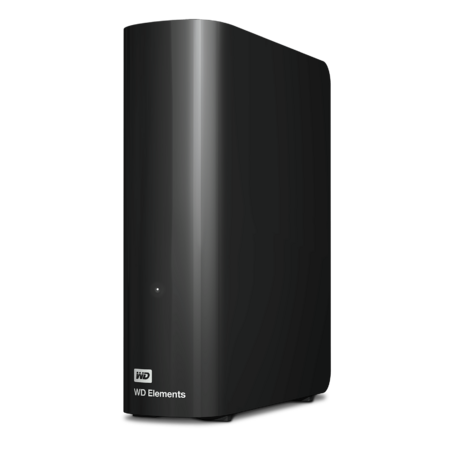
I wonder if these can easily be shucked. If so, it's a good deal for some large (slow) storage for backups and such.
<edit> Answering my own question, from what I can tell these enclosures have WD140EDGZ drives in them, and they can be shucked and used without the enclosure.
Our community has rated this post as helpful. If you agree, why not thank SatchBoogie1
Quote
from timur38
:
Order and see yourself. Mine were shipped with zero padding with ups ground delivered which took like 7 days.
I can relate. Three years ago I ordered eight WD Gold bare drives during a sale. No padding whatsoever. Not even in small cardboard boxes. You could literally hear the drives clank in the box when you picked it up. I had to fight with WD to return them because I was not going to even attempt to find out if they were still working. It was their careless error that someone couldn't package them up. They wanted me to do warranty claims which I had no interest (would take more time, and I would be giving up a new drive for a refurb drive x eight). They finally gave me a refund for the order.
They have the worst shipping ever. I ordered 4 internal drives from them last year and all 4 drives were loose in the bottom of the box. No foam, nothing. Not to worry though because they put some bubble wrap on top. As bad as that was, dealing with them for returns was an absolute nightmare. I recommend trying to find these deals at a store instead but in the end who knows how they were shipped as well.
I have ordered from WD many times in the past and every HD has come in its own individual box. The external HDs are in their retail box. The internal HDs are in a small brown box. Each has its own packing inside, so I'm not sure if you're talking about not having packing material around the retail/outer boxes so they slide around in a big box. I'm not sure if the packing matters around the retail/outer boxes.
Quote
from ArmoredCavalry
:
Bought this last time, after shucking it wouldn't work. Found it was the pin issue as others mentioned. Easier method than using tape is to just buy a Molex to SATA power adapter. Will have the same effect of not powering the pins than the the drive the "shutdown" command that causes the problem.
How do you know which WD drives require using an adapter or taping the pin? Is it listed on the drive itself or do you have to look up the specs online or use trial and error (if it doesn't power on then try the pin)?
I have ordered from WD many times in the past and every HD has come in its own individual box. The external HDs are in their retail box. The internal HDs are in a small brown box. Each has its own packing inside, so I'm not sure if you're talking about not having packing material around the retail/outer boxes so they slide around in a big box. I'm not sure if the packing matters around the retail/outer boxes.How do you know which WD drives require using an adapter or taping the pin? Is it listed on the drive itself or do you have to look up the specs online or use trial and error (if it doesn't power on then try the pin)?
Honestly just trial and error for me. I've used like 5 shucked drives before and this was the first I ran into with the pin issue.
Believe it. I bought a hd for a computer i was building and not only was it DOA but the mickey moused me so bad shuffling me from customer service rep to customer service rep for a month while i was trying to return it despite all my proof that i decided i would never do business with them again directly
Our community has rated this post as helpful. If you agree, why not thank Masejoer
Quote
from Thorguard
:
For those saying you need tape to block off a pin if you use an older PSU, thats because of the new power disable or whatever its called right? When i bought some recertified drives from goharddrive they included an adapter. So thats another option.
It has nothing to do with the ATX PSU age or type. If you plug it into anything that provides power to the 3.3V pin, the drive will stay powered down. This is used to allow systems (typically backplanes) to disable or enable drives by controlling that one pin. If you plug these straight into an ATX power supply, which always provides a constant 3.3V to the power-disable pin, then the drive will stay "off."
People get around this by:
A) Using a Molex to SATA adapter when attached directly to a power supply, since Molex 4-pin doesn't have 3.3V to begin with.
B) Using it in enclosure that controls the power-disable pin correctly (or rather, doesn't have 3.3V and that pin just floats).
C) Using it in a server chassis that controls, or doesn't support, the power-disable pin. My servers have backplanes that are powered from 4-pin Molex connectors, and have no separate 3.3V regulator, so they could never send 3.3V if they wanted to. Just 12V and 5V on different pins.
3
6
Like
Helpful
Funny
Not helpful
Nov 20, 2025 6:25 PM
319 Comments
Joined Aug 2020
This comment has been rated as unhelpful by Slickdeals users.
Does anyone know if WD.com offers PayPal Buy Now / Pay Later (for the 20% cash back option)? I see on the WD.com website that they accept PayPal, but nothing about Buy Now / Pay Later. I'm not sure if that means they don't accept it... or they do, and I'll just see it when it sends me over to Paypal.com to finish paying.
It has nothing to do with the ATX PSU age or type. If you plug it into anything that provides power to the 3.3V pin, the drive will stay powered down. This is used to allow systems (typically backplanes) to disable or enable drives by controlling that one pin. If you plug these straight into an ATX power supply, which always provides a constant 3.3V to the power-disable pin, then the drive will stay "off."
People get around this by:
A) Using a Molex to SATA adapter when attached directly to a power supply, since Molex 4-pin doesn't have 3.3V to begin with.
B) Using it in enclosure that controls the power-disable pin correctly (or rather, doesn't have 3.3V and that pin just floats).
C) Using it in a server chassis that controls, or doesn't support, the power-disable pin. My servers have backplanes that are powered from 4-pin Molex connectors, and have no separate 3.3V regulator, so they could never send 3.3V if they wanted to. Just 12V and 5V on different pins.
Doesn't the PS provide the power connection for the HD? where else would the 3.3v come from?
Our community has rated this post as helpful. If you agree, why not thank Masejoer
Quote
from Orange_Elvis
:
Doesn't the PS provide the power connection for the HD? where else would the 3.3v come from?
3.3V is part of the ATX standard - the 20 and 24-pin connectors will always have 3.3V. Nearly every computer in existence has a power supply that provides 3.3V.
The lack-of-power has nothing to do with the PSU model. The issue is that you cannot just plug an ATX power supply's SATA connector straight into one of these drives, and have them run.
A SATA Power connector has 3.3V on pins 1, 2, and 3, and an ATX PSU with a SATA cable coming out of it will have 3.3V on these pins, which tells the drive to stay powered down. Pin 3 is the one that some drives are designed around to control whether they should be "on" or "off." ATX SATA cable will have 3.3V on all of pins 1-3.
You plug a normal SATA cable from a PSU into the drive, the drive gets 3.3V on pin 3. This tells the drive to stay powered off. The solutions are to NOT plug the drive directly into the power supply's SATA cable - you need that pin 3 Voltage to go away. Taping over the pins can work fine. Modifying the cable to remove 3.3V is fine. Using a modded SATA to SATA cable, or a Molex to SATA adapter is fine. Using a backplane that has no 3.3V is fine. Using it in a server that controls power-disable pin 3 is fine. Using it in any device that doesn't provide 3.3V is fine.
Our community has rated this post as helpful. If you agree, why not thank nbread
Quote
from nbread
:
Does anyone know if WD.com offers PayPal Buy Now / Pay Later (for the 20% cash back option)? I see on the WD.com website that they accept PayPal, but nothing about Buy Now / Pay Later. I'm not sure if that means they don't accept it... or they do, and I'll just see it when it sends me over to Paypal.com to finish paying.
Answering my own question, for anyone else wondering the same:
I was able to successfully use PayPal's Buy Now / Pay Later for a transaction on WesternDigital.com. I immediately received a "points pending" notification as well, so I assume that means the 20% cash back option worked as intended.
I had an incredibly unlucky experience with hard drives in past year. I experienced six hard drive failures within one year. Four were 8TB WD external desktop drives purchased from Best Buy, one was a 6TB WD Red Pro, and one was a 10TB Toshiba N300 Pro.
All of the drives failed just outside of their warranty period, except for the 10TB Toshiba. Unfortunately, Toshiba only offered me store credit as a resolution. You don't have to believe my string of bad luck, but you can imagine how fortunate someone else's DoA, they don't have to deal with almost 40TB photos and videos recovery.
1
Like
Helpful
Funny
Not helpful
Sign up for a Slickdeals account to remove this ad.
3.3V is part of the ATX standard - the 20 and 24-pin connectors will always have 3.3V. Nearly every computer in existence has a power supply that provides 3.3V.
The lack-of-power has nothing to do with the PSU model. The issue is that you cannot just plug an ATX power supply's SATA connector straight into one of these drives, and have them run.
A SATA Power connector has 3.3V on pins 1, 2, and 3, and an ATX PSU with a SATA cable coming out of it will have 3.3V on these pins, which tells the drive to stay powered down. Pin 3 is the one that some drives are designed around to control whether they should be "on" or "off." ATX SATA cable will have 3.3V on all of pins 1-3.
You plug a normal SATA cable from a PSU into the drive, the drive gets 3.3V on pin 3. This tells the drive to stay powered off. The solutions are to NOT plug the drive directly into the power supply's SATA cable - you need that pin 3 Voltage to go away. Taping over the pins can work fine. Modifying the cable to remove 3.3V is fine. Using a modded SATA to SATA cable, or a Molex to SATA adapter is fine. Using a backplane that has no 3.3V is fine. Using it in a server that controls power-disable pin 3 is fine. Using it in any device that doesn't provide 3.3V is fine.
That's interesting. I have 6 PC's around the house and all but one have been able to correctly power up these shucked drives.
The one that gave me problems is an HTPC I built in 2005 with an 80+ Antec PS, the PS in that PC shut down the HD. I just ran an adapter and problem solved. I just thought it was an older SATA standard vs newer SATA standard for power saving.
Like
Helpful
Funny
Not helpful
Join The Conversation
Share your experience with the Slickdeals community
Share information with the community. Please follow our Community Guidelines and be kind!
Top Comments
Not sure if this is the most up to date version:
https://docs.google.com/spreadshe...A/htmlview
People get around this by:
A) Using a Molex to SATA adapter when attached directly to a power supply, since Molex 4-pin doesn't have 3.3V to begin with.
B) Using it in enclosure that controls the power-disable pin correctly (or rather, doesn't have 3.3V and that pin just floats).
C) Using it in a server chassis that controls, or doesn't support, the power-disable pin. My servers have backplanes that are powered from 4-pin Molex connectors, and have no separate 3.3V regulator, so they could never send 3.3V if they wanted to. Just 12V and 5V on different pins.
<edit> Answering my own question, from what I can tell these enclosures have WD140EDGZ drives in them, and they can be shucked and used without the enclosure.
Join The Conversation
Share your experience with the Slickdeals community
Share information with the community. Please follow our Community Guidelines and be kind!
157 Comments
Sign up for a Slickdeals account to remove this ad.
Our community has rated this post as helpful. If you agree, why not thank SatchBoogie1
https://www.bhphotovide
https://www.amazon.com/Western-Di...B07YD3G568
Amazon has it marked as a "Black Friday Deal"already.
Sign up for a Slickdeals account to remove this ad.
Our community has rated this post as helpful. If you agree, why not thank Masejoer
People get around this by:
A) Using a Molex to SATA adapter when attached directly to a power supply, since Molex 4-pin doesn't have 3.3V to begin with.
B) Using it in enclosure that controls the power-disable pin correctly (or rather, doesn't have 3.3V and that pin just floats).
C) Using it in a server chassis that controls, or doesn't support, the power-disable pin. My servers have backplanes that are powered from 4-pin Molex connectors, and have no separate 3.3V regulator, so they could never send 3.3V if they wanted to. Just 12V and 5V on different pins.
People get around this by:
A) Using a Molex to SATA adapter when attached directly to a power supply, since Molex 4-pin doesn't have 3.3V to begin with.
B) Using it in enclosure that controls the power-disable pin correctly (or rather, doesn't have 3.3V and that pin just floats).
C) Using it in a server chassis that controls, or doesn't support, the power-disable pin. My servers have backplanes that are powered from 4-pin Molex connectors, and have no separate 3.3V regulator, so they could never send 3.3V if they wanted to. Just 12V and 5V on different pins.
Doesn't the PS provide the power connection for the HD? where else would the 3.3v come from?
Our community has rated this post as helpful. If you agree, why not thank Masejoer
The lack-of-power has nothing to do with the PSU model. The issue is that you cannot just plug an ATX power supply's SATA connector straight into one of these drives, and have them run.
A SATA Power connector has 3.3V on pins 1, 2, and 3, and an ATX PSU with a SATA cable coming out of it will have 3.3V on these pins, which tells the drive to stay powered down. Pin 3 is the one that some drives are designed around to control whether they should be "on" or "off." ATX SATA cable will have 3.3V on all of pins 1-3.
You plug a normal SATA cable from a PSU into the drive, the drive gets 3.3V on pin 3. This tells the drive to stay powered off. The solutions are to NOT plug the drive directly into the power supply's SATA cable - you need that pin 3 Voltage to go away. Taping over the pins can work fine. Modifying the cable to remove 3.3V is fine. Using a modded SATA to SATA cable, or a Molex to SATA adapter is fine. Using a backplane that has no 3.3V is fine. Using it in a server that controls power-disable pin 3 is fine. Using it in any device that doesn't provide 3.3V is fine.
Our community has rated this post as helpful. If you agree, why not thank nbread
I was able to successfully use PayPal's Buy Now / Pay Later for a transaction on WesternDigital.com. I immediately received a "points pending" notification as well, so I assume that means the 20% cash back option worked as intended.
All of the drives failed just outside of their warranty period, except for the 10TB Toshiba. Unfortunately, Toshiba only offered me store credit as a resolution. You don't have to believe my string of bad luck, but you can imagine how fortunate someone else's DoA, they don't have to deal with almost 40TB photos and videos recovery.
Sign up for a Slickdeals account to remove this ad.
The lack-of-power has nothing to do with the PSU model. The issue is that you cannot just plug an ATX power supply's SATA connector straight into one of these drives, and have them run.
A SATA Power connector has 3.3V on pins 1, 2, and 3, and an ATX PSU with a SATA cable coming out of it will have 3.3V on these pins, which tells the drive to stay powered down. Pin 3 is the one that some drives are designed around to control whether they should be "on" or "off." ATX SATA cable will have 3.3V on all of pins 1-3.
You plug a normal SATA cable from a PSU into the drive, the drive gets 3.3V on pin 3. This tells the drive to stay powered off. The solutions are to NOT plug the drive directly into the power supply's SATA cable - you need that pin 3 Voltage to go away. Taping over the pins can work fine. Modifying the cable to remove 3.3V is fine. Using a modded SATA to SATA cable, or a Molex to SATA adapter is fine. Using a backplane that has no 3.3V is fine. Using it in a server that controls power-disable pin 3 is fine. Using it in any device that doesn't provide 3.3V is fine.
That's interesting. I have 6 PC's around the house and all but one have been able to correctly power up these shucked drives.
The one that gave me problems is an HTPC I built in 2005 with an 80+ Antec PS, the PS in that PC shut down the HD. I just ran an adapter and problem solved. I just thought it was an older SATA standard vs newer SATA standard for power saving.
Join The Conversation
Share your experience with the Slickdeals community
Share information with the community. Please follow our Community Guidelines and be kind!