This collaborative space allows users to contribute additional information, tips, and insights to enhance the original deal post. Feel free to share your knowledge and help fellow shoppers make informed decisions.
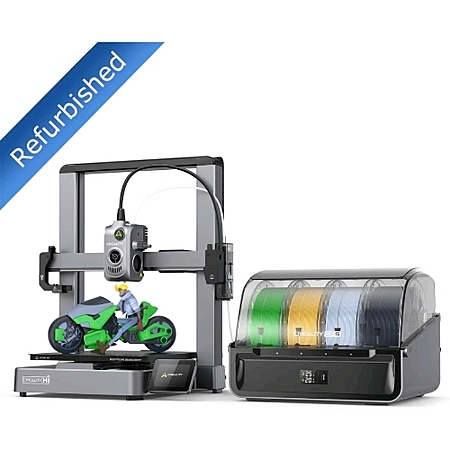
This refurbished Creality Hi Combo is mainly appealing as a multicolor printer bundle with the CFS included, and the two year warranty adds real peace of mind. The build volume is larger than many compact printers, and the newer Creality machines avoid the fussy setup of older Ender models. Print quality is solid around 300 millimeters per second, though pushing to maximum speed hurts results. Refurbished units can arrive missing accessories or with minor packaging annoyances, and the CFS does not have an active dryer. A practical pick if you want the CFS and can live with refurbished risk.
Makers upgrading from an Ender-style printer who want a larger build volume, because the newer design avoids fidgety setup and offers a bigger print area.
Refurbished units can be a gamble, but this deal includes a 2-year warranty. Some refurbished printers have arrived missing bolts or tools, while others have printed reliably right out of the box, so the main tradeoff is lower price versus possible accessory or packaging issues.
It can start printing quickly, but it is not a true plug-and-play paper-printer experience. You still need to understand supports, bed adhesion, and file setup, though the newer Creality machines avoid the more fiddly Ender-style assembly and calibration.
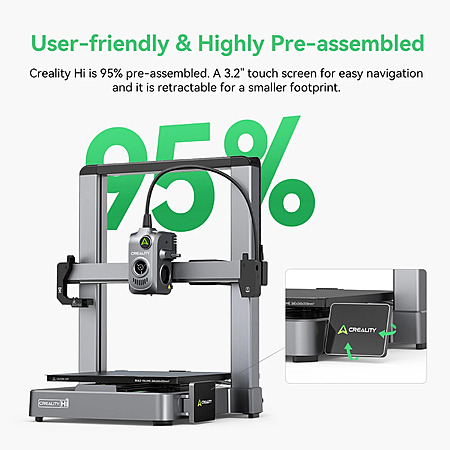
The Hi is reported at about 260x260x300 mm build volume, with typical good-quality print speeds around 300 mm/s. It is faster than older machines but quality can drop if pushed to maximum speed.
The CFS is described as having a drying function, but not an active dryer. It uses compartments for drying packets instead, so it helps with storage dryness rather than heated drying.
It comes with only a small sample of white PLA, and any standard 1.75 mm PLA roll should work fine. That makes it easy to use common third-party filament after the sample runs out.
Would this be a good machine for a beginner. What to buy it for my niece and nephew but I'm sure they have no knowledge about 3d printing so they are gonna have to figure it out themselves
Refurbished, it's a gamble if you are going to get a good one.
Bought a refurbished V3 and it was missing the gantry bolts and most of the tools that normally come with a new printer. Once assembled, it worked just fine.
Would this be a good machine for a beginner. What to buy it for my niece and nephew but I'm sure they have no knowledge about 3d printing so they are gonna have to figure it out themselves
How interested in leaving are they and how tech comfortable are they?
I honestly think this is about as good as anything. It's not quite as good as Bambu but I doubt the differences are much to worry about. Think of it this way, a paper printer is a 90/100 on the easy to use scale. Bambu is 45, this is 40. All of these machines are far from the "just works" of a typical paper printer. You need to either count on pre made files or understand things like what shapes will require support or might have bed adhesion issues. Unlike the old Ender 3 printers (basically anything other than the V3 models) you don't have complex/fidgety setup procedures with these newer printers. Think of that like these others don't have paper jam issues. However, unlike the paper printer where you can basically expect your Word document will print regardless of what you typed, here the shape of your parts greatly affects your results.
So I bought and sold my Flashforge AD5X without using it (I needed funds). Now the deal is over. How does this compare to AD5X?
Slower print speeds but I wouldn't call it slow. Bigger print volume (250^3 mm vs 220^3). Not really a good option for enclosing. The CFS I think has a dryer function. The FF is more compact.
Slower print speeds but I wouldn't call it slow. Bigger print volume (250^3 mm vs 220^3). Not really a good option for enclosing. The CFS I think has a dryer function. The FF is more compact.
Yea, average print speeds are around 300mm for good quality on all of these new printers. You can speed them up but quality is going to suffer greatly if you push them to their max ratings to the point they become unsightly unless you are just prototyping and dont care.
The build volume is much larger @ 260x260x300 on the HI. No active dryer, just compartments for drying packets.
Great deal even for the CFS. Replacing an Ender 3 v3 KE with this and adding the CFS to my K2 Plus. Creality needs to figure out how to stack CFS units.
How interested in leaving are they and how tech comfortable are they? I honestly think this is about as good as anything. It's not quite as good as Bambu but I doubt the differences are much to worry about. Think of it this way, a paper printer is a 90/100 on the easy to use scale. Bambu is 45, this is 40. All of these machines are far from the "just works" of a typical paper printer. You need to either count on pre made files or understand things like what shapes will require support or might have bed adhesion issues. Unlike the old Ender 3 printers (basically anything other than the V3 models) you don't have complex/fidgety setup procedures with these newer printers. Think of that like these others don't have paper jam issues. However, unlike the paper printer where you can basically expect your Word document will print regardless of what you typed, here the shape of your parts greatly affects your results.
I will greatly disagree with that assessment.
My A1 and my ender 3 V3 SE are
Waaaay easier to use than any ink jet printers I have used.
The ender 3 V3 SE was also a lot easier to assemble than the A1 was.
But both machines are a lot easier to use than any ink jet.
I have nothing but problems with paper printers and I frequently need to call support.
Getting things to print where I want them and how I want them and the right size is very challenging with paper printers as compared to 3D printers.
getting cloud print to work is always a problem with paper printers too.
I will greatly disagree with that assessment.
My A1 and my ender 3 V3 SE are
Waaaay easier to use than any ink jet printers I have used.
The ender 3 V3 SE was also a lot easier to assemble than the A1 was.
But both machines are a lot easier to use than any ink jet.
I have nothing but problems with paper printers and I frequently need to call support.
Getting things to print where I want them and how I want them and the right size is very challenging with paper printers as compared to 3D printers.
getting cloud print to work is always a problem with paper printers too.
I guess inkjets can be a pain. They aren't laser printers. But really a difference is the paper printer doesn't fail because of what print job you send it. FDM printers will.
Like
Helpful
Funny
Not helpful
Sign up for a Slickdeals account to remove this ad.
I bought this a few days before black Friday and it's been a fantastic reliable printer. They did just tape the screen protector tape over the screen. That was a pain In the ass to remove but otherwise great machine. I've already used it for about 100 print hours.
1
Like
Helpful
Funny
Not helpful
Join The Conversation
Share your experience with the Slickdeals community
Share information with the community. Please follow our Community Guidelines and be kind!


 eBay
eBay


Community Reviews
This refurbished Creality Hi Combo is mainly appealing as a multicolor printer bundle with the CFS included, and the two year warranty adds real peace of mind. The build volume is larger than many compact printers, and the newer Creality machines avoid the fussy setup of older Ender models. Print quality is solid around 300 millimeters per second, though pushing to maximum speed hurts results. Refurbished units can arrive missing accessories or with minor packaging annoyances, and the CFS does not have an active dryer. A practical pick if you want the CFS and can live with refurbished risk.
Common Questions (5)
AI-generated summary based on comments from the community. Updated ago
Join The Conversation
Share your experience with the Slickdeals community
Share information with the community. Please follow our Community Guidelines and be kind!
32 Comments
Sign up for a Slickdeals account to remove this ad.
Sign up for a Slickdeals account to remove this ad.
I honestly think this is about as good as anything. It's not quite as good as Bambu but I doubt the differences are much to worry about. Think of it this way, a paper printer is a 90/100 on the easy to use scale. Bambu is 45, this is 40. All of these machines are far from the "just works" of a typical paper printer. You need to either count on pre made files or understand things like what shapes will require support or might have bed adhesion issues. Unlike the old Ender 3 printers (basically anything other than the V3 models) you don't have complex/fidgety setup procedures with these newer printers. Think of that like these others don't have paper jam issues. However, unlike the paper printer where you can basically expect your Word document will print regardless of what you typed, here the shape of your parts greatly affects your results.
The build volume is much larger @ 260x260x300 on the HI. No active dryer, just compartments for drying packets.
My A1 and my ender 3 V3 SE are
Waaaay easier to use than any ink jet printers I have used.
The ender 3 V3 SE was also a lot easier to assemble than the A1 was.
But both machines are a lot easier to use than any ink jet.
I have nothing but problems with paper printers and I frequently need to call support.
Getting things to print where I want them and how I want them and the right size is very challenging with paper printers as compared to 3D printers.
getting cloud print to work is always a problem with paper printers too.
My A1 and my ender 3 V3 SE are
Waaaay easier to use than any ink jet printers I have used.
The ender 3 V3 SE was also a lot easier to assemble than the A1 was.
But both machines are a lot easier to use than any ink jet.
I have nothing but problems with paper printers and I frequently need to call support.
Getting things to print where I want them and how I want them and the right size is very challenging with paper printers as compared to 3D printers.
getting cloud print to work is always a problem with paper printers too.
Sign up for a Slickdeals account to remove this ad.
Join The Conversation
Share your experience with the Slickdeals community
Share information with the community. Please follow our Community Guidelines and be kind!