Amazon has
TP-Link 24 Port PoE Gigabit Switch (SG2428LP) for
$179.99.
Shipping is free.
Note: Earn 10% back on this item when you pay with your Prime Card (
more information). To verify, you should see "Get 5% back, and additional rewards on select items charged to this card" listed in the 'Paying with (your card info)' section at checkout.
Thanks to Deal Hunter
phoinix for finding this deal.
Features: - 24 x Gigabit RJ45 Ethernet Ports
- 16 x PoE+ Complaint Ports
- 4 x Gigabit SFP+ Ports
- 56 Gb/s Switching Capacity
- 41.66 Mpps Forwarding Rate
- 150W PoE Budget
- Rack Mountable
- Fanless Design
- Works with Omada App
- Centralized Cloud Management

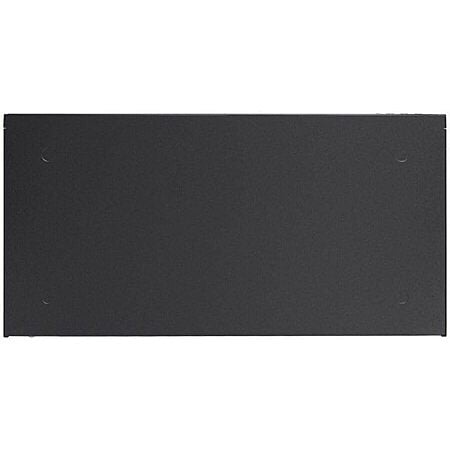
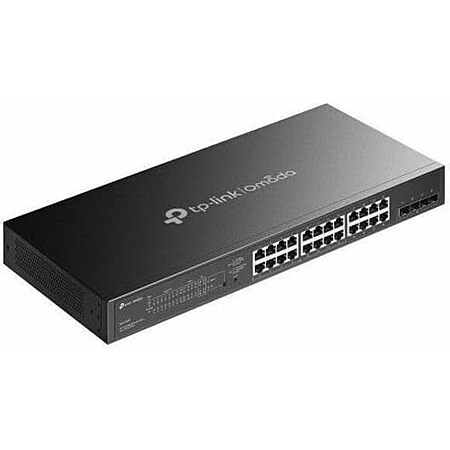
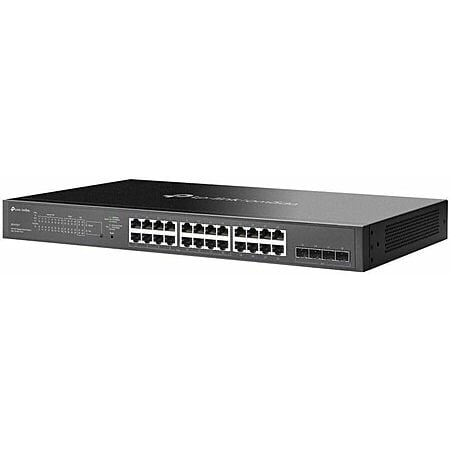

 + Free Shippingat Amazon


Top Comments
I'm also having several issues with it. First it has started to overheat and completely shuts down without warning, which is bad since my WAP and cameras are attached to it! This has happened twice in the few weeks I've been using it.
Second, I started experiencing daily Internet outages that I'm still diagnosing. My network was completely fine for over a year, but since adding this switch, the outages started. I can't rule out the switch since it had that overheating issue.
Not sure if others have issues but that's my story.
Community Reviews
This TP-Link 24 port PoE Gigabit switch stands out as a practical fit for wired homes, homelabs, and small businesses that need PoE for cameras, access points, and VoIP phones. The Omada management tools are described as solid for the price, with a web interface and Cisco like CLI, and the 24 port layout makes sense once TVs, streamers, PCs, and other devices start adding up. The main caution is noise and heat on the fan version, with reports of loud startup behavior and even shutdowns, though the SG2428LP is called out as the quiet low power model. It looks best for a setup that truly needs PoE and plenty of ports.
Common Questions (4)
AI-generated summary based on comments from the community. Updated ago
Join The Conversation
Share your experience with the Slickdeals community
Share information with the community. Please follow our Community Guidelines and be kind!
30 Comments
Sign up for a Slickdeals account to remove this ad.
Our community has rated this post as helpful. If you agree, why not thank
Our community has rated this post as helpful. If you agree, why not thank
I'm also having several issues with it. First it has started to overheat and completely shuts down without warning, which is bad since my WAP and cameras are attached to it! This has happened twice in the few weeks I've been using it.
Second, I started experiencing daily Internet outages that I'm still diagnosing. My network was completely fine for over a year, but since adding this switch, the outages started. I can't rule out the switch since it had that overheating issue.
Not sure if others have issues but that's my story.
I'm also having several issues with it. First it has started to overheat and completely shuts down without warning, which is bad since my WAP and cameras are attached to it! This has happened twice in the few weeks I've been using it.
Second, I started experiencing daily Internet outages that I'm still diagnosing. My network was completely fine for over a year, but since adding this switch, the outages started. I can't rule out the switch since it had that overheating issue.
Not sure if others have issues but that's my story.
Personally any rack mount device I think is too loud for working in the same room because the fans are so small they need to spin at high rates to move air. To me, that's too loud. But if something is wrong with the fans of your switch then they might be making extra noise, and the overheating indicates them running at 100%.
I've seen these in a few small businesses and they worked great without any issue.
Newer devices that are affordable are now arriving with 2.5gbe connections. Decent motherboards in the $120-150 range normally include it now, so we aren't talking about the premium $499 boards here. As an example, on SD today there is a cpu, motherboard, and ram deal for $600. The board has 2.5gbe. This stuff is getting affordable now. Link: https://slickdeals.net/f/19155241-amd-ryzen-7-7800x3d-asus-b650e-e-tuf-gaming-wifi-am5-crucial-pro-overclocking-32gb-ddr5-6000-kit-599-99?attrsrc=User
Internet access is also speeding up a lot. The majority of people in the US have internet above 1 gbps available. It might be expensive now, but in a few years it will likely be normal. 5 years ago the base internet plans offered to me were 100mbps. Today the cheap $35 dollar plan is 500 mbps, 1 gbps is $65, and 2 gbps is $120.
I revamped my network recently. I bought a used TEG 30262 switch, 24 gig ethernet ports and importantly 4 SFP+ 10 gbps cages. It cost $69 shipped. I also bought a 8x2.5gbe with 1xSFP+ cage switch for $67. Throw in a 10gb DAC for the SFP+ to link the switches at 10 gig, cost $13.
This gives me 8 2.5gbe ports and 24 1gbe ports for older/slower devices that won't benefit from 2.5g, but allows me to link my main pc and other important devices at a higher speed. It also allows me an upgrade path in the future to internet speeds above 1 gbps. The switches are also fanless and quiet. The whole upgrade cost about $150, so pretty cheap.
Newer devices that are affordable are now arriving with 2.5gbe connections. Decent motherboards in the $120-150 range normally include it now, so we aren't talking about the premium $499 boards here. As an example, on SD today there is a cpu, motherboard, and ram deal for $600. The board has 2.5gbe. This stuff is getting affordable now. Link: https://slickdeals.net/f/19155241-amd-ryzen-7-7800x3d-asus-b650e-e-tuf-gaming-wifi-am5-crucial-pro-overclocking-32gb-ddr5-6000-kit-599-99?attrsrc=User
Internet access is also speeding up a lot. The majority of people in the US have internet above 1 gbps available. It might be expensive now, but in a few years it will likely be normal. 5 years ago the base internet plans offered to me were 100mbps. Today the cheap $35 dollar plan is 500 mbps, 1 gbps is $65, and 2 gbps is $120.
I revamped my network recently. I bought a used TEG 30262 switch, 24 gig ethernet ports and importantly 4 SFP+ 10 gbps cages. It cost $69 shipped. I also bought a 8x2.5gbe with 1xSFP+ cage switch for $67. Throw in a 10gb DAC for the SFP+ to link the switches at 10 gig, cost $13.
This gives me 8 2.5gbe ports and 24 1gbe ports for older/slower devices that won't benefit from 2.5g, but allows me to link my main pc and other important devices at a higher speed. It also allows me an upgrade path in the future to internet speeds above 1 gbps. The switches are also fanless and quiet. The whole upgrade cost about $150, so pretty cheap.
Our community has rated this post as helpful. If you agree, why not thank
Newer devices that are affordable are now arriving with 2.5gbe connections. Decent motherboards in the $120-150 range normally include it now, so we aren't talking about the premium $499 boards here. As an example, on SD today there is a cpu, motherboard, and ram deal for $600. The board has 2.5gbe. This stuff is getting affordable now. Link: https://slickdeals.net/f/19155241-amd-ryzen-7-7800x3d-asus-b650e-e-tuf-gaming-wifi-am5-crucial-pro-overclocking-32gb-ddr5-6000-kit-599-99?attrsrc=UserFlow%3ADealFeed%3AFor+You&src=forYou
Internet access is also speeding up a lot. The majority of people in the US have internet above 1 gbps available. It might be expensive now, but in a few years it will likely be normal. 5 years ago the base internet plans offered to me were 100mbps. Today the cheap $35 dollar plan is 500 mbps, 1 gbps is $65, and 2 gbps is $120.
I revamped my network recently. I bought a used TEG 30262 switch, 24 gig ethernet ports and importantly 4 SFP+ 10 gbps cages. It cost $69 shipped. I also bought a 8x2.5gbe with 1xSFP+ cage switch for $67. Throw in a 10gb DAC for the SFP+ to link the switches at 10 gig, cost $13.
This gives me 8 2.5gbe ports and 24 1gbe ports for older/slower devices that won't benefit from 2.5g, but allows me to link my main pc and other important devices at a higher speed. It also allows me an upgrade path in the future to internet speeds above 1 gbps. The switches are also fanless and quiet. The whole upgrade cost about $150, so pretty cheap.
Our community has rated this post as helpful. If you agree, why not thank
These are VERY loud when they start up but are not too bad once they have booted up. I certainly wouldn't want one in a bedroom. They are definitely designed for a server closet.
I've had no issues with any of the tp-link smart switches in those 15 years.
Sign up for a Slickdeals account to remove this ad.
Our community has rated this post as helpful. If you agree, why not thank
WiFi cameras are useless when burglars use radio jamming equipment now. WiFi signals are notoriously bad in older homes with plaster and lath walls. The higher the frequencies (as in the higher bandwidth bands), the worse the range. Roaming in a mesh systems is still not nearly as good as a hard line. The more devices you have on WiFi, the slower it gets.
The only advantage wireless has over a wired connections is convenience of not being physically tied to one location. Wired connections are superior to WiFi in every metric. And yes, I do use a USB to RJ45 dongle. Not for my phone, but for my laptops. I don't really use my phone at home other than phone calls a text messaging. Only time I use a USB to RJ45 dongle on my phone is to use the internet sharing feature on my phone when I do VPN testing or when my ISP is having issues.
You won't use wifi? What's the issue with wifi? How do you use your cellphone in your house? Do you think the cellular towers are better than the home internet? Are you afraid of big brother watching you?
Plenty of people have switches like this, and more, in their homes.
Yes, I have over a dozen cameras. Yes, I have a few (5) wireless access points. No, IP phones, but 6 desktop PCs and a couple laptops (with docks).
Just checking my interface and listing some of the large uses.
AV equipment is a chunk of it:
7 Apple TVs
2 projectors
2 AV receivers
Sonos
Smart home equipment:
Philips Hue
Some smart sensors with adapters to power the USB devices
2 Envisalink security devices
Solar panel monitoring
I have a Ubiquiti 48 port 1GbE POE++ switch and a Ubiquiti 48 port 2.5GbE POE+ switch. Both are in a rack in my kids' bedroom. You can barely hear them in the dead of night.
Sign up for a Slickdeals account to remove this ad.
Join The Conversation
Share your experience with the Slickdeals community
Share information with the community. Please follow our Community Guidelines and be kind!