Slickdeals is community-supported.  We may get paid by brands for deals, including promoted items.

Black Friday deals are here! Go bananas, pay peanuts.Black Friday deals are here! Go bananas, pay peanuts.

View Deals
frontpage
Mark D 18.7K Views
Sep 23, 2026 6:19 PM

JSAUX USB-C Video Capture Card (Switch 2, Steam Deck & More)

$23

$40

42% off
+ Free S&Hat Amazon
Get Deal at Amazon
Good Deal?
29Comments
Save
Share
Deal Details
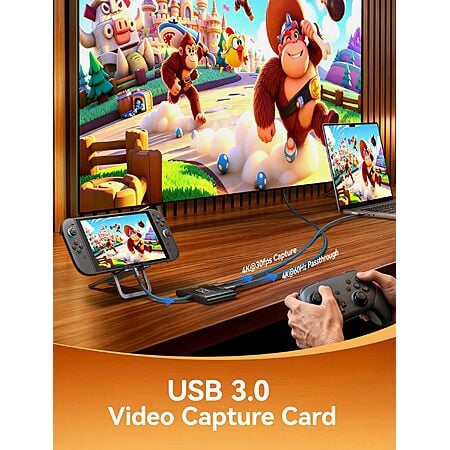
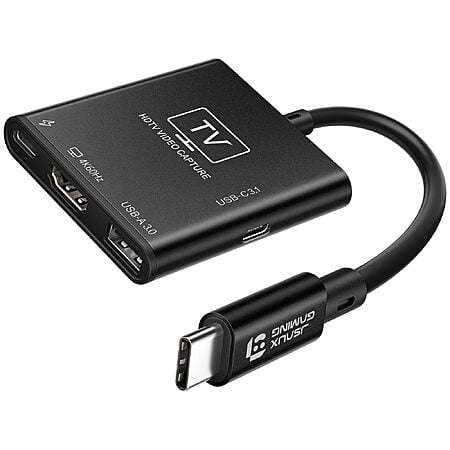
JS Digital US via Amazon has JSAUX USB-C Video Capture Card (CV0089) on sale for $39.99 - $17.20 promo code W7OARC8G at checkout = $22.79. Shipping is free.

Thanks to Community Member Mark D for sharing this deal.
  • Note: You must be logged in to clip coupons or apply promo codes. Coupons/Promo codes may vary by account or may need to be re-applied in order to discount properly.
Details:
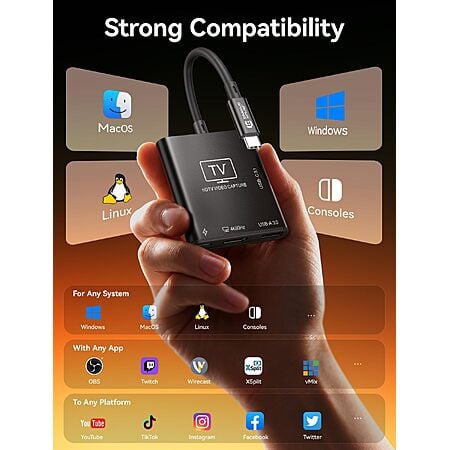
  • 2-in-1 USB-C capture card and handheld dock; aluminum shell; plug-and-play on Windows, macOS, and Linux
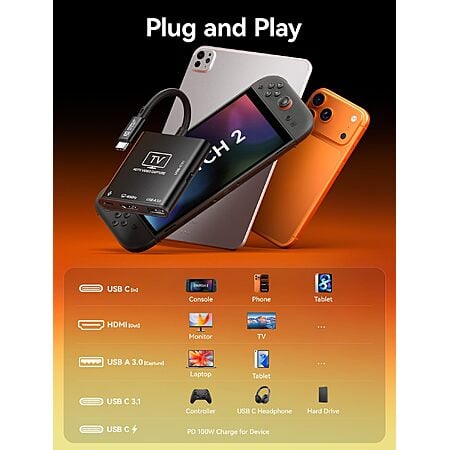
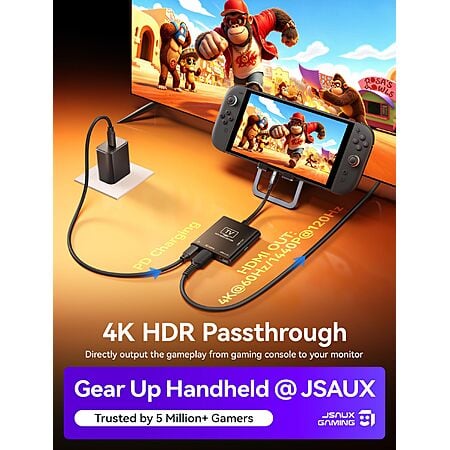
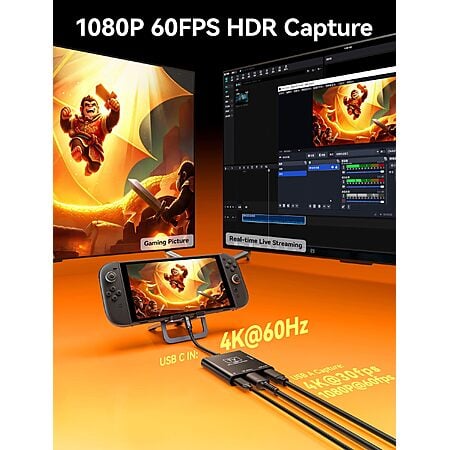
  • USB-C video in: 4K@60 Hz or 1440p@120 Hz; HDMI passthrough; Switch 2 must use the console's bottom USB-C port
  • USB-A capture out: 4K30 or 1080p60; OBS, Streamlabs, XSplit, vMix, Twitch Studio
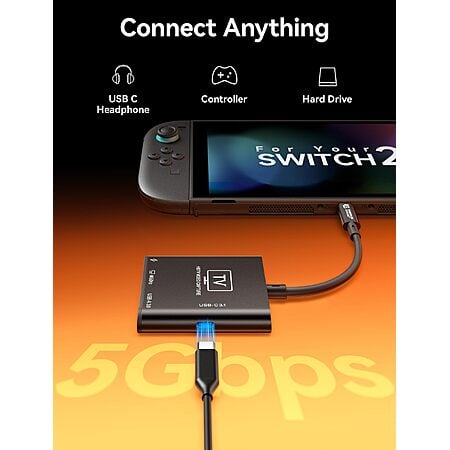
  • Separate USB-C PD in up to 100W; USB-C 3.1 data port at 5 Gbps for drives, keyboard/controller, or USB-C headphones
  • Source device needs a full-featured USB-C port; listed for Switch 2, Steam Deck, ROG Ally, iPad, phone, laptop, and camera

Editor's Notes

Written by powerfuldoppler | Staff

Original Post

Written by Mark D
Community Notes
About the Poster
Deal Details
Community Notes
About the Poster
JS Digital US via Amazon has JSAUX USB-C Video Capture Card (CV0089) on sale for $39.99 - $17.20 promo code W7OARC8G at checkout = $22.79. Shipping is free.

Thanks to Community Member Mark D for sharing this deal.
  • Note: You must be logged in to clip coupons or apply promo codes. Coupons/Promo codes may vary by account or may need to be re-applied in order to discount properly.
Details:
  • 2-in-1 USB-C capture card and handheld dock; aluminum shell; plug-and-play on Windows, macOS, and Linux
  • USB-C video in: 4K@60 Hz or 1440p@120 Hz; HDMI passthrough; Switch 2 must use the console's bottom USB-C port
  • USB-A capture out: 4K30 or 1080p60; OBS, Streamlabs, XSplit, vMix, Twitch Studio
  • Separate USB-C PD in up to 100W; USB-C 3.1 data port at 5 Gbps for drives, keyboard/controller, or USB-C headphones
  • Source device needs a full-featured USB-C port; listed for Switch 2, Steam Deck, ROG Ally, iPad, phone, laptop, and camera
Editor's Notes

Written by powerfuldoppler | Staff

Original Post

Written by Mark D

Community Voting

Deal Score
+49
Good Deal
Bad Deal

Community Reviews

This is a compact capture card and portable dock for Switch 2, Steam Deck, or a laptop setup, and it can also serve as a travel-friendly second dock. It works with Switch 2 in real use, and the USB-C power passthrough can keep a device charging while capturing. The main setup detail is that the computer connection goes through the USB Type-A port, and a USB 3 Type-A to Type-A cable may be needed to avoid falling back to USB 2 speeds. Switch 2 firmware changes have also broken some dock-style accessories, so compatibility may depend on future updates. It is best suited to portable play setups where a separate screen is not practical.

Common Questions (5)

  • Yes, it works with Switch 2 and can be used as a portable dock/capture setup. It may be a useful secondary dock for travel or another room, but Switch 2 firmware updates can break some dock-related third-party devices, so compatibility may depend on firmware.

  • The computer connection uses the USB-A port on the capture card, and a USB 3 Type-A to Type-A cable is needed for full USB 3 speeds. A USB-A to USB-C cable can fall back to USB 2, which can prevent OBS from seeing the device correctly or limit performance.

  • It can be used with a Steam Deck, including a setup that sends the Steam Deck display to an iPad Pro 13-inch for travel. It is not a direct fit for camcorders that output through FireWire, composite, or component, since it appears to expect a USB-C-based output.

  • Yes, USB-C power delivery passthrough works while the card is in use. One setup showed about 65W charging to a laptop during capture, though the actual wattage may be capped by the connected device.

  • On Linux, it reports USB 3.2 and supports up to 1080p MJPEG at 120 fps, 1440p MJPEG or NV12 at 60 fps, and 4K MJPEG at 60 fps. At 4K, NV12 is 30 fps and YUYV is 25 fps.

Join The Conversation

Share your experience with the Slickdeals community

Share information with the community. Please follow our Community Guidelines and be kind!

29 Comments

Sign up for a Slickdeals account to remove this ad.

Sep 25, 2026 5:42 PM
5.3K Comments
Joined Nov 2003
gergevSep 25, 2026 5:42 PM
5.3K Comments
Quote from mulligan View quoted comment :
Could/should I use this to pull old HD video from a Sony HDV (cassette) camcorder? I need to digitize, it has HDMI output. Thanks AV club
I have some old tapes from a sony mini dv hdv camcorder I tried digitizing with an older windows capture device and obs studio but it was slow going and results weren't too good.


I'm looking for a device with some simple software.
Sep 26, 2026 3:49 PM
391 Comments
Joined Aug 2017
superchonggoSep 26, 2026 3:49 PM
391 Comments
Quote from daxund View quoted comment :
why do you need this for a switch 2? Doesnt this do what the dock does?
I bought a similar one last year and the reason that I bought it is because I was traveling and this one is more portable. However, the firmware updates on the switch 2 made the dock unusable. The "manufacturer's fix" was a series of flashing to the device that isn't intuitive.
1
Sep 26, 2026 8:59 PM
436 Comments
Joined Nov 2011
DevanteWearySep 26, 2026 8:59 PM
436 Comments
Quote from beermanair View quoted comment :
I bought one a few weeks ago. So far so good. It works with switch 2
I'm a little confused. So can you use this to connect your switch to your computer so that you can use OBS to stream your switch?
Sep 27, 2026 2:09 AM
309 Comments
Joined Feb 2010
GreyoutSep 27, 2026 2:09 AM
309 Comments
Quote from mulligan View quoted comment :
Could/should I use this to pull old HD video from a Sony HDV (cassette) camcorder? I need to digitize, it has HDMI output. Thanks AV club
Not sure of your exact camcorder model, but you may need a FireWire, composite, or component conversion capture card. This device looks like it requires a USB-C based output, so it wouldn't work directly
Sep 29, 2026 11:30 AM
489 Comments
Joined Nov 2013
AceCooperSep 29, 2026 11:30 AM
489 Comments
What's the best software to use with this if I only want to play my switch 2 on my laptop screen?
Sep 29, 2026 5:31 PM
73 Comments
Joined Oct 2022
ElatedFruit2433Sep 29, 2026 5:31 PM
73 Comments
Quote from DevanteWeary View quoted comment :
I'm a little confused. So can you use this to connect your switch to your computer so that you can use OBS to stream your switch?
Bingo. You can use this as a switch capture card, or you can use it as a normal dock.
Sep 29, 2026 7:00 PM
3.3K Comments
Joined Mar 2011
jasongwSep 29, 2026 7:00 PM
3.3K Comments
Quote from SharpWing9744 View quoted comment :
Could also risk bricking the switch 2 I heard. I just hate how stingy Nintendo has gotten, I had an adapter for my switch 1 that's alot more portable than the dock.
Unlikely. Possible, yes, but unlikely. I use a similar model with switch 1 AND 2, with no problems at all. Have another I've been using portable for switch 1 for years.

Sign up for a Slickdeals account to remove this ad.

Pro
Sep 29, 2026 8:54 PM
44 Comments
Joined Sep 2019
CeeTea
Pro
Sep 29, 2026 8:54 PM
44 Comments
Thanks. Just bought one without the code. Reoredered and will return the 1st one.
Sep 29, 2026 10:18 PM
40 Comments
Joined Feb 2015
DealsarewhyimbrokeSep 29, 2026 10:18 PM
40 Comments
Quote from DeniedSalience View quoted comment :
My use case is to connect my steam deck to my ipad pro 13". That will let me play my steam deck on the ipad screen so i dont have to purchase or carry around an external screen for flights or vacation type car rides.I'd imagine you can do the same with the Switch 2
Could you tell me what app on the iPad allows you to use it as a monitor? Would I be able to play my switch 2 on my iPad using this adapter?
Sep 30, 2026 9:53 AM
1.2K Comments
Joined Apr 2014
ScottPotiSep 30, 2026 9:53 AM
1.2K Comments
Will this let me use my Rayneos S3 Pro in the Switch
Sep 30, 2026 3:02 PM
1.5K Comments
Joined Feb 2005
bennynihonSep 30, 2026 3:02 PM
1.5K Comments
Quote from beermanair View quoted comment :
I bought one a few weeks ago. So far so good. It works with switch 2
Even after v23 update on Switch 2?
Oct 2, 2026 3:18 AM
436 Comments
Joined Nov 2011
DevanteWearyOct 2, 2026 3:18 AM
436 Comments
Quote from MemorableHealth804 View quoted comment :
I bought one last week - interesting device, not too intuitive to use. As a capture card the output for the computer is the USB Type A port, all the type Cs are for Nintendo Switch and power.
I got mine but cannot get OBS to see it. How did you get yours working? For the USB-A output, I have a USB-A (at the capute card) to USB-C (at the PC) cable connected. In OBS, I have the source as "Video Capture Device" and the only device that shows is "Virtual OBS Device".
Oct 2, 2026 7:31 PM
11 Comments
Joined Aug 2025
MemorableHealth804Oct 2, 2026 7:31 PM
11 Comments
Quote from DevanteWeary View quoted comment :
I got mine but cannot get OBS to see it. How did you get yours working? For the USB-A output, I have a USB-A (at the capute card) to USB-C (at the PC) cable connected. In OBS, I have the source as "Video Capture Device" and the only device that shows is "Virtual OBS Device".
Do you have power going into the PD port?
Oct 3, 2026 3:13 AM
6 Comments
Joined Jul 2025
randommname1231Oct 3, 2026 3:13 AM
6 Comments
Received mine a few days back. Make sure to buy a USB 3 Type A to Type A Cable. I've tried with USB Type A to C, it only show up as USB2 Video and achieves USB 2.0 speeds.

The card supports the following, tested on Linux. Reports bcdUSB 3.20 and bcdDevice 31.00

1080p (1920×1080):
- MJPEG: 120 fps
- YUYV 4:2:2: 60 fps
- NV12: 60 fps
- BGR24 / RGB 4:4:4: 60 fps

1440p (2560×1440):
- MJPEG: 60 fps
- NV12: 60 fps
- YUYV: 50 fps

4K (3840×2160):
- MJPEG: 60 fps
- NV12 4:2:0: 30 fps
- YUYV 4:2:2: 25 fps


PD passthrough also works. My charging cable shows about 65W charging the laptop while using the capture card. Possibly capped due to laptop.
1

Join The Conversation

Share your experience with the Slickdeals community

Share information with the community. Please follow our Community Guidelines and be kind!