PrimeTimeBuys via eBay has
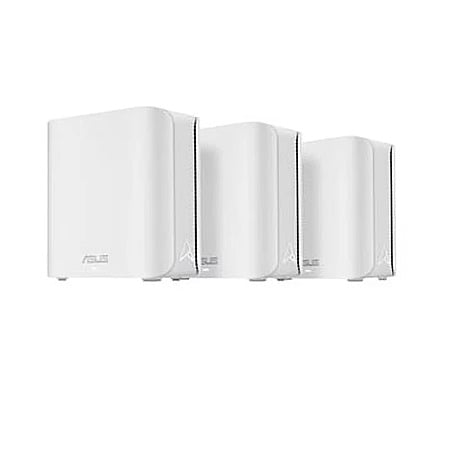
Refurbished - Excellent: 3-Pack ASUS ZenWiFi BD5 Dual-Band WiFi 7 Mesh Router System (BD5 W-3-PK)
w/ 1-Year Allstate Warranty on sale for
$149.99.
Shipping is free.
Thanks to SD staff member
DesertGardener for finding this deal.
Excellent - Refurbished Details:
- Appearance: Looks brand new, no dents or visible scratches.
- Performance: Fully functional. Works like new.
- Warranty: One-year warranty serviced by Allstate.
- Packaging: Comes in new, generic packaging with original or new accessories (if applicable).
- Return Policy: 30-day free returns (seller pays for return shipping)
Product Details:
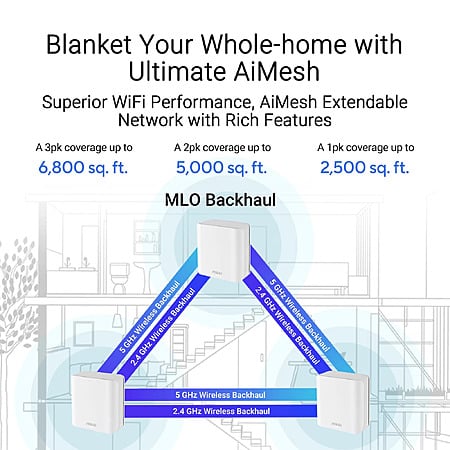
- Dual-band WiFi 7 speeds up to 5000 Mbps with MLO and 4K-QAM
- ASUS AiMesh technology boosts coverage up to 6,800 sq. ft. and easy extendibility with compatible ASUS routers for seamless and secure whole home WiFi
- Four internal antennas and four high-power front-end modules eliminate WiFi dead zones
- 24/7 end-to-end protection with commercial-grade AiProtection Pro and advanced VPNs
- IoT Network, parental controls & VPN easy setup on multiple devices with Smart Home Master SSIDs
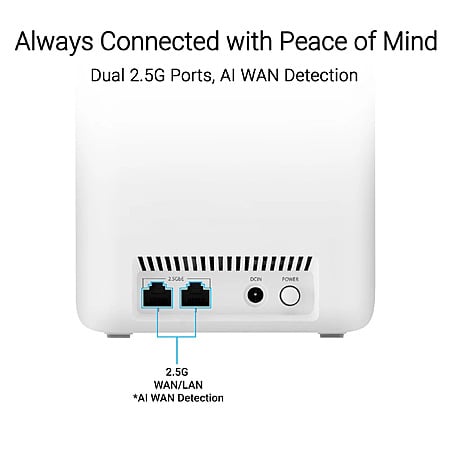
- Dual 2.5G Ethernet ports with auto detection
- Quad-core 1.5 GHz CPU and robust cooling



 + Free S&Hat eBay


Top Comments
Massive savings versus new units
Whole-home WiFi 7 mesh
Dual 2.5G Ethernet ports
Free lifetime security features
Reputable high-volume eBay seller
Cons
Refurbished not brand-new units
No 6 GHz WiFi band
Mixed customer stability reviews
One-year Allstate third-party warranty
Only two ports per node
Community Reviews
This refurbished ASUS ZenWiFi BD5 3 pack is a low cost WiFi 7 mesh kit aimed at whole home coverage, with strong value versus buying new. The dual 2.5G Ethernet ports and free lifetime security features add flexibility, and the price is especially compelling for three nodes. The main tradeoffs are that it is dual band, has no 6 GHz radio, and only two ports per node, so wireless backhaul and wired device plans need to fit that design. It looks best for simpler homes or fully wired setups where the savings matter most.
Common Questions (5)
AI-generated summary based on comments from the community. Updated ago
Join The Conversation
Share your experience with the Slickdeals community
Share information with the community. Please follow our Community Guidelines and be kind!
54 Comments
Sign up for a Slickdeals account to remove this ad.
This product is dual band, therefore one will only suffer and regret.
The REQUIRED features of WiFi 7 already help with interference and congestion. You don't know what you're talking about, you don't actually need 6 GHz, and you're just whining about a product designed for value that you're not even gonna get. Wasting everybody's time.
This product is dual band, therefore one will only suffer and regret.
The newest protocol is usually the best, but that does nothing for the majority of the devices that don't support it. Older protocols are more widely adopted and supported. Having to run your backhaul on the same band as your devices is going to cause more congestion, so not having 6ghz locks you out of more flexible configurations. You don't know what the airwave congestion looks like for anyone but yourself but please continue telling everyone else that their network configurations are wrong and accusing people of "nerd rage".
The newest protocol is usually the best, but that does nothing for the majority of the devices that don't support it. Older protocols are more widely adopted and supported. Having to run your backhaul on the same band as your devices is going to cause more congestion, so not having 6ghz locks you out of more flexible configurations. You don't know what the airwave congestion looks like for anyone but yourself but please continue telling everyone else that their network configurations are wrong and accusing people of "nerd rage".
MLO allows for all bands to be used as backhaul and for clients simultaneously. Preamble Puncturing allows for the router to avoid interference and congestion without losing entire channels like on WiFi 6.
If you don't like the product, don't buy it. Nobody's forcing you. You're not being "locked out" of other options. But there are plenty of people who will benefit from something like this, and plenty of people for whom this would be overkill. 6 GHz is optional because not every country allows unrestricted use yet.
Massive savings versus new units
Whole-home WiFi 7 mesh
Dual 2.5G Ethernet ports
Free lifetime security features
Reputable high-volume eBay seller
Cons
Refurbished not brand-new units
No 6 GHz WiFi band
Mixed customer stability reviews
One-year Allstate third-party warranty
Only two ports per node
Sign up for a Slickdeals account to remove this ad.
Now to answer the other question, well it depends on if youre happy or not with the current setup. You probably paid a decent bit for the 2 Eeros so if they work well then maybe keep it. However, with this asus kit, it will keep all the same wifi name and management will all be in one place. I truly don't know how your current set up is with mixing brands. Do you have 2 different wifi names or can you name the APs the same and it all works seemless with the Asus? Lastly, ya setting up a VPN on this is super easy. I set up wireguard on the BE7200 before I swapped everything over to OPNsense.
Since everyone else is just arguing over dumb stuff, I'll try and help. I just bought this kit last week new for like $200. I have a RT-BE7200 in the center of our new house but it just wasn't quite cutting it on the far ends of the house. So i grabbed this kit to use the BD5 as access points. One is hard wired and the other is wireless. I've only had this set up since friday so I can't tell you how well its doing but I have no complaints so far. If you have wired backhaul then I think this kit is fine. All that being said, I dont do any routing on these. I have an OPNsense firewall doing everything and my 3 asus are all APs. I have the 3rd BD5 siting in the box as a spare.
Now to answer the other question, well it depends on if youre happy or not with the current setup. You probably paid a decent bit for the 2 Eeros so if they work well then maybe keep it. However, with this asus kit, it will keep all the same wifi name and management will all be in one place. I truly don't know how your current set up is with mixing brands. Do you have 2 different wifi names or can you name the APs the same and it all works seemless with the Asus? Lastly, ya setting up a VPN on this is super easy. I set up wireguard on the BE7200 before I swapped everything over to OPNsense.
Honestly now I'm in a ranch stay house and don't really need all the APs, but figure might as well plug them in. Most important stuff is wired.
I'm honestly too lazy to swap over all my stuff to PFsense that's already set up in the Asus as far as port forwarding etc. But I do use it on a proxmox machine I use to simulate a network for homelab.
They don't bother spending the extra few cents to add the rest of the Ethernet ports because this is marketed as a wireless mesh kit, so having lots of wires going to each one ruins the look. The 3 pack has 6 ports between all nodes compared to 5 on a standalone router, so technically it has more. It's just going to kill wireless performance if you actually try and use the ports on the wireless ones.
There are two statements there. 1) Most devices can't even use it. Well, most laptops and phones that can use WIFI 7 will benefit from 6ghz, so this argument is a bit circular. If you don't need Wifi 7, you can buy cheaper mesh units. If you can use Wifi7, you can benefit from 6ghz.
2) it has horrible range compared to 5 GHz. This is absolutely true, but I use 6ghz every day. The two mesh units are in the rooms we use our laptops and phones the most and those devices operate on 6ghz the whole time. We live in a dense city and there are 10+ 5ghz access points with pretty strong signals that reach us. 6ghz when used is faster.
This is a good deal. I think if you only felt you needed 2 access points, you might strongly consider trying to spend that on triband routers. But if you need three units, this is probably the best you can do at this price point.
Sign up for a Slickdeals account to remove this ad.
There are two statements there. 1) Most devices can't even use it. Well, most laptops and phones that can use WIFI 7 will benefit from 6ghz, so this argument is a bit circular. If you don't need Wifi 7, you can buy cheaper mesh units. If you can use Wifi7, you can benefit from 6ghz.
2) it has horrible range compared to 5 GHz. This is absolutely true, but I use 6ghz every day. The two mesh units are in the rooms we use our laptops and phones the most and those devices operate on 6ghz the whole time. We live in a dense city and there are 10+ 5ghz access points with pretty strong signals that reach us. 6ghz when used is faster.
This is a good deal. I think if you only felt you needed 2 access points, you might strongly consider trying to spend that on triband routers. But if you need three units, this is probably the best you can do at this price point.
TikTok, YouTube, Facebook, Instagram, Snapchat, Twitch, your browser of choice, whatever, aren't loading noticeably faster at 2000+ Mbps than they are at 900 Mbps, or even 300. And most of them don't accept uploads faster than that either, in case you're streaming or content creating. At those speeds, response latency is a lot more of the delay between asking and receiving what you ask for. You might notice a difference if you're doing local network transfers, but most people aren't doing that regularly.
6 GHz is also going to be more affected by what obstacles are between your phone and your router, or even how you're holding it. Won't take much for it to go back down to 5 GHz speeds. Laptops would be more stable and more likely to do something that would benefit from 6 GHz, but they can also use wired Ethernet more easily, as you don't often walk around while using them and they tend to have multiple usb ports or even Ethernet ports built in. Wired connections will always be superior.
6GHz is for power users or very specific use cases (wireless backhaul between nodes where wiring them is not feasible). iPhones and Macs don't even get a speed boost, their WiFi 6 modem and WiFi 7 modem have nearly the same top speed due to other limitations. If you think you know better, good for you. You're probably a power user. Not most people.
Join The Conversation
Share your experience with the Slickdeals community
Share information with the community. Please follow our Community Guidelines and be kind!