Slickdeals is community-supported.  We may get paid by brands for deals, including promoted items.
Missed This Deal? Get alerts when similar deals are posted.
expired
CartCipher 12.6K Views
Sep 30, 2026 3:14 PM

Amazon – 15.6" 1080p Laptop Screen Extender - $137.99 w/ Code

$138

$230

40% off
Amazon
Visit Amazon

Why are you downvoting this deal?

Good Deal?
15Comments
Save
Share
Deal Details
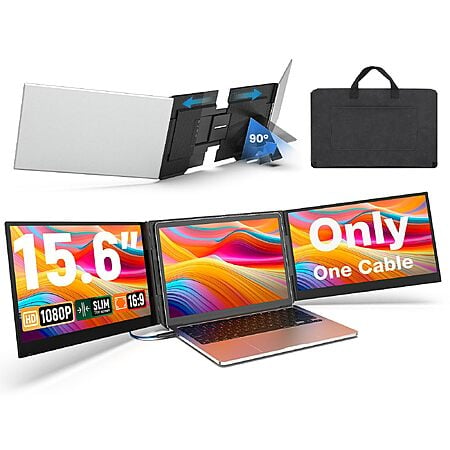
ShangJiaMP via Amazon has the 15.6-inch 1080p Laptop Screen Extender for $229.99. Apply promo code 8S4V3PJL at checkout for 40% off = $137.99.

Product Link: https://www.amazon.com/dp/B0GYJFKWGL
  • Promo Code: 8S4V3PJL
  • Original Price: $229.99
  • Final Price: $137.99
  • 40% off with promo code
Product Details:
  • 15.6-inch Full HD 1920 x 1080 IPS display
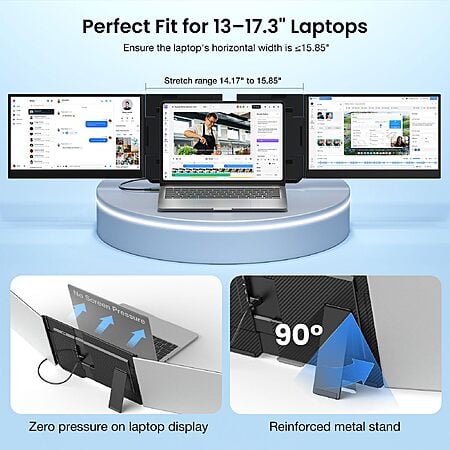
  • Designed for 13-inch to 17.3-inch laptops
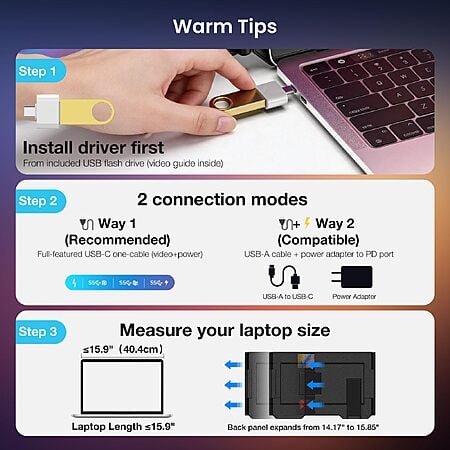
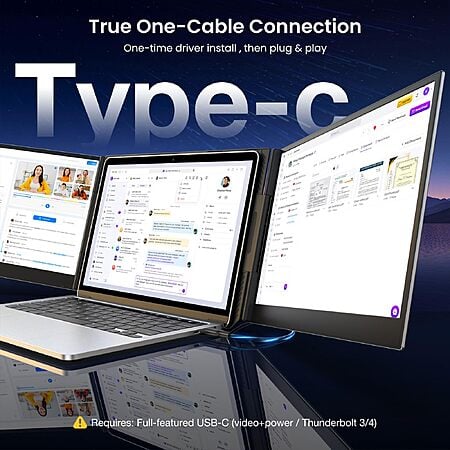
  • One-cable USB-C connection for both extender screens
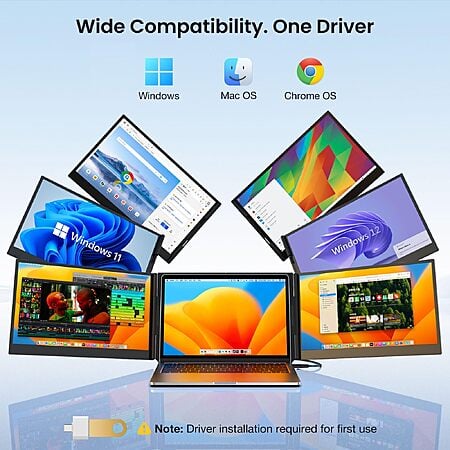
  • Works with Windows and macOS, including M1–M5 Macs
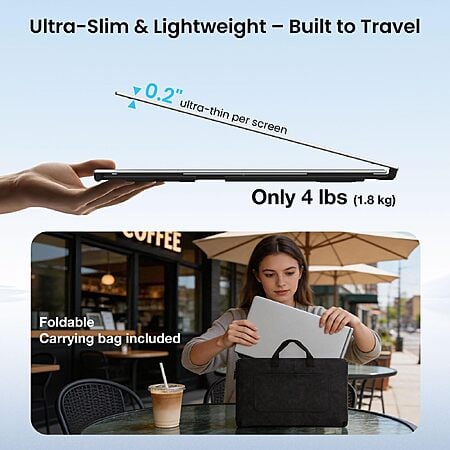
  • Includes carrying case and power adapter
Seller: ShangJiaMP | Expires: 10/5/26 at 11:00 PM PDT or while promo lasts.
Community Notes
About the Poster
Deal Details
Community Notes
About the Poster
ShangJiaMP via Amazon has the 15.6-inch 1080p Laptop Screen Extender for $229.99. Apply promo code 8S4V3PJL at checkout for 40% off = $137.99.

Product Link: https://www.amazon.com/dp/B0GYJFKWGL
  • Promo Code: 8S4V3PJL
  • Original Price: $229.99
  • Final Price: $137.99
  • 40% off with promo code
Product Details:
  • 15.6-inch Full HD 1920 x 1080 IPS display
  • Designed for 13-inch to 17.3-inch laptops
  • One-cable USB-C connection for both extender screens
  • Works with Windows and macOS, including M1–M5 Macs
  • Includes carrying case and power adapter
Seller: ShangJiaMP | Expires: 10/5/26 at 11:00 PM PDT or while promo lasts.

Community Voting

Deal Score
+42
Good Deal
Bad Deal

Why are you downvoting this deal?

Join The Conversation

Share your experience with the Slickdeals community

Share information with the community. Please follow our Community Guidelines and be kind!

15 Comments

Sign up for a Slickdeals account to remove this ad.

Oct 1, 2026 12:44 AM
75 Comments
Joined Feb 2021
BAZONGLESOct 1, 2026 12:44 AM
75 Comments
in for one. If I don't like it on my laptop, seems to work just fine with my steamdeck. either way ill be happy for that price and for only 2 cables.
Oct 1, 2026 1:03 AM
143 Comments
Joined Nov 2012
Riverdales27Oct 1, 2026 1:03 AM
143 Comments
Quote from BAZONGLES View quoted comment :
in for one. If I don't like it on my laptop, seems to work just fine with my steamdeck. either way ill be happy for that price and for only 2 cables.
You use for your steamdeck? How does it look?
Oct 1, 2026 2:41 AM
6.6K Comments
Joined Feb 2004
armedmetallicaOct 1, 2026 2:41 AM
6.6K Comments
Are the screens connected to each other, or do you have to connect them to each other with the other cable?
Oct 1, 2026 5:15 AM
5.6K Comments
Joined Dec 2005
mrmochiOct 1, 2026 5:15 AM
5.6K Comments
Quote from armedmetallica View quoted comment :
Are the screens connected to each other, or do you have to connect them to each other with the other cable?
You connect each monitor independently to the laptop via USB-C or USB-A + Mini HDMI
Oct 1, 2026 5:48 AM
1.2K Comments
Joined Jul 2008
pandy00Oct 1, 2026 5:48 AM
1.2K Comments
For anyone really working off these often enough ... I recommend getting the vertical one stacks on top
2
Oct 1, 2026 7:44 AM
6.6K Comments
Joined Feb 2004
armedmetallicaOct 1, 2026 7:44 AM
6.6K Comments
Quote from mrmochi View quoted comment :
You connect each monitor independently to the laptop via USB-C or USB-A + Mini HDMI
Ahh so even though it says 1 cable it really isn't..

Thank you
Oct 1, 2026 2:43 PM
111 Comments
Joined Jul 2014
petervitoOct 1, 2026 2:43 PM
111 Comments
Anybody know how well this might work with a surface tablet? I know that sounds like a stupid question AND, here we are.😆

Sign up for a Slickdeals account to remove this ad.

Oct 1, 2026 6:10 PM
115 Comments
Joined Dec 2018
BOO_OOSOct 1, 2026 6:10 PM
115 Comments
Quote from petervito View quoted comment :
Anybody know how well this might work with a surface tablet? I know that sounds like a stupid question AND, here we are.😆
The second customer video shows it working with a Surface tablet.
Oct 1, 2026 7:42 PM
1.9K Comments
Joined Jul 2005
mdboyz69Oct 1, 2026 7:42 PM
1.9K Comments
fellas, do you need to change screen resolution from laptop to match with other monitors, I have 4k laptop screen.
1
Oct 1, 2026 7:44 PM
2.6K Comments
Joined Nov 2006
pdincOct 1, 2026 7:44 PM
2.6K Comments
Quote from armedmetallica View quoted comment :
Ahh so even though it says 1 cable it really isn't..Thank you
It looks like this new model truly only needs one cable
Oct 1, 2026 8:48 PM
127 Comments
Joined Nov 2009
RighterOnOct 1, 2026 8:48 PM
127 Comments
the listing is very unclear. Does this extender come with one monitor or none?
Oct 1, 2026 11:36 PM
6.6K Comments
Joined Feb 2004
armedmetallicaOct 1, 2026 11:36 PM
6.6K Comments
Quote from pdinc View quoted comment :
It looks like this new model truly only needs one cable
My larger 32" Dell setup connects with one cable, and then between each Dell there's a display port cable.

I was thinking this would be the same. I wonder if there's an internal cable routed between these two.
Oct 2, 2026 2:16 AM
97 Comments
Joined Feb 2021
NeatPolice3574Oct 2, 2026 2:16 AM
97 Comments
Quote from pdinc View quoted comment :
It looks like this new model truly only needs one cable
What I'm seeing from the description is that it can be connected directly to the usb c port on the laptop, for power and display input. Or you can power it from a charging block usb a to c, then hdmi to connect to the laptop.
Oct 2, 2026 2:33 AM
1K Comments
Joined May 2016
omar10wahabOct 2, 2026 2:33 AM
1K Comments
Code is not worky anymore

Sign up for a Slickdeals account to remove this ad.

Oct 2, 2026 2:36 AM
12 Comments
Joined Apr 2013
netstrikeOct 2, 2026 2:36 AM
12 Comments
deal is either dead or its ymmv cause code doesnt work for me

Join The Conversation

Share your experience with the Slickdeals community

Share information with the community. Please follow our Community Guidelines and be kind!