

Did this coupon
work for you?
work for you?


| Rating: | (4 out of 5 stars) |
| Reviews: | 77 B&H Photo Video Reviews |
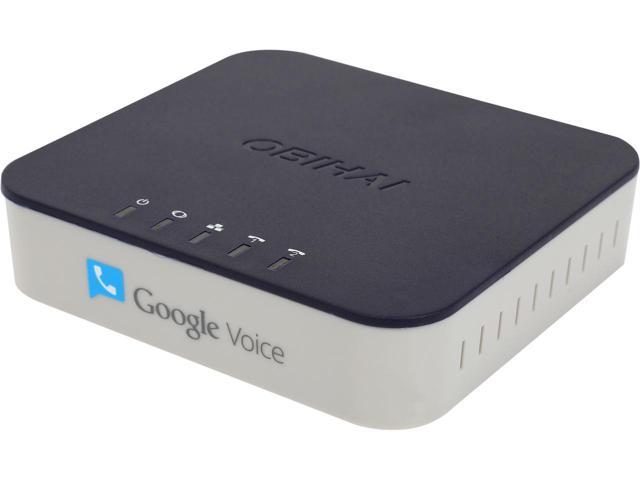
| Product Name: | OBIHAI UNIVERSAL VOIP ADAPTER SUPPORTS 4 SIP SERVICES & OBITALK |
| Product Description: | The OBi202 works with Google Voice. It is perfect for customers who do not have a traditional telco phone service and want the savings and simplicity of using a VoIP service for all their calls. With its support for 2 independently configurable phone ports, support for many VoIP providers, the OBi202 provides you with an abundance of control and convenience from the comfort of your home phone(s). The OBi202 is equipped with a 2-port router/bridge with support for integrated quality of service (QoS). The OBi202 may be installed in a variety of environments where an extra Ethernet port is needed to connect a computer/network behind the OBi202 and/or locations where upstream voice traffic needs to be prioritized above other types of traffic like web surfing and uploading pictures and movies. So Many Features! - Works with Up to Four (4) VoIP Services - Collaborative features which allow its phone ports to work together as a mini-phone system. - T.38 Real Time Fax over IP - High Quality Voice over IP Technology - Built-In Router with QoS for VoIP Traffic Prioritization - USB Port for Use with OBiWiFi Wireless Adapter or Storage Device - OBiTALK Web Portal: The OBiTALK Web Portal allows you to manage your OBi endpoints and your Circle of Trust. The OBiTALK portal helps OBi users configure, add services and manage their OBi devices with ease. - OBiON: iPhone and Android App Integration - Call Forwarding on All Calls, Busy Calls, Forward on No Answer - Caller ID – Name &- Number - Call Waiting - Call Transfer - Block by Caller ID - Automatic Call Back - Do Not Disturb - Conference Calling - Anonymous Calling - Message Waiting Indication - Visual and Tone Based |
| Manufacturer: | OBIHAI TECHNOLOGY |
| Model Number: | OBI202 |
| Product SKU: | N82E16833617003 |
| UPC: | 804879327578 |

The link has been copied to the clipboard.

107 Comments
Your comment cannot be blank.
Featured Comments
However, per the reviews, the throughput from this isn't great for downstream devices. So it doesn't make sense to use it as a router, especially when you have the option not to, as is the case with most home users. So you'll want to turn off DHCP and use your own router. But you can still use it as a switch so that another wired device can connect to the LAN and internet through it. Most routers already provide high priority to VOIP traffic, but you can also configure this on many of them.
I once added a second router (with active DHCP) to my LAN so that I could isolate my work laptop from the rest of my network whenever I connected it to my corporate VPN network. I didn't want the devices and shares on my home network to be visible to anyone who was on my corporate network. This was after I inadvertently stumbled on a colleague's home network share containing media rips. I assume this isolation should be possible through the 202 in router mode as well if needed, but I haven't personally tried it.
For GV setup, it's fairly easy:
0. Setup the 202 as per instructions in the box.
1. Get a Google account and get a Gmail account and a GV #. After you do that you can port another tel # into GV but it MUST BE a cell #. To port a land line # you MUST port that # to a prepaid mobile cell service like a PREPAID T-Mobile or AT&T first and then port it to GV. Porting a cell # to GV costs $20. An AT&T prepaid Sim card costs 99 cents and you must buy $10 prepaid time/mins. T-Mobile is similarly priced for the Sim but there is no need to buy more mins/time.
2. Go to obitalk.com and sign in with your Gmail user name and password. Do NOT setup an obitalk account, it's NOT needed.
3. Obitalk will automatically link your GV account and the obi 202 after you accept the T&C.
4. In the Obitalk 202 account you can now configure one or 2 tel lines with your Tel # or #s.
Again the Obi account will auto setup the tel # or #s to GV. It takes a while, a few mins or more maybe. Be patient and let it finish the configuration/setup of your GV #.
Obi 202 has 2 tel line ports in the back so you can configure 2 different tel. #s. BUT it has the ability to link 2 more #s for a total of 4. Most people will probably use it with just 1 # or maybe 2 #s.
5. In your GV account settings you will not see the 202 as a forwarding device/tel. number. You must go to the Legacy GV settings to see it. It's a very long character string.
You can have more forwarding tel. #s with GV in addition to the 202.
Keep in mind that GV is JUST A TEL # FORWARDING SERVICE, nothing more.
Calls to your tel. # are forwarded to the 202 using Google Chat that gets automatically configured by Obitalk when you do #3 and #4 above.
Sign up for a Slickdeals account to remove this ad.
The 'Router' part means that you could hook this up directly to the WAN (i.e. to your cable modem) and it can be a DHCP server assigning IP addresses to all downstream devices. This way it can take care of providing the highest priority to VOIP traffic
However, per the reviews, the throughput from this isn't great for downstream devices. So it doesn't make sense to use it as a router, especially when you have the option not to, as is the case with most home users. So you'll want to turn off DHCP and use your own router. But you can still use it as a switch so that another wired device can connect to the LAN and internet through it. Most routers already provide high priority to VOIP traffic, but you can also configure this on many of them.
I once added a second router (with active DHCP) to my LAN so that I could isolate my work laptop from the rest of my network whenever I connected it to my corporate VPN network. I didn't want the devices and shares on my home network to be visible to anyone who was on my corporate network. This was after I inadvertently stumbled on a colleague's home network share containing media rips. I assume this isolation should be possible through the 202 in router mode as well if needed, but I haven't personally tried it.
Sign up for a Slickdeals account to remove this ad.
I bought this but an OBI200 deal would have been nice. Don't need all the extras that come with the 202