Did this coupon
work for you?
work for you?


|
Quote
:
Heads up for anyone using Chase Pay for the first time with this deal. Chase will decline the transaction since it is the first time using Chase Pay and it is a big amount. I had to call up Chase to get them to unlock the card before it would go through at Walmart. Also, the Chase rep warned me that if multiple transactions for the same item are declined before Chase clears the Chase Pay usage, Walmart back office may cancel the successful order. Something about after so many attempts, Chase no longer provides charge back protection to the merchant for that order. We'll see if this happens to me as I tried doing the order a few times, as I assumed maybe the Walmart/Chase Pay connection was down or something.
|

The link has been copied to the clipboard.

1,228 Comments
Your comment cannot be blank.
Featured Comments
1. What's the big deal?
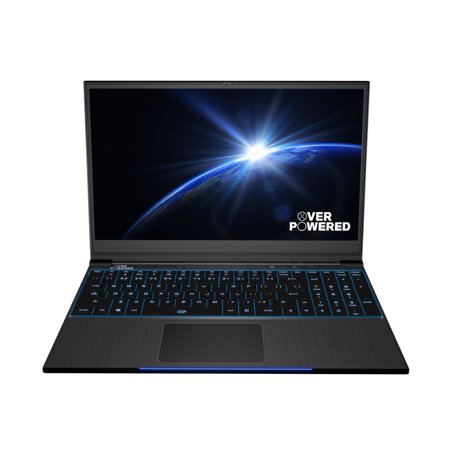
The laptop here is a rebranded TongFang GK5CN6Z laptop. TongFang units, like similar units made by Sager, are barebones systems that are rebranded and minimally-customized by resellers. Here are a few examples of this laptop being sold by other vendors (you can Google/YouTube any one of these and find reviews):
A. Schenker XMG Neo 15
B. Monster Tulpar T5
C. PC Specialist Recoil II
D. Aftershock Apex-15R
E. Eluktronics Mech-15 G2
F. Origin EON15-S
G. Nextcore GK5CN6Z
H. CyberpowerPC Tracer 3 VR 400
And more. This list is not exhaustive. There is very little customization available with these barebones chassis, so the units generally only vary by storage (both NVME and Mechanical Drives), RAM (by manufacturer, quantity and timings), keyboard (in both blue and brown switches), aftermarket thermal solutions (quality of thermal paste, additional thermal padding, use of liquid metal, etc.), and in Surface Decals/Custom BIOS Features.
The vast majority of the core components of these barebones units do not change. This means that there is extraordinarily little for Walmart to screw up, and that other vendor's BIOS and gaming center software are usable on the OP 15+.
NOTE: If you don't want to read past here, or just find this TLDR in general, you should go to YouTube and check out Bob Of All Trades's teardown video, review, and commentary on this unit which will cover most/all of the below and more in a pretty entertaining fashion. You might also consider looking at NotebookCheck's reviews of a couple of the other vendor's units listed above. Information is out there and easily accessible.
2. Why is it so cheap?
Good question. Likely, it's this cheap because their desktop units just got hammered publicly (and quite brutally) by reviewers and they are dumping inventory. That doesn't spell good news for the future of the brand or for Walmart's direct support of the laptops. This bit is all just speculation.
The good news is that the laptops and the desktops are completely different beasts when it comes down to: 1. Who built them; 2. Value per dollar; 3. Long-term second- and third-party support. Recall what I said above – all of the software made by the other vendors is usable on the OP 15+. So even if Walmart drops support for the unit there will be plenty of forum-level community support on other forums and long-term support through the various other vendors that use the barebones chassis.
3. Did you buy one?
Yes, I've had it in house for a few days. I've already updated the BIS, EC, and gaming control software with updates from OP (downloaded from Notebook Review's Forums). I bought it at $999 and it was a very good deal relative to other TongFang GK5CN6Z models/15" thin and light laptops of the same caliber even then. At $799, it's even better.
4. What are the downsides?
As far I can see it, a few. First, the battery life is short. Second, the keyboard layout is a bit cramped and can be uncomfortable. Third, the touchpad isn't glass and it is pretty damn average. Fourth, the speakers are pretty damn quiet. Fifth, the fans can get quite loud under heavy load or under turbo. Sixth, the included SSD is generic and very slow by contemporary standards (still quick in practical use for day-to-day purposes, but don't expect a Samsung PM971 here because you're not getting that). Seventh, the RAM is also some generic Gold Key RAM (1 stick, 16GB, 2666) that is about as basic as it gets. Eighth, the battery life with the stock 3 Cell 4100mAh battery isn't great. Ninth, the edges of the chassis under the armrest are a bit unfinished and can get uncomfortable. The front corners can be a bit sharp too.
5. That's a lot of downsides. What are the upsides?
I'm glad you asked, Me. First, the screen is the same IPS 144hz LG panel used on a number of top tier thin and light 15" gaming laptops (the Gigabyte Aero 15x and the Razer Blade 15 2018, just to name two). For this type of device, it's very color accurate. My own unit has 98% SRGB, 70% NTSC, and 75% Adobe RGB color gamut coverage. Subjectively, colors vibrant without being too oversaturated and the contrast ratio is very good producing deep blacks. It's quite good. Second, the chassis is extremely durably built and rigid. There is no keyboard flex or display flex at all and even the plastics on the bottom are well built. Third, the unit is a thin and light gaming laptop weighting in at only 4.4 lbs. It really is quite small. Fourth, it uses a full 6GB non-MaxQ 1060 and has excellent performance. Thermals are very good for the form factor as well. Fifth, I like tactile keyboards and the brown switches on this are quite good in that respect, *if* you can get used to the compressed layout. Sixth, it has solid per key RGB, which is like having a laptop/Christmas tree combo. Seventh, and finally, I'm a right-to-repair guy. This unit is extremely expandable and upgradable and – even without TB3 – I expect this system will be usable for my purposes for quite some time to come. The battery is replicable, even with a larger capacity battery manufactured for other models (at the cost of the mechanical drive). It has two NVME slots. It's quite easy to open and work inside of the laptop (18 screws, no clips, and one warranty sticker that is the warranty equivalent of a 'beware of dog' sign).
6. Anything else?
The OP branding is stupid. And they put it in three spots on the system (lid, top left of the keyboard, and on the space bar. Buy your favorite novelty stickers and cover them up: Problem Solved.
Sign up for a Slickdeals account to remove this ad.
Great deal at this price. Thinking about picking one up now...
Sign up for a Slickdeals account to remove this ad.
Just don't use that garbage "the Verge" review that is going around in the other threads (they need an editor for quality control).