Slickdeals is community-supported.  We may get paid by brands for deals, including promoted items.
Sorry, this deal has expired. Get notified of deals like this in the future. Add Deal Alert for this Item
Forum Thread

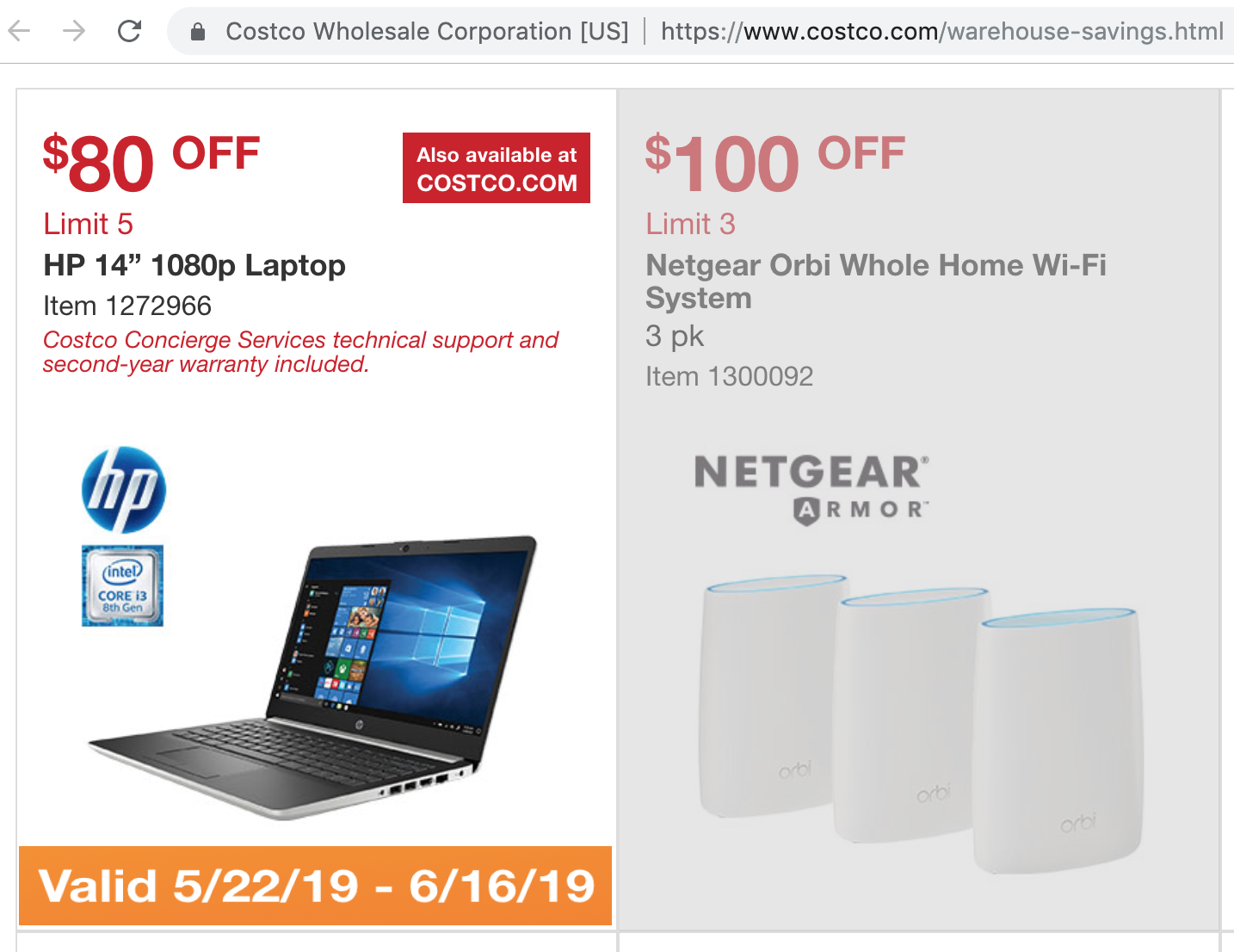
$319 14" HP Laptop at CostCo (8130U/4GB RAM/128GB SSD/1920x1080 display), upgradeable, from 5/22 to 6/16

$319.00
+32 Deal Score
26,659 Views
Live Now! On sale for $319 at CostCo. This is the lowest price since last year. Shipping is $15 if purchased online, plus tax as per your locale. Member price starts 5/22, ends 6/16.

Deal History: This 14" HP Laptop was a +285 FrontPage deal on BlackFriday 2018 when priced at $299 ($315 shipped), and had a second +34 thread in the BlackFriday forum as well. There are over 132 pages of posts in the main thread with great documentation on how to tweak and upgrade it.

https://slickdeals.net/f/12270274-costco-members-hp-14-laptop-i3-8130u-4gb-ddr4-128gb-ssd-315

https://slickdeals.net/f/12169396-costco-wholesale-black-friday-hp-14-df0023cl-14-laptop-intel-i3-8th-gen-4gb-ram-128gb-ssd-win-10-for-299-99

Upgrades: I bought this last fall and while it performs reasonably well off the shelf, it is also nicely upgradeable. The small SSD drive in the M.2 slot can be replaced with a larger and 2x-5x faster NVMe x4 SSD (e.g. ~$60-$80 for a 512GB). There is an empty bay for a 2.5" SATA SSD or hard drive (requires ~$17 cable). There is a free slot to upgrade the RAM (+4GB for $20-25; +8GB for $35). Windows 10 Home is a free, easy and quick upgrade from Windows S.

Caveats: Sadly, the USB C port is data only won't charge it; the HP power supply must be used. Some people have experienced wifi dropouts when using bluetooth and have replaced the wifi/bluetooth card (~$20). A few people report that the trackpad has malfunctioned. The screen case flexes a little too much, and my display developed a glitch (probably when being transported with a pointy object that pressed into it)--but CostCo replaced the computer immediately. The CPU is an i3-8130U; it's no slouch, but a low power 2 core/4 thread processor.

Bottom line: Use it as is, or for ~$80-$120 you can upgrade this to specs similar to (or better than) many $600 notebooks (pretty darn good for a $400-$425 laptop).

Item link: https://www.costco.com/HP-14%22-L...61207.html

Sale details (or see attached screen shot): https://www.costco.com/warehouse-savings.html

Specifications:
  • Product name: HP Notebook - 14-DF0023CL
  • Microprocessor: Intel® Core™ i3-8130U (2.2 GHz base frequency, up to 4 GHz with Intel® Turbo Boost Technology, 4 MB cache, 2 cores)
  • Memory: 4 GB DDR4-2400 SDRAM (1 x 4 GB)
  • Hard/SSD drive: 128 GB M.2 SATA SSD (Samsung MZNLN128HAHQ) - M.2 slot supports NVMe upgrade
  • Video graphics: Intel® UHD Graphics 620 Integrated
  • Display: 14" diagonal FHD IPS BrightView micro-edge WLED-backlit (1920 x 1080)
  • Keyboard: Full-size island-style BACKLIT keyboard
  • Pointing device: Touchpad with multi-touch gesture support
  • Wireless connectivity: 802.11b/g/n/ac (2x2) Wi-Fi® and Bluetooth® 4.2 combo
  • Network interface: Integrated 10/100/1000 GbE LAN
  • External ports: 1 USB 3.1 Type-C™ Gen 1 (Data Transfer up to 5 Gb/s); 2 USB 3.1 Gen 1 (Data transfer only); 1 HDMI 1.4b. 1 RJ-45; 1 headphone/microphone combo
  • Expansion slots: 1 multi-format SD media card reader
  • Audio features: Dual speakers
  • Power supply type: 45 W Smart AC adapter
  • Battery type: 3-cell, 41 Wh Li-ion
  • Product number: 5JV97UA
  • Minimum dimensions (W x D x H): 32.4 x 22.59 x 1.99 cm
  • Weight: 3.1 lbs
Note that similar models sold on Amazon and at Wal-wart reportedly lack the backlit keyboard.
If you purchase something through a post on our site, Slickdeals may get a small share of the sale.
Deal
Score
+32
26,659 Views
$319.00

Community Wiki

Last Edited by CheaperMoFo May 21, 2019 at 04:01 PM
Note that this wiki was imported from from the 132 page thread from Black Friday 2018. There are more details in that thread.

Maintenance and service guide showing internals
http://h10032.www1.hp.com/ctg/Man...tid=166580

Pics from DCheeseDanish showing two ram slots
https://slickdeals.net/forums/showpost.php?p=121739716&postcount=94
Max RAM supported: 16GB (2x8GB-2400) DDR4

3min video of the laptop made by SDUser rapdeals
https://www.youtube.com/watch?v=zmHJoN0c4mM

The other thread about this deal. Shorter and has some good info
https://slickdeals.net/f/12169396-costco-wholesale-black-friday-hp-14-df0023cl-14-laptop-intel-i3-8th-gen-4gb-ram-128gb-ssd-win-10-for-299-99?v=1

Memory chip used (2 slots, 1 used): https://www.samsung.com/semicondu...1a0a1c0e14

Crucial Memory Checker [crucial.com] Going in and out of stock

Can I buy this in the store?

YES

Can anyone find a compatible 4GB stick in stock?

Newegg Filter [newegg.com]

I found this @ NewEgg: https://www.newegg.com/Product/Pr...6820232163 Out of stock

If I want to replace the M.2 SSD, can I use an NVMe or does it have to be a SATA M.2 SSD?

Lots of debate about this. This is what we know:
- the laptop ships with an M2 SSD that is SATA
- The service manual MENTIONS NVMe drives, but it could be for a different model, so this does not guarantee that it would work.
- THIS post is by a SDealer who has successfully installed an NVMe M2

Can a 2nd drive be installed?
There is space inside the body of the computer for a sata drive to be installed. It can be seen in the maintenance guide and in photos posted by DCcheeseDanish.

There are HP parts required to possibly use a 2nd drive. There is a bracket and a cable to connect the drive to the sata connector. Part numbers are listed in the service manual and the part number for the cable is: L23187-001 The bracket is: L24490-001

If you go to http://partsurfer.hp.com/search.aspx and select the UK as your location, the cable can be ordered, but the cable does not seem to be available from HP in the US

There are many similar looking cables that can be found on Ebay or even Amazon if you search for terms like: HP 14 sata cable Some of these appear to be too short while others are really long.
First thread-confirmed installation of 2.5" HD from p4spooky
HDD Cable used: DW17 6017B0421501
This is the one p4spooky used successfully: https://www.amazon.com/gp/product/B06XKQ8T4Z/

BIOS RELATED QUESTIONS AND ANSWERS


I heard the CPU is throttled and only runs at 1.3 and not 2.2 GHz. What's the deal?

LINK TO GET BIOS UPDATE
Link for BIOS update instructions from HP: https://support.hp.com/us-en/document/c00042629

Some users have reported that running tests on the CPU shows it as being throttled constantly. It seems that this problem can be fixed with a BIOS update. See this post for info: https://slickdeals.net/forums/showpost.php?p=121988113&postcount=700

I can't get the BIOS to update using the HP Utility / When i try to update the BIOS, it tells me to reboot but nothing happens

From p4spooky:
Bios would not update running HP utility. Had to install UEFI diagnostics on HDD partition and then apply the BIOS upgrade from this tool (HIT F2 repeatedly to get to the diagnostics menu while the system is booting) Cool

Link to Tool: https://www8.hp.com/us/en/campaigns/hpsupportassistant/pc-diags.html [HP UEFI Diagnostics Tool]


If laptop fails to turn back on after HP utility Bios update: Holding down the power button does not fix it. The fan keeps coming on, and shutting off. You will need to remove the internal battery for a minute, while unplugged. This should fix the issue. But there might be some F or delete keys to try out that might resolve this first, before having to remove the battery??


What does updating the BIOS fix? What does it break?

One person said: I FIXED THE THROTTLING ISSUE. YOU MUST UPDATE THE BIOS AT SUPPORT.HP.COM

One person said: The bios update caused network issues for the machine I can't fix on either WiFi or Ethernet

However, another person replied to this: Is anyone getting network lag or timeout once a while? by saying the BIOS update fixed network problems I had the same issue. I updated the Bios (see wiki), and it connected much better afterward.

And a totally different person said: I find the issue I am seeing only happens on WiFi, only on battery, and only when using Bluetooth. Updating the bios did not help.

Most recently, this was posted: There was a driver update available for the Realtek RTL8822BE 802.11ac PCIe Adapter #2 in the device manager. The driver updated to version 2024.0.1.102, and helped with my latency issues. I still see the first packet normally fail, but the latency issues aren't as rampant as before.

Update 2/12/19 This user posted, at the suggestion of user gmdodt, that uninstalling the Realtek RTL8xxxx driver downloaded via Device Manager and installing the driver sourced directly from HP completely solved his dropout/latency issues.

One person said: While you're in the BIOS, you can also turn off the action keys so that you get all your F1 thru F12 keys back.

I heard the BIOS update makes it so you can't switch out of the "S" version anymore?

Multiple users have reported that they switched from Windows 10 S to the Home version and THEN did the BIOS update and were put back in Win10 S and couldn't switch out to the Home version again without reinstalling the OS first.

What is the easiest way to restore the OS if this happens?

If you haven't installed any additional software, you can do an HP factory restore which should bring it back to original setup state. Instructions in this post

If you update the BIOS before you switch from Win10 S to Win 10 Home, does that work?

Quote from svinokot :
I just updated BIOS via HP assistant utility and after restart it did not switch back to Windows S mode.

I did all windows updates though before updating the drivers. Maybe that's why.

This comes with Windows 10 S. How to I change to the Home version of windows.
What else can I do to eliminate software bloat?


Helpful posts from users are:
To switch out of S mode. Go to Settings, Update & Security, Activation and Switch to Windows 10 Home

Windows 10 has a "Fresh Start" feature already. It's a feature that removes 3rd party software. Its under Windows Security. (under Device Performance & Health)

So this will remove all HP drivers? If that's the case, will some functions (audio, video etc) of the laptop become disabled or distorted?

Save HP drivers and programs that you want to a USB drive: https://support.hp.com/us-en/drivers. Windows 10 will install drivers on its own -- you can install HP given drivers afterwards (just to play it safe if you're worried) and install whatever HP programs you want on there


The big issue I found is the WiFi connection is constantly dropped entirely using Bluetooth, battery power and Wifi at the same time. The adapter seemingly can't handle using both Bluetooth and WiFi at the same time on battery.


RAM QUESTIONS

What RAM should I get?!?!?!?


The thread is long and full of suggestions, responses, and backtracking. If you're not comfortable making the decision yourself, or figuring out what post is the best to listen to, Crucial memory has a RAM finder for you:
http://www.crucial.com/usa/en/com...4-df0023cl

Below is additional relevant info regarding the speed of the RAM:

Quote from RespectSlickyD :
So the memory is 2666 MHz according to:

https://www.samsung.com/semicondu...620a1c0e0d
Quote from NickN7069 :
1.2v and CL19 2666 mhz 4 GB
Quote from woodlecj :
More details if anyone is interested.

Memory = Samsung (DDR4-2666 / PC4-21300)
Quote from 02nz :
The installed stick of RAM is capable of running at up to 2666, but the computer determines what speed to actually run it at. 2400 is all the chipset/processor support, per Intel: https://ark.intel.com/products/13...-3-40-GHz-

Bottom line, get DDR4-2400 or 2666 RAM, it doesn't matter. In either case it will run at 2400.
Quote from harle :
Are you absolutely certain? I only ask because the service guide says that it will only support 2400 dual channel. I wasn't sure if the laptop would automatically change it to 2400 if I bought 2666 ram.
Quote from 02nz :
Yes. You can run 2666 RAM at 2400, but not 2400 RAM at 2666 (at least not without stability issues).
Quote from 02nz :
Same size to run 100% in dual channel. If you mix say 4GB and 8GB, you'll get dual channel for 8GB out of the 12GB total.
HIGH DYNAMIC RANGE

Quote from HappyGorilla491 :
FYI: Shockingly, this laptop's display supports HDR. Another nicety I would never expect at this price point, along with Windows Precision Touchpad. I do like that the machine came in S mode on account of that meaning the machine ships with near-zero bloat. Just UWP apps that can be uninstalled by right clicking on them.
Quote from HappyGorilla491 :
In the Settings app. Open it and search 'HDR', select 'HDR color options', scroll down and select Windows HD Color settings. That page will tell you that the display supports HDR and let you turn on HDR.
Quote from WeakestG :
I did some test on YouTube 4k HDR videos and WOW the colors and black levels are much better than original factory settings. More darker with eye popping vivid color details.
Quote from speedbump47 :
Here is the Windows 10 stance (seems like for laptops they've only started with the brightness and not the color improvements):
https://blogs.windows.com/windows...n-your-pc/

"2. Improving video on current generation built-in displays (i.e., laptops)

Currently, most laptop displays don't truly support HDR content, particularly when it comes to color (they do not have wider color gamuts nor higher color precision). Nevertheless, medium- to high-end models tend to have bright screens. We can combine these bright screens with the expanded range of brightness information available in HDR video formats so that Windows plays HDR video at its best for that display.

Playback quality of HDR content on these devices is noticeably better than the SDR version of the same content. This is particularly apparent in scenes where movie creators have mastered their content to fully exploit new HDR technologies.

While this update for built-in displays focused on the better brightness of HDR content, in the future we are working on bringing you better color. "

I know you said you've adjusted with some software, but in case this also aids you:
https://support.microsoft.com/en-...ay-for-hdr
Quote from WeakestG :
AOU // To test you need to use EDGE browser. Chrome and Firefox runs only at 720p even with netflix. So use Edge browers goes on 1080p/4k and then run Youtube 4K HDR.

Make sure you see (HDR) on youtube settings, otherwise it won't work.
Attached icc profile for the LG panel.Hope it's useful to some folks.
Link: http://s000.tinyupload.com/index....8406189786


HOW TO GET INTEL GRAPHICS CONTROL PANEL WORKING:
It allows you to make custom resolutions, adjust brightness, contrast, gamma, color(s), Video, 3D, gaming profiles, and power plans. Only the drivers from Intel's site will work.
See post # 1871 https://slickdeals.net/f/12270274-costco-members-hp-14-laptop-i3-8130u-4gb-ddr4-128gb-ssd-315?page=125#comments

Your comment cannot be blank.

Sign up for a Slickdeals account to remove this ad.

Joined Jul 2010
L4: Apprentice
> bubble2 420 Posts
87 Reputation
Ekis
05-20-2019 at 10:03 AM.
SlickDeals, where a deal posted from a catalog still triggers a Price Mistake alert
Reply
Joined Mar 2010
Computer Geek
> bubble2 563 Posts
381 Reputation
AzBertman
05-20-2019 at 10:51 AM.
Why the td? Looks like a decent deal.
Reply
Joined Apr 2008
L10: Grand Master
> bubble2 7,188 Posts
757 Reputation
Mr.Chinito
05-20-2019 at 11:08 AM.
Quote from AzBertman :
Why the td? Looks like a decent deal.
Because we are in 2019, where 2018 tech is Jurassic era.
Reply
Joined Sep 2009
Time for a deal
> bubble2 2,344 Posts
721 Reputation
kungFu-master
05-20-2019 at 11:37 AM.
Quote from ToToToToToRo :
Because we are in 2019, where 2018 tech is Jurassic era.
So is the state of the 2018 Planet called Earth. Pollute and sh!t some more!!
Reply
Joined Dec 2006
L6: Expert
> bubble2 1,450 Posts
479 Reputation
GeorgeMcFly
05-20-2019 at 11:48 AM.
Quote from ToToToToToRo :
Because we are in 2019, where 2018 tech is Jurassic era.
can't tell if sarcasm...

anyways, pretty much the same deal just 6 months back has a deal score of +285 with almost 2,000 comments, along with a huge wiki page of info.. and this is getting voted down?

Reply
Joined Nov 2012
L6: Expert
> bubble2 1,376 Posts
352 Reputation
killerkoala5590
05-20-2019 at 11:53 AM.
Quote from GeorgeMcFly :
can't tell if sarcasm...

anyways, pretty much the same deal just 6 months back has a deal score of +285 with almost 2,000 comments, along with a huge wiki page of info.. and this is getting voted down?

This is the best PC at $300 with the Asus ar microcenter, gasp, same deal.
Reply
Joined Jun 2004
CEO, Log Jammin Inc
> bubble2 309 Posts
217 Reputation
Original Poster
CheaperMoFo
05-20-2019 at 11:55 AM.
Quote from AzBertman :
Why the td? Looks like a decent deal.
Quote from ToToToToToRo :
Because we are in 2019, where 2018 tech is Jurassic era.
Hmmm. Can you show me a better deal at this $319 pricepoint?

There's some bottom of the barrel laptops with un-upgradeable EMC drives, but no current deal that comes close to this at these prices.

Quote from GeorgeMcFly :
can't tell if sarcasm...

anyways, pretty much the same deal just 6 months back has a deal score of +285 with almost 2,000 comments, along with a huge wiki page of info.. and this is getting voted down?
yep. Maybe I just posted it too early and people are clicking through to the current price, not reading the part about starting Wednesday.
Reply

Sign up for a Slickdeals account to remove this ad.

Joined Apr 2016
L2: Beginner
> bubble2 6,156 Posts
1,035 Reputation
Dealzez
05-20-2019 at 12:42 PM.
Quote from CheaperMoFo :
Hmmm. Can you show me a better deal at this $319 pricepoint?

There's some bottom of the barrel laptops with un-upgradeable EMC drives, but no current deal that comes close to this at these prices.


yep. Maybe I just posted it too early and people are clicking through to the current price, not reading the part about starting Wednesday.

Probably TD for setting off 'price glitch' alerts. It set mine off. Not personally something I get mad and TD about, but others likely would. Maybe repost it again on Wed w.o using the word glitch (or mistake if you said that one too)

+Rep for the detail/time you took to post all that you did
Reply
Last edited by Dealzez May 20, 2019 at 12:44 PM.

This comment has been rated as unhelpful by Slickdeals users

Show Comment
Joined Jun 2009
L7: Teacher
> bubble2 2,862 Posts
348 Reputation
g725s
05-21-2019 at 08:46 AM.
Quote from ToToToToToRo :
Because we are in 2019, where 2018 tech is Jurassic era.
Do you yourself buy a lower end $320 laptop every year? What do you do with the old one?

This hit front page with nearly 300 Thumbs Up roughly 6 months ago, and now it's not worthy to even be used.

Is that pretty standard lifespan of a laptop of this type? Expect to only use it for half a year or just slightly more then throw away?
Reply
Joined Apr 2008
L10: Grand Master
> bubble2 7,188 Posts
757 Reputation
Mr.Chinito
05-21-2019 at 08:50 AM.
Quote from g725s :
Do you yourself buy a lower end $320 laptop every year? What do you do with the old one?

This hit front page with nearly 300 Thumbs Up roughly 6 months ago, and now it's not worthy to even be used.

Is that pretty standard lifespan of a laptop of this type? Expect to only use it for half a year or just slightly more then throw away?
I buy one every day and throw it away at midnight. Can't use old tech when there's new tech!
Reply
Joined Jun 2009
L7: Teacher
> bubble2 2,862 Posts
348 Reputation
g725s
05-21-2019 at 09:15 AM.
Quote from CheaperMoFo :
Hmmm. Can you show me a better deal at this $319 pricepoint?

There's some bottom of the barrel laptops with un-upgradeable EMC drives, but no current deal that comes close to this at these prices.


yep. Maybe I just posted it too early and people are clicking through to the current price, not reading the part about starting Wednesday.
Are there any videos of opening this up and doing upgrades. Mind posting what the most popular upgrades are. If you got this what would you do?

Is this matte screen?

This got buried early and seems is not getting the coverage it deserves. Change the title tomorrow. I would like to hear from those that actually bought this 6 months ago and are having or have had good success with it.
Reply
Joined Jun 2004
CEO, Log Jammin Inc
> bubble2 309 Posts
217 Reputation
Original Poster
CheaperMoFo
05-21-2019 at 03:59 PM.
Quote from g725s :
Are there any videos of opening this up and doing upgrades. Mind posting what the most popular upgrades are. If you got this what would you do?

Is this matte screen?

This got buried early and seems is not getting the coverage it deserves. Change the title tomorrow. I would like to hear from those that actually bought this 6 months ago and are having or have had good success with it.
No videos but here are a couple of pics from the other thread. Check the wiki on that thread for more info and a link to the HP manuals. I'll paste that in here too.

Photos

Opening instructions

The screen is glossy, but still quite nice.

Upgrading it took me about half an hour. The case is only a little tricky to open.
Reply
Page 1 of 6
Start the Conversation
 

More Laptops Deals & Discounts

More HP Deals

Link Copied

The link has been copied to the clipboard.