| Dimensions: |
6.7 x 6.6 x 8.9" / 17.0 x 16.8 x 22.6 cm |
| Installed Operating System: |
QTS 4.3 |
| Power Source: |
AC Adapter |
| Box Dimensions (LxWxH): |
12.6 x 12.0 x 9.8" |
| User-Replaceable Memory: |
1 x 2 GB |
| Encryption: |
AES-NI |
| Supported Protocols: |
AFPCIFS/SMBFTPHTTPSSSHTelnet |
| Maximum Memory Capacity: |
8 GB |
| RAID Modes: |
RAID 0, 1, 10, 5, 6 |
| Built-In Speakers: |
Yes |
| iSCSI Target: |
256 |
| IR Sensor: |
Yes |
| VPN Server Connections: |
300 |
| Expansion Slots: |
1 x PCIe 2.0 x2 |
| Status Monitoring: |
LED Indicator |
| Power Consumption: |
30.04 W (Typical)15 W (Idle) |
| Noise Level: |
18.8 dBA |
| Link Aggregation and Failover Support: |
Yes |
| Clock Speed: |
Base: 1.5GHz / Maximum Boost: 2.3 GHz |
| Max Sync Tasks: |
32 |
| Form Factor: |
Desktop |
| File System Formats Supported: |
Internal: EXT4External: EXT3, EXT4, FAT32, HFS+, NTFS, exFAT |
| GPU: |
Intel HD Graphics 500 |
| Processor: |
Intel Celeron J3455 Quad-Core |
| OS Compatibility: |
macOS 10.7 or LaterLinuxUNIXWindows 10Windows 8Windows 7Windows Server 2016Windows Server 2012 R2Windows Server 2012Windows Server 2008 R2Windows Server 2008Windows Server 2003 |
| Supported Languages: |
CzechDanishDutchEnglishFinnishFrenchGermanGreekHungarianItalianJapaneseKoreanNorwegianPolishPortugueseRomanianRussianSimplified ChineseSpanishSwedishThaiTraditional ChineseTurkish |
| Wake on LAN: |
Yes |
| Max Concurrent Connections: |
90 |
| Supported Browsers: |
Chrome, Firefox, Internet Explorer, Safari |
| Total Installed Memory: |
2 GB 1866 MHz DDR3L |
| Operating Humidity: |
5 to 95% |
| Connections: |
5 x USB Type-A (USB 3.1 Gen 1 (5 Gb/s))2 x HDMI Type-A (HDMI 1.4b)2 x RJ45 (Gigabit Ethernet)2 x 3.5 mm (Audio In) |
| Media Card Slots: |
None |
| AC Input Power: |
100 to 240 VAC, 50 / 60 Hz |
| Max Cameras Supported: |
40 |
| Total Memory Slots: |
2 x SO-DIMM |
| Cooling: |
1 x 120 mm Fan |
| Operating Temperature: |
32 to 104°F / 0 to 40°C |
| Compatible Drive Interface: |
SATA II, SATA III |
| Hot-Swap Support: |
Yes |
| Number of Bays: |
4 x 2.5"/3.5" |
| Security Features: |
Kensington Security Slot |
| PSU Wattage: |
1 x 90 W |
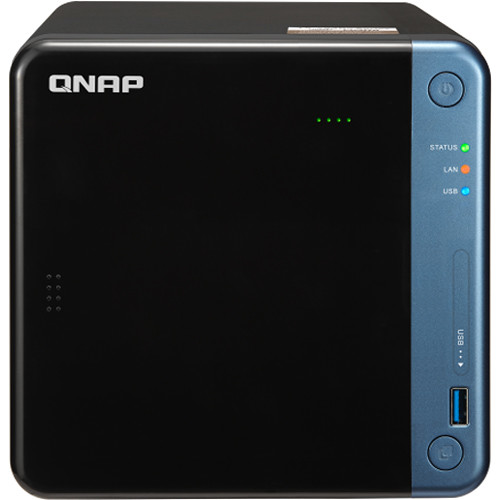
| With PCIe expansion, the TS-453Be provides flexibility in extending NAS functionality and potential applications. Install a QNAP QM2 card to provide M.2 SSD caching/10GbE connectivity, or use the TS-453Be as a wireless access point by installing a compatible wireless network card (ex. QNAP QWA-AC2600), or boost USB connectivity of the TS-453Be by installing a 10 Gb/s USB 3.1 Gen 2 card (USB 3.1). |
| Powered by a 1.5 GHz Intel Celeron J3455 Quad-Core processor (burst up to 2.3 GHz), 2GB of DDR3L RAM (up to 8GB), dual Gigabit LAN ports, and supporting SATA III 6 Gb/s hard drives, the TS-453Be provides dependable performance of up to 225 MB/s read/write speeds. The TS-453Be features Intel AES-NI hardware-accelerated encryption to drive transfer speeds of up to 225 MB/s with AES 256-bit encryption for both full NAS volumes and shared folders, boosting system performance while ensuring the security of sensitive data stored in the TS-453Be. |
| Snapshots help protect your data by fully recording the NAS system state and metadata. If a file is accidentally deleted or modified, you can use snapshots to quickly restore the file to its previously recorded state. QNAP snapshots are block based and only record the changed data. Not only does this save storage space, but also reduces the time required to back up and restore data. The TS-453Be supports up to 1024 snapshots per NAS and up to 256 snapshots per volume or LUN. |
| QNAP 10GbE/NBASE-T unmanaged switches allow you to instantly upgrade your network environment at a cost-effective price. With a 10GbE network, you can enjoy fast transfer speeds, empower bandwidth-demanding tasks like virtualization, and enable simultaneous real-time access to large NAS-based files using multiple workstations (good for video editing and multimedia). QNAP also provide a 10GbE PCIe network expansion card for the TS-453Be and Windows/Linux systems to take advantage of high-speed LAN environments. |
| QNAP provides a wide range of multimedia applications for you to easily enjoy photos, music, and videos. QVHelper allows users to stream media files or music playlists from a QNAP NAS to VLC player and Qmedia allows music, photos, and videos to be streamed to Android TVs or settop boxes. Video HD is a free KODI add-on that combines KODI's streaming and video decoding capabilities and fully supports Video Station's features. |
| With integrated data backup, restoration, and synchronization, Hybrid Backup Sync helps you easily backup or synchronize data on the TS-453Be to other QNAP NAS, USB storage (one touch copy), or cloud storage. With Qsync, you can also access your NAS files from desktops, laptops, or mobile devices connected with the TS-453Be. |
| Virtualization Station and Container Station provide comprehensive solutions for creating virtualized environments to improve business IT infrastructure, workflows, and productivity. |
| Virtualization Station allows you to run multiple Windows, Linux, UNIX, and Android virtual machines on the TS-453Be. You can use Virtual Network Computing (VNC) through a browser to manage the VMs. Virtualization Station is made for organizations to run multiple applications on a single NAS. |
| Container Station integrates LXC and Docker lightweight virtualization technologies. You can download apps from the built-in Docker Hub to easily import/export container apps and manage access control, enjoying the benefit of easy installation, transferability, and high-efficiency. |
| QNAP NAS now supports the popular 360° panorama recording format. By clicking the 360° panorama display button, these photos and videos will be displayed as 360° panorama media files. The QNAP mobile apps Qfile, Qphoto, and Qvideo also support 360° format viewing. |
| QNAP's QVR Pro surveillance solution allows you to arrange a dedicated, independent storage space for surveillance data on TS-453Be and leverage the advantages of scalability and storage manageability from QTS. With QVR Pro, camera management, storage space allocation, camera live view, and playback become more user-friendly. You can also use QVR Pro Client's mobile app to monitor anytime, or use a USB webcam as an ONVIF network camera with the QUSBCam2 app. |
| Surveillance Station provides an intelligent video management system to assist in managing real-time monitoring, video & audio recording, and playback with a wide range of customizable settings to safeguard your physical environment. You can use the Vmobile mobile app to manage the monitored channels, or install the Vcam mobile app to turn your device into a network camera to instantly record to your NAS. |



157 Comments
Your comment cannot be blank.
Featured Comments
This server is also capable of being a VPN server. I find it far more reliable than the Asus VPN services.
You can install the HDHomeRun DVR software to record OTA programs with a tuner.
The CPU is too weak to run any real VMs such as Windows 10. But I do have Hassio running for home automation.
It comes with IP camera DVR software. Up to 8 cameras free. I use all 8 licenses for 24/7 recording.
Upgraded mine with 16gb gskill memory and it performs all the above functions with breaking a sweat.
For Plex use, I haven't had any problems with transcoding at least one stream, but be aware that may be all you can do depending on the resolution of your video files. Be sure to check "hardware transcoding" in Plex.
I run a few docker containers, but I didn't care to much for their Container Station, so I run Portainer as a Docker container. I installed that container through CLI and subsequently all others through Portainer.
One of the biggest reasons I switched to Portainer is that if your QNAP goes down due to a power outage, Container Station will not restart the containers again until you perform a drive scan first.
Download Station is just awful. I have Deluge running in Docker seeding my torrents.
There's unofficial QNAP qpkg apps you can install for various programs if you do a quick Google search. I have Tautulli installed this way and works quite nice with Plex.
System boot up time is loooooong at approximately 5+ mins.
Would like their VPN app to allow me to choose apps/containers that I want to tunnel through it, but it's all or nothing once setup.
Hope this helps.
Sign up for a Slickdeals account to remove this ad.
Awesome. I'm thinking of a second one, but i think bh collects ca tax now.
Rarely does, but was on sale a couple few months back.
Sign up for a Slickdeals account to remove this ad.
Hoping they will go on sale sometime.
Hmm, interesting...