Original Post
Written by
Edited June 13, 2019
at 03:35 PM
by
STEPS:
Go to
https://store.hp.com/us/en/pdp/om...-7fr35av-1 and Click on
Customize & buy.
Under Processor and graphics, select Intel® Core™ i7 8750H(2.2 GHz, up to 4.1 GHz, 9 MB cache, 6 cores)+NVIDIA® GeForce® RTX 2060 (6 GB GDDR6 dedicated) (+$60)
Click on
ADD TO CART.
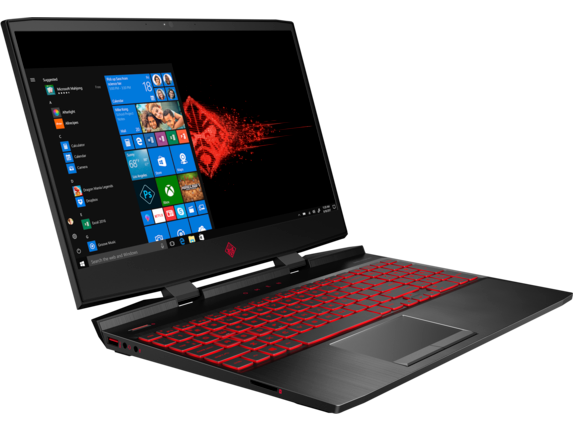
This is one of the cheapest RTX 2060 Laptop with 144 Hz Display, i7 and Thunderbolt 3 port. Also, the battery capacity is 70 WHr, higher than all the Dell G series Laptops.
SPEC:- Windows 10 Home 64 Bit
- 15.6" 1080P 144 Hz IPS Micro-Edge Display
- i7-8750H 2.2 GHz (4.1 GHz Turbo, 9MB Cache)
- 16GBx1 DDR4L 2666 MHz Ram (32GB Max)
- 256GB PCIe NVMe SSD + Empty 2.5" Bay
- RTX 2060 6GB GDDR6 Graphics
- Backlit Keyboard (4 Zone RGB)
- 720P HD Camera
- Bang & Olufsen, dual speakers, HP Audio Boost 2.0, DTS Headphone:X™ support
- Dual Band 802.11ac (2x2) + Bluetooth 4.2 + Gigabit Ethernet
- PORTS:
- 3x USB 3.0 (1 /w HP Sleep & Charge)
- 1x USB 3.1 Type-C Gen 2 /w Thunderbolt 3 (4 Lanes)
- 1x HDMI 2.0
- 1x Mini DisplayPort
- 1x SDXC Card Reader
- 4 Cell 70 WHr Battery
- 5.26 lbs



125 Comments
Your comment cannot be blank.
Featured Comments
Now regarding the Display Quality, all the G series are literally garbage in terms of color accuracy, Color gamut (sRGB and Adobe RGB) and cannot be used for anything apart from gaming. On the other hand, the Display in the Omen is probably a LG LGD050CO 144 Hz Panel which covers 99% sRGB and 76% Adobe RGB. Because of this, this laptop is pretty much suitable for any kind of semiprofessional photo and video editing works. The color accuracy can be enhanced by some calibration.
And regarding 8th Generation and 9th Generation i7, read again and find out how much benefit you can get or that is even necessary.
I had the Omen 15t and 17t last year model (late 2018) before I gifted to my younger brothers. They were both very great machines and the OMEN series are absolutely the BEST BANG FOR THE BUCK.
Moreover, they have excellent tech support (sale supports are pretty useless), use the built-in HP diagnostic and Support Contact software, it is excellent. I had my Omen 17t shipped with defected SD slot which didn't release my SD card. I found out the problem a week before my traveling out of the country, they have it fixed in just 5 days (mail-in service). After every problem I contacted with the support, they always tried to call me, this I like better than Dell.
However, the trade off are:
1. They are running hot, even on the 17t model. Throttlestop and new cooling paste will solve this with ease. In addition, always levitate the laptop several centimeters (3, 4 cm) with anything (I even used books while waiting for Amazon shipping) to help the air-intake or you can use this https://www.amazon.com/s?k=Vacuum...nb
2. The GPU power, capacity or whatever won't be as strong as the competitors. Same HP OEM RTX 2060 won't be as strong as MSI or DELL RTX 2060 (5-10% different may be). I experienced this with both my Omen 15t (1070 Max-q) and Omen 17t (1070 full).
3. Build-quality is pretty much acceptable, you will find something unpleasant (I am a picky person) right out of the box. The 15t had a small gap between the display and the bottom bezel which allowed lots of dust in. The 17t had a broken or defected SD slot I mentioned above. HP Tech Supports helped me solve these just fine.
4. Sale supports are garbage since they provide confused information about the product. IF YOU WANT RGB KEYBOARD, CHOOSE THE WHITE - LEGEND OPTION.
5. HP DOESN'T HAVE INTERNATIONAL WARRANTY FOR HARDWARE. Doesn't matter what HP tells you, the Warranty only cover Hardware in the U.S., unlike DELL. So if you plan on gifting it to someone out of the country, keep that in mind.
Finally, the shipment will always arrive earlier than what HP shipping prediction gives you. Returning is also very easy (they count 30 days from the day you receive the laptop, unlike DELL which they count from the shipping day, yikes).
Hope this help!
Sign up for a Slickdeals account to remove this ad.
Also the Omen's 2.5inch bay is empty while the G7 has a 1TB HDD.
All USB-A ports on the Omen are USB 3.0 (5Gbps) while the G7 has USB 3.1 (10Gbps).
G7: Bluetooth 5.0 vs Omen: Bluetooth 4.2
In terms of the specs, I'd say that the differences above are worth the $131 premium.
Also the Omen's 2.5inch bay is empty while the G7 has a 1TB HDD.
All USB-A ports on the Omen are USB 3.0 (5Gbps) while the G7 has USB 3.1 (10Gbps).
Now regarding the Display Quality, all the G series are literally garbage in terms of color accuracy, Color gamut (sRGB and Adobe RGB) and cannot be used for anything apart from gaming. On the other hand, the Display in the Omen is probably a LG LGD050CO 144 Hz Panel which covers 99% sRGB and 76% Adobe RGB. Because of this, this laptop is pretty much suitable for any kind of semiprofessional photo and video editing works. The color accuracy can be enhanced by some calibration.
And regarding 8th Generation and 9th Generation i7, read again and find out how much benefit you can get or that is even necessary.
Sign up for a Slickdeals account to remove this ad.
I bought the 15-CE015DX model from BestBuy (SKU:5911800) in 2017 for $1000, hoping that it would be enough to run CSGO.
Turns out it's not. I kept getting less than 60 fps, no matter how many times I factory reset it, remove all the bloatware, tweak the clock speed. It kept underperforming. I had to play on low resolution and low settings.
Rocket League is literally unplayable unless the laptop is plugged into a power source.
The screen is horrible. It looks like as if it has a matte screen guard on it. There is hardly any visibility even on full brightness if you're hoping to work in daylight.
The battery lasts 2/2.5 hours with low-moderate cpu usage. 1/1.5 hours on heavy load.
It is quite bulky for a laptop that wouldn't run not-so-resource-heavy games.
I bought the 15-CE015DX model from BestBuy (SKU:5911800) in 2017 for $1000, hoping that it would be enough to run CSGO.
Turns out it's not. I kept getting less than 60 fps, no matter how many times I factory reset it, remove all the bloatware, tweak the clock speed. It kept underperforming. I had to play on low resolution and low settings.
Rocket League is literally unplayable unless the laptop is plugged into a power source.
The screen is horrible. It looks like as if it has a matte screen guard on it. There is hardly any visibility even on full brightness if you're hoping to work in daylight.
The battery lasts 2/2.5 hours with low-moderate cpu usage. 1/1.5 hours on heavy load.
It is quite bulky for a laptop that wouldn't run not-so-resource-heavy games.
https://youtu.be/khDMI4LU27o
It's probably running on the integrated graphics, here's a 1050ti max settings at 1080p running between 120-170fps.