Slickdeals is community-supported.  We may get paid by brands for deals, including promoted items.
Sorry, this deal has expired. Get notified of deals like this in the future. Add Deal Alert for this Item
Frontpage

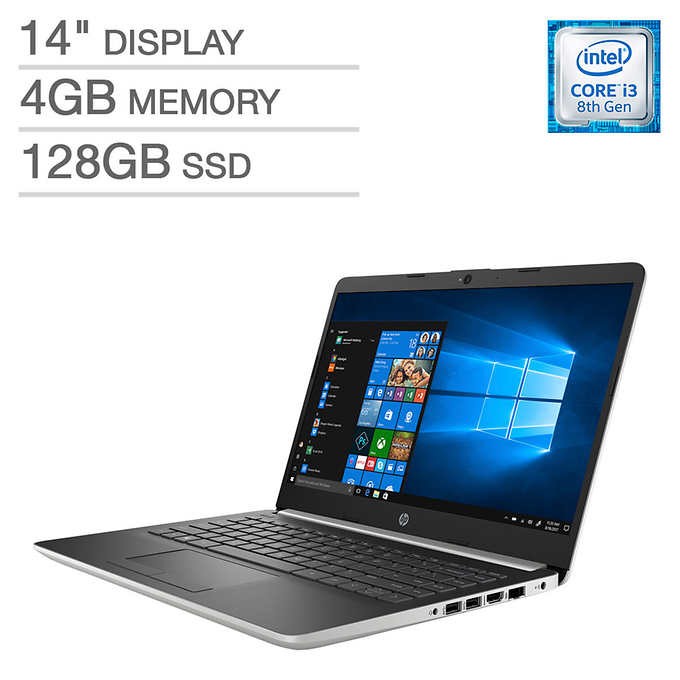
Costco Members: HP 14" Laptop: i3-8130U, 4GB DDR4, 128GB SSD Expired

$315 or Less
$399.99
+82 Deal Score
76,266 Views
Costco Wholesale has for Costco Members: HP 14" Laptop (14-DF0023CL) for $299.99. Shipping is $14.95. Thanks delz4stelz

Note, those without a membership may purchase w/ 5% non-member surcharge.

Costco Wholesale via Google Express has for Costco Members: HP 14" Laptop (14-DF0023CL) for $299.99. Shipping is $5.

Note, new Google Express Customers can use promo code AUGSAVE19 to save 20% off their first order (up to $20 off).

Specs
  • Intel Core i3-8130U Processor
  • 14" 1920x1080 IPS Display
  • 4GB DDR4 Memory
  • 128GB M.2 Solid State Drive
  • Intel UHD Graphics 620
    • 1x USB 3.1 Gen1 Type-C (Data Transfer Only)
    • 2x USB 3.1 Gen 1 (Data Transfer Only)
    • 1x HDMI 1.4b
    • 1x RJ-45
  • Backlit Keyboard
  • 3-cell 41WHr Battery
  • Windows 10

Editor's Notes & Price Research

Written by
Offer valid through 9/1/19 or while supplies last.

Original Post

Written by
Edited August 28, 2019 at 02:13 PM by
Costco Wholesale

$14.95 Shipping

HP 14-DF0023CL Laptop: 8th Gen Intel Core i3-8130U Dual-Core, 14" 1080p IPS, 4GB DDR4, 128GB SSD, Type-C, Backlit Keyboard, Win 10 $299.99
https://www.costco.com/HP-14%22-L...61207.html

Costco via Google Express [google.com] $279.99 w/ code AUGSAVE19
*New Google Express Customers Only
in Laptops (5) Get Costco Wholesale coupons
If you purchase something through a post on our site, Slickdeals may get a small share of the sale.
Deal
Score
+82
76,266 Views
$315 or Less
$399.99

Community Wiki

Last Edited by CheaperMoFo August 28, 2019 at 08:55 AM
Thread from May with detailed specs:

https://slickdeals.net/f/13092901-319-14-hp-laptop-at-costco-8130u-4gb-ram-128gb-ssd-1920x1080-display-upgradeable-from-5-22-to-6-16

Specifications:
  • Product name: HP Notebook - 14-DF0023CL
  • Microprocessor: Intel® Core™ i3-8130U (2.2 GHz base frequency, up to 4 GHz with Intel® Turbo Boost Technology, 4 MB cache, 2 cores)
  • Memory: 4 GB DDR4-2400 SDRAM (1 x 4 GB)
  • Hard/SSD drive: 128 GB M.2 SATA SSD (Samsung MZNLN128HAHQ) - M.2 slot supports NVMe upgrade
  • Video graphics: Intel® UHD Graphics 620 Integrated
  • Display: 14" diagonal FHD IPS BrightView micro-edge WLED-backlit (1920 x 1080)
  • Keyboard: Full-size island-style BACKLIT keyboard
  • Pointing device: Touchpad with multi-touch gesture support
  • Wireless connectivity: 802.11b/g/n/ac (2x2) Wi-Fi® and Bluetooth® 4.2 combo
  • Network interface: Integrated 10/100/1000 GbE LAN
  • External ports: 1 USB 3.1 Type-C™ Gen 1 (Data Transfer up to 5 Gb/s); 2 USB 3.1 Gen 1 (Data transfer only); 1 HDMI 1.4b. 1 RJ-45; 1 headphone/microphone combo
  • Expansion slots: 1 multi-format SD media card reader
  • Audio features: Dual speakers
  • Power supply type: 45 W Smart AC adapter
  • Battery type: 3-cell, 41 Wh Li-ion
  • Product number: 5JV97UA
  • Minimum dimensions (W x D x H): 32.4 x 22.59 x 1.99 cm
  • Weight: 3.1 lbs

Note that similar models sold on Amazon and at Wal-wart reportedly lack the backlit keyboard.

Thread from BF:

https://slickdeals.net/f/12270274-costco-members-hp-14-laptop-i3-8130u-4gb-ddr4-128gb-ssd-315?v=1

169 Comments

Your comment cannot be blank.

Featured Comments

Did you update the BIOS? Mine was the same way but I realized Windows Defender was constantly running and the BIOS needed to be updated. Much less intrusive now
This laptop says it has "Windows 10 in S mode." I had to look that up since I've never heard of "S mode" and S mode sounds like you're forced to use Microsoft Edge and you can only install apps from the Microsoft store...ewww.

Fortunately, it says you can switch from S mode to regular Windows 10 home very easily, which would be the first thing I would do if I ever got this laptop.
I believe that one had a 720P screen.
This one is 1080p.

Sign up for a Slickdeals account to remove this ad.

Joined Sep 2006
L4: Apprentice
> bubble2 470 Posts
348 Reputation
rojey
08-27-2019 at 10:22 AM.
Got it last time. The fan was awfully loud and runs constantly. Returned it immediately
Reply
Joined Oct 2018
New User
> bubble2 8 Posts
14 Reputation
TylerT4246
08-27-2019 at 10:31 AM.
Quote from rojey :
Got it last time. The fan was awfully loud and runs constantly. Returned it immediately

Did you update the BIOS? Mine was the same way but I realized Windows Defender was constantly running and the BIOS needed to be updated. Much less intrusive now
Reply
Joined Aug 2009
L5: Journeyman
> bubble2 803 Posts
918 Reputation
clovergirl
08-27-2019 at 10:45 AM.
Is this basically the same as the Best Buy one over the weekend that was $250?
Reply
Joined Sep 2014
L10: Grand Master
> bubble2 7,249 Posts
534 Reputation
tacoreactor
08-27-2019 at 10:48 AM.
Quote from clovergirl :
Is this basically the same as the Best Buy one over the weekend that was $250?
I believe that one had a 720P screen.
This one is 1080p.
Reply

This comment has been rated as unhelpful by Slickdeals users

Show Comment
Joined Sep 2014
L10: Grand Master
> bubble2 7,249 Posts
534 Reputation
tacoreactor
08-27-2019 at 11:02 AM.
Quote from TylerT4246 :
Did you update the BIOS? Mine was the same way but I realized Windows Defender was constantly running and the BIOS needed to be updated. Much less intrusive now
Not sure if these have been updated since November as last year, but if they haven't, you will need to update the BIOS, as there have been some speed improvements that allowed the laptop run at its proper speed.
When I did mine, I got a blank screen afterwards. For some reason I knew it did not brick my laptop. So I took the bottom case off and took out the CMOS battery, as well as disconnecting the laptop battery, held down the power button for 2 minutes, while using a screwdriver to short the battery slot.
Booted up into BIOS afterwards, with new update installed.
Reply
Joined Apr 2006
L6: Expert
> bubble2 1,833 Posts
628 Reputation
So-Many-Deals
08-27-2019 at 12:03 PM.
Quote from agrm :
Not sure if these have been updated since November as last year, but if they haven't, you will need to update the BIOS, as there have been some speed improvements that allowed the laptop run at its proper speed.
When I did mine, I got a blank screen afterwards. For some reason I knew it did not brick my laptop. So I took the bottom case off and took out the CMOS battery, as well as disconnecting the laptop battery, held down the power button for 2 minutes, while using a screwdriver to short the battery slot.
Booted up into BIOS afterwards, with new update installed.
So it's plugged in with no batteries, running off electricity, when you used the screw driver?

Is that just bypassing the button battery, ignoring it?
Reply

Sign up for a Slickdeals account to remove this ad.

Joined Jul 2006
L10: Grand Master
> bubble2 9,147 Posts
1,736 Reputation
gkwong
08-27-2019 at 01:16 PM.
Quote from agrm :
Did they ever fix the crappy wifi card issue?
I know that I can go out and buy a cheap card to replace the one inside, but those pci pins are fragile, and might break if not super careful.
Some youtube 4k hdr 60fps, like the battlefield 5 videos, do not play at all in firefox, but will sort of play in opera and chrome, though it is unbearable to watch. 1440p plays like a charm though.
The screen is beautiful. The keyboard is not for heavy use.

Is this the same one from BF last year? I replaced the wifi card and I still get random disconnections that require me to restart. But just not as often as with the original card.
Reply
Joined Aug 2017
L5: Journeyman
> bubble2 698 Posts
143 Reputation
Steelers1986
08-27-2019 at 01:23 PM.
This laptop says it has "Windows 10 in S mode." I had to look that up since I've never heard of "S mode" and S mode sounds like you're forced to use Microsoft Edge and you can only install apps from the Microsoft store...ewww.

Fortunately, it says you can switch from S mode to regular Windows 10 home very easily, which would be the first thing I would do if I ever got this laptop.
Reply
Last edited by Steelers1986 August 27, 2019 at 01:30 PM.
Joined Jan 2005
Chubby McGee
> bubble2 1,290 Posts
396 Reputation
santookie
08-27-2019 at 01:32 PM.
Is this the one with easily upgradeable RAM and NVME?
Reply
Joined May 2010
L3: Novice
> bubble2 247 Posts
70 Reputation
pinksyd
08-27-2019 at 01:44 PM.
These is a huuggggeeee Slickdeals thread on this laptop from BF onward titled "Costco Members: HP 14" Laptop: i3-8130U, 4GB DDR4, 128GB SSD $315 (expired)" if anyone wants more info on this machine.
Reply
Joined Oct 2004
L1: Summoner
> bubble2 585 Posts
201 Reputation
GoGo98102
08-27-2019 at 01:50 PM.
I got this from the BF deal. I upgraded the ram to 8gb and it improved the speed tremendously. I have no problem whatsoever with this laptop.
Reply
Page 1 of 12
Start the Conversation
 

More Costco Wholesale Deals

More HP Deals

Link Copied

The link has been copied to the clipboard.