Slickdeals is community-supported.  We may get paid by brands for deals, including promoted items.
Sorry, this deal has expired. Get notified of deals like this in the future. Add Deal Alert for this Item
Popular

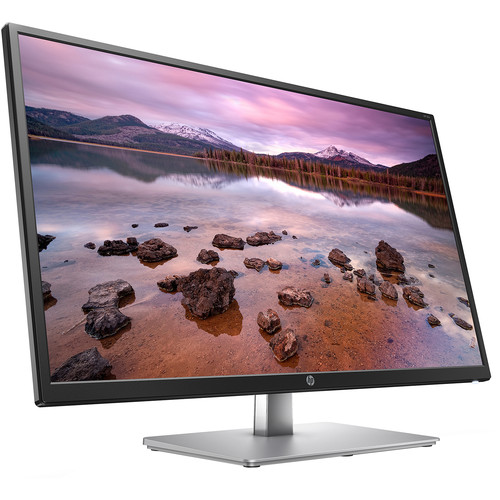
HP Offer - HP 32s IPS Dual Monitor Bundle for $339.98

$339.98
$459.98
-1 Deal Score
36,567 Views
https://store.hp.com/us/en/pdp/hp...onitor-kit

That's $170 per monitor, which is $10 less than our mention of a single monitor from last week and the lowest price we could find for this quantity today by $60. Buy Now at HP

1920x1080 (1080p) native resolution
HDMI input
Model: 2UD96AA#ABA


Product specifications
HP Data Sheet
AMS HP 32s Display Curved Display Datasheet

Display type
ADS with LED backlight
Display features
Anti-glare; Anti-static; Language selection; LED backlights; On-screen controls; Plug and Play; User programmable
Onscreen controls
Brightness; Color control; Contrast; Exit; Factory reset; Image control; Information; Language; Management; Menu; Power
Display viewing angle
178° horizontal; 178° vertical
Native resolution
FHD (1920 x 1080 @ 60 Hz)
Resolutions supported
1024 x 768; 1280 x 1024; 1280 x 720; 1280 x 800; 1440 x 900; 1600 x 900; 1680 x 1050; 1920 x 1080; 640 x 480; 720 x 400; 800 x 600
Contrast ratio
1200:1 static; 6000000:1 dynamic
Brightness
250 cd/m²
Pixel pitch
0.363 mm
Signal input connectors
1 HDMI 2.0 (with HDCP support); 1 VGA
Display Tilt & Swivel Range
Tilt: -5 to +13°
Power supply
Input voltage 100 to 240 VAC
Dimensions (W X D X H)
28.72 x 2.3 x 17.04 in
Without stand.
Weight
17.03 lb
Warranty
Limited 1 year warranty. Certain restrictions and exclusions apply.
What's in the box
AC power cord; Documentation; HDMI cable; VESA Mount adapter; Warranty card
If you purchase something through a post on our site, Slickdeals may get a small share of the sale.
Deal
Score
-1
36,567 Views
$339.98
$459.98

Your comment cannot be blank.

Sign up for a Slickdeals account to remove this ad.

Joined Sep 2010
L6: Expert
> bubble2 1,342 Posts
244 Reputation
sandamn12
08-22-2020 at 04:47 PM.
Even 27 in is too big for 1080p, 31.5 is just plain wrong
12
Reply

This comment has been rated as unhelpful by Slickdeals users

Show Comment

This comment has been rated as unhelpful by Slickdeals users

Show Comment
Joined Mar 2008
L7: Teacher
> bubble2 2,310 Posts
286 Reputation
yourr8
08-22-2020 at 11:12 PM.
price is okay but the spec, I will pass
2
Reply
Joined Aug 2005
L7: Teacher
> bubble2 2,986 Posts
752 Reputation
Pro
leecm
08-22-2020 at 11:53 PM.
I agree that 1080p is too low resolution for a 32" monitor. Needs QHD.
3
Reply
Joined Nov 2015
L2: Beginner
> bubble2 71 Posts
14 Reputation
enfox
08-23-2020 at 01:45 AM.
Quote from GlenC3825 :
Ridiculous comment. 1080p is perfectly fine for most people who aren't gaming or doing fine line drawing etc.

it not ridiculous! with 32 in your one should be able to see more content. if i am coding i should be able to see more lines. making just big doesn't help. may be good for movies when sit far behind.
2
Reply
Joined Feb 2018
L3: Novice
> bubble2 254 Posts
78 Reputation
jdoubleh
08-23-2020 at 03:24 AM.
Quote from GlenC3825 :
Ridiculous comment. 1080p is perfectly fine for most people who aren't gaming or doing fine line drawing etc.

The "standard" resolution for 24" monitors in 2012 was 1920x1280 (WXUGA, 16:10) . 1080 pixels vertical is lower resolution and means more scrolling on web pages, office documents, etc. 8 to 10 years ago, it was more common to find this vertical resolution on 19 to 22 inch monitors.

"Full HD" is a marketing term coined to sell TVs (back when the choices were between 720p and 1080p) and is a really disappointing computer monitor resolution for just about anything BUT gaming or maybe a small laptop screen, especially on a monitor which takes up as much physical desk space as a 32". But for better or worse (mostly worse) most computer monitors are now the same 16:9 resolutions as TV panels (720P, 1080P, and 4k). QHD /aka 2k / 2160x1440 is the exception, and is much more useful for most applications in this monitor size. 4k is neat for 4k video and Google resolution graphics, but not if you care about reading text without having to use display scaling or large text settings, or care about system resources without a dedicated GPU, or running multiple monitors from a work laptop, etc...
1
Reply

Sign up for a Slickdeals account to remove this ad.

Joined Nov 2014
L2: Beginner
> bubble2 44 Posts
14 Reputation
binderII
08-23-2020 at 10:04 AM.
Quote from jdoubleh :
The "standard" resolution for 24" monitors in 2012 was 1920x1280 (WXUGA, 16:10) . 1080 pixels vertical is lower resolution and means more scrolling on web pages, office documents, etc. 8 to 10 years ago, it was more common to find this vertical resolution on 19 to 22 inch monitors.

"Full HD" is a marketing term coined to sell TVs (back when the choices were between 720p and 1080p) and is a really disappointing computer monitor resolution for just about anything BUT gaming or maybe a small laptop screen, especially on a monitor which takes up as much physical desk space as a 32". But for better or worse (mostly worse) most computer monitors are now the same 16:9 resolutions as TV panels (720P, 1080P, and 4k). QHD /aka 2k / 2160x1440 is the exception, and is much more useful for most applications in this monitor size. 4k is neat for 4k video and Google resolution graphics, but not if you care about reading text without having to use display scaling or large text settings, or care about system resources without a dedicated GPU, or running multiple monitors from a work laptop, etc...
Scaling is almost perfect with windows 10. I use 28 inch 4k screens for software development, windows apps, command line, productivity and web-surfing. It's not unusual for me to have a few remote windows open as well. My Kid has a 1440 27 inch screen for gaming and I do NOT like it for text. At the end of the day, sharper is ALWAYS better for eye fatigue and most anything remotely modern can run 1 or 2 4K screens. There are a ton of used HP and Dell business desktops out there that will run the screens. My cheep $300 laptop has no issues with a good USB-C doc. Finally, display port is your friend. I know you can run 4k from HDMI, but your potential for issues increases dramatically.
Reply
Joined Dec 2006
Keyboard Commando
> bubble2 438 Posts
659 Reputation
treasurebeacon
08-23-2020 at 10:10 AM.
Quote from enfox :
it not ridiculous! with 32 in your one should be able to see more content. if i am coding i should be able to see more lines. making just big doesn't help. may be good for movies when sit far behind.
FYI coding existed long before 1080P
2
Reply
Joined Feb 2017
Expert PC Builder
> bubble2 900 Posts
367 Reputation
GlenC3825
08-23-2020 at 10:33 AM.
Quote from treasurebeacon :
FYI coding existed long before 1080P
In the industry since the late 70's. Own a computer company. Sell monitors including this model. 99.9% of the monitors we sell and see in the field are 1080p and even 720p on
smaller sizes. In 2012 24" monitors were not the most common size sold or in use, 19,20, and 22 were. 22 and 24 are the most popular sizes now. 2k, 4k, 5k, and 8k monitors make up less than 10% of all computer monitors sold. Most popular gaming monitors right now are 1080p 27" 144Hz. Many older folks like 32" 1080p as it make objects LARGER not more info on screen. BOTTOM line --FOR this price its a great deal. Comment remains ridiculous. Remote sessions. Hmmm. I have 10 screens on my desk 22" 1080p. and output to one large 4k TV.
2
Reply
Joined Feb 2017
Expert PC Builder
> bubble2 900 Posts
367 Reputation
GlenC3825
08-23-2020 at 10:38 AM.
Quote from binderII :
Scaling is almost perfect with windows 10. I use 28 inch 4k screens for software development, windows apps, command line, productivity and web-surfing. It's not unusual for me to have a few remote windows open as well. My Kid has a 1440 27 inch screen for gaming and I do NOT like it for text. At the end of the day, sharper is ALWAYS better for eye fatigue and most anything remotely modern can run 1 or 2 4K screens. There are a ton of used HP and Dell business desktops out there that will run the screens. My cheep $300 laptop has no issues with a good USB-C doc. Finally, display port is your friend. I know you can run 4k from HDMI, but your potential for issues increases dramatically.
19" monitors were almost ALL 720p -1366-768. 20" and 22" were 1600x900 back in 2012. Price still drives the market. 24" 1080p monitors are $80-$120 each. 27" $140-$200. 32" 4k are twice the price of this model and up. My 59 year old eyes want larger, not more stuff.
1
Reply
Joined Jul 2012
L6: Expert
> bubble2 1,526 Posts
262 Reputation
jaeun87
08-23-2020 at 11:48 AM.
Quote from treasurebeacon :
FYI coding existed long before 1080P
Driving existed before power steering or airbags did, doesn't mean we're better off without them now. Confused

If you're old and need everything to look larger, you can get a good QHD and increase the windows scaling to suit your needs, it will be less blurry that way too. Yes, it costs more, so if you don't care, then obviously go for the 1080p. At this price point, it's not a ton more (deals for $200 for 32" have been up before, if you want to know which ones, search function is your friend), However, I would also not recommend 32" unless you have a deep desk or can sit back quite a bit, it was a little too much to sit close to.
2
Reply
Last edited by jaeun87 August 23, 2020 at 12:06 PM.
Joined Feb 2007
L2: Beginner
> bubble2 44 Posts
123 Reputation
theGuv
08-23-2020 at 11:52 AM.
Total is $379.99 now unfortunately.
1
Reply
Joined Jul 2018
L6: Expert
> bubble2 1,138 Posts
75 Reputation
Raccoonish
08-23-2020 at 01:03 PM.
Quote from sandamn12 :
Even 27 in is too big for 1080p, 31.5 is just plain wrong
People downvoting this comment must not have ever worked on a 1080p, 32in monitor.

It's OK for watching movies, but it's NOT ok for doing work, as many of us are with such a dual monitor setup.
5
Reply
Page 1 of 2
Start the Conversation
 

More Monitors Deals & Discounts

More HP Deals

Link Copied

The link has been copied to the clipboard.