Slickdeals is community-supported.  We may get paid by brands for deals, including promoted items.
Sorry, this deal has expired. Get notified of deals like this in the future. Add Deal Alert for this Item
Frontpage

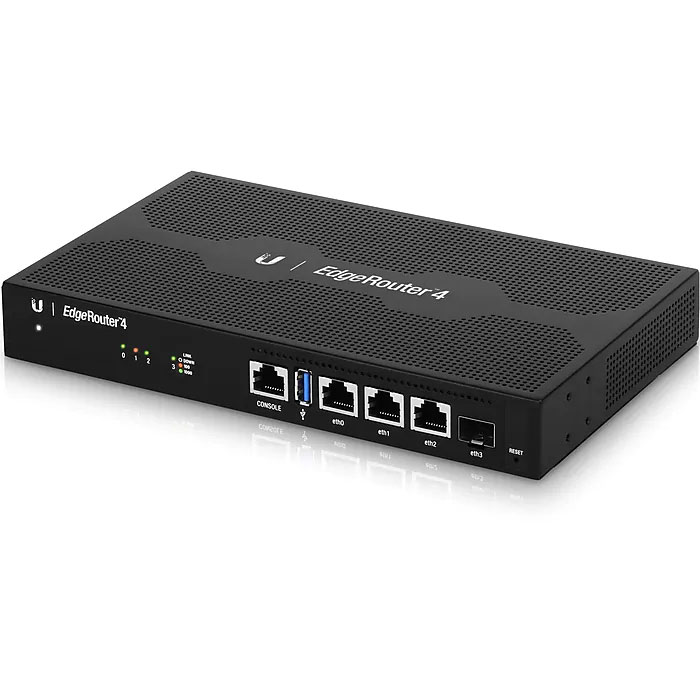
Ubiquiti EdgeRouter 4 USB Router Expired

$155
$179.99
+ Free Shipping
+48 Deal Score
38,383 Views
Staples has Ubiquiti EdgeRouter 4 USB Router (ER-4) for $179.99 - $25 with coupon code 32269 = $154.99. Shipping is free.

Thanks to community member edge929 for sharing this deal.

Note, must proceed to checkout for the coupon code to apply.

Product Features
  • (3) 10/100/1000 Mbps Ethernet Ports and (1) SFP Port
  • 4-Core 1GHz MIPS64 Processor
  • Internal PSU
  • Fan-less
  • Desk, wall, and rack-mount options

Editor's Notes & Price Research

Written by
  • About this Deal
    • Our research indicates that the Ubiquiti EdgeRouter 4 USB Router (ER-4) is $18.50 less (10.66% savings) than the next best price from a reputable merchant with prices starting from $173.49 at the time of this posting.
  • Reviews
    • 4.8 out of 5 stars based on 700 reviews at Amazon.
  • About this Store
    • Staples return policy can be found here.

Original Post

Written by
Edited February 9, 2021 at 03:31 PM by
Staples.com has Ubiquiti EdgeRouter 4 USB Router (ER-4) for $179.99 - $25 w/ coupon code 32269 ($25 off Your Order of $150+. Online Only). Shipping is free.

Note, coupon savings are reflected on the final checkout page.

https://www.staples.com/ubiquiti-..._IM12KF565
If you purchase something through a post on our site, Slickdeals may get a small share of the sale.
Deal
Score
+48
38,383 Views
$155
$179.99

130 Comments

Your comment cannot be blank.

Featured Comments

They definitely aren't user friendly. I often have to look things up and wonder "Why would that setting be there? Or why would they do it like that?". I'm sure it all makes since to a networking person. The good news is they are very popular so it is very easy to Google what you are looking for.

Most importantly, it's the most stable router I've ever owned. It's highly recommended if you don't mind Googling the occasional thing.
this model doesn't have a built in switch, nor does it support POE, so for *many* it will require an external switch, which means two power supplies will be needed (one for this router and one for the switch).

It's really too bad the ER-4 and ER-6P don't have a built in switch, so you have to jump up to the 12 or 12P to get this level of processor, RAM, and storage, with a built in switch.

Sign up for a Slickdeals account to remove this ad.

Joined Nov 2006
L5: Journeyman
> bubble2 560 Posts
632 Reputation
this n00b again
02-09-2021 at 09:57 AM.
Not bad... debating to start switching over to this from the erx since the erx is a bit limited even with hw offloading enabled.
Reply

This comment has been rated as unhelpful by Slickdeals users

Show Comment
Joined Nov 2016
L6: Expert
> bubble2 1,028 Posts
123 Reputation
Original Poster
edge929
02-09-2021 at 10:01 AM.
Quote from this n00b again :
Not bad... debating to start switching over to this from the erx since the erx is a bit limited even with hw offloading enabled.
Ha yeah, exactly my situation. I had HW offloading enabled via CLI too. I am not running QoS but I can see that in my future, just depends on how much longer the entire family is home.

I was debating splurging on the Dream Machine Pro but I wouldn't use most of it's stuff. Don't use protect, firewall is nice but not "needed" for home use, I have a raspberry pi 3B with the Unifi Controller on it already. My X was rock solid over many years. $380 vs $155 made it an easy choice.
5
Reply
Joined Aug 2017
L5: Journeyman
> bubble2 698 Posts
143 Reputation
Steelers1986
02-09-2021 at 10:21 AM.
Have been thinking of getting a router like this for awhile. I have a basic understanding of setting up a router, how hard is this to configure to work properly? I've read alot on Ubiquiti routers and I know they are not as user friendly as your average consumer router so just curious.

I moved into a new home recently that is wired with CAT5e and right now I just have a single Asus wifi router plugged into my modem on Comcast Xfinity 600mbps plan. So was thinking of getting a ER4 or other pure router and a switch then buy a few access points and plug them into the ethernet drops around the house for full coverage.

ER4 a good router from Ubiquiti to handle this or should I be looking at something else?
Reply
Joined Oct 2006
L3: Novice
> bubble2 172 Posts
88 Reputation
gregg098
02-09-2021 at 10:22 AM.
I upgraded from an ERX-SFP to this about a year ago and am very happy. I have Comcast Gigabit, so not symmetrical, but I do max it out easily with the ER4. I also put my ERX-SFP into switch mode to power my 3 Unifi APs.
1
Reply
Joined Nov 2003
Living in sunny Florida!
> bubble2 926 Posts
470 Reputation
Trekboy
02-09-2021 at 10:25 AM.
Love my EdgeRouter 4! Highly recommend it if you want to get into the Ubiquiti infrastructure. Rock solid and never skips a beat.
Reply
Joined Oct 2015
L2: Beginner
> bubble2 61 Posts
18 Reputation
g4asdf
02-09-2021 at 10:31 AM.
I thought about this previously as well going from an ERL. may want to look at Protectli box with either pfsense or opnsense.
Reply

Sign up for a Slickdeals account to remove this ad.

Joined Jul 2017
L2: Beginner
> bubble2 30 Posts
10 Reputation
Hoveys
02-09-2021 at 10:34 AM.
Any reason to not get this and get the dream machine for basic home use? I have the ERx and I like it but not able to keep up with everything.
Reply
Joined Sep 2008
L6: Expert
> bubble2 1,182 Posts
587 Reputation
aem
02-09-2021 at 10:46 AM.
Finally upgraded my X to this last year to allow for higher speeds with smart queue (qos) enabled. Worth the upgrade imo.
Reply
Joined May 2008
L3: Novice
> bubble2 261 Posts
59 Reputation
ob2kenobi
02-09-2021 at 10:48 AM.
Quote from Steelers1986 :
Have been thinking of getting a router like this for awhile. I have a basic understanding of setting up a router, how hard is this to configure to work properly? I've read alot on Ubiquiti routers and I know they are not as user friendly as your average consumer router so just curious.

I moved into a new home recently that is wired with CAT5e and right now I just have a single Asus wifi router plugged into my modem on Comcast Xfinity 600mbps plan. So was thinking of getting a ER4 or other pure router and a switch then buy a few access points and plug them into the ethernet drops around the house for full coverage.

ER4 a good router from Ubiquiti to handle this or should I be looking at something else?
They definitely aren't user friendly. I often have to look things up and wonder "Why would that setting be there? Or why would they do it like that?". I'm sure it all makes since to a networking person. The good news is they are very popular so it is very easy to Google what you are looking for.

Most importantly, it's the most stable router I've ever owned. It's highly recommended if you don't mind Googling the occasional thing.
Reply
Last edited by ob2kenobi February 9, 2021 at 12:27 PM.
Joined Feb 2009
L8: Grand Teacher
> bubble2 3,569 Posts
269 Reputation
sdaddict001
02-09-2021 at 10:51 AM.
Well damn. This could be a good solution for me to upgrade from USG. I assume this would just mean I have to have two separate apps to manage. But if I'm considering pfsense then it makes sense for me to consider this instead. Low power consumption and still have that rock solid stability and gain the performance of UDM.
Reply
Joined Aug 2016
L5: Journeyman
> bubble2 695 Posts
169 Reputation
tximagineer
02-09-2021 at 10:55 AM.
I just bought an ER-X. Now I'm wondering if I underbought.
Reply
Joined Aug 2015
L99: Cookie Monster
> bubble2 224 Posts
GSDragoon
02-09-2021 at 10:56 AM.
I just picked up an EdgeRouter 4 a few weeks ago from a consumer TP-Link router. It took a bit or work to get the initial setup. It's definitely more complicated, but the basic stuff can be done through the UI. It's very fast and reliable (with the latest hotfix).
Reply
Page 1 of 9
Start the Conversation
 
Link Copied

The link has been copied to the clipboard.