This collaborative space allows users to contribute additional information, tips, and insights to enhance the original deal post. Feel free to share your knowledge and help fellow shoppers make informed decisions.
As many others have mentioned, yes you can. There are numerous guides on how to shuck them. There is also a community led Google doc that says which PSU models need the 3.3v mod.
It has nothing to do with the ATX PSU age or type. If you plug it into anything that provides power to the 3.3V pin, the drive will stay powered down. This is used to allow systems (typically backplanes) to disable or enable drives by controlling that one pin. If you plug these straight into an ATX power supply, which always provides a constant 3.3V to the power-disable pin, then the drive will stay "off."
People get around this by:
A) Using a Molex to SATA adapter when attached directly to a power supply, since Molex 4-pin doesn't have 3.3V to begin with.
B) Using it in enclosure that controls the power-disable pin correctly (or rather, doesn't have 3.3V and that pin just floats).
C) Using it in a server chassis that controls, or doesn't support, the power-disable pin. My servers have backplanes that are powered from 4-pin Molex connectors, and have no separate 3.3V regulator, so they could never send 3.3V if they wanted to. Just 12V and 5V on different pins.
I wonder if these can easily be shucked. If so, it's a good deal for some large (slow) storage for backups and such.
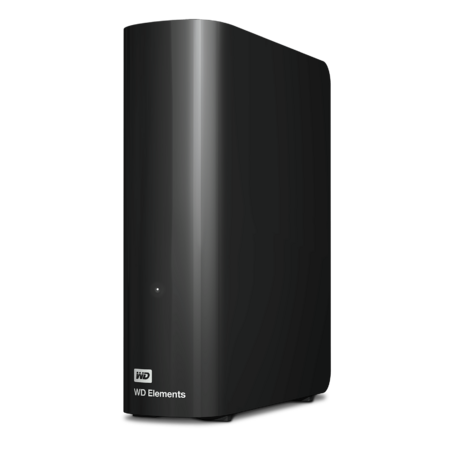
<edit> Answering my own question, from what I can tell these enclosures have WD140EDGZ drives in them, and they can be shucked and used without the enclosure.
They have the worst shipping ever. I ordered 4 internal drives from them last year and all 4 drives were loose in the bottom of the box. No foam, nothing. Not to worry though because they put some bubble wrap on top. As bad as that was, dealing with them for returns was an absolute nightmare. I recommend trying to find these deals at a store instead but in the end who knows how they were shipped as well.
Our community has rated this post as helpful. If you agree, why not thank Pythonz
Quote
from AquaLinen207
:
I always wonder why everyone is keen on shucking? Unless it's for or RAIS, what do u gain? A cleaner setup? There are generally drives at the same price/TB or less, with w 3-year warranty (not 1 that is likely voided). Plus, you can hookup a bunch of USB devices via splitter.or existing IO, but that's not the case for SATA - you'll end up needing an expansion card - which throws off the entire pricing model. Let me know peeps!
Last time I looked, I couldn't find any NAS-tier 14TB drives nearly as cheap as shucking this one. You do take some risk with the warranty, but it's super easy to shuck and the drives are great. I do run them in RAID in a ZFS pool, but that's probably true of almost anyone buying NAS drives. I bought 2 originally in 2020, and just added 2 more this year. The first 2 drives have been running pretty much 24/7 in my DIY NAS for 5 years with no issues for Plex and general photos/files backup.
FYI for anyone worried about shipping issues, Amazon has these for the same price. I'd probably go that route myself for convenience of returns and the 5% back.
For those saying you need tape to block off a pin if you use an older PSU, thats because of the new power disable or whatever its called right? When i bought some recertified drives from goharddrive they included an adapter. So thats another option.
1
Like
Helpful
Funny
Not helpful
Nov 20, 2025 3:59 PM
120 Comments
Joined Mar 2020
This comment has been rated as unhelpful by Slickdeals users.
Sign up for a Slickdeals account to remove this ad.
I wonder if these can easily be shucked. If so, it's a good deal for some large (slow) storage for backups and such.
Answering my own question, from what I can tell these enclosures have WD140EDGZ drives in them, and they can be shucked and used without the enclosure.
I shucked one with one of the pry tools that looks like a guitar pick. Had it open and out in 10 minutes tops.
FYI for anyone worried about shipping issues, Amazon has these for the same price. I'd probably go that route myself for convenience of returns and the 5% back.
With Amazon you lose a year on warranty but I agree that is cheapest way with 5% back with their credit card.
Bought this last time, after shucking it wouldn't work. Found it was the pin issue as others mentioned. Easier method than using tape is to just buy a Molex to SATA power adapter. Will have the same effect of not powering the pins than the the drive the "shutdown" command that causes the problem.
Top Comments
Not sure if this is the most up to date version:
https://docs.google.com/spreadshe...A/htmlview
People get around this by:
A) Using a Molex to SATA adapter when attached directly to a power supply, since Molex 4-pin doesn't have 3.3V to begin with.
B) Using it in enclosure that controls the power-disable pin correctly (or rather, doesn't have 3.3V and that pin just floats).
C) Using it in a server chassis that controls, or doesn't support, the power-disable pin. My servers have backplanes that are powered from 4-pin Molex connectors, and have no separate 3.3V regulator, so they could never send 3.3V if they wanted to. Just 12V and 5V on different pins.
<edit> Answering my own question, from what I can tell these enclosures have WD140EDGZ drives in them, and they can be shucked and used without the enclosure.
Join The Conversation
Share your experience with the Slickdeals community
Share information with the community. Please follow our Community Guidelines and be kind!
157 Comments
Sign up for a Slickdeals account to remove this ad.
Our community has rated this post as helpful. If you agree, why not thank Pythonz
Sign up for a Slickdeals account to remove this ad.
Answering my own question, from what I can tell these enclosures have WD140EDGZ drives in them, and they can be shucked and used without the enclosure.
Our community has rated this post as helpful. If you agree, why not thank rgalverson
Sign up for a Slickdeals account to remove this ad.
Join The Conversation
Share your experience with the Slickdeals community
Share information with the community. Please follow our Community Guidelines and be kind!