

expiredGreenteaic626 posted Dec 10, 2025 06:48 PM


Item 1 of 3
Item 1 of 3
expiredGreenteaic626 posted Dec 10, 2025 06:48 PM
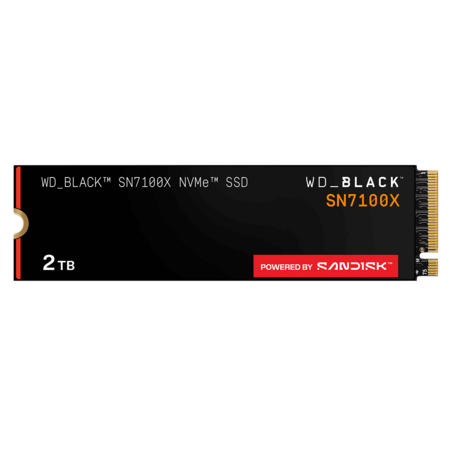
2TB WD_BLACK SN7100X PCIe Gen 4 NVMe M.2 2280 SSD for ROG Xbox Ally (X) & PC
+ Free Shipping$160
SanDisk
Visit SanDiskGood Deal
Bad Deal
Save
Share







Leave a Comment
Top Comments
https://slickdeals.net/f/18870490
SN850X: ~7,300 MB/s read / ~6,300–6,600 MB/s write across capacities
SN7100X: ~7,250 MB/s read / ~6,900 MB/s write (1–2 TB models)
Choose SN850X if:
- You value DRAM cache and sustained performance under heavier loads.
- You want a proven high-end Gen4 drive with long track record.
-You're building a desktop gaming/creator rig.
Great all-around strong performer and longtime enthusiast favorite.
Choose SN7100X if:
- You want newer NAND and efficiency (battery-friendly in laptops portable consoles).
- You prefer lower heat and power draws.
- You're buying for gaming/system SSD where the tiny DRAM benefit isn't critical.
- You want slightly better write performance per dollar.
Best bang-for-your-buck modern Gen4 SSD.
28 Comments
Sign up for a Slickdeals account to remove this ad.
Our community has rated this post as helpful. If you agree, why not thank SociableHaddock3665
Our community has rated this post as helpful. If you agree, why not thank Steven409
https://slickdeals.net/f/18870490
SN850X: ~7,300 MB/s read / ~6,300–6,600 MB/s write across capacities
SN7100X: ~7,250 MB/s read / ~6,900 MB/s write (1–2 TB models)
Choose SN850X if:
- You value DRAM cache and sustained performance under heavier loads.
- You want a proven high-end Gen4 drive with long track record.
-You're building a desktop gaming/creator rig.
Great all-around strong performer and longtime enthusiast favorite.
Choose SN7100X if:
- You want newer NAND and efficiency (battery-friendly in laptops portable consoles).
- You prefer lower heat and power draws.
- You're buying for gaming/system SSD where the tiny DRAM benefit isn't critical.
- You want slightly better write performance per dollar.
Best bang-for-your-buck modern Gen4 SSD.
Our community has rated this post as helpful. If you agree, why not thank lzb
Sign up for a Slickdeals account to remove this ad.
https://slickdeals.net/f/18870490
SN850X: ~7,300 MB/s read / ~6,300–6,600 MB/s write across capacities
SN7100X: ~7,250 MB/s read / ~6,900 MB/s write (1–2 TB models)
Choose SN850X if:
- You value DRAM cache and sustained performance under heavier loads.
- You want a proven high-end Gen4 drive with long track record.
-You're building a desktop gaming/creator rig.
Great all-around strong performer and longtime enthusiast favorite.
Choose SN7100X if:
- You want newer NAND and efficiency (battery-friendly in laptops portable consoles).
- You prefer lower heat and power draws.
- You're buying for gaming/system SSD where the tiny DRAM benefit isn't critical.
- You want slightly better write performance per dollar.
Best bang-for-your-buck modern Gen4 SSD.
This guy SSD's
never gonna happen eh?
what are y'all doing with 2TB ssd
May be a different story for PS5 though. While it SHOULD be fine since that's the minimum speed required, I've seen quite a few forums where users report compatibility issues when installing it in a PS5. Seems the normal "real-world" speeds are closer to 5000MB/s falling short of the minimal requirement and resulting in the PS5 rejecting it as insufficient.
No perceptible speed difference from the stock SSD in PS5.
No perceptible speed difference from the stock SSD in PS5.
I bought a 2TB XPG S70 Blade for my PS5 back in 2021 for $99. Was expensive because it was just released, but I would've bought 2 if I had known prices were going to increase as much as they have. That same drive is now $179-199.
Sign up for a Slickdeals account to remove this ad.
I ran a 2TB SATA drive in my last PC with a Ryzen3700x and 3070. In my new build, which has a Gen4 NVMe, the difference in load times for most games was less than 2 seconds.
Cyberpunk, for instance, took 7 seconds to load from main menu using the SATA. On the NVMe, it took 5 seconds. No other perceivable difference once loaded.
The only time I noticed a difference was when transferring data back and forth which want get often. For every day use in the PC world, there's really nothing in Windows or current games that require (let alone utilize) the speed of an NVMe.
Leave a Comment