QVC has
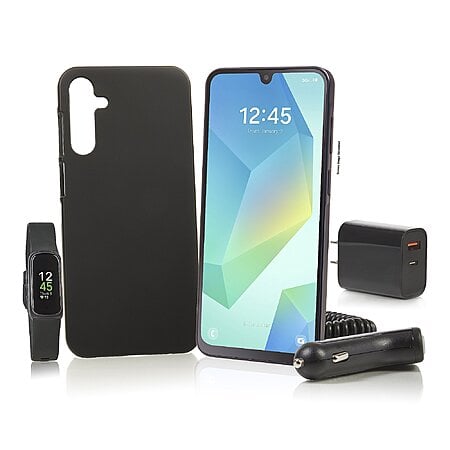
128GB Tracfone Samsung A16 Smartphone + Fitbit Inspire 3 Fitness Tracker + 1-Year Service Plan with 1500 Talk / 1500 Text / 1.5GB Data on sale for
$99.98.
Shipping is free.
Thanks to community member
kenshabby for finding this deal.
About this bundle:
- Includes Galaxy A16 5G smartphone, case, car charger, wall charger, one year of service/1,500 minutes/1,500 texts/1.5GB data; Fitbit Inspire 3 Heart Rate Monitor and Fitness Tracker, USB cable, voucher
- Compatible with 5G networks; service sold separately
- Android 14 operating system
- 2.4GHz Exynos 1330 octa-core processor
- 6.7" diagonal FHD+ Super AMOLED Infinity-U display
- 4GB RAM
- 128GB memory
- 802.11 a/b/g/n/ac dual-band Wi-Fi
- Bluetooth 5.3 wireless technology
- 50-megapixel Wide main rear-facing camera; 5-megapixel Ultra Wide camera; 2-megapixel Macro camera
- 13-megapixel front-facing camera
- GPS
- USB Type-C port
- Fitbit Inspire 3: tracks steps, distance, and calories; exercise modes; call and text notifications; 24/7 continuous heart-rate monitoring with resting heart rate and heart rate zones, blood oxygen tracking, and notifications; GPS; sleep score; smart wake alarm; menstrual health tracking




Top Comments
A. Use the included sim tray eject tool to remove your sim card.
B. Boot up phone and say no to all the optional settings, dont connect to wifi.
C. Install Samsung Smart Switch app on your desktop this is the software that can update your phone
it will also download and install the correct drivers for communicating with samsung phones.
D. Use the Smart Switch app with phone connected via usb to your PC in order to update the phones firmware, repeat as many times as necessary until you are on the latest firmware.
E. Connect phone to Wi-Fi and open playstore, click the top right and select UPDATE. Update all your existing apps over Wi-Fi.
F. Install Tracfone MyAccount app, open app and below the username/password login form you will find a link to 'activate device'
G. Click link, select "Tracfone Phone", enter the IMEI 1 of your A16.
H. Select 'Need a New Number" and enter zip code.
I. Next page phone is now 'activated' and app will ask you to setup an account login with eMail, password, and 4 digit pin.
J. After entering app will ask if you want to buy a plan or add an airtime pin, select the bottom option "SKIP THIS STEP" no plan purchase is needed as your original purchase includes a bonus 1 year plan, that is tied to the activation of IMEI1 of your A16 which is already registered with the tracfone network.
K. Now insert your sim tray with sim card, as soon as you get mobile signal reboot the phone, then go into settings and disable mobile data and enable data saver mode.
Extra: L. Sign into app and click green banner up top to join rewards program, enter an 8 character ref code and for signs up this month you will gain 4000 reward points that will become available to spend on day 60 of active service, same day or the next day after your phone unlocks. good for an extra month of service or a refill of up to 12GB of mobile data.
NEVER INSERT THE SIM CARD THAT'S INCLUDED INTO ANY OTHER PHONE, NOT FOR A SECOND.
NO "LET ME BORROW THIS SIM FOR A SECOND TO TEST IF MY OTHER PHONE IS UNLOCKED"
Join The Conversation
Share your experience with the Slickdeals community
Share information with the community. Please follow our Community Guidelines and be kind!
54 Comments
Sign up for a Slickdeals account to remove this ad.
Our community has rated this post as helpful. If you agree, why not thank
Hope A16 has a better camera.
Our community has rated this post as helpful. If you agree, why not thank
A. Use the included sim tray eject tool to remove your sim card.
B. Boot up phone and say no to all the optional settings, dont connect to wifi.
C. Install Samsung Smart Switch app on your desktop this is the software that can update your phone
it will also download and install the correct drivers for communicating with samsung phones.
D. Use the Smart Switch app with phone connected via usb to your PC in order to update the phones firmware, repeat as many times as necessary until you are on the latest firmware.
E. Connect phone to Wi-Fi and open playstore, click the top right and select UPDATE. Update all your existing apps over Wi-Fi.
F. Install Tracfone MyAccount app, open app and below the username/password login form you will find a link to 'activate device'
G. Click link, select "Tracfone Phone", enter the IMEI 1 of your A16.
H. Select 'Need a New Number" and enter zip code.
I. Next page phone is now 'activated' and app will ask you to setup an account login with eMail, password, and 4 digit pin.
J. After entering app will ask if you want to buy a plan or add an airtime pin, select the bottom option "SKIP THIS STEP" no plan purchase is needed as your original purchase includes a bonus 1 year plan, that is tied to the activation of IMEI1 of your A16 which is already registered with the tracfone network.
K. Now insert your sim tray with sim card, as soon as you get mobile signal reboot the phone, then go into settings and disable mobile data and enable data saver mode.
Extra: L. Sign into app and click green banner up top to join rewards program, enter an 8 character ref code and for signs up this month you will gain 4000 reward points that will become available to spend on day 60 of active service, same day or the next day after your phone unlocks. good for an extra month of service or a refill of up to 12GB of mobile data.
NEVER INSERT THE SIM CARD THAT'S INCLUDED INTO ANY OTHER PHONE, NOT FOR A SECOND.
NO "LET ME BORROW THIS SIM FOR A SECOND TO TEST IF MY OTHER PHONE IS UNLOCKED"
Sign up for a Slickdeals account to remove this ad.
I had a Moto G but had to get a Samsung phone because the Moto G really struggled to get a signal at the vacation house out in the woods. The Samsung had no problem recieving a good steady signal at the vacation house.
Nothing wrong with Moto G but just not a good signal pulling /recieving phone when you are out in out in the sticks that I've noticed.
https://slickdeals.net/click?sdtid=189
Sign up for a Slickdeals account to remove this ad.
Join The Conversation
Share your experience with the Slickdeals community
Share information with the community. Please follow our Community Guidelines and be kind!