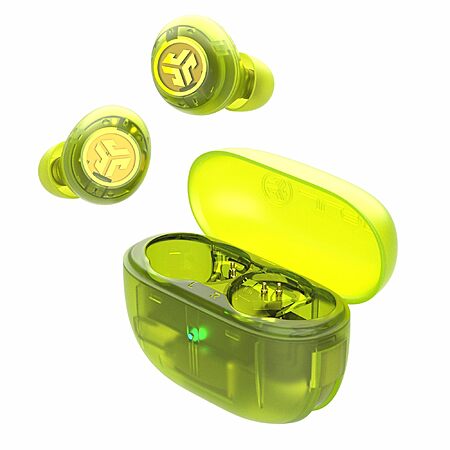
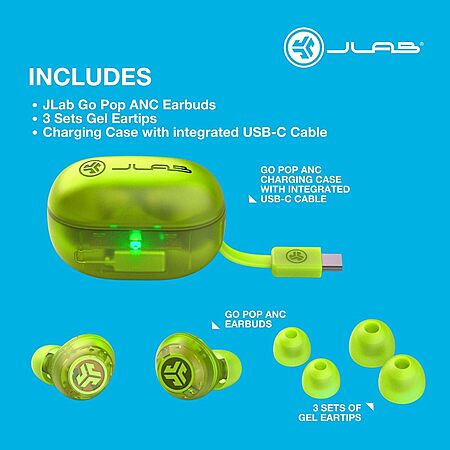
JLab Store via Amazon has JLab Go Pop ANC True Wireless Earbuds & Charging Case (various) on sale for $19.99. Shipping is free with Prime or on $35+ orders.
Thanks to community member tunabreath for finding this deal.
This collaborative space allows users to contribute additional information, tips, and insights to enhance the original deal post. Feel free to share your knowledge and help fellow shoppers make informed decisions.
JLab Store via Amazon has JLab Go Pop ANC True Wireless Earbuds & Charging Case (various) on sale for $19.99. Shipping is free with Prime or on $35+ orders.
Thanks to community member tunabreath for finding this deal.
Model: JLab Go Pop ANC True Wireless Earbuds & Charging Case, Transparent Neon Green, Active Noise Cancelling, 10mm Drivers, Dual Connect, Customize Your Sound with App, Be Aware Mode, MEMS Microphone
Deal History
Deal History includes data from multiple reputable stores, such as Best Buy, Target, and Walmart. The lowest price among stores for a given day is selected as the "Sale Price".
Sale Price does not include sale prices at Amazon unless a deal was posted by a community member.
Wait. How do you charge these? You need a USB c port? I feel like I don't have that.
Smartphones have been using usb-c since 2015. Macbook Airs since 2018.
Suppose if you haven't bought anything new since then with a usb-c port or charger, pickup a cheap usb-c charger at the same time, like under $1.90 on eBay.
Smartphones have been using usb-c since 2015. Macbook Airs since 2018.
Suppose if you haven't bought anything new since then with a usb-c port or charger, pickup a cheap usb-c charger at the same time, like under $1.90 on eBay.
You're misunderstanding. Do you have a USB C female port on a cable? I understand they make most power adapters with USB c female ports now though I do own mostly USB type A power adapters. The issue is the physical cables now are usually USB Type c male to male both ends.
This earbud case seems to have an attached USB c male plug which this needs to be plugged into USB c female port. So sure I can plug it into my USB c power adapter plugged into the wall, but then this earbud case is going to dangle and unplug itself or at the very least stress the tiny cable/case. It's just stupid design decision now I'm going to need extension cord or buy a USB c female to male cable.
Last edited by AmusedPanther530 January 24, 2026 at 04:42 PM.
Can't speak to these specifically. I have the non-ANC version and they are great. That said, you can get some p30i for $25 on sale quote frequently and they will be superior in every way other than fit, which is personal/subjective.
Wait. How do you charge these? You need a USB c port? I feel like I don't have that.
I do own mostly USB type A power adapters
[Great, I think you'll be able to charge these then]
This earbud case seems to have an attached USB c male plug which this needs to be plugged into USB c female port.
[Yes, but you can certainly use your existing USB A to C cables!]
1
Like
Helpful
Funny
Not helpful
Sign up for a Slickdeals account to remove this ad.
[Great, I think you'll be able to charge these then]
This earbud case seems to have an attached USB c male plug which this needs to be plugged into USB c female port.
[Yes, but you can certainly use your existing USB A to C cables!]
Do you not understand the difference between male plug and female port?
I've had JLab Jbuds Air ANC for about 1.5 years. I'm currently sitting on my couch, trying to get them to pair with each other. I have two other JLab pairs(work/gym) and they're both doing the same thing. They all sound good, so I've been suggesting them this whole time; looking around, my issue is extremely common, sometimes occurring within a year of ownership. Between that and their inability to stay in sync when I'm walking/jogging local trails(one will continuously cut out), I'm done with JLab for good.
From BB's troubleshooting page:
"find the nearest river/lake/swamp and use them and the charging case in a rock skipping competition because I've tried literally everything and nothing works. The right and left chambers of US congress pair better than the right and left jlab earbuds."
"Dude I feel your pain. I've been using these going on a year now and they seriously suck. Constantly depairing from one another is just one problem. They also seem to randomly switch into this terrible EQ mode where everything sounds like it's being played through a 1930s ham radio. These headphones have a mind of their own and are completely useless. I follow the steps to get them re-paired to one another constantly, with very inconsistent results every time. Sometimes I spend days without them just letting the battery drain flat so I can reset them and use them again for anywhere from 1hour to 3 days before the issue occurs again. I honestly will never buy any product manufactured by JLAB again."
"You start typing how to fixed and they send u to press the bottom 7 times and after u repeat this process 20 more times you're gonna realice that it just doesn't work. And u will go have to go and buy a new one. And do yourself a favor don't buy this brand legit sucks"
"So the best thing I can recommend is to try the troubleshooting, get frustrated because it doesn't work, and bring them back to Best Buy for a refund. Then put that toward a product that works."
"These earbuds are great if you can only hear out of one of your ears at once."
"Complete waste of $100. I have tried forgetting device . Pushing 7 x inside case , outside case , tapping together .light blink all blue . All white . Blue and white . Rubbing my head and belly and jumping on one foot. NOTHING WORKS! Finally had to buy new buds (different brand of course ) Jlab clearly there's an issue , and clearly these are TRASH !!"
"I had to get them blinking white…(hit them x7 in charging case, wait ten seconds pull them out.) I turned them both off holding them in for however long until the while light quit blinking. I then turned them both back on, The white light blinked slowly. Like every 3 seconds or so. But when I tapped them three times, the white light blinked more rapidly. I did this to the other side, keeping them within 2inches of each other and they finally synced up. I've been at it for over an hour."
"Lol i stomped out my pair out of fustration"
"Absolute garbage, so many problems. Do not buy"
"DONT BUY!!! WORST PRODUCT EVER."
"Once you disconnected from both and forgot the device and they're in the case, press the right one 7x rapidly until the light blinks, then do it for the left 7x until the light blinks. Make you you leave them in the case for at least a minute after you did that." wait a 1 minute... then RESTART YOUR PHONE! Then pair to your device now."
"If none of this works I would just find something that is worth buying that works because there have been many problems with them before and they never work for me but you have to go through a deep process."
"I found with my earbuds that they were pairing to my phone as separate devices, so to solve this I forgot them on my device and then paired them both to a different device for 24hrs (idk if the timeframe counts) then when I paired it with my phone they connected together again. But honestly I would never buy another jlab product again."
"Argh - came here looking for help. Left ear bud absolutely not cooperating. Literally nothing Ive tried from all these suggestions and various youtube videos will work. #frustrationtothemax"
"So no doubt this product is dog**** but as my dude above said u gotta put them both back in the case rapidly do the reset bounce 7x each … reset one at a time while in the case … thats when you forget each device put back in case … do same to the other …. Back in case . Shut cover wait a minute and open and pair again . It worked rote as I was gonna throw them across the pond as a skipping stone . Go figure . They'll go bust and break in 3 months as you all know"
"The best thing you can do with crap is get rid of it and start again."
"Do not waste another moment in your precious life on trying to pair these USELESS, but highly-promoted, earbuds. I plan to bury mine deep deep deep in the woods and move on to the expensive but (I am told, reliable) Apple buds. At least the Jays only cost me £29 (at Argos) and even at that low price were not worth it."
"honestly 7x is not enough since they're so crappy, just tap as quickly and as many times as you can on one of them until you see it blink blue rapidly 4 times and then do the same with the other one. It only works if you're desperate enough, like stuck in the library at 8pm studying for finals desperate"
"I have jlab go pop+ earbuds. Right out of the box I could get them to connect to Bluetooth separately but not together. I tried putting them back in the case and forgetting them then tapping each one 7x then removing to allow to pair and the turning Bluetooth on to pair to my phone. I did this over and over"
"They are out of sync after a few uses. I sent them back and got a new pair. They said it probably has a battery issue. The new once same issue. The 7 taps is non sense. The only way you can get it work some times it to completely drain the battery and cross your fingers it will reset."
"I've been using these for a year, and they have worked great except for this. Follow the directions on their website and then tapping them together works, but once these ones break I'm getting a different brand. Don't use them."
"I tried all the answers in this thread, and somehow, not sure which, one of them worked. What I can tell is that both earbuds were out of case, only one was rapidly flashing blue (other steady white) , I did tap 7 times quickly on the logo to get into pairing mode. But honestly I tried everything 10 times so I have no certainty. What a piece of junk. At least it works now, but my patience has worn out for the remainder of the week"
"So this is still a problem sadly. I just got a pair and it has this problem, they count as separate devices and both won't connect at the same time or to each other. I've had zero luck with any the solutions posted here and it's kind of sad. This was my second pair of these headphones and the first worked fine for years. Just seems like a lot of lemons in the production line."
"Thank you to everyone who has provided some version of troubleshooting. I've had this issue for 2 months and this page was one (out of many) that I kept coming to in my daily attempt to fix my issue."
"For some reason, this worked for me when everything else failed. I think a better recommendation would be to get a product with less battery and pairing issues, but it is what it is."
"Anyways it took a full hr to connect them back and I have to say the guy who said (this is exactly what I did) actually gave a good answer, just follow it to the tea I guess"
"I just tried it for a third time and they finally repaired together."
"I figured it guys AFTER 2 hours!!!"
"Dude you could connect two potatoes together easier than these. Try resetting them and troubleshooting or just let the battery drain and reset them that way"
"So no joke. I've been trying to get my buds to pair for months. I almost gave up until I tried what one of you suggested about getting the blinking lights to go slow then getting to go more rapidly while holding them about 2 inches apart."
"Do yourself a favor and don't buy these. I've never owned a Jlab product that worked well. Get something else"
"Save your money...or spend a little more and buy a better product. The company sent me a second pair after six months because I couldn't resolve this issue. Six months after the second set, they started to do weird stuff too. Flashing sound back and forth between ears, randomly disconnecting while in use, and finally only a single earbud would connect. Exactly the same story on both sets."
"Against all odds and logic reseting them in the case after forgetting them on my phone THEN taking them out of the case and wacking them together and repairing DID work. These are hot garbage. But at least I can listen with two ears until they break again."
"NOTHING I read and tried worked until after plugging into chromebook." (some folks report them working after pairing with a laptop for some reason)
"After many frustrating days and failed "fixes" this did work."
"Hi, I had this exact problem with my jlab earbuds, I found that if I forgot both of them (because they were no long connecting as a singular device) and then connected them both to my laptop/other unknown device. I then left them connected for 24hrs (idk if that time had any impact). And then when I connected back to my phone they were pairing together again. I have the air pop earbuds btw."
"Cant get them to connect together but my phone will allow me to play music to 2 devices.."
"Proceed to the kitchen, place one foot on the bin pedal press once then throw your h lab sports in and release pedal, SORTED."
Last edited by MisterOfMagma January 27, 2026 at 12:56 PM.
I bought the non-ANC version of this the last time they popped up here. They're really good earbuds. Only minor gripe I have with them is they're a pain to get out of the charging box. Otherwise, they're super reliable and pretty decent sound for the price.
I bought the non-ANC version of this the last time they popped up here. They're really good earbuds. Only minor gripe I have with them is they're a pain to get out of the charging box. Otherwise, they're super reliable and pretty decent sound for the price.
I carved some horizontal slits on all of mine to assist getting them out the both the case and me ears. Great earbuds that are untouchable in the price range for musicality IMO











Leave a Comment
Top Comments
Purchased a pair.
29 Comments
Sign up for a Slickdeals account to remove this ad.
Suppose if you haven't bought anything new since then with a usb-c port or charger, pickup a cheap usb-c charger at the same time, like under $1.90 on eBay.
Suppose if you haven't bought anything new since then with a usb-c port or charger, pickup a cheap usb-c charger at the same time, like under $1.90 on eBay.
This earbud case seems to have an attached USB c male plug which this needs to be plugged into USB c female port. So sure I can plug it into my USB c power adapter plugged into the wall, but then this earbud case is going to dangle and unplug itself or at the very least stress the tiny cable/case. It's just stupid design decision now I'm going to need extension cord or buy a USB c female to male cable.
Sign up for a Slickdeals account to remove this ad.
From BB's troubleshooting page:
"find the nearest river/lake/swamp and use them and the charging case in a rock skipping competition because I've tried literally everything and nothing works. The right and left chambers of US congress pair better than the right and left jlab earbuds."
"Dude I feel your pain. I've been using these going on a year now and they seriously suck. Constantly depairing from one another is just one problem. They also seem to randomly switch into this terrible EQ mode where everything sounds like it's being played through a 1930s ham radio. These headphones have a mind of their own and are completely useless. I follow the steps to get them re-paired to one another constantly, with very inconsistent results every time. Sometimes I spend days without them just letting the battery drain flat so I can reset them and use them again for anywhere from 1hour to 3 days before the issue occurs again. I honestly will never buy any product manufactured by JLAB again."
"You start typing how to fixed and they send u to press the bottom 7 times and after u repeat this process 20 more times you're gonna realice that it just doesn't work. And u will go have to go and buy a new one. And do yourself a favor don't buy this brand legit sucks"
"So the best thing I can recommend is to try the troubleshooting, get frustrated because it doesn't work, and bring them back to Best Buy for a refund. Then put that toward a product that works."
"These earbuds are great if you can only hear out of one of your ears at once."
"Complete waste of $100. I have tried forgetting device . Pushing 7 x inside case , outside case , tapping together .light blink all blue . All white . Blue and white . Rubbing my head and belly and jumping on one foot. NOTHING WORKS! Finally had to buy new buds (different brand of course ) Jlab clearly there's an issue , and clearly these are TRASH !!"
"I had to get them blinking white…(hit them x7 in charging case, wait ten seconds pull them out.) I turned them both off holding them in for however long until the while light quit blinking. I then turned them both back on, The white light blinked slowly. Like every 3 seconds or so. But when I tapped them three times, the white light blinked more rapidly. I did this to the other side, keeping them within 2inches of each other and they finally synced up. I've been at it for over an hour."
"Lol i stomped out my pair out of fustration"
"Absolute garbage, so many problems. Do not buy"
"DONT BUY!!! WORST PRODUCT EVER."
"Once you disconnected from both and forgot the device and they're in the case, press the right one 7x rapidly until the light blinks, then do it for the left 7x until the light blinks. Make you you leave them in the case for at least a minute after you did that." wait a 1 minute... then RESTART YOUR PHONE! Then pair to your device now."
"If none of this works I would just find something that is worth buying that works because there have been many problems with them before and they never work for me but you have to go through a deep process."
"I found with my earbuds that they were pairing to my phone as separate devices, so to solve this I forgot them on my device and then paired them both to a different device for 24hrs (idk if the timeframe counts) then when I paired it with my phone they connected together again. But honestly I would never buy another jlab product again."
"Argh - came here looking for help. Left ear bud absolutely not cooperating. Literally nothing Ive tried from all these suggestions and various youtube videos will work. #frustrationtothemax"
"So no doubt this product is dog**** but as my dude above said u gotta put them both back in the case rapidly do the reset bounce 7x each … reset one at a time while in the case … thats when you forget each device put back in case … do same to the other …. Back in case . Shut cover wait a minute and open and pair again . It worked rote as I was gonna throw them across the pond as a skipping stone . Go figure . They'll go bust and break in 3 months as you all know"
"The best thing you can do with crap is get rid of it and start again."
"Do not waste another moment in your precious life on trying to pair these USELESS, but highly-promoted, earbuds. I plan to bury mine deep deep deep in the woods and move on to the expensive but (I am told, reliable) Apple buds. At least the Jays only cost me £29 (at Argos) and even at that low price were not worth it."
"honestly 7x is not enough since they're so crappy, just tap as quickly and as many times as you can on one of them until you see it blink blue rapidly 4 times and then do the same with the other one. It only works if you're desperate enough, like stuck in the library at 8pm studying for finals desperate"
"I have jlab go pop+ earbuds. Right out of the box I could get them to connect to Bluetooth separately but not together. I tried putting them back in the case and forgetting them then tapping each one 7x then removing to allow to pair and the turning Bluetooth on to pair to my phone. I did this over and over"
"They are out of sync after a few uses. I sent them back and got a new pair. They said it probably has a battery issue. The new once same issue. The 7 taps is non sense. The only way you can get it work some times it to completely drain the battery and cross your fingers it will reset."
"I've been using these for a year, and they have worked great except for this. Follow the directions on their website and then tapping them together works, but once these ones break I'm getting a different brand. Don't use them."
"I tried all the answers in this thread, and somehow, not sure which, one of them worked. What I can tell is that both earbuds were out of case, only one was rapidly flashing blue (other steady white) , I did tap 7 times quickly on the logo to get into pairing mode. But honestly I tried everything 10 times so I have no certainty. What a piece of junk. At least it works now, but my patience has worn out for the remainder of the week"
"So this is still a problem sadly. I just got a pair and it has this problem, they count as separate devices and both won't connect at the same time or to each other. I've had zero luck with any the solutions posted here and it's kind of sad. This was my second pair of these headphones and the first worked fine for years. Just seems like a lot of lemons in the production line."
"Thank you to everyone who has provided some version of troubleshooting. I've had this issue for 2 months and this page was one (out of many) that I kept coming to in my daily attempt to fix my issue."
"For some reason, this worked for me when everything else failed. I think a better recommendation would be to get a product with less battery and pairing issues, but it is what it is."
"Anyways it took a full hr to connect them back and I have to say the guy who said (this is exactly what I did) actually gave a good answer, just follow it to the tea I guess"
"I just tried it for a third time and they finally repaired together."
"I figured it guys AFTER 2 hours!!!"
"Dude you could connect two potatoes together easier than these. Try resetting them and troubleshooting or just let the battery drain and reset them that way"
"So no joke. I've been trying to get my buds to pair for months. I almost gave up until I tried what one of you suggested about getting the blinking lights to go slow then getting to go more rapidly while holding them about 2 inches apart."
"Do yourself a favor and don't buy these. I've never owned a Jlab product that worked well. Get something else"
"Save your money...or spend a little more and buy a better product. The company sent me a second pair after six months because I couldn't resolve this issue. Six months after the second set, they started to do weird stuff too. Flashing sound back and forth between ears, randomly disconnecting while in use, and finally only a single earbud would connect. Exactly the same story on both sets."
"Against all odds and logic reseting them in the case after forgetting them on my phone THEN taking them out of the case and wacking them together and repairing DID work. These are hot garbage. But at least I can listen with two ears until they break again."
"NOTHING I read and tried worked until after plugging into chromebook." (some folks report them working after pairing with a laptop for some reason)
"After many frustrating days and failed "fixes" this did work."
"Hi, I had this exact problem with my jlab earbuds, I found that if I forgot both of them (because they were no long connecting as a singular device) and then connected them both to my laptop/other unknown device. I then left them connected for 24hrs (idk if that time had any impact). And then when I connected back to my phone they were pairing together again. I have the air pop earbuds btw."
"Cant get them to connect together but my phone will allow me to play music to 2 devices.."
"Proceed to the kitchen, place one foot on the bin pedal press once then throw your h lab sports in and release pedal, SORTED."
Leave a Comment