Amazon has
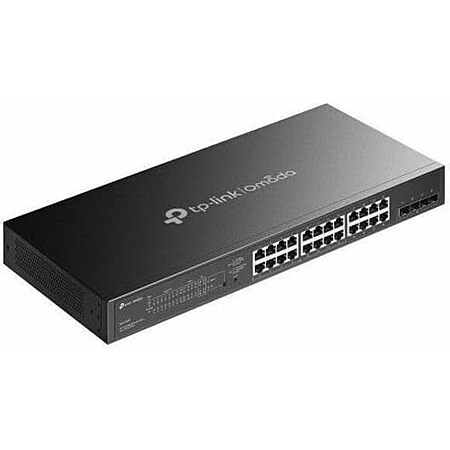
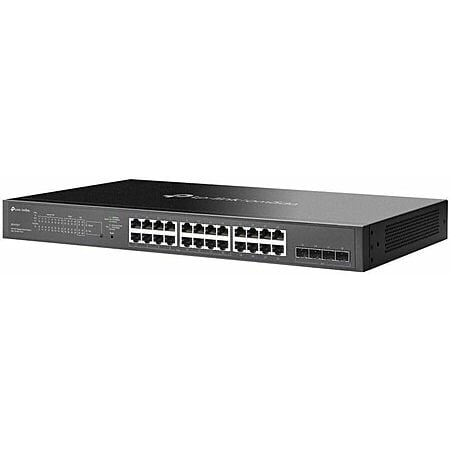
TP-Link 24 Port PoE Gigabit Switch (SG2428LP) for
$179.99.
Shipping is free.
Note: Earn 10% back on this item when you pay with your Prime Card (
more information). To verify, you should see "Get 5% back, and additional rewards on select items charged to this card" listed in the 'Paying with (your card info)' section at checkout.
Thanks to Deal Hunter
phoinix for finding this deal.
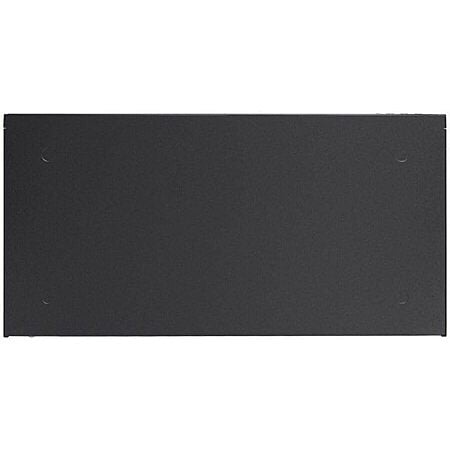
Features: - 24 x Gigabit RJ45 Ethernet Ports
- 16 x PoE+ Complaint Ports
- 4 x Gigabit SFP+ Ports
- 56 Gb/s Switching Capacity
- 41.66 Mpps Forwarding Rate
- 150W PoE Budget
- Rack Mountable
- Fanless Design
- Works with Omada App
- Centralized Cloud Management


 + Free Shippingat Amazon


Top Comments
I'm also having several issues with it. First it has started to overheat and completely shuts down without warning, which is bad since my WAP and cameras are attached to it! This has happened twice in the few weeks I've been using it.
Second, I started experiencing daily Internet outages that I'm still diagnosing. My network was completely fine for over a year, but since adding this switch, the outages started. I can't rule out the switch since it had that overheating issue.
Not sure if others have issues but that's my story.
Community Reviews
This TP-Link 24 port PoE Gigabit switch stands out as a practical fit for wired homes, homelabs, and small businesses that need PoE for cameras, access points, and VoIP phones. The Omada management tools are described as solid for the price, with a web interface and Cisco like CLI, and the 24 port layout makes sense once TVs, streamers, PCs, and other devices start adding up. The main caution is noise and heat on the fan version, with reports of loud startup behavior and even shutdowns, though the SG2428LP is called out as the quiet low power model. It looks best for a setup that truly needs PoE and plenty of ports.
Common Questions (4)
24 ports can fill up quickly once you add access points, PoE cameras, phones, PCs, streaming boxes, and AV gear. It is especially practical for small businesses or larger homes with multiple wired rooms and several PoE devices.
The SG2428LP is the low-power fanless version, while the louder reports apply to the fan-equipped SG2428P. The LP model is described as suitable for a home lab or server closet, and the fan version can be very loud at startup and in bedrooms.
Yes. It is well suited for PoE cameras, access points, and corded VoIP phones, including setups where a single Ethernet cable powers both the phone and its wireless base station. That makes installation simpler for small businesses and home networks.
If you do not specifically need PoE+, it may be worth skipping because 2.5GbE gear is becoming affordable and can offer a better upgrade path. The switch still makes sense when you need PoE for cameras, access points, or phones.
AI-generated summary based on comments from the community. Updated ago
Join The Conversation
Share your experience with the Slickdeals community
Share information with the community. Please follow our Community Guidelines and be kind!
30 Comments
Sign up for a Slickdeals account to remove this ad.
Access points, how many do you have? Probably overkill like most for streaming Netflix for your kids. Cameras? Hmmm. again maybe if you have 15, do you need that many? Phones use WIFI so you don't need it for that. Is everyone using USB-C/Lightning to RJ-45 adapters with a 50ft cable to this? No, it doesn't add up fast for people at home. IP phones? Are we in 2015? Do you have 10?
You won't use wifi? What's the issue with wifi? How do you use your cellphone in your house? Do you think the cellular towers are better than the home internet? Are you afraid of big brother watching you?
Newer devices that are affordable are now arriving with 2.5gbe connections. Decent motherboards in the $120-150 range normally include it now, so we aren't talking about the premium $499 boards here. As an example, on SD today there is a cpu, motherboard, and ram deal for $600. The board has 2.5gbe. This stuff is getting affordable now. Link: https://slickdeals.net/f/19155241-amd-ryzen-7-7800x3d-asus-b650e-e-tuf-gaming-wifi-am5-crucial-pro-overclocking-32gb-ddr5-6000-kit-599-99?attrsrc=User
Internet access is also speeding up a lot. The majority of people in the US have internet above 1 gbps available. It might be expensive now, but in a few years it will likely be normal. 5 years ago the base internet plans offered to me were 100mbps. Today the cheap $35 dollar plan is 500 mbps, 1 gbps is $65, and 2 gbps is $120.
I revamped my network recently. I bought a used TEG 30262 switch, 24 gig ethernet ports and importantly 4 SFP+ 10 gbps cages. It cost $69 shipped. I also bought a 8x2.5gbe with 1xSFP+ cage switch for $67. Throw in a 10gb DAC for the SFP+ to link the switches at 10 gig, cost $13.
This gives me 8 2.5gbe ports and 24 1gbe ports for older/slower devices that won't benefit from 2.5g, but allows me to link my main pc and other important devices at a higher speed. It also allows me an upgrade path in the future to internet speeds above 1 gbps. The switches are also fanless and quiet. The whole upgrade cost about $150, so pretty cheap.
And not everyone has over 1gig speed. My residential in Diamond Bar,CA is at 500/20.
Access points, how many do you have? Probably overkill like most for streaming Netflix for your kids. Cameras? Hmmm. again maybe if you have 15, do you need that many? Phones use WIFI so you don't need it for that. Is everyone using USB-C/Lightning to RJ-45 adapters with a 50ft cable to this? No, it doesn't add up fast for people at home. IP phones? Are we in 2015? Do you have 10?
You won't use wifi? What's the issue with wifi? How do you use your cellphone in your house? Do you think the cellular towers are better than the home internet? Are you afraid of big brother watching you?
Businesses use VOIP phones. The Polycom ones we use in our stores still require an Ethernet connection to function. POE is enough to power corded phones and the wireless base station for cordless phones, so it's a single cord solution and really simplifies installation.
A small business owner would find a switch like this to be perfect for their needs.
Sign up for a Slickdeals account to remove this ad.
These are more useful for small businesses that have security cameras, multiple networks, multiple access points, etc. For the average homeowner, they're just doing this for their own enthusiast self and will probably gain barely anything by putting time and effort into building an "enterprise-lite" network.
Too many people exaggerate their internet needs. My area still hasn't gotten proper fiber service so most internet packages with the current main ISP are overpriced. People constantly complain about how much they're forced to pay for 1 Gigabit internet, when all they do is stream Netflix and occasionally download video games. There is honestly no reason these people need to spend extra for these speeds but they think they need it.
I have multiple VLANs setup in my home for different device types and honestly I feel like even that was unnecessary. Meanwhile my neighbors are probably running consumer grade routers with outdated firmware, connecting all devices on them, low quality smart devices and the computers they use to check their bank statements, and nobody is likely stealing their info.
The web gui is fine, not the best I've seen and definitely not the worst.
The biggest advantage to me was how similar the cli is to Cisco IOS.
Not a 1:1 copy but very similar syntax and configuration.
In this price range the switches I've seen are more "Semi-managed" and only allow configuration from a web interface and are missing important features like SNMP, syslog, or even a CLI.
For someone with a small homelab looking to dabble in networking or someone just needing a 24 port managed switch this isn't a bad buy.
Then again older switches from cisco like the 3750 or 3560 can be had on eBay pretty cheap so those might be a better buy if you're looking for something to lab with.
For under $200 for an actual business class (at least a small business) 24 port PoE switch is a great deal in my opinion.
*Of course you will say who cares, we need 24 ports for cameras with POE and VLANs of all things at our house. I'll save you the response. 2.5gb switches are here, might as get those instead right? Nope. Ok, you do you.
Plenty of people have switches like this, and more, in their homes.
Am I the only CCNA in here? 2008 cert'd
*Of course you will say who cares, we need 24 ports for cameras with POE and VLANs of all things at our house. I'll save you the response. 2.5gb switches are here, might as get those instead right? Nope. Ok, you do you.
You're about 10 years in the past.
CCNA wouldn't even get your resume past HR filtering at my previous place of employment.
CCNA is still relevant today
Everyone else posting here, you're lightyears behind now. Update your network, are you running 100ft cables throughout your house? Do you have RJ-45 ports in your house? No, you're using WIFI.
Sign up for a Slickdeals account to remove this ad.
Newer devices that are affordable are now arriving with 2.5gbe connections. Decent motherboards in the $120-150 range normally include it now, so we aren't talking about the premium $499 boards here. As an example, on SD today there is a cpu, motherboard, and ram deal for $600. The board has 2.5gbe. This stuff is getting affordable now. Link: https://slickdeals.net/f/19155241-amd-ryzen-7-7800x3d-asus-b650e-e-tuf-gaming-wifi-am5-crucial-pro-overclocking-32gb-ddr5-6000-kit-599-99?attrsrc=User
Internet access is also speeding up a lot. The majority of people in the US have internet above 1 gbps available. It might be expensive now, but in a few years it will likely be normal. 5 years ago the base internet plans offered to me were 100mbps. Today the cheap $35 dollar plan is 500 mbps, 1 gbps is $65, and 2 gbps is $120.
I revamped my network recently. I bought a used TEG 30262 switch, 24 gig ethernet ports and importantly 4 SFP+ 10 gbps cages. It cost $69 shipped. I also bought a 8x2.5gbe with 1xSFP+ cage switch for $67. Throw in a 10gb DAC for the SFP+ to link the switches at 10 gig, cost $13.
This gives me 8 2.5gbe ports and 24 1gbe ports for older/slower devices that won't benefit from 2.5g, but allows me to link my main pc and other important devices at a higher speed. It also allows me an upgrade path in the future to internet speeds above 1 gbps. The switches are also fanless and quiet. The whole upgrade cost about $150, so pretty cheap.
Join The Conversation
Share your experience with the Slickdeals community
Share information with the community. Please follow our Community Guidelines and be kind!