Slickdeals is community-supported.  We may get paid by brands for deals, including promoted items.
Heads up, this deal has expired. Want to create a deal alert for this item?
expiredphoinix | Staff posted Jan 30, 2026 08:02 AM

24-Port TP-Link Omada Gigabit PoE+ Network Switch + 10% Back w/ Prime Card

+ Free Shipping

$180

$290

37% off
Amazon
30 Comments 11,312 Views
Visit Amazon
Good Deal
Save
Share
Deal Details
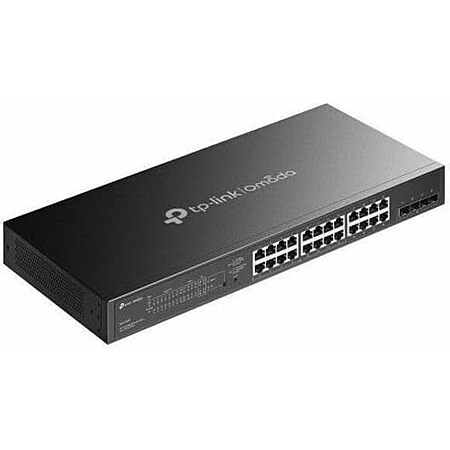
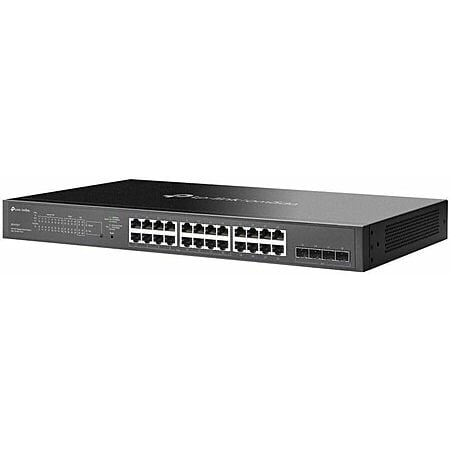
Amazon has TP-Link 24 Port PoE Gigabit Switch (SG2428LP) for $179.99. Shipping is free.

Note: Earn 10% back on this item when you pay with your Prime Card (more information). To verify, you should see "Get 5% back, and additional rewards on select items charged to this card" listed in the 'Paying with (your card info)' section at checkout.

Thanks to Deal Hunter phoinix for finding this deal.

Features:
  • 24 x Gigabit RJ45 Ethernet Ports
  • 16 x PoE+ Complaint Ports
  • 4 x Gigabit SFP+ Ports
  • 56 Gb/s Switching Capacity
  • 41.66 Mpps Forwarding Rate
  • 150W PoE Budget
  • Rack Mountable
  • Fanless Design
  • Works with Omada App
  • Centralized Cloud Management

Editor's Notes

Written by johnny_miller | Staff
  • About this deal:
    • Please see the original post for additional details & give the forum comments a read for helpful discussion. 
  • About this product:
    • Rating of 4.9 from over 30 customer reviews.
  • About this store:

Original Post

Written by phoinix | Staff
Product Info
Community Notes
About the Poster
Deal Details
Product Info
Community Notes
About the Poster
Amazon has TP-Link 24 Port PoE Gigabit Switch (SG2428LP) for $179.99. Shipping is free.

Note: Earn 10% back on this item when you pay with your Prime Card (more information). To verify, you should see "Get 5% back, and additional rewards on select items charged to this card" listed in the 'Paying with (your card info)' section at checkout.

Thanks to Deal Hunter phoinix for finding this deal.

Features:
  • 24 x Gigabit RJ45 Ethernet Ports
  • 16 x PoE+ Complaint Ports
  • 4 x Gigabit SFP+ Ports
  • 56 Gb/s Switching Capacity
  • 41.66 Mpps Forwarding Rate
  • 150W PoE Budget
  • Rack Mountable
  • Fanless Design
  • Works with Omada App
  • Centralized Cloud Management

Editor's Notes

Written by johnny_miller | Staff
  • About this deal:
    • Please see the original post for additional details & give the forum comments a read for helpful discussion. 
  • About this product:
    • Rating of 4.9 from over 30 customer reviews.
  • About this store:

Original Post

Written by phoinix | Staff

Community Voting

Deal Score
+34
Good Deal
Visit Amazon

Price Intelligence

Model: TP-Link Omada SG2428LP V1 - switch - 28 ports - smart - rack-mountable

Deal History 

Sale Price
Slickdeal
  • $NaN
  • Today

Current Prices

Sort: Lowest to Highest | Last Updated 3/23/2026, 09:29 AM
Sold By Sale Price
Amazon$179
NewEgg$289.99

Leave a Comment

Unregistered (You)

Top Comments

dnguyen800
487 Posts
129 Reputation
I have the SG2428P version of this, which is quite loud. Don't recommend a switch like this unless you absolutely need it and can install it somewhere you can't hear it. I would never install it in the same room I sleep in. I would also be annoyed if this was installed in my homelab or the room where I work.

I'm also having several issues with it. First it has started to overheat and completely shuts down without warning, which is bad since my WAP and cameras are attached to it! This has happened twice in the few weeks I've been using it.

Second, I started experiencing daily Internet outages that I'm still diagnosing. My network was completely fine for over a year, but since adding this switch, the outages started. I can't rule out the switch since it had that overheating issue.

Not sure if others have issues but that's my story.
banorwood
228 Posts
188 Reputation
Should probably add "Omada" to the title. That's pretty important to some people!
liamtoh1
1705 Posts
568 Reputation
Is it centrally managed like the OP's switch? If not, then your solution is not a true comparison, is it?

30 Comments

Sign up for a Slickdeals account to remove this ad.

Jan 31, 2026 08:17 AM
1,041 Posts
Joined Oct 2012
MxxCJan 31, 2026 08:17 AM
1,041 Posts
TP-Link offers quite a lot for the money, but with the government constantly threatening to ban them in the US, I'd be hesitant to invest in significant infrastructure based on TP-Link. Plus their security track record is not that great.
Jan 31, 2026 01:29 PM
2,893 Posts
Joined Oct 2008
sup3rson1cJan 31, 2026 01:29 PM
2,893 Posts
Quote from Adeezl :

Access points, how many do you have? Probably overkill like most for streaming Netflix for your kids. Cameras? Hmmm. again maybe if you have 15, do you need that many? Phones use WIFI so you don't need it for that. Is everyone using USB-C/Lightning to RJ-45 adapters with a 50ft cable to this? No, it doesn't add up fast for people at home. IP phones? Are we in 2015? Do you have 10? shake head


You won't use wifi? What's the issue with wifi? How do you use your cellphone in your house? Do you think the cellular towers are better than the home internet? Are you afraid of big brother watching you? EEK! You use a USB-C to RJ-45 adapter to your phone at home?
Clearly this is not the thread for you. Go away.
1
Jan 31, 2026 02:19 PM
70 Posts
Joined Nov 2011
geant90Jan 31, 2026 02:19 PM
70 Posts
Quote from EricH5400 :
I'd skip this unless you need poe+. No point in buying something you'll upgrade in a few years.
Newer devices that are affordable are now arriving with 2.5gbe connections. Decent motherboards in the $120-150 range normally include it now, so we aren't talking about the premium $499 boards here. As an example, on SD today there is a cpu, motherboard, and ram deal for $600. The board has 2.5gbe. This stuff is getting affordable now. Link: https://slickdeals.net/f/19155241-amd-ryzen-7-7800x3d-asus-b650e-e-tuf-gaming-wifi-am5-crucial-pro-overclocking-32gb-ddr5-6000-kit-599-99?attrsrc=UserFlow%3ADealFeed%3AFor+You&src=forYou


Internet access is also speeding up a lot. The majority of people in the US have internet above 1 gbps available. It might be expensive now, but in a few years it will likely be normal. 5 years ago the base internet plans offered to me were 100mbps. Today the cheap $35 dollar plan is 500 mbps, 1 gbps is $65, and 2 gbps is $120.


I revamped my network recently. I bought a used TEG 30262 switch, 24 gig ethernet ports and importantly 4 SFP+ 10 gbps cages. It cost $69 shipped. I also bought a 8x2.5gbe with 1xSFP+ cage switch for $67. Throw in a 10gb DAC for the SFP+ to link the switches at 10 gig, cost $13.
This gives me 8 2.5gbe ports and 24 1gbe ports for older/slower devices that won't benefit from 2.5g, but allows me to link my main pc and other important devices at a higher speed. It also allows me an upgrade path in the future to internet speeds above 1 gbps. The switches are also fanless and quiet. The whole upgrade cost about $150, so pretty cheap.
Pretty personal and pointless post. It's a great deal and 1GB wouldn't be replaced as soon as your lengthy post suggests.
Last edited by geant90 January 31, 2026 at 06:22 AM.
1
Jan 31, 2026 02:23 PM
28 Posts
Joined Sep 2018
NanbakatJan 31, 2026 02:23 PM
28 Posts
Quote from Adeezl :
What do you guys plug into 24 port switches? Who needs 24 ports at their house?
If you have a whole house wired network with multiple LAN ports in every room of your house you need this. Getting your streaming devices and computers off the wireless network makes a huge difference.
Jan 31, 2026 02:56 PM
37 Posts
Joined Jul 2014
BDD12Jan 31, 2026 02:56 PM
37 Posts
Great deal! In for one for home lab. Don't mistaken these quiet fanless version for the fan version that others mentioned that they're loud. These are the "LP" Low Power, not "P".

And not everyone has over 1gig speed. My residential in Diamond Bar,CA is at 500/20.
Jan 31, 2026 03:39 PM
586 Posts
Joined Mar 2019
RogueVariableJan 31, 2026 03:39 PM
586 Posts
Quote from dnguyen800 :
I have the SG2428P version of this, which is quite loud. Don't recommend a switch like this unless you absolutely need it and can install it somewhere you can't hear it. I would never install it in the same room I sleep in. I would also be annoyed if this was installed in my homelab or the room where I work. I'm also having several issues with it. First it has started to overheat and completely shuts down without warning, which is bad since my WAP and cameras are attached to it! This has happened twice in the few weeks I've been using it. Second, I started experiencing daily Internet outages that I'm still diagnosing. My network was completely fine for over a year, but since adding this switch, the outages started. I can't rule out the switch since it had that overheating issue. Not sure if others have issues but that's my story.
Sounds like a faulty fan that's ready to give out. Pursue a warranty replacement if that option is available to you.
Jan 31, 2026 04:38 PM
831 Posts
Joined Nov 2011
freakingwillyJan 31, 2026 04:38 PM
831 Posts
Quote from Adeezl :

Access points, how many do you have? Probably overkill like most for streaming Netflix for your kids. Cameras? Hmmm. again maybe if you have 15, do you need that many? Phones use WIFI so you don't need it for that. Is everyone using USB-C/Lightning to RJ-45 adapters with a 50ft cable to this? No, it doesn't add up fast for people at home. IP phones? Are we in 2015? Do you have 10? shake head


You won't use wifi? What's the issue with wifi? How do you use your cellphone in your house? Do you think the cellular towers are better than the home internet? Are you afraid of big brother watching you? EEK! You use a USB-C to RJ-45 adapter to your phone at home?
I'm a deployment engineer, I also use Omada at home.

Businesses use VOIP phones. The Polycom ones we use in our stores still require an Ethernet connection to function. POE is enough to power corded phones and the wireless base station for cordless phones, so it's a single cord solution and really simplifies installation.

A small business owner would find a switch like this to be perfect for their needs.

Sign up for a Slickdeals account to remove this ad.

Jan 31, 2026 09:47 PM
2,708 Posts
Joined May 2015
justyeJan 31, 2026 09:47 PM
2,708 Posts
Quote from Adeezl :
What do you guys plug into 24 port switches? Who needs 24 ports at their house?
For the average home owner, likely security cameras and access points that require PoE ports. This is perfect for that. I think a lot of amateur techno dad types go overboard and buy things like this unnecessarily because they have too much time on their hands and no interesting hobbies. Like most people don't need all their devices hooked up via ethernet. The crazy thing is they go overboard with the Wi-Fi network too, so they don't really have to worry about too many devices clogging up their Wi-Fi network. Why do you need a Blu-ray player connected to your home network via ethernet? Most homes probably have 4-5 ethernet cable runs throughout the house to begin with so everything else requires additional work and money. It's just stupid and a waste of time, but people like to spend time with this kind of work. Whatever floats their boat.

These are more useful for small businesses that have security cameras, multiple networks, multiple access points, etc. For the average homeowner, they're just doing this for their own enthusiast self and will probably gain barely anything by putting time and effort into building an "enterprise-lite" network.

Too many people exaggerate their internet needs. My area still hasn't gotten proper fiber service so most internet packages with the current main ISP are overpriced. People constantly complain about how much they're forced to pay for 1 Gigabit internet, when all they do is stream Netflix and occasionally download video games. There is honestly no reason these people need to spend extra for these speeds but they think they need it.

I have multiple VLANs setup in my home for different device types and honestly I feel like even that was unnecessary. Meanwhile my neighbors are probably running consumer grade routers with outdated firmware, connecting all devices on them, low quality smart devices and the computers they use to check their bank statements, and nobody is likely stealing their info.
Last edited by justye January 31, 2026 at 01:53 PM.
Feb 01, 2026 12:15 AM
81 Posts
Joined Sep 2012
2chainzFeb 01, 2026 12:15 AM
81 Posts
I haven't used this exact model but the omada switch I have used was decent for the price.
The web gui is fine, not the best I've seen and definitely not the worst.
The biggest advantage to me was how similar the cli is to Cisco IOS.
Not a 1:1 copy but very similar syntax and configuration.
In this price range the switches I've seen are more "Semi-managed" and only allow configuration from a web interface and are missing important features like SNMP, syslog, or even a CLI.
For someone with a small homelab looking to dabble in networking or someone just needing a 24 port managed switch this isn't a bad buy.
Then again older switches from cisco like the 3750 or 3560 can be had on eBay pretty cheap so those might be a better buy if you're looking for something to lab with.
For under $200 for an actual business class (at least a small business) 24 port PoE switch is a great deal in my opinion.
Feb 01, 2026 04:41 AM
897 Posts
Joined Dec 2012
AdeezlFeb 01, 2026 04:41 AM
897 Posts
Quote from sup3rson1c :
Clearly this is not the thread for you. Go away.
Am I the only CCNA in here? 2008 cert'd worship Funny as I don't even work in network admin anymore for 14 years. That's why I asked, so overkill for everyone. 24 ports? People are using 10 max.

*Of course you will say who cares, we need 24 ports for cameras with POE and VLANs of all things at our house. I'll save you the response. 2.5gb switches are here, might as get those instead right? Nope. Ok, you do you.

Quote from scraejtp :
Not every product is meant for you.

Plenty of people have switches like this, and more, in their homes.
You're about 10 years in the past.
Last edited by Adeezl January 31, 2026 at 08:50 PM.
1
Feb 01, 2026 05:47 AM
16 Posts
Joined Apr 2015
dtlokeyFeb 01, 2026 05:47 AM
16 Posts
Quote from Adeezl :

Am I the only CCNA in here? 2008 cert'd worship Funny as I don't even work in network admin anymore for 14 years. That's why I asked, so overkill for everyone. 24 ports? People are using 10 max.

*Of course you will say who cares, we need 24 ports for cameras with POE and VLANs of all things at our house. I'll save you the response. 2.5gb switches are here, might as get those instead right? Nope. Ok, you do you.


You're about 10 years in the past.
I have a family of 4 i I can list off 4 pc's, 1 work laptop, 5 streaming boxes, 1 home server, 5 POE cameras, 3 AV receivers, 4 game systems of various generations, and that's not including any backbone IOT, the AP's, not sure how you can't fathom how someone who doesn't live alone can find more than 10 ports to use...smh. if you have 1-2 people and an equivalent space don't assume everyone else lives in a household like yours.
1
Feb 01, 2026 04:53 PM
738 Posts
Joined Nov 2013
PinakoFeb 01, 2026 04:53 PM
738 Posts
Quote from duc135 :
I have a Ubiquiti 48 port 1GbE POE++ switch and a Ubiquiti 48 port 2.5GbE POE+ switch. Both are in a rack in my kids' bedroom. You can barely hear them in the dead of night.People like me who refuse to use WiFi unless absolutely necessary. Just about everything is internet enabled these days. TVs, A/V receivers, audio amplifiers, DVD/Blu-ray players, media streamers, security cameras, etc.
Even folks who double down on WiFi need to plug their access points into their network at some point. Unless they don't mind compromising with "mesh" or whatever the kids call it these days.
1
Feb 01, 2026 04:53 PM
625 Posts
Joined Sep 2011
duc135Feb 01, 2026 04:53 PM
625 Posts
Quote from Adeezl :
Am I the only CCNA in here?.
It's possible. I'm sure many here are far beyond a simple entry level networking certification. Personally, I wouldn't be using a CCNA certification as anything close to bragging about knowledge level. I can probably get my 7 year old to pass the CCNA in about 6 months.

CCNA wouldn't even get your resume past HR filtering at my previous place of employment.


Quote from Adeezl :
... I don't even work in network admin anymore for 14 years.
Yes, that is painfully obvious. I wouldn't be surprised if it was a LOT longer than that.
1
Feb 05, 2026 04:25 AM
897 Posts
Joined Dec 2012
AdeezlFeb 05, 2026 04:25 AM
897 Posts
Quote from duc135 :
I can probably get my 7 year old to pass the CCNA in about 6 months. CCNA wouldn't even get your resume past HR filtering at my previous place of employment. Yes, that is painfully obvious. I wouldn't be surprised if it was a LOT longer than that.
I was fully expecting these type of responses here on slickdeals. Everyone here is a pro in every thread they post in. Your 7yr is old is so weak, You can't pass them, and they could never pass a CCNA cert. EEK!

CCNA is still relevant today EEK!. No, people at their house with little to no experience do not need a 24 port switch for their home network, especially nearing EOL for 1gb speeds. If you're so into the networking, why would you support this cheap stuff? Are we going to talk about the SFP Ports? Are people using these at home? shake head

Everyone else posting here, you're lightyears behind now. Update your network, are you running 100ft cables throughout your house? Do you have RJ-45 ports in your house? No, you're using WIFI.

Quote from Nanbakat :
If you have a whole house wired network with multiple LAN ports in every room of your house you need this. Getting your streaming devices and computers off the wireless network makes a huge difference.
You need 24 ports for that? How much cable are you guys running through your house? You guys don't use wifi? I don't think your kids need wired connections to stream netflix.

Quote from justye :
Whatever floats their boat. These are more useful for small businesses that have security cameras, multiple networks, multiple access points, etc.
Probably the best post on here. That being said, people here buying these don't have a small business. They just think it's cool to have a 24 port 1gb switch, only using 8-10 at most. I think we agree on this?
Last edited by Adeezl February 4, 2026 at 08:38 PM.
1

Sign up for a Slickdeals account to remove this ad.

Pro
Feb 05, 2026 08:08 PM
3,913 Posts
Joined Nov 2005
FierceDeityLink
Pro
Feb 05, 2026 08:08 PM
3,913 Posts
Quote from EricH5400 :
I'd skip this unless you need poe+. No point in buying something you'll upgrade in a few years.
Newer devices that are affordable are now arriving with 2.5gbe connections. Decent motherboards in the $120-150 range normally include it now, so we aren't talking about the premium $499 boards here. As an example, on SD today there is a cpu, motherboard, and ram deal for $600. The board has 2.5gbe. This stuff is getting affordable now. Link: https://slickdeals.net/f/19155241-amd-ryzen-7-7800x3d-asus-b650e-e-tuf-gaming-wifi-am5-crucial-pro-overclocking-32gb-ddr5-6000-kit-599-99?attrsrc=UserFlow%3ADealFeed%3AFor+You&src=forYou


Internet access is also speeding up a lot. The majority of people in the US have internet above 1 gbps available. It might be expensive now, but in a few years it will likely be normal. 5 years ago the base internet plans offered to me were 100mbps. Today the cheap $35 dollar plan is 500 mbps, 1 gbps is $65, and 2 gbps is $120.


I revamped my network recently. I bought a used TEG 30262 switch, 24 gig ethernet ports and importantly 4 SFP+ 10 gbps cages. It cost $69 shipped. I also bought a 8x2.5gbe with 1xSFP+ cage switch for $67. Throw in a 10gb DAC for the SFP+ to link the switches at 10 gig, cost $13.
This gives me 8 2.5gbe ports and 24 1gbe ports for older/slower devices that won't benefit from 2.5g, but allows me to link my main pc and other important devices at a higher speed. It also allows me an upgrade path in the future to internet speeds above 1 gbps. The switches are also fanless and quiet. The whole upgrade cost about $150, so pretty cheap.
I did a similar thing with the TEG-30284 (also about $70 used). A couple of those and the Linksys MX8503 3-pack that Woot had a year ago for $80 greatly improved my network (it has WiFi 6E and a 5GbE uplink port and can be flashed with OpenWRT). Too bad it hasn't been that price since.

Leave a Comment

Unregistered (You)

Popular Deals

Trending Deals