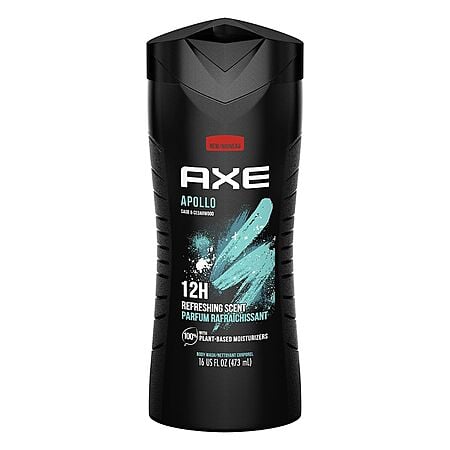
Walgreens has 16-oz AXE Body Wash (various) on sale for $8.98 (add a quantity of 2 to cart) - $5 (clip the $5 off 2 coupon on the item page) - $0.40 (apply promo code WAG10 in cart) = 2 for $3.58. Select free store pick up where stock permits ($10 minimum required for store pick up).
Combine with other Walgreens Deals to meet the $10 minimum order requirement for pickup.
Thanks to community member SUCHaDEAL for finding this deal.
Our research indicates that this offer is $3 lower each (60% savings) than the next best available price from a reputable merchant with prices starting from $4.97 each.
Please see the original post for additional details & give the WIKI and additional forum comments a read for helpful discussion.
This collaborative space allows users to contribute additional information, tips, and insights to enhance the original deal post. Feel free to share your knowledge and help fellow shoppers make informed decisions.
Walgreens has 16-oz AXE Body Wash (various) on sale for $8.98 (add a quantity of 2 to cart) - $5 (clip the $5 off 2 coupon on the item page) - $0.40 (apply promo code WAG10 in cart) = 2 for $3.58. Select free store pick up where stock permits ($10 minimum required for store pick up).
Combine with other Walgreens Deals to meet the $10 minimum order requirement for pickup.
Thanks to community member SUCHaDEAL for finding this deal.
Our research indicates that this offer is $3 lower each (60% savings) than the next best available price from a reputable merchant with prices starting from $4.97 each.
Please see the original post for additional details & give the WIKI and additional forum comments a read for helpful discussion.
How to bypass the $10 minimum for Walgreens pickup
1) Sign into your account.
2) Add the item or items you want to buy.
3) Add ANYTHING else to hit $10.
4) Proceed to checkout and enter your credit card info and "Continue to review."
5) Copy and paste link to a new window.
6) In the original window, click BACK until you can delete the item(s) you don't want; Switch to the new window tab and refresh the page. Then check the total was updated and submit the order.
15 Comments
Sign up for a Slickdeals account to remove this ad.
Our community has rated this post as helpful. If you agree, why not thank eric_cartman
How to bypass the $10 minimum for Walgreens pickup
1) Sign into your account.
2) Add the item or items you want to buy.
3) Add ANYTHING else to hit $10.
4) Proceed to checkout and enter your credit card info and "Continue to review."
5) Copy and paste link to a new window.
6) In the original window, click BACK until you can delete the item(s) you don't want; Switch to the new window tab and refresh the page. Then check the total was updated and submit the order.
How to bypass the $10 minimum for Walgreens pickup
1) Sign into your account.
2) Add the item or items you want to buy.
3) Add ANYTHING else to hit $10.
4) Proceed to checkout and enter your credit card info and "Continue to review."
5) Copy and paste link to a new window.
6) In the original window, click BACK until you can delete the item(s) you don't want; Switch to the new window tab and refresh the page. Then check the total was updated and submit the order.
This information is almost as valuable as the deal itself 🤣
How to bypass the $10 minimum for Walgreens pickup
1) Sign into your account.
2) Add the item or items you want to buy.
3) Add ANYTHING else to hit $10.
4) Proceed to checkout and enter your credit card info and "Continue to review."
5) Copy and paste link to a new window.
6) In the original window, click BACK until you can delete the item(s) you don't want; Switch to the new window tab and refresh the page. Then check the total was updated and submit the order.
FYI Target has a $2 manufacturer coupon for the 32oz body wash, so I think it averages out to the same as this deal give or take. In case Target is closer to you.
How to bypass the $10 minimum for Walgreens pickup
1) Sign into your account.
2) Add the item or items you want to buy.
3) Add ANYTHING else to hit $10.
4) Proceed to checkout and enter your credit card info and "Continue to review."
5) Copy and paste link to a new window.
6) In the original window, click BACK until you can delete the item(s) you don't want; Switch to the new window tab and refresh the page. Then check the total was updated and submit the order.
Genius hack! Thank you so much!!!!!!!!! Literally was adding gum just to get to $10 but their gum is pricey! LOL












Leave a Comment
Top Comments
1) Sign into your account.
2) Add the item or items you want to buy.
3) Add ANYTHING else to hit $10.
4) Proceed to checkout and enter your credit card info and "Continue to review."
5) Copy and paste link to a new window.
6) In the original window, click BACK until you can delete the item(s) you don't want; Switch to the new window tab and refresh the page. Then check the total was updated and submit the order.
15 Comments
Sign up for a Slickdeals account to remove this ad.
got the garnier shampoo for $4 with $2 Walgreens cash, picked it up and received $2WC right away.
ordered this using $4WC.
thanks
Our community has rated this post as helpful. If you agree, why not thank eric_cartman
1) Sign into your account.
2) Add the item or items you want to buy.
3) Add ANYTHING else to hit $10.
4) Proceed to checkout and enter your credit card info and "Continue to review."
5) Copy and paste link to a new window.
6) In the original window, click BACK until you can delete the item(s) you don't want; Switch to the new window tab and refresh the page. Then check the total was updated and submit the order.
1) Sign into your account.
2) Add the item or items you want to buy.
3) Add ANYTHING else to hit $10.
4) Proceed to checkout and enter your credit card info and "Continue to review."
5) Copy and paste link to a new window.
6) In the original window, click BACK until you can delete the item(s) you don't want; Switch to the new window tab and refresh the page. Then check the total was updated and submit the order.
1) Sign into your account.
2) Add the item or items you want to buy.
3) Add ANYTHING else to hit $10.
4) Proceed to checkout and enter your credit card info and "Continue to review."
5) Copy and paste link to a new window.
6) In the original window, click BACK until you can delete the item(s) you don't want; Switch to the new window tab and refresh the page. Then check the total was updated and submit the order.
Sign up for a Slickdeals account to remove this ad.
Apparently they were not careful and got this in their eyes and it burnedddddd!
Shahhere
Sign up for a Slickdeals account to remove this ad.
1) Sign into your account.
2) Add the item or items you want to buy.
3) Add ANYTHING else to hit $10.
4) Proceed to checkout and enter your credit card info and "Continue to review."
5) Copy and paste link to a new window.
6) In the original window, click BACK until you can delete the item(s) you don't want; Switch to the new window tab and refresh the page. Then check the total was updated and submit the order.
Leave a Comment