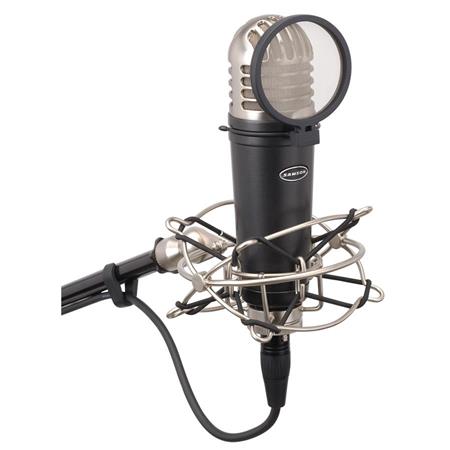
Samson MTR101A Studio Condenser Microphone + Shockmount & Pop Filter
Expired
$45
$119.99
+ Free Shipping
+56Deal Score
34,514 Views
Update: This offer is still available for a limited time
Adorama.com has Samson 1" Diaphragm Studio Condenser Microphone w/ Shockmount & Pop Filter (MTR101A) on sale for $44.99. Shipping is free. Thanks iconian
This does NOT have a USB connector. To use it with a computer you will need a mic preamp that provides phantom power along with an external USB sound card (or one box that does both)
For the pricing involved and what you get out of it, I'd personally recommend getting a USB interface/pre-amp that supplies phantom power… the one catch is that it must be 48v phantom power, otherwise you'll need to also buy an additional phantom power supply for mics like this.
I had a $19 phantom power supply and it died in about 2 months (a common complaint of the cheap ones it seems), and the more expensive ones are just as much as a cheap pre-amp, so why not just skip that?
One cheap option (what I have) that still sounds good and does a good job of being reasonable latency is the Behringer UMC22[adorama.com]. Should be available for $39 (if that link goes up, just google search).
Even just the UMC22 will be a significant improvement over taking an XLR mic, adding phantom power, and connecting it directly to a mic-in or line-in using an XLR to 1/8ths adapter. The pre-amp gain controls are MUCH better than trying to adjust gain after your computer has done the analog to digital conversion, and even the cheapo ADCs in these USB interfaces are generally better than what's on your motherboard. You'll get a lot less noise doing this than trying to get away with only buying a phantom power and then adding gain in the OS controls.
And, generally speaking, this approach (buy a good XLR mic and a decent USB interface with 48v phantom power) is worth it over buying something like a Snowball that's already USB. One issue I've had with USB mics in Windows 8 and 10 is that they often can't have any gain applied at the OS level in the device settings, and end up sounding too quiet to be usable because of that. Having a pre-amp solves all of that, and sounds MUCH better than what the OS level gain ever did, too.
Just, pay attention if you get something different than the options I recommended. Even if it says "Phantom Power" on it, make SURE it's 48v Phantom Power. 15V (as one example I've seen) is not always enough for all mics.
not TCing, but so that someone else doesn't have to search, this does not have USB and is XLR output
This guy mics
Sign up for a Slickdeals account to remove this ad.
For the pricing involved and what you get out of it, I'd personally recommend getting a USB interface/pre-amp that supplies phantom power… the one catch is that it must be 48v phantom power, otherwise you'll need to also buy an additional phantom power supply for mics like this.
I had a $19 phantom power supply and it died in about 2 months (a common complaint of the cheap ones it seems), and the more expensive ones are just as much as a cheap pre-amp, so why not just skip that?
One cheap option (what I have) that still sounds good and does a good job of being reasonable latency is the Behringer UMC22[adorama.com]. Should be available for $39 (if that link goes up, just google search).
Even just the UMC22 will be a significant improvement over taking an XLR mic, adding phantom power, and connecting it directly to a mic-in or line-in using an XLR to 1/8ths adapter. The pre-amp gain controls are MUCH better than trying to adjust gain after your computer has done the analog to digital conversion, and even the cheapo ADCs in these USB interfaces are generally better than what's on your motherboard. You'll get a lot less noise doing this than trying to get away with only buying a phantom power and then adding gain in the OS controls.
And, generally speaking, this approach (buy a good XLR mic and a decent USB interface with 48v phantom power) is worth it over buying something like a Snowball that's already USB. One issue I've had with USB mics in Windows 8 and 10 is that they often can't have any gain applied at the OS level in the device settings, and end up sounding too quiet to be usable because of that. Having a pre-amp solves all of that, and sounds MUCH better than what the OS level gain ever did, too.
Just, pay attention if you get something different than the options I recommended. Even if it says "Phantom Power" on it, make SURE it's 48v Phantom Power. 15V (as one example I've seen) is not always enough for all mics.
For the pricing involved and what you get out of it, I'd personally recommend getting a USB interface/pre-amp that supplies phantom power… the one catch is that it must be 48v phantom power, otherwise you'll need to also buy an additional phantom power supply for mics like this.
I had a $19 phantom power supply and it died in about 2 months (a common complaint of the cheap ones it seems), and the more expensive ones are just as much as a cheap pre-amp, so why not just skip that?
One cheap option (what I have) that still sounds good and does a good job of being reasonable latency is the Behringer UMC22[adorama.com]. Should be available for $39 (if that link goes up, just google search).
Even just the UMC22 will be a significant improvement over taking an XLR mic, adding phantom power, and connecting it directly to a mic-in or line-in using an XLR to 1/8ths adapter. The pre-amp gain controls are MUCH better than trying to adjust gain after your computer has done the analog to digital conversion, and even the cheapo ADCs in these USB interfaces are generally better than what's on your motherboard. You'll get a lot less noise doing this than trying to get away with only buying a phantom power and then adding gain in the OS controls.
And, generally speaking, this approach (buy a good XLR mic and a decent USB interface with 48v phantom power) is worth it over buying something like a Snowball that's already USB. One issue I've had with USB mics in Windows 8 and 10 is that they often can't have any gain applied at the OS level in the device settings, and end up sounding too quiet to be usable because of that. Having a pre-amp solves all of that, and sounds MUCH better than what the OS level gain ever did, too.
Just, pay attention if you get something different than the options I recommended. Even if it says "Phantom Power" on it, make SURE it's 48v Phantom Power. 15V (as one example I've seen) is not always enough for all mics.



63 Comments
Your comment cannot be blank.
Featured Comments
I had a $19 phantom power supply and it died in about 2 months (a common complaint of the cheap ones it seems), and the more expensive ones are just as much as a cheap pre-amp, so why not just skip that?
One cheap option (what I have) that still sounds good and does a good job of being reasonable latency is the Behringer UMC22 [adorama.com]. Should be available for $39 (if that link goes up, just google search).
For a bit more, but still below $100, you can get a Focusrite Scarlett solo. [amazon.com]
Even just the UMC22 will be a significant improvement over taking an XLR mic, adding phantom power, and connecting it directly to a mic-in or line-in using an XLR to 1/8ths adapter. The pre-amp gain controls are MUCH better than trying to adjust gain after your computer has done the analog to digital conversion, and even the cheapo ADCs in these USB interfaces are generally better than what's on your motherboard. You'll get a lot less noise doing this than trying to get away with only buying a phantom power and then adding gain in the OS controls.
And, generally speaking, this approach (buy a good XLR mic and a decent USB interface with 48v phantom power) is worth it over buying something like a Snowball that's already USB. One issue I've had with USB mics in Windows 8 and 10 is that they often can't have any gain applied at the OS level in the device settings, and end up sounding too quiet to be usable because of that. Having a pre-amp solves all of that, and sounds MUCH better than what the OS level gain ever did, too.
Just, pay attention if you get something different than the options I recommended. Even if it says "Phantom Power" on it, make SURE it's 48v Phantom Power. 15V (as one example I've seen) is not always enough for all mics.
Sign up for a Slickdeals account to remove this ad.
Good to know. I'll just wait for a Blue Yeti deal.
But this does come with a lot for the money.
But this does come with a lot for the money.
Honestly you're better off getting this and a preamp or just a phantom power box
Key Features
Sign up for a Slickdeals account to remove this ad.
I had a $19 phantom power supply and it died in about 2 months (a common complaint of the cheap ones it seems), and the more expensive ones are just as much as a cheap pre-amp, so why not just skip that?
One cheap option (what I have) that still sounds good and does a good job of being reasonable latency is the Behringer UMC22 [adorama.com]. Should be available for $39 (if that link goes up, just google search).
For a bit more, but still below $100, you can get a Focusrite Scarlett solo. [amazon.com]
Even just the UMC22 will be a significant improvement over taking an XLR mic, adding phantom power, and connecting it directly to a mic-in or line-in using an XLR to 1/8ths adapter. The pre-amp gain controls are MUCH better than trying to adjust gain after your computer has done the analog to digital conversion, and even the cheapo ADCs in these USB interfaces are generally better than what's on your motherboard. You'll get a lot less noise doing this than trying to get away with only buying a phantom power and then adding gain in the OS controls.
And, generally speaking, this approach (buy a good XLR mic and a decent USB interface with 48v phantom power) is worth it over buying something like a Snowball that's already USB. One issue I've had with USB mics in Windows 8 and 10 is that they often can't have any gain applied at the OS level in the device settings, and end up sounding too quiet to be usable because of that. Having a pre-amp solves all of that, and sounds MUCH better than what the OS level gain ever did, too.
Just, pay attention if you get something different than the options I recommended. Even if it says "Phantom Power" on it, make SURE it's 48v Phantom Power. 15V (as one example I've seen) is not always enough for all mics.
I had a $19 phantom power supply and it died in about 2 months (a common complaint of the cheap ones it seems), and the more expensive ones are just as much as a cheap pre-amp, so why not just skip that?
One cheap option (what I have) that still sounds good and does a good job of being reasonable latency is the Behringer UMC22 [adorama.com]. Should be available for $39 (if that link goes up, just google search).
For a bit more, but still below $100, you can get a Focusrite Scarlett solo. [amazon.com]
Even just the UMC22 will be a significant improvement over taking an XLR mic, adding phantom power, and connecting it directly to a mic-in or line-in using an XLR to 1/8ths adapter. The pre-amp gain controls are MUCH better than trying to adjust gain after your computer has done the analog to digital conversion, and even the cheapo ADCs in these USB interfaces are generally better than what's on your motherboard. You'll get a lot less noise doing this than trying to get away with only buying a phantom power and then adding gain in the OS controls.
And, generally speaking, this approach (buy a good XLR mic and a decent USB interface with 48v phantom power) is worth it over buying something like a Snowball that's already USB. One issue I've had with USB mics in Windows 8 and 10 is that they often can't have any gain applied at the OS level in the device settings, and end up sounding too quiet to be usable because of that. Having a pre-amp solves all of that, and sounds MUCH better than what the OS level gain ever did, too.
Just, pay attention if you get something different than the options I recommended. Even if it says "Phantom Power" on it, make SURE it's 48v Phantom Power. 15V (as one example I've seen) is not always enough for all mics.
This guy mics
BY is a USB mic - ! - and is an interface by itself