Hey guys, First post so please go easy.
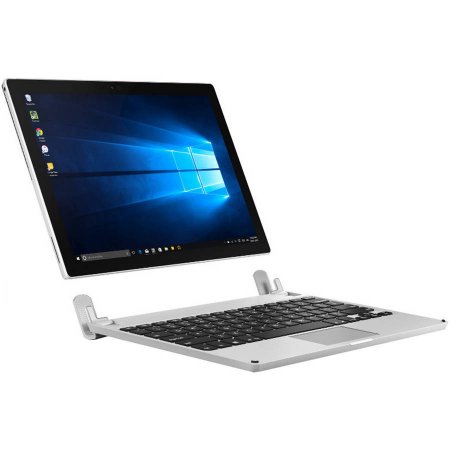
Walmart has the Brydge Keyboard 12.3 for Microsoft Surface Pro 3/4 for $87.33 with Free 2-Day Shipping sold by Walmart. This is the lowest price for this bluetooth keyboard that was recently released. It's currently sold everywhere for $149. Amazon review at 4 stars (11 reviews probably due to it being released as of May 2017). Not available in store for local p/u. Free 2-day Shipping or Free ship to store.
Org Price: $149.99
Saving: $62.66
Now $86.64
Features:
-160° VIEWING - Patented hinge with 0-160° rotation, without the need of a kickstand
-BACKLIT KEYS - With 3 levels to meet visibility needs
-LIGHTWEIGHT & STRONG - Only 23oz & made from high-grade aluminum
-RECHARGEABLE Battery - Built-in rechargeable battery lasting up to 3 months
-Compatible with the NEW Microsoft Surface Pro, Pro 3 & Pro 4
Brydge 12.3 Keyboard for Microsoft Surface Pro 3/4 [walmart.com]



12 Comments
Your comment cannot be blank.
Sign up for a Slickdeals account to remove this ad.
https://www.laptopmag.c
https://www.digitaltren
kinda wanna go into store to try it out myself though
The pros are:
Cons are:
Despite this, I may give it a try for myself. Not being able to use the SP easily in my lap or a small desk is very frustrating. I can't help but think that this could have been so much better if it could provide extended battery life and was not bluetooth dependent.
I bought this after the pre-order pricing was announced after CES 2017. It was priced at $129 on Brydge's website. I got it reduced to $126 because of their President's Day sale being cheaper.
Pro's:
- Solid, solid construction
- Works very well with Surface Pro (I have the 3 Pro). It is the same dimensions, looks the same, its sleek. When you close the lid, it shuts off. When you open it, it turns on. The unit was built to recognize when you open/close the unit.
- Using it on your lap is so much better than using the Surface Pro with the MS keyboard and kickstand. Not even a contest.
- Hinges are super sturdy. They come installed with the silicone for the SP4 but silicone for the SP3 are provided extra. Installation is not too bad.
- Backlit (although the MS keyboards are too).
- Works with all SP models, 3+.
- Keyboard comes with a battery indicator (green - full, yellow - moderate, red - low/charging)
- Arrow keys are the proper inverted T. (MS keyboard has the oversized Left/Right buttons)
- Printscreen button. SP3 keyboard lacked this, SP4 keyboard added it.
- Right CTRL button. MS keyboards lack this.
ConsThis!!! Are you listening Logitech?
Sign up for a Slickdeals account to remove this ad.
The pros are:
Cons are:
Despite this, I may give it a try for myself. Not being able to use the SP easily in my lap or a small desk is very frustrating. I can't help but think that this could have been so much better if it could provide extended battery life and was not bluetooth dependent.
Just want to add that some reviews say the tightness of the clamps means you can't have a skin or screen protector unless you cut them to fit.
So the keyboard just arrived and i've been using it for a few hours. In fact, I am typing on it right now.
There is no noticeable lag except in the first 2-3 seconds after booting up the surface. After that, the keyboard is very responsive. Bluetooth also allows the screen to be detached while the keyboard is wirelessly connected. Makes it a pretty interesting setup.
The touchpad is great and very tactile. Palm rest while typing does not move the mouse. It also registers multi-touch (i.e pinch to zoom, desktop, cortana) But I really don't see myself using the touchpad since the surface has a touchscreen. I've never used the touchpad on the typecover.
There is no screen bleed around hinge contact. Initially, I kept the SP4 rubber cushion (the one it originally ships with) and tried to attach the screen. There was noticeable "bleed" near the hinge. I switched it out to SP3 (not a hard task like others have mentioned) and I don't see anything with this. There is no space for a screen protector. Brydge is coming out with a shell protector soon but I don't see myself getting one. This is not a surface book replacement. You can't flip the screen backwards and write on it like the surface book. The hinge is well balanced and can be fully extended without tipping over.
Overall, this keyboard breathes new life into my surface pro 3. It is more enjoyable to be typing on this than with the type cover. So I say, to each their own.
Edit: Price now up to $99.99.
It does provide a pretty nice laptop look.