This post can be edited by most users to provide up-to-date information about developments of this thread based on user responses, and user findings. Feel free to add, change or remove information shown here as it becomes available. This includes new coupons, rebates, ideas, thread summary, and similar items.
Once a Thread Wiki is added to a thread, "Create Wiki" button will disappear. If you would like to learn more about Thread Wiki feature, click here.
Hey, guys. Thanks for the detailed insights about why you feel this way. Without such details, I would have had doubts about your opinion. In my humble opinion, anonymous Internet strangers can't be trusted without at least some explanation. Thanks again!!
Having owned many different brands over the past 25 years, (Dell, HP, IBM, Lenovo, Sony), all brands will eventually have a bad product. Thus, generalizing 1 or 2 experiences across an entire brand isn't an objective way to rule that brand in or out.
You really do need to research each model you come across or are interested in (expert reviews from different websites, verified purchase reviews, etc.). While these reviews are entirely subjective, if you average across a large enough sample, the reviews will be fairly accurate in terms of what you can expect to experience.
Performance: You also need to understand 4 key aspects regarding performance: CPU (is it the mobile U version with lower power draw but less processing power), HDD (spinning disk or solid state), and RAM (look for DDR4), GPU (discrete is best for gaming, integrated is fine for office/school workloads).
Display: You also need to ensure you understand the type of display and resolution (and ensure it will work for your needs). It's rare now... but every once in a while you'll come across a 720p screen (1280x768... or in most laptops with 16:9, 1366x768). Stay away from those.
Warranty/Customer Service: Make certain you understand the warranty terms and look for the experience of others when interacting with that company's Customer Service department. For many, including myself, this can be a deal breaker.
Case in point: I've had great experiences with Dell laptops.... and I've also had awful experiences. Dell Customer Service is one of the worst that I've had to deal with. And I've had multiple reasons to deal with them over the past decade. Therefore, while on average Dell laptop hardware is good, I stay away due to the awful CS unless I'm getting a crazy great deal. I factor in the headache/wasted time of possibly dealing with CS into the purchase price, which can easily tip the scales from a great deal to an okay deal.
If you do advance research and know what to look for, the time spent above can help you spot a truly great deal and avoid the "buy and return" effort of jumping on a deal without enough understanding of what you are buying. By being prepared, you can quickly assess a deal's worthiness.
Best case I can reference goes back to this time last year. The Lenovo e570 deal. That was an awesome deal. And, if you had done some basic research in advance, you would know that a 7th gen i7 + SSD + 950M discrete graphics for $500 was a steal. You could do some basic research on that model to assess overall community sentiment with quality/durability. I did just that last year and purchased the e570.
This e570 has been rock solid. Driver updates have been consistent and I've had zero hardware issues. Even if I had paid $750 for that laptop, I would still give it 4.2 stars out of 5 (nothing is perfect). Had I solely based my purchase decision on my prior experience with a Lenovo laptop from 2007, I wouldn't have made the purchase (that was an awful machine).
Long story short: do some research, understand your needs, only use community sentiment when provided in a large enough sample size (e.g. - not a couple of posts on a SD thread), and factor in your own experiences to make a purchase decision that works for you.
You can also grab the $25 off online coupon from the store.
Sign up for a Slickdeals account to remove this ad.
This deal was brought up in another Costco laptop thread: https://slickdeals.net/f/10832115-hp-envy-x360-15-aq273cl-touchscreen-2-in-1-laptop-intel-core-i7-1080p-699-99?v=1&p=107403079#post107403079
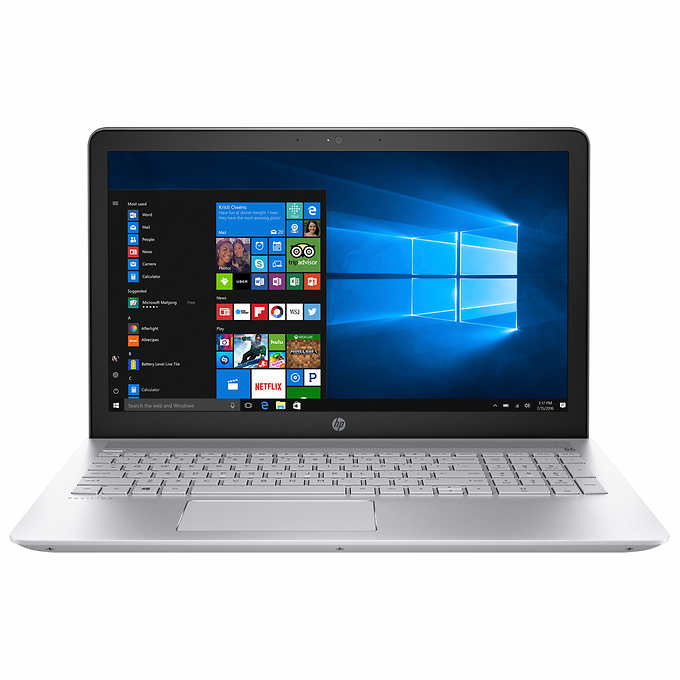
I too am wondering if there's any way to switch out the HD for an SSD without screwing the warranty. The 5400 rpm HD is a deal killer for me but I'd be willing to pay another $160 to put a 512 SSD in it. The 3 cell battery is also a question... no info on watt hr on this model afaict.
I have a request for more info from Costco but it will probably be a couple of days. It's occurred to me to just order this and the Envy linked above and return the one I don't like...
Doesn't the Pavillion 15 series have an ssd slot that you can just slide an ssd in? Then just install the os on the ssd and format the other hdd?
Do you mean a m.2 sata3 or nvme connector? If so 'just slide' trivializes the difficulty to add the drive.
I basically assume all laptops will require the bottom plate removed at this point and prepare for the requirement of removing the keyboard and motherboard to access the hdd/ram. per the above link posted its more difficult than a few screws.
I have seen that acer still includes a access panel thats a few screws for the 2.5 inch sata' m.2 sata3/nvme and ram slots.
One rookie mistake is to put the m.2 sata3 in backwards. That or putting in a nvme drive will cause smoking. You can check
And its slick deals thread to see how people keep stating it has a nvme but amazon reviews and others have confirmed its a sata3 m.2. There is a great amazon review that gives pictures on the proper way to install the m.2 sata3 despite multiple incorrect statements in q&a and other reviews/slick deals posts that it has a nvme m.2
Generally you will void the warranty for doing so yourself, all depends on the motherboard.
It voids the warranty if you make a claim and it looks like work was done by someone who did not know what they were doing. For example prying the bottom plate off with a screw driver marking it all over and breaking clips.
In general if you do a normal professional looking job your fine. If your really worried you can pay a repair shop to do the work and the warranty would not be voided. If it was the mfg would show proof the work done broke the machine and than you would go tot he repair shop. Biggest one around is geek squad and they/bestbuy make it a point to state them uogradding your desktop/laptop does not void the warranty. Hell if you had a desktop with issues popping the access door breaks the warranty sticker, but its the freaking first thing you have to do for something as dumb as a loose cable connection to your ssd/hdd that will make the machine inoperable. Any mfg that says you doing that voided the warranty is full of crap and your probably dealing with a noob support rep. They don't want you sending the stuff across country for a loose cable etc.


143 Comments
Your comment cannot be blank.
Featured Comments
You really do need to research each model you come across or are interested in (expert reviews from different websites, verified purchase reviews, etc.). While these reviews are entirely subjective, if you average across a large enough sample, the reviews will be fairly accurate in terms of what you can expect to experience.
Performance: You also need to understand 4 key aspects regarding performance: CPU (is it the mobile U version with lower power draw but less processing power), HDD (spinning disk or solid state), and RAM (look for DDR4), GPU (discrete is best for gaming, integrated is fine for office/school workloads).
Display: You also need to ensure you understand the type of display and resolution (and ensure it will work for your needs). It's rare now... but every once in a while you'll come across a 720p screen (1280x768... or in most laptops with 16:9, 1366x768). Stay away from those.
Warranty/Customer Service: Make certain you understand the warranty terms and look for the experience of others when interacting with that company's Customer Service department. For many, including myself, this can be a deal breaker.
Case in point: I've had great experiences with Dell laptops.... and I've also had awful experiences. Dell Customer Service is one of the worst that I've had to deal with. And I've had multiple reasons to deal with them over the past decade. Therefore, while on average Dell laptop hardware is good, I stay away due to the awful CS unless I'm getting a crazy great deal. I factor in the headache/wasted time of possibly dealing with CS into the purchase price, which can easily tip the scales from a great deal to an okay deal.
If you do advance research and know what to look for, the time spent above can help you spot a truly great deal and avoid the "buy and return" effort of jumping on a deal without enough understanding of what you are buying. By being prepared, you can quickly assess a deal's worthiness.
Best case I can reference goes back to this time last year. The Lenovo e570 deal. That was an awesome deal. And, if you had done some basic research in advance, you would know that a 7th gen i7 + SSD + 950M discrete graphics for $500 was a steal. You could do some basic research on that model to assess overall community sentiment with quality/durability. I did just that last year and purchased the e570.
This e570 has been rock solid. Driver updates have been consistent and I've had zero hardware issues. Even if I had paid $750 for that laptop, I would still give it 4.2 stars out of 5 (nothing is perfect). Had I solely based my purchase decision on my prior experience with a Lenovo laptop from 2007, I wouldn't have made the purchase (that was an awful machine).
Long story short: do some research, understand your needs, only use community sentiment when provided in a large enough sample size (e.g. - not a couple of posts on a SD thread), and factor in your own experiences to make a purchase decision that works for you.
Sign up for a Slickdeals account to remove this ad.
Generally you will void the warranty for doing so yourself, all depends on the motherboard.
If it's just a couple screws anyone can do it, and usually SSD and RAM are pretty accessible.
Here you go
https://h30434.www3.hp.com/t5/Notebook-Hardware-and-Upgrade-Questions/HP-pavilion-15t-laptop-SSD-upg... [hp.com]
https://slickdeals.net/f/10832115-hp-envy-x360-15-aq273cl-touchscreen-2-in-1-laptop-intel-core-i7-1080p-699-99?v=1&p=107403
I too am wondering if there's any way to switch out the HD for an SSD without screwing the warranty. The 5400 rpm HD is a deal killer for me but I'd be willing to pay another $160 to put a 512 SSD in it. The 3 cell battery is also a question... no info on watt hr on this model afaict.
I have a request for more info from Costco but it will probably be a couple of days. It's occurred to me to just order this and the Envy linked above and return the one I don't like...
Sign up for a Slickdeals account to remove this ad.
Do you mean a m.2 sata3 or nvme connector? If so 'just slide' trivializes the difficulty to add the drive.
I basically assume all laptops will require the bottom plate removed at this point and prepare for the requirement of removing the keyboard and motherboard to access the hdd/ram. per the above link posted its more difficult than a few screws.
I have seen that acer still includes a access panel thats a few screws for the 2.5 inch sata' m.2 sata3/nvme and ram slots.
One rookie mistake is to put the m.2 sata3 in backwards. That or putting in a nvme drive will cause smoking. You can check
https://www.amazon.com/dp/B0762S8...87688
And its slick deals thread to see how people keep stating it has a nvme but amazon reviews and others have confirmed its a sata3 m.2. There is a great amazon review that gives pictures on the proper way to install the m.2 sata3 despite multiple incorrect statements in q&a and other reviews/slick deals posts that it has a nvme m.2
It voids the warranty if you make a claim and it looks like work was done by someone who did not know what they were doing. For example prying the bottom plate off with a screw driver marking it all over and breaking clips.
In general if you do a normal professional looking job your fine. If your really worried you can pay a repair shop to do the work and the warranty would not be voided. If it was the mfg would show proof the work done broke the machine and than you would go tot he repair shop. Biggest one around is geek squad and they/bestbuy make it a point to state them uogradding your desktop/laptop does not void the warranty. Hell if you had a desktop with issues popping the access door breaks the warranty sticker, but its the freaking first thing you have to do for something as dumb as a loose cable connection to your ssd/hdd that will make the machine inoperable. Any mfg that says you doing that voided the warranty is full of crap and your probably dealing with a noob support rep. They don't want you sending the stuff across country for a loose cable etc.
live chat with a Costco rep online and ask for $25 off $250 coupon