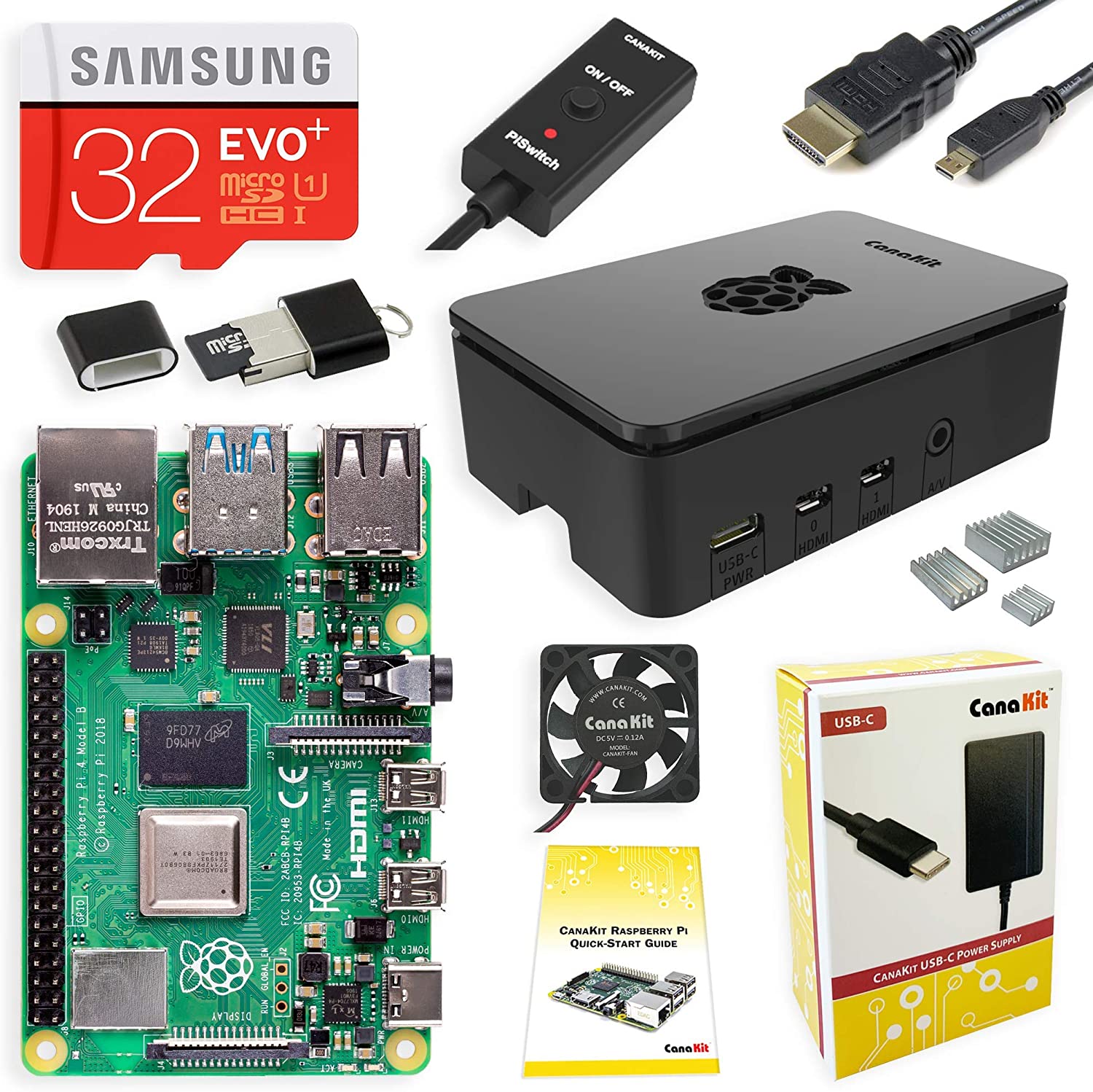
CanaKit Raspberry Pi 4 4GB Starter Kit - 4GB RAM Black case 10% COUPON APPLIED AT CHECKOUT $89.99
$89.99
+78Deal Score
58,561 Views
Price is $99.99 but Amazon is applying a $10 coupon at checkout. If using the Amazon app you may need to click a box below the price to activate the 10% coupon.
Our community has rated this post as helpful. If you agree, why not thank mwebb11111
06-27-2020 at 07:50 AM.
I don't understand these, unless you really need another 32gb SD card, power supply, and card reader. The micro hdmi to hdmi is useful but I just bought an adapter off ebay for $3 because I have multiple hdmi cords not in use. I guess if you aren't technically inclined this is the way to go. But if you aren't technically inclined why are you messing with a pi?
If your willing to wait a bit longer (I was) there are better deals to be had on kits on Aliexpress. I got essentially the same kit in 2GB version for ~$62 shipped. That said, if you like the assurance of Amazon, not bad.
I don't understand these, unless you really need another 32gb SD card, power supply, and card reader. The micro hdmi to hdmi is useful but I just bought an adapter off ebay for $3 because I have multiple hdmi cords not in use. I guess if you aren't technically inclined this is the way to go. But if you aren't technically inclined why are you messing with a pi?
people went crazy for the 4gb pi at target. after adding all the things in this set. it came out to be the same or more. so i guess this is a good deal.
Honestly it's a good starter set, but I would go with a better case and a larger memory card. Price wise it's a great starting point in getting into the sbc scene.
Our community has rated this post as helpful. If you agree, why not thank humblepie
06-27-2020 at 11:17 AM.
Prefer other cases to this. The Argon ONE is probably the best case I've seen. The Argon NEO is decent too if you buy a stick on fan and drill some holes in the removable lid. I did and temps are excellent even overclocked.
$45 for the pi 4 4gb these days + $7 case + $7 SD card + $20 in cables is still cheaper than this setup though if you want to go ultra cheap. Still for everything included this is a decent enough deal.
Anyone wanting to stick with a windows or macOS feel should check out this debian distro for the pi 4.
I did some quick looking online to see if Minecraft full (no pi version) and/or roblocks will work well on this? My nephew plays on a tablet/phone all the time and maybe trying to baby step him into PC world.
I'm thinking I could work with him remotely on some fun things on this too, win-win to my brother... Maybe some programming tasks and send some gadgets every now and then for us to get a LED light to flash or something.
He loves minecraft, so I would want it to run well; or is it worth it to move up to a PC/laptop that's more future proof but less DIY/testing/projects.
I did some quick looking online to see if Minecraft full (no pi version) and/or roblocks will work well on this? My nephew plays on a tablet/phone all the time and maybe trying to baby step him into PC world.
I'm thinking I could work with him remotely on some fun things on this too, win-win to my brother... Maybe some programming tasks and send some gadgets every now and then for us to get a LED light to flash or something.
He loves minecraft, so I would want it to run well; or is it worth it to move up to a PC/laptop that's more future proof but less DIY/testing/projects.
TIA
Truth be told, unless you have a use to mess around with pi, if you are looking for something like what you describe for your kid I wouldn't bother. Grab a lenovo m93p cheap off ebay or craiglist for $100 or less. More than adequate for those games. You can get either the tiny or the half size version. If you get the half size version, you can fit in a low profile card later like a GTX 1650 low profile. Then when the kid wants to play beefier games it is an easy upgrade for that. Both the tiny and half size m93p are around the same price these days. The tiny typically comes with a 4570T which is a 2 core/4 threads, and the half size typically comes with a 4570 normal which is 4 cores/4 threads. If you get the tiny you can upgrade the CPU, and memory later. Even the drive I suppose. The best CPU you can put in the tiny is the Xeon e3 1265L v3 (make sure it is socket 1150). Although I find it isn't really needed for basic stuff like what I think you want. The half size m93p can get a much beefier CPU in it though later.
Personally, I've been buying these cheap and setting up new people like what you are looking for to give out to friends and family.
Still, you can use the pi for a minecraft server easy enough.
Our community has rated this post as helpful. If you agree, why not thank DaMoneyNerd
06-27-2020 at 12:38 PM.
You gotta get a much better case, like the one that Flirc makes. These boards run HOT and won't perform at their best and the heat will impact the life of these things. Honestly, you're better off buying what you NEED separately.
I don't understand these, unless you really need another 32gb SD card, power supply, and card reader. The micro hdmi to hdmi is useful but I just bought an adapter off ebay for $3 because I have multiple hdmi cords not in use. I guess if you aren't technically inclined this is the way to go. But if you aren't technically inclined why are you messing with a pi?
One word convenience! You order and two days later you can set it up! That simple and no more drama like is this a good case, is that fan handles my pie heat, good sd card to store install is where is no ss card failures etc.. you are literally saving all the time and everything is right next to you. Lots of people are not tinkers; they read about pi this forum and look at YouTube videos. So, for them this is best startup kit without fuss about buying separate power cable, hdmi, fan, sd card etc.
I don't understand these, unless you really need another 32gb SD card, power supply, and card reader. The micro hdmi to hdmi is useful but I just bought an adapter off ebay for $3 because I have multiple hdmi cords not in use. I guess if you aren't technically inclined this is the way to go. But if you aren't technically inclined why are you messing with a pi?
I don't understand this comment. Assuming that you did already own many of these because you own other pi's, whose to say that all of your existing accessories aren't currently being used by your other pi's? Your comment is bizarre to me.
I don't understand this comment. Assuming that you did already own many of these because you own other pi's, whose to say that all of your existing accessories aren't currently being used by your other pi's? Your comment is bizarre to me.
I own one pi zero, how many do I need? Limited use piece of equipment. Neat to play with but that's about it. Basement is a computer graveyard as it is.
I own one pi zero, how many do I need? Limited use piece of equipment. Neat to play with but that's about it. Basement is a computer graveyard as it is.
Whoa! I should have known you weren't a serious tech person, now your comment makes perfect sense. Carry on...
My PiZeroW hasn't gotten to me yet and it has been 20 days. I would have been happy to save some extra money on my Pihole project.
Use AdGuard instead, I thought it was easier to configure and gave me way less trouble blocking necessary things like most of the free video apps on Roku.


81 Comments
Your comment cannot be blank.
Sign up for a Slickdeals account to remove this ad.
Our community has rated this post as helpful. If you agree, why not thank mwebb11111
Our community has rated this post as helpful. If you agree, why not thank humblepie
$45 for the pi 4 4gb these days + $7 case + $7 SD card + $20 in cables is still cheaper than this setup though if you want to go ultra cheap. Still for everything included this is a decent enough deal.
Anyone wanting to stick with a windows or macOS feel should check out this debian distro for the pi 4.
https://raspbian-x.com/
I'm thinking I could work with him remotely on some fun things on this too, win-win to my brother... Maybe some programming tasks and send some gadgets every now and then for us to get a LED light to flash or something.
He loves minecraft, so I would want it to run well; or is it worth it to move up to a PC/laptop that's more future proof but less DIY/testing/projects.
TIA
Sign up for a Slickdeals account to remove this ad.
I'm thinking I could work with him remotely on some fun things on this too, win-win to my brother... Maybe some programming tasks and send some gadgets every now and then for us to get a LED light to flash or something.
He loves minecraft, so I would want it to run well; or is it worth it to move up to a PC/laptop that's more future proof but less DIY/testing/projects.
TIA
Personally, I've been buying these cheap and setting up new people like what you are looking for to give out to friends and family.
Still, you can use the pi for a minecraft server easy enough.
https://www.balena.io/blog/how-to...th-balena/
Our community has rated this post as helpful. If you agree, why not thank DaMoneyNerd
One word convenience! You order and two days later you can set it up! That simple and no more drama like is this a good case, is that fan handles my pie heat, good sd card to store install is where is no ss card failures etc.. you are literally saving all the time and everything is right next to you. Lots of people are not tinkers; they read about pi this forum and look at YouTube videos. So, for them this is best startup kit without fuss about buying separate power cable, hdmi, fan, sd card etc.
I don't understand this comment. Assuming that you did already own many of these because you own other pi's, whose to say that all of your existing accessories aren't currently being used by your other pi's? Your comment is bizarre to me.
I own one pi zero, how many do I need? Limited use piece of equipment. Neat to play with but that's about it. Basement is a computer graveyard as it is.
Whoa! I should have known you weren't a serious tech person, now your comment makes perfect sense. Carry on...
Use AdGuard instead, I thought it was easier to configure and gave me way less trouble blocking necessary things like most of the free video apps on Roku.