Slickdeals is community-supported.  We may get paid by brands for deals, including promoted items.
Sorry, this deal has expired. Get notified of deals like this in the future. Add Deal Alert for this Item
Frontpage

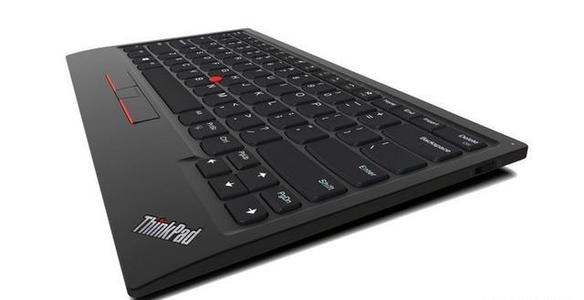
ThinkPad TrackPoint Wireless Bluetooth Keyboard II Expired

$77.40
$99.99
+ Free Shipping
+61 Deal Score
59,875 Views
Lenovo has ThinkPad TrackPoint Wireless Bluetooth Keyboard II (4Y40X49493) on sale for $85.99 - $8.60 when you apply eCoupon ACCEXTRA10 in cart = $77.39. Shipping is free. Thanks geektech

Editor's Notes & Price Research

Written by
  • Features: dish-shaped ergonomic keys for comfort; Versatile and reliable Bluetooth or Wireless Nano USB Dongle allows up to 2 devices to connect; TrackPoint II's 6-point entry support for visually impaired use.
  • Please refer to the forum thread for additional details & discussion. -StrawMan86

Original Post

Written by
Edited October 5, 2020 at 01:44 PM by
Lenovo is discounting ThinkPad TrackPoint Keyboard II Bluetooth keyboard for $86. With coupon code ACCEXTRA10 the price drops to $77.39. Seniors/military/education/first responders etc may also receive an extra 5% discount. This is the lowest price so far.

This keyboard is a second gen stand-alone ThinkPad TrackPoint keyboard. While the first gen is wired (not the ThinkPad Compact Bluetooth Keyboard with TrackPoint), this gen has a bluetooth/2.4G dual-mode, and is well received by critics. It's also compatible with macOS, flawlessly. One review in here: https://www.laptopmag.com/reviews...eyboard-ii

Again, this keyboard is not for everyone. It's for specific groups of people, e.g. those who need to intensively type on a keyboard while move hands between the keyboard and mouse, or those who enjoy typing on a ThinkPad laptop keyboard. If you think it's too expensive, then you do not need it.

https://www.lenovo.com/us/en/acce...4Y40X49493

https://www.lenovo.com/us/en/acce...4Y40X49493
If you purchase something through a post on our site, Slickdeals may get a small share of the sale.
Deal
Score
+61
59,875 Views
$77.40
$99.99

100 Comments

Your comment cannot be blank.

Featured Comments

Did not know they even made desktop keyboards with the nipple. Where has this been all my life?
omg, I want this keyboard but wish they would make a full size version. I love thinkpads for their keyboards over other laptops but 10 key + normal F keys are a must for me nowadays.
You weren't looking. They have wired version of those since ibm days. I have at least 3 in my collection.
That said. It is a unforgivable sin they moved from 7 row to 6, and for that I am not buying.

Sign up for a Slickdeals account to remove this ad.

Joined Dec 2007
L6: Expert
> bubble2 1,454 Posts
427 Reputation
munkymonkjr
10-05-2020 at 01:43 PM.
Did not know they even made desktop keyboards with the nipple. Where has this been all my life?
6
Reply
Joined Nov 2004
L5: Journeyman
> bubble2 718 Posts
237 Reputation
macb
10-05-2020 at 01:47 PM.
omg, I want this keyboard but wish they would make a full size version. I love thinkpads for their keyboards over other laptops but 10 key + normal F keys are a must for me nowadays.
Reply
Joined Dec 2006
L6: Expert
> bubble2 1,269 Posts
100 Reputation
z3razerviper
10-05-2020 at 01:48 PM.
I have this its very nice its basically a laptop keyboard thats bluetooth& 2.4 with a dongle. The software annoys me however because it splashes a caps lock notification on the screen when ever you tap it....so I dont use the software.
Reply
Joined Feb 2011
L4: Apprentice
> bubble2 309 Posts
531 Reputation
Dianoda
10-05-2020 at 01:52 PM.
Add in backlighting, maybe some dedicated media keys, and this would be a great keyboard/mouse solution for a HTPC.

I'm still tempted to pick up one of these for that use case even without either of those features (although I say that in part because the logitech K400+ that I'm currently using is just trash to type on, has weird key spacing, meh touchpad).
1
Reply
Joined Jun 2019
L5: Journeyman
> bubble2 812 Posts
1,426 Reputation
Pro
Expert
This user is an Expert in Home & Home Improvement
Ruyi
10-05-2020 at 01:54 PM.
I have the corded one and using on my macbook, I love it, very nice.
Reply
Joined Dec 2009
L9: Master
> bubble2 5,128 Posts
737 Reputation
SDSummerDay
10-05-2020 at 01:56 PM.
Quote from munkymonkjr :
Did not know they even made desktop keyboards with the nipple. Where has this been all my life?

You weren't looking. They have wired version of those since ibm days. I have at least 3 in my collection.
That said. It is a unforgivable sin they moved from 7 row to 6, and for that I am not buying.
Reply
Joined Jun 2014
L2: Beginner
> bubble2 29 Posts
26 Reputation
wyhang
10-05-2020 at 01:58 PM.
bought one. thanks.
Reply

Sign up for a Slickdeals account to remove this ad.

Joined May 2008
L6: Expert
> bubble2 1,319 Posts
378 Reputation
minj
10-05-2020 at 01:58 PM.
This is a decent keyboard for anyone looking for a slim keyboard with trackpoint. Battery life wasn't that but I was using the dongle. Bluetooth should be better on the battery life. If anyone is looking for a mechanical keyboard with the trackpoint, look at the Tex Yoda (I or II) or Tex Shinobi. Just get ready for a sticker shock though.

Major complaints are the Fn and ctrl key locations and you are not able to swap them. Depending on how you like your function (lock), you might end up with a constant LED on the escape key. I personally had issues with the page up and down placement. Often times,I would end up hitting one of those by accident. But if you want the same layout as the laptop (for those that use on the go often) then you don't have to get used to multiple keyboard layouts.
Reply
Last edited by minj October 5, 2020 at 02:01 PM.
Joined Mar 2018
L7: Teacher
> bubble2 2,916 Posts
688 Reputation
ThinksTooMuch
10-05-2020 at 02:06 PM.
Quote from macb :
omg, I want this keyboard but wish they would make a full size version. I love thinkpads for their keyboards over other laptops but 10 key + normal F keys are a must for me nowadays.

Agreed - if they'd at least had the embedded numeric keypad option then there's a good chance I'd have gone for this nonetheless as I'm not as reliant upon the function keys as you apparently are. I cannot comprehend how they thought a keyboard designed for serious business users would fly without these features, though - obviously somebody didn't think this through.
1
Reply
Joined Nov 2017
L3: Novice
> bubble2 146 Posts
313 Reputation
holahello
10-05-2020 at 02:08 PM.
I got a coupon expired -- have the wired version and was looking to upgrade Frown
Reply
Joined Apr 2018
L4: Apprentice
> bubble2 353 Posts
62 Reputation
dpid
10-05-2020 at 02:10 PM.
Quote from seanleeforever :
You weren't looking. They have wired version of those since ibm days. I have at least 3 in my collection.
That said. It is a unforgivable sin they moved from 7 row to 6, and for that I am not buying.
I've been using various thinkpads for the last 20 years and only found they made wired ones with the point couple years ago, and by . I'm going to say there's little or non-existent marking on these keyboards.
During covid when I started working from home, it was a tossup between this keyboard which just came out or the surface ergonomic keyboard. I ended up with the Microsoft surface because of ergonomics. I do wish there was a trackpoint so I don't have switch between keyboard and mouse, but oh well.
1
Reply
Joined Mar 2018
L7: Teacher
> bubble2 2,916 Posts
688 Reputation
ThinksTooMuch
10-05-2020 at 02:10 PM.
Quote from minj :
This is a decent keyboard for anyone looking for a slim keyboard with trackpoint. Battery life wasn't that but I was using the dongle. Bluetooth should be better on the battery life. If anyone is looking for a mechanical keyboard with the trackpoint, look at the Tex Yoda (I or II) or Tex Shinobi. Just get ready for a sticker shock though.

Major complaints are the Fn and ctrl key locations and you are not able to swap them. Depending on how you like your function (lock), you might end up with a constant LED on the escape key. I personally had issues with the page up and down placement. Often times,I would end up hitting one of those by accident. But if you want the same layout as the laptop (for those that use on the go often) then you don't have to get used to multiple keyboard layouts.

Ugh - good catch. I thought the proper placement of the CTRL key had long been settled. Why don't they ever learn?
Reply
Joined Sep 2003
L5: Journeyman
> bubble2 502 Posts
54 Reputation
ordmaster
10-05-2020 at 02:19 PM.
You have me with backlit function Lenovo.
Reply
Page 1 of 7
Start the Conversation
 

More Lenovo Deals

More Lenovo Deals

Link Copied

The link has been copied to the clipboard.