Slickdeals is community-supported.  We may get paid by brands for deals, including promoted items.
Sorry, this deal has expired. Get notified of deals like this in the future. Add Deal Alert for this Item
Frontpage

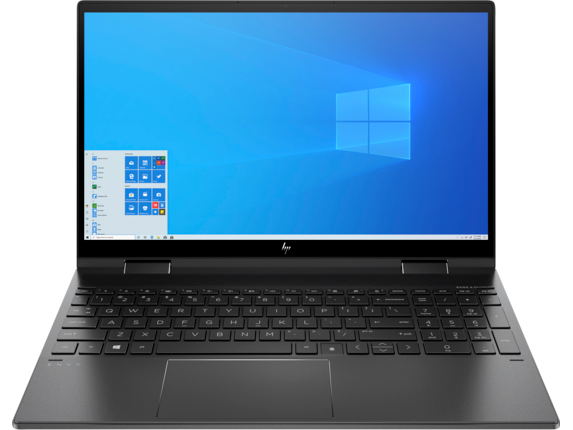
HP Envy x360 2-in-1 Touch Laptop: Ryzen 7 4700U, 15.6" FHD, 16GB DDR4, 256GB SSD Expired

$900
$1,099.99
+ Free Shipping
+29 Deal Score
15,601 Views
HP.com has HP Envy x360 15 2-in-1 Touchscreen Laptop (15z-ee000 touch, Nightfall Black) + HP Pen (Dark Ash Silver) on sale for $899.99 when you follow the steps below. Shipping is free. Thanks Suryasis

Steps:
  1. Click here and then click on "CUSTOMIZE & BUY"
  2. Under Processor and graphics, select AMD Ryzen 7 4700U (2.0 GHz, up to 4.2 GHz, 4 MB L2 cache, 8 cores) + AMD Radeon Graphics [+$140]
  3. Under Memory, select 16 GB DDR4-3200 SDRAM (2 x 8 GB) [+$90]
  4. Under Display, select 15.6" diagonal FHD, IPS, micro-edge WLED-backlit, multitouch-enabled, edge-to-edge glass, 400 nits (1920 x 1080) [+$100]
  5. Click on "ADD TO CART" for $999.99.
  6. Proceed to cart and enter coupon code 10STACKBFCM21 (10% Off over $999) = $899.99 + Free Shipping
Specs:
  • Ryzen 7 4700U 2 GHz Processor (8C/8T, 4.2 GHz Turbo, 12MB Cache)
  • 15.6" 1080P IPS 400 nits Touchscreen Display
  • AMD Radeon Graphics
  • 16GB (8GBx2) DDR4 3200 MHz Ram
  • 256GB M.2 PCIe NVMe Solid State Drive
  • Backlit Keyboard
  • 720p HD Webcam
  • Realtek Wi-Fi 5 (2x2) + Bluetooth 5.0
  • 3-cell, 51 Wh Li-Ion Polymer Battery
  • Windows 10 Home 64
  • 4.42 lbs

Original Post

Written by
Edited November 22, 2020 at 10:00 PM by
HP Offers Envy x360 Convertible Laptop, 15z-ee000 Touch with Ryzen 7 4700U, 400 nits IPS Display, 16GB Ram and 256GB SSD @ $899.99 if you follow the below steps:
  • Go to https://store.hp.com/us/en/pdp/hp...-8mf60av-1 and click on CUSTOMIZE & BUY
  • Under Processor and graphics, select AMD Ryzen™ 7 4700U (2.0 GHz, up to 4.2 GHz, 4 MB L2 cache, 8 cores) + AMD Radeon™ Graphics [+$140]
  • Under Memory, select 16 GB DDR4-3200 SDRAM (2 x 8 GB) [+$90]
  • Under Display, select 15.6" diagonal FHD, IPS, micro-edge WLED-backlit, multitouch-enabled, edge-to-edge glass, 400 nits (1920 x 1080) [+$100]
  • Click on ADD TO CART with a price of $999.99.
  • Use the coupon code 10STACKBFCM21 (10% Off over $999) to get the final price of $899.99

SPEC:
  • Windows 10 Home 64 bit
  • 15.6" 1080P IPS 400 nits Touchscreen Display, 100% sRGB
  • Ryzen 7 4700U 2 GHz (8C/8T, 4.2 GHz Turbo, 12MB Cache)
  • AMD VEGA 7 Integrated Graphics
  • 16GB (8GBx2) DDR4 3200 MHz Ram (64GB Max)
  • 256GB M.2 PCIe NVMe SSD
  • Backlit Keyboard with numeric keyboard
  • 720p HD Webcam
  • HP Active Pen (Dark ash silver)
  • Realtek 802.11ac (2x2) + Bluetooth 5.0
  • PORTS:
    • 2x USB 3.1 Gen 1 Type-A
    • 1x USB 3.1 Gen 2 Type-C (10 Gb/s, Power Delivery, DisplayPort 1.4)
    • 1x HDMI 2.0a
    • 1x SD Card Reader
    • 1x Audio Combo Jack
  • 3-cell, 51 Wh Li-Ion Polymer Battery
  • 4.42 lbs
If you purchase something through a post on our site, Slickdeals may get a small share of the sale.
Deal
Score
+29
15,601 Views
$900
$1,099.99

Community Wiki

Last Edited by Suryasis November 22, 2020 at 09:29 PM
This base model of HP Envy x360 15 is called 15z-ee000 and this is the version which offers the 400 nits 1080P 100% sRGB upgrade option. The other version is called 15z-ds100 which only offers the 250 nits option. There are some other key differences between these two.
  • 15z-ee000 model is slightly lighter, starting at 4.47 lbs vs 4.57 lbs for the 15z-ds100 model.
  • This model has 53 WHr battery vs the 55.67 WHr battery for the 15z-ds100.
  • The Type-C port on this model is a Gen 2 Port supporting 10 Gb/s vs 15z-ds100, having a Gen 1 Type-C port at 5 Gb/s. Both of them support Display Out (DP 1.4) and Power Delivery though.
  • Internally the cooling solution layout is different as well. Found that from the YouTube Reviews by OwnorDisown who did the 250 nits version (15z-ds100) and AMD Tech who did the 15z-ee000 version review. This model has a bit better cooling solution with 2 Fans, placed together at the back of the Chassis and connected to the CPU with a single Heatpipe and a moderately sized heatsink.
  • Link for AMDTech (15z-ee000): https://youtu.be/Yfk4AAerRws?t=241
  • Link for OWnorDisown (15z-ds100): https://youtu.be/HpqwjaKvBnI?t=453

Added these information as it is very hard to understand for even some technically savvy people and no concentrated information is available in a single place.

Your comment cannot be blank.

Sign up for a Slickdeals account to remove this ad.

Joined Jan 2013
L7: Teacher
> bubble2 2,396 Posts
tonkotsu
11-22-2020 at 09:30 PM.
I think this is it!! Thank You!
1
Reply
Joined Nov 2015
New User
> bubble2 5 Posts
10 Reputation
jasonchen89
11-22-2020 at 09:49 PM.
Is the AMD Radeon™ Graphics designated or integrated?
Reply
Joined Jul 2015
L10: Grand Master
> bubble2 20,267 Posts
18,539 Reputation
Original Poster
Pro
Expert
This user is an Expert in Computers
Suryasis
11-22-2020 at 09:51 PM.
Quote from tonkotsu :
I think this is it!! Thank You!
Check the Community Wiki where I have highlighted all the major (and minor) differences between these two models.

Apart from the Storage Capacity, the other difference is that this has Wi-Fi 5 vs the Wi-Fi 6 on the cheaper model. This model is charging $50 from the Wi-Fi 5 to Wi-Fi 6 Upgrade but you can just do it by buying a Wi-Fi 6 card at $20 from Amazon. Also, unless you already having a Wi-Fi 6 router in the first place, you won't see any real world Wi-Fi Speed difference.
Reply
Joined Nov 2012
L3: Novice
> bubble2 140 Posts
30 Reputation
frstimr
11-22-2020 at 09:52 PM.
Quote from jasonchen89 :
Is the AMD Radeon™ Graphics designated or integrated?
AMD VEGA 7 Integrated Graphics
Reply
Joined Jul 2015
L10: Grand Master
> bubble2 20,267 Posts
18,539 Reputation
Original Poster
Pro
Expert
This user is an Expert in Computers
Suryasis
11-22-2020 at 09:52 PM.
Quote from jasonchen89 :
Is the AMD Radeon™ Graphics designated or integrated?
Integrated VEGA 7 Graphics which is more or less equivalent to a dedicated Nvidia MX250 or MX330. However, this is designated as well. I think you meant dedicated, not designated.
Reply
Last edited by Suryasis November 22, 2020 at 10:18 PM.
Joined Jan 2013
L7: Teacher
> bubble2 2,396 Posts
tonkotsu
11-22-2020 at 09:53 PM.
Quote from Suryasis :
Check the Community Wiki where I have highlighted all the major (and minor) differences between these two models.

Apart from the Storage Capacity, the other difference is that this has Wi-Fi 5 vs the Wi-Fi 6 on the cheaper model. This model is charging $50 from the Wi-Fi 5 to Wi-Fi 6 Upgrade but you can just do it by buying a Wi-Fi 6 card at $20 from Amazon. Also, unless you already having a Wi-Fi 6 router in the first place, you won't see any real world Wi-Fi Speed difference.
can you please go into detail about this

is it easy to swap?

what type of card is needed?
Reply
Joined Jul 2015
L10: Grand Master
> bubble2 20,267 Posts
18,539 Reputation
Original Poster
Pro
Expert
This user is an Expert in Computers
Suryasis
11-22-2020 at 10:00 PM.
Quote from tonkotsu :
can you please go into detail about this

is it easy to swap?

what type of card is needed?
It is very easy, similar to replace a SSD. Check the Video links for the internal layout. You need to buy a M.2 Network card. Example below: https://www.amazon.com/UFON-MU-MI...B07SH6GV5S
There are two antenna wires connected to the Network card. After opening the back panel, you first need to disconnect those two wires from the network card, remove it, add the new card and attach those two antenna wires back to the new card. Check in YouTube where you can find tons of Video about that. You can download and install the driver from Intel site for AX200 card but normally Windows update automatically pulls that for you.
However, I will recommend to use it first and see if the Wi-Fi performance is satisfactory first which I think should be. This should be planned as a future upgrade when Wi-Fi 6 routers become cheaper and more common.
Reply

Sign up for a Slickdeals account to remove this ad.

Joined Jan 2013
L7: Teacher
> bubble2 2,396 Posts
tonkotsu
11-22-2020 at 10:13 PM.
Quote from Suryasis :
It is very easy, similar to replace a SSD. Check the Video links for the internal layout. You need to buy a M.2 Network card. Example below: https://www.amazon.com/UFON-MU-MI...B07SH6GV5S
There are two antenna wires connected to the Network card. After opening the back panel, you first need to disconnect those two wires from the network card, remove it, add the new card and attach those two antenna wires back to the new card. Check in YouTube where you can find tons of Video about that. You can download and install the driver from Intel site for AX200 card but normally Windows update automatically pulls that for you.
However, I will recommend to use it first and see if the Wi-Fi performance is satisfactory first which I think should be. This should be planned as a future upgrade when Wi-Fi 6 routers become cheaper and more common.

Thank you
Reply
Joined Mar 2011
L2: Beginner
> bubble2 84 Posts
10 Reputation
chosen_one
11-22-2020 at 10:30 PM.
Hi I wanted a 400nits laptop so I think this is a great fit...but:
1) Does the tablet mode touchscreen make the screen very glassy and therefore glossy/reflective?
2) Does the tablet mode capability add lots of weight to the laptop?

I dont need tablet mode, just a plain laptop (chrome+ word) with a great screen. No gaming.
Reply
Joined Aug 2017
L2: Beginner
> bubble2 83 Posts
80 Reputation
Torvotjosh
11-22-2020 at 10:37 PM.
This vs Thinkpad T14? any difference in build quality?
Reply
Joined Jul 2015
L10: Grand Master
> bubble2 20,267 Posts
18,539 Reputation
Original Poster
Pro
Expert
This user is an Expert in Computers
Suryasis
11-22-2020 at 10:46 PM.
Quote from barney5242 :
This vs Thinkpad T14? any difference in build quality?
T14 is lighter and a Clamshell Laptop, not a 2-in-1. That is lighter as well. And This is a consumer Laptop and having a very solid build quality for a consumer product, has that attractive and flashy look. T14 is a durable Business laptop and it is much durable than this. And that is true for any Consumer Laptop and Business Laptop at similar price bracket.
Reply
Joined Jul 2015
L10: Grand Master
> bubble2 20,267 Posts
18,539 Reputation
Original Poster
Pro
Expert
This user is an Expert in Computers
Suryasis
11-22-2020 at 10:49 PM.
Quote from chosen_one :
Hi I wanted a 400nits laptop so I think this is a great fit...but:
1) Does the tablet mode touchscreen make the screen very glassy and therefore glossy/reflective?
2) Does the tablet mode capability add lots of weight to the laptop?

I dont need tablet mode, just a plain laptop (chrome+ word) with a great screen. No gaming.
Any Touchscreen Laptop will be glossy and will have reflection in outdoor. Since, this has 400 nits brightness, it will work still.
The weight is given in the spec section, isn't it? Decide if that is okay for you.

For AMD Ryzen, there is no consumer Laptop with 400 nits display option. This one and the 13.3" version of it are the only option i know of and both are 360 degree 2-in-1. You may need to look for Lenovo ThinkPad T14 with Ryzen 4000 series. Search here with Thinkpad T14 and you will find some deals posted here.
Reply
Page 1 of 3
Start the Conversation
 

More HP Deals

More HP Deals

Link Copied

The link has been copied to the clipboard.