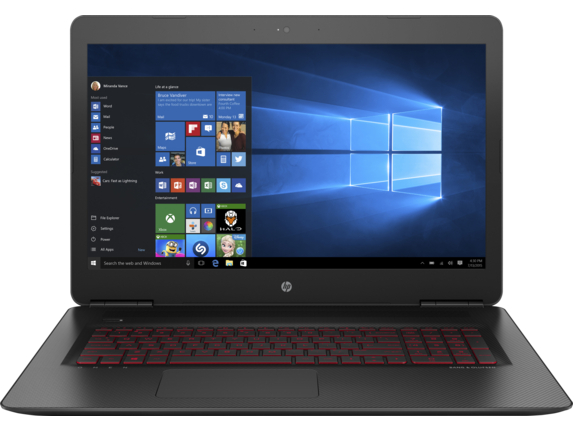
Hp.com has the VR Ready OMEN gaming laptop for
$1,460 w/ FS
To get this price:
- Sign up for the HP Employee Purchase Program http://hp.force.com/external/Frie...Q49_052010;
- Go to http://store.hp.com/us/en/Configu...quantity=1;
- under Processor and Graphics , add Intel® Core™ i7-6700HQ (2.6 GHz, up to 3.5 GHz, 6 MB cache, 4 cores) + NVIDIA® GeForce® GTX 1070 (8GB GDDR5 dedicated);
- under Hard Drive , add 512GB PCIe® NVMe™ M.2 SSD. (If you'd rather have the default configuration with 128GB SSD + 2TB HDD, then the price will be $50 cheaper.)
- Windows 10 Home 64
- Intel® Core™ i7-6700HQ (2.6 GHz, up to 3.5 GHz, 6 MB cache, 4 cores) + NVIDIA® GeForce® GTX 1070 (8GB GDDR5 dedicated)
- 16GB DDR4-2133 SDRAM (2 x 8GB)
- 17.3" diagonal UHD IPS UWVA anti-glare WLED-backlit (3840 x 2160)
- 512GB PCIe® NVMe™ M.2 SSD
- 6-cell 95.8 WHr Lithium-ion Battery
- Full-size island-style backlit keyboard
- HP Wide Vision HD Webcam with Dual Digital Microphone
- Intel® 802.11ac (2x2) Wi-Fi® and Bluetooth® 4.2 Combo
The price has gone up $50 since I first posted this 5 days ago but it still can't be beat by any other gaming laptop with the same specs. And it is $40 cheaper than the Black Friday deal for this configuration.


69 Comments
Your comment cannot be blank.
Sign up for a Slickdeals account to remove this ad.
Decent price for a 1070 with i7 i agree.However, as a user coming from 4K, dropping to 2K (1440P) was a much better alternative. 4K is not optimized for many applications except gaming and intense video/picture editing. Windows 10 is still having trouble with optimization. The text has to be supersized to 150% to look viewable and Windows 10 looks even tinier on a 17" screen. (I had a 27" LG 4K and if it looked tiny on that, then i can't imagine it lookin any better on a 17" 4K screen)
TL;DR: 1440P/2K res would be a much better option for a 1070 for good stable high 60+ FPS at high/ultra details for most modern games.
Its just the right "amount", as goldilocks would say.
I agree that a 1440p screen would be better both in terms of Windows scaling and as an optimal match for GTX 1070, which is meant for 1440p gaming. Even GTX 1080 struggles in some games at 4K. Unfortunately, there's no option for a 2560x1440 screen.
I agree 4k does make everything a little too small for a 17" and most apps don't support that resolution. For me, the only advantage is that everything looks very sharp and detailed, good for watching videos, both regular hd and 4k sources.
Edit: Works here! http://hp.force.com/external/Frie...Q49_0520
I agree that a 1440p screen would be better both in terms of Windows scaling and as an optimal match for GTX 1070, which is meant for 1440p gaming. Even GTX 1080 struggles in some games at 4K. Unfortunately, there's no option for a 2560x1440 screen.
http://www.laptopmag.c
^Looks pretty good except temps, sadly. I still might jump. A 1070 at this price is good.
Edit: https://www.youtube.com/watch?v=wtJoiDV
This review got pretty good temps.
I'm seeing a lot of inconsistency in the reviews for heat/keyboard/trackpad/display brightness. Hm. Also, too bad about tax.
Sign up for a Slickdeals account to remove this ad.
If you don't have many programs to install on the SSD, then the default hard drive configuration with a 128GB SSD and a 2TB HDD may work out better for you. Even a 512GB SSD can fill up pretty fast if you install a lot of modern games on it. GTA V alone is almost 70GB. And if you are like me and record videos of some of your best gameplay, then it could be twice as much.
Other options include using an external HDD or online storage.
Also, you can save an additional $150 if you downgrade the video card to only 6gb of memory. Wow, I remember when 128mb was HUGE!!!
If you don't have many programs to install on the SSD, then the default hard drive configuration with a 128GB SSD and a 2TB HDD may work out better for you. Even a 512GB SSD can fill up pretty fast if you install a lot of modern games on it. GTA V alone is almost 70GB. And if you are like me and record videos of some of your best gameplay, then it could be twice as much.
Other options include using an external HDD or online storage.
If you don't have many programs to install on the SSD, then the default hard drive configuration with a 128GB SSD and a 2TB HDD may work out better for you. Even a 512GB SSD can fill up pretty fast if you install a lot of modern games on it. GTA V alone is almost 70GB. And if you are like me and record videos of some of your best gameplay, then it could be twice as much.
Other options include using an external HDD or online storage.
I tried an Asus before that had a 256+1TB and I hated moving files around so much. Plus, the screen bleed was terrible and the battery drain when playing games.
Also, you can save an additional $150 if you downgrade the video card to only 6gb of memory. Wow, I remember when 128mb was HUGE!!!
A better option I would think would be to replace the 128gb with a 512 or 1tb ssd. You can get a good 512 for about 190 now. Then you have storage for files and speed for your current game list.