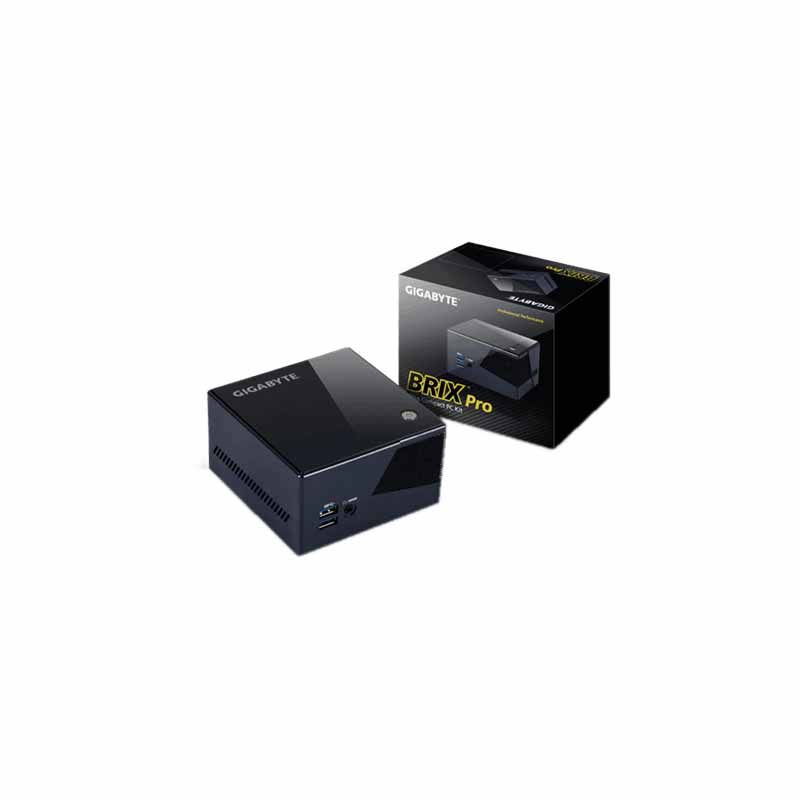
Fry's Electronics has the Gigabyte i7-5775R for 229.00 after promo code.
Gigabyte Brix [frys.com]
This is available in store and online with free shipping (though online quantities are probably limited).
Previous discussion
here when it was 249.99.
My promo codes I'm not using
4600694
1838188
4793098
1269866
6854603
2419738
6584264
9260613



54 Comments
Your comment cannot be blank.
Sign up for a Slickdeals account to remove this ad.
FYI, it uses blower fan and it's loud. I've managed to put an Noctua NF-A9x14 fan as a replacement but requires a bit of modding.
The fan I got is is 92mm x 14mm, 92mm is a bit too large since it exceeds the dimensions of where the chassis screw mounts sit and where the power button rod sits, you'll need to cut the corners. Another problem that can come up after this is that the fan itself will interfere with a screw that holds the power button rod in place. I ended up cutting off the screw and just have a loose power button there, which causes the power button to rotate, but meh. If you are adventurous, you can solder your own power button, there are for points, LED+, LED-, Switch +, Switch - (shown here [imgur.com]). However, an easier alternative would be to look for 80mm x 15mm fans (there are a few from cooler master) and that should sit nicely in the center.
The fan is held together to the heatsink via doublesided thermal tape. I'm sure there are better solutions to clamping the fan down.
Prior to mounting the fan, you'll need to remove the two fan mount holes on the heatsink for the existing blower fan, you can remove the heatsink altogether and knock the mount holes from the back, but I just use a dremel to cut it off.
The fan mod itself won't do jack since the vents are on the side, so I cut my case open on the top with a 3 inch hole saw (which is a bit small for the 92mm fan, 3 1/2 inch would be ideal). I'm planning on gluing a fan grill over it. Careful not to cut the antenna wires, lift it up from the sticky plastic part of chassis before you start cutting.
You'll then want to go to Bios and disable bios fan control. I couldn't get SpeedFan to control the fan for some reason, Argus Monitor can, and it shows it as SYS_FAN1.
With Argus Monitor, and currently with an open chassis top, I'm getting 41 deg C idle / browsing, and extremely silent. Even when I'm using exporting / rendering Videos, the temp goes up to 70s and is still not as loud as the blower fan on idle.
This is my first time modding a computer (and also using a hole saw & dremel) so it turned out pretty bad physically, but functionally it works.
My next mod for this device is to remove the wlan+bt mpcie slot and connect it to a EGPU solution, it'll only give me x1 pcie lane speed but I'll be using a spare GTX 750 I have so I don't think it matters that much.
[Edit] Here is what it looks like right now
https://imgur.com/a/ZnmJn
Too bad you can't fit a GPX card in there :/
Those who want one better hurry though, my local store sold out between clicking the link and selecting in store pickup & checkout completion. Online will probably follow soon.
Oh, and thanks OP! I used your second to last code if you want to remove or line it out.
Sign up for a Slickdeals account to remove this ad.
FYI, it uses blower fan and it's loud. I've managed to put an Noctua NF-A9x14 fan as a replacement but requires a bit of modding.
The fan I got is is 92mm x 14mm, 92mm is a bit too large since it exceeds the dimensions of where the chassis screw mounts sit and where the power button rod sits, you'll need to cut the corners. Another problem that can come up after this is that the fan itself will interfere with a screw that holds the power button rod in place. I ended up cutting off the screw and just have a loose power button there, which causes the power button to rotate, but meh. If you are adventurous, you can solder your own power button, there are for points, LED+, LED-, Switch +, Switch - (shown here [imgur.com]). However, an easier alternative would be to look for 80mm x 15mm fans (there are a few from cooler master) and that should sit nicely in the center.
The fan is held together to the heatsink via doublesided thermal tape. I'm sure there are better solutions to clamping the fan down.
Prior to mounting the fan, you'll need to remove the two fan mount holes on the heatsink for the existing blower fan, you can remove the heatsink altogether and knock the mount holes from the back, but I just use a dremel to cut it off.
The fan mod itself won't do jack since the vents are on the side, so I cut my case open on the top with a 3 inch hole saw (which is a bit small for the 92mm fan, 3 1/2 inch would be ideal). I'm planning on gluing a fan grill over it. Careful not to cut the antenna wires, lift it up from the sticky plastic part of chassis before you start cutting.
You'll then want to go to Bios and disable bios fan control. I couldn't get SpeedFan to control the fan for some reason, Argus Monitor can, and it shows it as SYS_FAN1.
With Argus Monitor, and currently with an open chassis top, I'm getting 41 deg C idle / browsing, and extremely silent. Even when I'm using exporting / rendering Videos, the temp goes up to 70s and is still not as loud as the blower fan on idle.
This is my first time modding a computer (and also using a hole saw & dremel) so it turned out pretty bad physically, but functionally it works.
My next mod for this device is to remove the wlan+bt mpcie slot and connect it to a EGPU solution, it'll only give me x1 pcie lane speed but I'll be using a spare GTX 750 I have so I don't think it matters that much.
Too bad you can't fit a GPX card in there :
Pardon my excitement; my question is this: so this box only needs RAM and a HD, yeah? Np if it's in pieces, I can build it, just want to make sure I'm not missing something.
P.S. I figured it out. But I already have this so I will wait for this to be 200 from Newegg if I want a second brix.
Pardon my excitement; my question is this: so this box only needs RAM and a HD, yeah? Np if it's in pieces, I can build it, just want to make sure I'm not missing something.