Slickdeals is community-supported.  We may get paid by brands for deals, including promoted items.
Sorry, this deal has expired. Get notified of deals like this in the future. Add Deal Alert for this Item
Frontpage

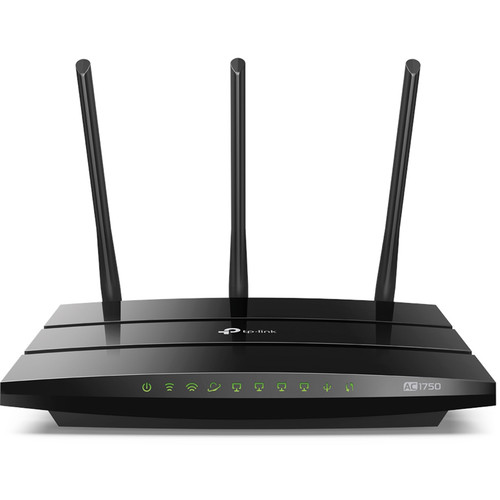
TP-Link Archer A7 AC1750 Wireless Dual Band Gigabit Router (Refurb) Expired

$30
$59.99
+ Free S/H
+21 Deal Score
17,714 Views
BHPhotoVideo.com has TP-Link Archer A7 AC1750 Wireless Dual Band Gigabit Router (Refurbished) on sale for $29.99. Shipping is free. Thanks TheAnarchist

Note, includes a 90-day limited warranty w/ purchase.

Includes
  • TP-Link Archer A7 AC1750 Wireless Dual Band Gigabit Router (Refurbished)
  • Power Supply Unit
  • Ethernet Cable

Editor's Notes & Price Research

Written by
  • This router provides up to 450 Mb/s over 2.4 GHz and 1300 MB/s over 5 GHz line. Connect devices via USB 2.0 Type-A port for file sharing or wireless printing.
  • Offer valid only for October 10, 2019 or while supplies last. This matches a previous Frontpage deal from August. -StrawMan86

Original Post

Written by
Edited October 10, 2019 at 12:09 AM by
BH Photo Video [bhphotovideo.com] has TP-Link Archer A7 AC1750 Wireless Dual-Band Gigabit Router (Refurbished) on sale for $29.99. Shipping is free.

Note, available October 10th only or while supplies last.
If you purchase something through a post on our site, Slickdeals may get a small share of the sale.
Deal
Score
+21
17,714 Views

Your comment cannot be blank.

Featured Comments

From Amazon reviews, FYI:

"This is the US v5.0 of the TP-Link Archer C7 (AC1750). There is only one version of the firmware from April 2018. The DD-WRT site states that v5.0 is not supported and "probably never will be". Regardless, the 5ghz antenna refuses to stay connected and recycles constantly. There is no problem with the 2.4ghz but having a dual band router with only one working set of antennas is completely unacceptable. I have v2.0 of the router running with DD-WRT and the 5ghz antenna works perfectly. I have to assume that TP-Link has deficient firmware for this router. The inability to upgrade to a newer native firmware from TP-Link, or to flash it with DD-WRT makes it unusable for someone like myself who utilizes the 5ghz band. Unfortunately, there's no way to tell what version hardware you're ordering. DD-WRT does support up to v4.0."
Thats I always get my firmware from a guy name HonestGuy23.
I had the C7 version of this router for a few years, but recently had to replace it. I kept getting dropped connections more and more frequently. Perhaps too many devices on WIFI (definitely more compared to when I first bought the router).

The sounds of "Dad, youtube's not loading" still haunt me to this day.

Sign up for a Slickdeals account to remove this ad.

Joined Dec 2006
L10: Grand Master
> bubble2 6,690 Posts
4,340 Reputation
theimage13
10-10-2019 at 05:53 AM.
From Amazon reviews, FYI:

"This is the US v5.0 of the TP-Link Archer C7 (AC1750). There is only one version of the firmware from April 2018. The DD-WRT site states that v5.0 is not supported and "probably never will be". Regardless, the 5ghz antenna refuses to stay connected and recycles constantly. There is no problem with the 2.4ghz but having a dual band router with only one working set of antennas is completely unacceptable. I have v2.0 of the router running with DD-WRT and the 5ghz antenna works perfectly. I have to assume that TP-Link has deficient firmware for this router. The inability to upgrade to a newer native firmware from TP-Link, or to flash it with DD-WRT makes it unusable for someone like myself who utilizes the 5ghz band. Unfortunately, there's no way to tell what version hardware you're ordering. DD-WRT does support up to v4.0."
Reply
Joined Feb 2019
L3: Novice
> bubble2 2,318 Posts
397 Reputation
JakeW3302
10-10-2019 at 06:22 AM.
That is from Amazon. This is b&h. Also, why does the following review state:
"stable, strong signal, and well supported by the open source community (equiv to C7 v5)"
Reply
Joined Jul 2004
L5: Journeyman
> bubble2 867 Posts
3,012 Reputation
Turbowells
10-10-2019 at 06:36 AM.
Just go to the dd-wrt forums to find out if they are supported. The A7 V5 (and C7 V5) are supported.

Here's the A7 thread: https://forum.dd-wrt.com/phpBB2/v...sc&start=0

Latest build: https://download1.dd-wrt.com/dd-w...her-a7-v5/

I got a couple C7 V4 units when Walmart was clearing them out a while back and they've been fine on dd-wrt.
Reply
Joined Aug 2012
L3: Novice
> bubble2 287 Posts
227 Reputation
albisylk
10-10-2019 at 06:48 AM.
Does anyone know if this version supports the TP-Link Alexa skills? The AC1750 sold on Amazon does, but this page makes no mention of it.
Reply
Joined Jul 2015
L4: Apprentice
> bubble2 379 Posts
195 Reputation
OB_Bull
10-10-2019 at 06:50 AM.
How do you trust firmware built by some unknown person referred to as Kong or Brainslayer?
Reply
Joined Nov 2018
L3: Novice
> bubble2 194 Posts
26 Reputation
neanderthall
10-10-2019 at 06:57 AM.
Quote from OB_Bull :
How do you trust firmware built by some unknown person referred to as Kong or Brainslayer?

Thats I always get my firmware from a guy name HonestGuy23.
Reply
Joined Apr 2019
New User
> bubble2 9 Posts
10 Reputation
RobertB1936
10-10-2019 at 07:08 AM.
A7 va c7, pretty sure a7 means Alexa
Reply

Sign up for a Slickdeals account to remove this ad.

Joined Nov 2010
L3: Novice
> bubble2 130 Posts
67 Reputation
scharfie
10-10-2019 at 07:17 AM.
I had the C7 version of this router for a few years, but recently had to replace it. I kept getting dropped connections more and more frequently. Perhaps too many devices on WIFI (definitely more compared to when I first bought the router).

The sounds of "Dad, youtube's not loading" still haunt me to this day.
Reply
Joined Nov 2018
New User
> bubble2 15 Posts
10 Reputation
LoveGr8Deals
10-10-2019 at 07:47 AM.
I added a 2 year SquareTrade for $5.99. Slick!
Reply
Joined Aug 2014
L2: Beginner
> bubble2 398 Posts
262 Reputation
catch.nkn
10-10-2019 at 07:47 AM.
Price drop due to TP Link is releasing Archer AX1500 and Archer AX3000 with WiFi 6 Smilie
Reply
Joined Aug 2014
L3: Novice
> bubble2 243 Posts
163 Reputation
Pro
guitarguykevin
10-10-2019 at 08:20 AM.
Any point to upgrade my Archer C5 AC1200 to this?
Reply
Joined Nov 2017
L3: Novice
> bubble2 134 Posts
37 Reputation
commader_n
10-10-2019 at 08:44 AM.
I've been using this router for 4 months non-stop. Never had to restart, runs perfectly at 5ghz and 2.4ghz.

It was on sale at Microcenter for perhaps $60 new. I had a pretty long conversation with the knowledgable worker there and he recommended this one to me at that price.

The one thing I had to do was log into the router and tell it what my internet speed was so it knows how to distribute correctly. Before I did that, when I started using a new device it would often cause my internet to halt on one or more devices.
Reply
Joined Aug 2015
L3: Novice
> bubble2 146 Posts
14 Reputation
simplymt
10-10-2019 at 09:21 AM.
Quote from commader_n :
I've been using this router for 4 months non-stop. Never had to restart, runs perfectly at 5ghz and 2.4ghz.

It was on sale at Microcenter for perhaps $60 new. I had a pretty long conversation with the knowledgable worker there and he recommended this one to me at that price.

The one thing I had to do was log into the router and tell it what my internet speed was so it knows how to distribute correctly. Before I did that, when I started using a new device it would often cause my internet to halt on one or more devices.

I am assuming that it automatically distributes between 2.4 and 5ghz considering it's a smart one. I have 150 Mbps connection from Cox and got a wavlink router recently based on amazon reviews wherein I need to set up two different WiFis and decide which device to connect to which.
Reply
Page 1 of 4
Start the Conversation
 

More B&H Photo Video Deals

More TP-Link Deals

Link Copied

The link has been copied to the clipboard.