Last Edited by luvu43v3r
September 16, 2017
at
11:25 AM
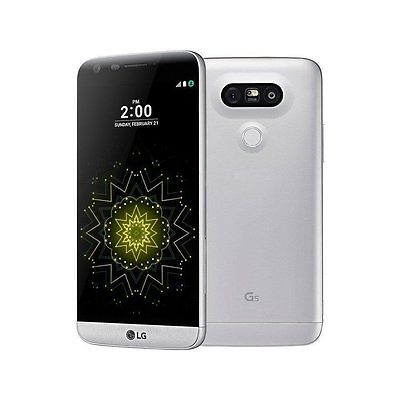
Boxes were opened (to be unlocked?) and resealed. The T-Mobile sticker seal on the outside of the box is cut. Everything else looks new and matches unboxing videos on Youtube. Manufacture date of February 2017 (phone originally released March 2016).
In addition to the above, there's some more info to be aware of before you make the decision to purchase this. This specific vendor is selling a version that has what appears to be a non-OEM ROM installed, which is listed as software version H83020i_un. Since it's not a factory ROM, if you send it to LG for warranty work, it's unlikely to be covered (they would consider it to be modified). Also, this ROM disables Android Pay. You will not receive over the air T-Mobile updates on this RIOM.
The vendor initially claimed to know nothing about this mystery ROM that is installed, but there have been numerous complaints directed to them and negative feedback left. They have recently added in their description that Android Pay does not work, but there's no mention of the unofficial ROM that is in use and the other associated problems.
The good news is that this can all be fixed, sort of. Go to post #241 by Skipjacks. He did a great job with information and links to XDA to flash a factory ROM back onto the phone, and it's easy. This will update it to software version H83020i (note that the _un part is gone). Then with the factory ROM running, check for updates on you phone and it should give you an over the air update to the most current software version that came out a few days ago, which is H83020k. Android Pay will now work. The bad news is that the installation of the proper factory ROM will most likely re-lock the phone to T-Mobile. To get it unlocked you will need to be on T-Mobile for 40 days.
With the factory software running, the LG warranty coverage of 15 months from date of manufacture should be honored.
So, if you wish to put some effort into flashing the legitimate factory ROM and you plan on using it on T-Mobile for at least 40 days, this is a good deal. It's just unfortunate that the vendor isn't honest about what's going on.
Okay after the factory data reset everything seems to be working okay.
I'm not done restoring all my stuff yet. But It makes phone calls. Texts work. I have mobile data. The phone is registered on the LTE network.
The settings shows the software is update to version H83020a with the option to do official T Mobile updates.
I reverted back to version 20a which is from like December. I did that to verify that the phone really returned to a true stock status that would get future OTA updates form T Mobile. It does.
The instructions below will take you straight to the most recent T Mobile official updated software that came out in April. (20i) If you want the 20a software, see the link at the bottom of this post.
Here is how to get the most recent official software on your phone and undo whatever the heck BuySpry or their supplier did to this phone.
DO THIS AT YOUR OWN RISK. YOU PROBABLY WON'T BREAK YOUR PHONE BUT IT'S NOT MY FAULT IF YOU DO
MAKE SURE YOUR BATTERY IS AT 100% BEFORE STARTING THIS
YOU WILL LOSE SIM UNLOCK BY DOING THIS The seller unlocked these with a ROM modification, which is the wrong way to do it. So changing the ROM will kill that mod. (But in theory if you've had the device for 40 days and are on the T Mobile network, you can use the included app to unlock it. But I have't had it for 40 days so I can't test that)
Follow those instructions to the letter. It's really kind of moron proof so don't worry if you're new to modifying phones. As long as you follow the instructions you should be okay.
HOW TO USE THOSE DIRECTIONS
The content in the first post of that XDA Developer's thread is hidden so its' not a mile long. You have to open the sections you want to see. (Keep in mind I used the first thread for downgrading to version 20a. So if you do the update to 20i it might look a smidge different)
Go to the DOWNLOADS section of that post and click "CLICK TO SHOW CONTENT"
You want the last file on the list. "H83020i_00_0422.kdz" so click on that.
It's a 2 GB file so make sure you have time to do this.
That's the full ROM (operating system) that the LG UP Software will install.
NEXT STEP
Go to INSTALL INSTRUCTIONS and click "CLICK TO SHOW CONTENT"
In the INSTALL INSTRUCTIONS you will see 3 options of how to do this. YOU WANT THE MIDDLE ONE FOR THE LG UP METHOD
(The LG Bridge option isn't available because the it only updates. It will say you have the most recent software and stop. The TWRP option isn't available because you don't have a custom recovery.)
Download the 3 things it tells you to and install them. (1 is the software your computer will run. 1 is the updates and drivers and stuff for the computer and phone. And 1 is the modification to the official LG software that lets this work)
Follow the 4 step by step instructions.
The update will take about 3 minutes to run on the computer. Then your phone will take another 5 minutes or so to complete it's part.
Check to make sure it worked by going to SETTINGS -> ABOUT PHONE -> SOFTWARE INFO -> 2nd line from the bottom should say H83020i WITHOUT the _un at the end. if it does you're good.
THIS WILL NOT WIPE YOUR USER DATA IF YOU FOLLOW THE INSTRUCTIONS! That may or may not be a problem.
There is an option in the LG UP software to wipe your data. It's the REFURBISH option. If doesn't work according to the thread. Do the UPGRADE option and then do a factory reset from settings or recovery when you're done or things probably won't work right. (But they MIGHT since you are going from a 20i bse ROM to a very similar 20i base ROM) When it reboots it will be like a new phone fresh out of the box.
TO GET THE OLDER 20a SOFTWARE SEE BLOW
If you want to be able to root your phone when you're done...use this thread for the downloads and instructions instead. You'll need that software version. https://forum.xda-developers.com/...s-t3511294
I'm glad you guys can at least restore it to stock and hold on to a good deal but I travel so I need an unlocked phone.
I can't afford to sacrifice os/security updates and warranty just to keep it unlocked. Those are the two main reasons I bought a new phone in the first place.
thanks for trying this. once it is factory set, could you please try to setup android pay? since it did not work previously.
If everything works great, could you share how you can flash 20a software on it? thanks again.
I don't use Android Pay. And I don't want to create an account to test it because I NEVER put my credit card number in my phone for security reasons.
Personally I hate the concept of Android Pay (or Apple Pay or anything else) because of the security issues so I won't even try it. (I'm a fuddy duddy. Sue me.)
But I can tell you that the app runs and asks me to put in a credit card. If you couldn't even get that far with it the way the phone came out of the box, I'd guess it's working. If you could already put in a card and it just wouldn't work when you went to actually use it...I can't help you. You'll have to test it yourself.
If I was a gambling man...I'd say it'll work based on everything else I see. The phone is running stock software as it came from LG and T Mobile. I don't think the Android Pay app would see anything weird that would stop it.
Okay after the factory data reset everything seems to be working okay.
I'm not done restoring all my stuff yet. But It makes phone calls. Texts work. I have mobile data. The phone is registered on the LTE network.
The settings shows the software is update to version H83020a with the option to do official T Mobile updates.
I reverted back to version 20a which is from like December. I did that to verify that the phone really returned to a true stock status that would get future OTA updates form T Mobile. It does.
The instructions below will take you straight to the most recent T Mobile official updated software that came out in April. (20i) If you want the 20a software, see the link at the bottom of this post.
Here is how to get the most recent official software on your phone and undo whatever the heck BuySpry or their supplier did to this phone.
DO THIS AT YOUR OWN RISK. YOU PROBABLY WON'T BREAK YOUR PHONE BUT IT'S NOT MY FAULT IF YOU DO
MAKE SURE YOUR BATTERY IS AT 100% BEFORE STARTING THIS
YOU WILL LOSE SIM UNLOCK BY DOING THIS The seller unlocked these with a ROM modification, which is the wrong way to do it. So changing the ROM will kill that mod. (But in theory if you've had the device for 40 days and are on the T Mobile network, you can use the included app to unlock it. But I have't had it for 40 days so I can't test that)
Follow those instructions to the letter. It's really kind of moron proof so don't worry if you're new to modifying phones. As long as you follow the instructions you should be okay.
HOW TO USE THOSE DIRECTIONS
The content in the first post of that XDA Developer's thread is hidden so its' not a mile long. You have to open the sections you want to see. (Keep in mind I used the first thread for downgrading to version 20a. So if you do the update to 20i it might look a smidge different)
Go to the DOWNLOADS section of that post and click "CLICK TO SHOW CONTENT"
You want the last file on the list. "H83020i_00_0422.kdz" so click on that.
It's a 2 GB file so make sure you have time to do this.
That's the full ROM (operating system) that the LG UP Software will install.
NEXT STEP
Go to INSTALL INSTRUCTIONS and click "CLICK TO SHOW CONTENT"
In the INSTALL INSTRUCTIONS you will see 3 options of how to do this. YOU WANT THE MIDDLE ONE FOR THE LG UP METHOD
(The LG Bridge option isn't available because the it only updates. It will say you have the most recent software and stop. The TWRP option isn't available because you don't have a custom recovery.)
Download the 3 things it tells you to and install them. (1 is the software your computer will run. 1 is the updates and drivers and stuff for the computer and phone. And 1 is the modification to the official LG software that lets this work)
Follow the 4 step by step instructions.
The update will take about 3 minutes to run on the computer. Then your phone will take another 5 minutes or so to complete it's part.
Check to make sure it worked by going to SETTINGS -> ABOUT PHONE -> SOFTWARE INFO -> 2nd line from the bottom should say H83020i WITHOUT the _un at the end. if it does you're good.
THIS WILL NOT WIPE YOUR USER DATA IF YOU FOLLOW THE INSTRUCTIONS! That may or may not be a problem.
There is an option in the LG UP software to wipe your data. It's the REFURBISH option. If doesn't work according to the thread. Do the UPGRADE option and then do a factory reset from settings or recovery when you're done or things probably won't work right. (But they MIGHT since you are going from a 20i bse ROM to a very similar 20i base ROM) When it reboots it will be like a new phone fresh out of the box.
TO GET THE OLDER 20a SOFTWARE SEE BLOW
If you want to be able to root your phone when you're done...use this thread for the downloads and instructions instead. You'll need that software version. https://forum.xda-developers.com/...s-t3511294
Dude, thanks alot. that's very detail. I think i might do this at home tonight. But shit, i already issue an refund. haha. I am still debating if i should do it. Any luck on set up android pay?
I don't use Android Pay. And I don't want to create an account to test it because I NEVER put my credit card number in my phone for security reasons.
Personally I hate the concept of Android Pay (or Apple Pay or anything else) because of the security issues so I won't even try it. (I'm a fuddy duddy. Sue me.)
But I can tell you that the app runs and asks me to put in a credit card. If you couldn't even get that far with it the way the phone came out of the box, I'd guess it's working. If you could already put in a card and it just wouldn't work when you went to actually use it...I can't help you. You'll have to test it yourself.
If I was a gambling man...I'd say it'll work based on everything else I see. The phone is running stock software as it came from LG and T Mobile. I don't think the Android Pay app would see anything weird that would stop it.
It is not only Android Pay app, it will be other app that access google safety. This special rom kills it.
I don't use Android Pay. And I don't want to create an account to test it because I NEVER put my credit card number in my phone for security reasons.
Personally I hate the concept of Android Pay (or Apple Pay or anything else) because of the security issues so I won't even try it. (I'm a fuddy duddy. Sue me.)
But I can tell you that the app runs and asks me to put in a credit card. If you couldn't even get that far with it the way the phone came out of the box, I'd guess it's working. If you could already put in a card and it just wouldn't work when you went to actually use it...I can't help you. You'll have to test it yourself.
If I was a gambling man...I'd say it'll work based on everything else I see. The phone is running stock software as it came from LG and T Mobile. I don't think the Android Pay app would see anything weird that would stop it.
You don't have to actually add a credit card to verify that it works. Previously, as soon as you try and add a CC, you will get a popup that says the bootloader has been unlocked. It won't actually let you enter your CC info. If you can actually enter your information, then the phone has passed security checks.
You don't have to actually add a credit card to verify that it works. Previously, as soon as you try and add a CC, you will get a popup that says the bootloader has been unlocked. It won't actually let you enter your CC info. If you can actually enter your information, then the phone has passed security checks.
When I clicked ADD ACCOUNT it brings up the credit card that I have saved to my Google account.
No errors.
I didn't actually add the card to the app (and I'm not going to) but it showed me my card.
Thanks for the effort and sharing the details. I was considering this as a gift. Although I'm quite happy with my ATT G5, I thought the TMO one would be slightly better for having an unlocked bootloader. I'm glad I didn't make the move and I would be more skeptical with any "unlocked" TMO phones on eBay going forward. I totally agree this cannot be listed as a "brand new unlocked" phone. It's more like a "newly hacked phone..." that only works with reduced functionality and unsupported firmware...
I've never heard of a phone (any brand) being unlocked via a custom ROM or firmware. If this were true, every Android phone would be unlocked this way. Is this ability unique to LG? I thought network unlock is at the deep system level, beyond the ROM. Arent the IMEI's network locked by T-Mobile's computers? I don't see how a ROM or firmware can circumvent that.
I've never heard of a phone (any brand) being unlocked via a custom ROM or firmware. If this were true, every Android phone would be unlocked this way. Is this ability unique to LG? I thought network unlock is at the deep system level, beyond the ROM. Arent the IMEI's network locked by T-Mobile's computers? I don't see how a ROM or firmware can circumvent that.
You are from Mar dude? Flashing ROM to unlock phone was done many years ago. Go to XDA forum to learn about it.


483 Comments
Your comment cannot be blank.
Sign up for a Slickdeals account to remove this ad.
Okay after the factory data reset everything seems to be working okay.
I'm not done restoring all my stuff yet. But It makes phone calls. Texts work. I have mobile data. The phone is registered on the LTE network.
The settings shows the software is update to version H83020a with the option to do official T Mobile updates.
I reverted back to version 20a which is from like December. I did that to verify that the phone really returned to a true stock status that would get future OTA updates form T Mobile. It does.
The instructions below will take you straight to the most recent T Mobile official updated software that came out in April. (20i) If you want the 20a software, see the link at the bottom of this post.
Here is how to get the most recent official software on your phone and undo whatever the heck BuySpry or their supplier did to this phone.
DO THIS AT YOUR OWN RISK. YOU PROBABLY WON'T BREAK YOUR PHONE BUT IT'S NOT MY FAULT IF YOU DO
MAKE SURE YOUR BATTERY IS AT 100% BEFORE STARTING THIS
YOU WILL LOSE SIM UNLOCK BY DOING THIS The seller unlocked these with a ROM modification, which is the wrong way to do it. So changing the ROM will kill that mod. (But in theory if you've had the device for 40 days and are on the T Mobile network, you can use the included app to unlock it. But I have't had it for 40 days so I can't test that)
READ THIS THREAD on XDA DEVELOPERS
https://forum.xda-developers.com/...s-t3609735
Follow those instructions to the letter. It's really kind of moron proof so don't worry if you're new to modifying phones. As long as you follow the instructions you should be okay.
HOW TO USE THOSE DIRECTIONS
The content in the first post of that XDA Developer's thread is hidden so its' not a mile long. You have to open the sections you want to see. (Keep in mind I used the first thread for downgrading to version 20a. So if you do the update to 20i it might look a smidge different)
Go to the DOWNLOADS section of that post and click "CLICK TO SHOW CONTENT"
You want the last file on the list. "H83020i_00_0422.kdz" so click on that.
It's a 2 GB file so make sure you have time to do this.
That's the full ROM (operating system) that the LG UP Software will install.
NEXT STEP
Go to INSTALL INSTRUCTIONS and click "CLICK TO SHOW CONTENT"
In the INSTALL INSTRUCTIONS you will see 3 options of how to do this. YOU WANT THE MIDDLE ONE FOR THE LG UP METHOD
(The LG Bridge option isn't available because the it only updates. It will say you have the most recent software and stop. The TWRP option isn't available because you don't have a custom recovery.)
Download the 3 things it tells you to and install them. (1 is the software your computer will run. 1 is the updates and drivers and stuff for the computer and phone. And 1 is the modification to the official LG software that lets this work)
Follow the 4 step by step instructions.
The update will take about 3 minutes to run on the computer. Then your phone will take another 5 minutes or so to complete it's part.
Check to make sure it worked by going to SETTINGS -> ABOUT PHONE -> SOFTWARE INFO -> 2nd line from the bottom should say H83020i WITHOUT the _un at the end. if it does you're good.
THIS WILL NOT WIPE YOUR USER DATA IF YOU FOLLOW THE INSTRUCTIONS! That may or may not be a problem.
There is an option in the LG UP software to wipe your data. It's the REFURBISH option. If doesn't work according to the thread. Do the UPGRADE option and then do a factory reset from settings or recovery when you're done or things probably won't work right. (But they MIGHT since you are going from a 20i bse ROM to a very similar 20i base ROM) When it reboots it will be like a new phone fresh out of the box.
TO GET THE OLDER 20a SOFTWARE SEE BLOW
If you want to be able to root your phone when you're done...use this thread for the downloads and instructions instead. You'll need that software version.
https://forum.xda-developers.com/...s-t3511294
I can't afford to sacrifice os/security updates and warranty just to keep it unlocked. Those are the two main reasons I bought a new phone in the first place.
If everything works great, could you share how you can flash 20a software on it? thanks again.
Personally I hate the concept of Android Pay (or Apple Pay or anything else) because of the security issues so I won't even try it. (I'm a fuddy duddy. Sue me.)
But I can tell you that the app runs and asks me to put in a credit card. If you couldn't even get that far with it the way the phone came out of the box, I'd guess it's working. If you could already put in a card and it just wouldn't work when you went to actually use it...I can't help you. You'll have to test it yourself.
If I was a gambling man...I'd say it'll work based on everything else I see. The phone is running stock software as it came from LG and T Mobile. I don't think the Android Pay app would see anything weird that would stop it.
Okay after the factory data reset everything seems to be working okay.
I'm not done restoring all my stuff yet. But It makes phone calls. Texts work. I have mobile data. The phone is registered on the LTE network.
The settings shows the software is update to version H83020a with the option to do official T Mobile updates.
I reverted back to version 20a which is from like December. I did that to verify that the phone really returned to a true stock status that would get future OTA updates form T Mobile. It does.
The instructions below will take you straight to the most recent T Mobile official updated software that came out in April. (20i) If you want the 20a software, see the link at the bottom of this post.
Here is how to get the most recent official software on your phone and undo whatever the heck BuySpry or their supplier did to this phone.
DO THIS AT YOUR OWN RISK. YOU PROBABLY WON'T BREAK YOUR PHONE BUT IT'S NOT MY FAULT IF YOU DO
MAKE SURE YOUR BATTERY IS AT 100% BEFORE STARTING THIS
YOU WILL LOSE SIM UNLOCK BY DOING THIS The seller unlocked these with a ROM modification, which is the wrong way to do it. So changing the ROM will kill that mod. (But in theory if you've had the device for 40 days and are on the T Mobile network, you can use the included app to unlock it. But I have't had it for 40 days so I can't test that)
READ THIS THREAD on XDA DEVELOPERS
https://forum.xda-developers.com/...s-t3609735
Follow those instructions to the letter. It's really kind of moron proof so don't worry if you're new to modifying phones. As long as you follow the instructions you should be okay.
HOW TO USE THOSE DIRECTIONS
The content in the first post of that XDA Developer's thread is hidden so its' not a mile long. You have to open the sections you want to see. (Keep in mind I used the first thread for downgrading to version 20a. So if you do the update to 20i it might look a smidge different)
Go to the DOWNLOADS section of that post and click "CLICK TO SHOW CONTENT"
You want the last file on the list. "H83020i_00_0422.kdz" so click on that.
It's a 2 GB file so make sure you have time to do this.
That's the full ROM (operating system) that the LG UP Software will install.
NEXT STEP
Go to INSTALL INSTRUCTIONS and click "CLICK TO SHOW CONTENT"
In the INSTALL INSTRUCTIONS you will see 3 options of how to do this. YOU WANT THE MIDDLE ONE FOR THE LG UP METHOD
(The LG Bridge option isn't available because the it only updates. It will say you have the most recent software and stop. The TWRP option isn't available because you don't have a custom recovery.)
Download the 3 things it tells you to and install them. (1 is the software your computer will run. 1 is the updates and drivers and stuff for the computer and phone. And 1 is the modification to the official LG software that lets this work)
Follow the 4 step by step instructions.
The update will take about 3 minutes to run on the computer. Then your phone will take another 5 minutes or so to complete it's part.
Check to make sure it worked by going to SETTINGS -> ABOUT PHONE -> SOFTWARE INFO -> 2nd line from the bottom should say H83020i WITHOUT the _un at the end. if it does you're good.
THIS WILL NOT WIPE YOUR USER DATA IF YOU FOLLOW THE INSTRUCTIONS! That may or may not be a problem.
There is an option in the LG UP software to wipe your data. It's the REFURBISH option. If doesn't work according to the thread. Do the UPGRADE option and then do a factory reset from settings or recovery when you're done or things probably won't work right. (But they MIGHT since you are going from a 20i bse ROM to a very similar 20i base ROM) When it reboots it will be like a new phone fresh out of the box.
TO GET THE OLDER 20a SOFTWARE SEE BLOW
If you want to be able to root your phone when you're done...use this thread for the downloads and instructions instead. You'll need that software version.
https://forum.xda-developers.com/...s-t3511294
Personally I hate the concept of Android Pay (or Apple Pay or anything else) because of the security issues so I won't even try it. (I'm a fuddy duddy. Sue me.)
But I can tell you that the app runs and asks me to put in a credit card. If you couldn't even get that far with it the way the phone came out of the box, I'd guess it's working. If you could already put in a card and it just wouldn't work when you went to actually use it...I can't help you. You'll have to test it yourself.
If I was a gambling man...I'd say it'll work based on everything else I see. The phone is running stock software as it came from LG and T Mobile. I don't think the Android Pay app would see anything weird that would stop it.
Personally I hate the concept of Android Pay (or Apple Pay or anything else) because of the security issues so I won't even try it. (I'm a fuddy duddy. Sue me.)
But I can tell you that the app runs and asks me to put in a credit card. If you couldn't even get that far with it the way the phone came out of the box, I'd guess it's working. If you could already put in a card and it just wouldn't work when you went to actually use it...I can't help you. You'll have to test it yourself.
If I was a gambling man...I'd say it'll work based on everything else I see. The phone is running stock software as it came from LG and T Mobile. I don't think the Android Pay app would see anything weird that would stop it.
Sign up for a Slickdeals account to remove this ad.
No errors.
I didn't actually add the card to the app (and I'm not going to) but it showed me my card.
Does that help?
No errors.
I didn't actually add the card to the app (and I'm not going to) but it showed me my card.
Does that help?
If you want to be able to root your phone when you're done...use this thread for the downloads and instructions instead. You'll need that software version.
https://forum.xda-developers.com/...s-t3511294 [xda-developers.com]
thanks
No errors.
I didn't actually add the card to the app (and I'm not going to) but it showed me my card.
Does that help?
Sign up for a Slickdeals account to remove this ad.