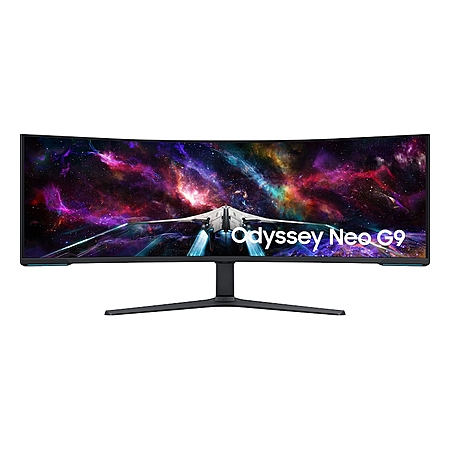
The World's First Dual UHD Monitor; 57" screen size
Gaming worlds feel more real. The 57" DUHD resolution brings you a display as wide as two UHD monitors with incredibly detailed, pin-sharp images and a wide field of view. See more of the action, and play with conviction, knowing you won't miss a thing.
This collaborative space allows users to contribute additional information, tips, and insights to enhance the original deal post. Feel free to share your knowledge and help fellow shoppers make informed decisions.
The World's First Dual UHD Monitor; 57" screen size
Gaming worlds feel more real. The 57" DUHD resolution brings you a display as wide as two UHD monitors with incredibly detailed, pin-sharp images and a wide field of view. See more of the action, and play with conviction, knowing you won't miss a thing.
Deal History includes data from multiple reputable stores, such as Best Buy, Target, and Walmart. The lowest price among stores for a given day is selected as the "Sale Price".
Sale Price does not include sale prices at Amazon unless a deal was posted by a community member.
Our community has rated this post as helpful. If you agree, why not thank
I picked it up about a week ago for this price. So far, I'm in love.
I previously tried a curved widescreen, but absolutely hated the curve and just wasn't able to get used to it - so I returned it and got a couple flat 34" to do side by side. But there have been lots of inconveniences I have been working around since day 1 with my setup, so I decided to give a curved ultra-widescreen another shot, and I'm glad that I did.
I'm a software architect/engineer, and I leverage (and abuse) my screen real estate as much as possible - multiple windows open side by side, lots of tabs, documents opened, slack, outlook, teams, you name it... MULTI-TASKING!!!!
My productivity on this 57" monster is notably improved. Not only do I not have a screen bezel breaking splitting my screen space down the center, but the quality of what I'm reading is consistent as I'm positioned for optimal viewing angles to the screen. I never realized how many times a day I was dragging docs from one screen to another for various reasons - now it's just glancing around because it's all basically positioned "Just as good" as anywhere else.
I do like the built in features of the screen - namely the ability to have 2 PCs downstream of the built in USB hub. I have 2 PCs, one that I dedicate as my work PC, and one that's my personal hobby/gaming machine. With the built in hub, I'm able to connect my keyboard and mouse to the monitor, then connect to both PCs via USB-B and have the keyboard and mouse be used on whichever PC's input I have selected on the monitor. Admittedly, I do wish there was a single-button hotkey to facilitate switching inputs, like the KVM functionality of my Gigabyte screen, but it is admittedly still a pretty simple 2 button press on this screen, so no biggie.
Used this for about a week now over the g91sd. Genuinely good monitor for productivity. Text is crisp and rtings has a calibrated profile. Granted the colors aren't as vibrant as the QD-OLED panel, but I can't complain. More pros than cons.
Every time this monitor is posted at any price, 90% of the comments are people waxing on about how much they love their overpriced 300W heater. If you want to feel better about overspending then at least wait until the price is on the lower end to start justifying it; $1350 is basically its everyday price now
3
Like
Helpful
Funny
Not helpful
Sign up for a Slickdeals account to remove this ad.
Every time this monitor is posted at any price, 90% of the comments are people waxing on about how much they love their overpriced 300W heater. If you want to feel better about overspending then at least wait until the price is on the lower end to start justifying it; $1350 is basically its everyday price now
I thought "no way a monitor is 300w" but sure enough it is. That's insane!
Our community has rated this post as helpful. If you agree, why not thank
Quote
from TrevorK
:
My brain can't logic spending over $1K and not being OLED...
Makes much more sense for a productivity centered monitor to not be OLED due to burn in issues, wanting better text, and due to greater brightness being more desirable.
My brain can't logic spending over $1K and not being OLED...
Modern Mini LED is actually pretty insane. It has super deep blacks and gets way brighter than OLED. This one has 2.4k zones. That said, next generation Mini LED is going to have RGB backlight, which seems like it going to be worth the wait if you don't have a need currently.
My brain can't logic spending over $1K and not being OLED...
OLED is fantastic if all you do is play games or watch shows. If it's 50/50 work and play the text is horrific and burn in is real for things like taskbars and whatnot.
Every time this monitor is posted at any price, 90% of the comments are people waxing on about how much they love their overpriced 300W heater. If you want to feel better about overspending then at least wait until the price is on the lower end to start justifying it; $1350 is basically its everyday price now
Not sure why it's such a big deal to you that people enjoy their monitors.Ultra wide monitors aren't cheap and this is the biggest of all. I'd pay $1350.
2
Like
Helpful
Funny
Not helpful
Sign up for a Slickdeals account to remove this ad.
Not sure why it's such a big deal to you that people enjoy their monitors.Ultra wide monitors aren't cheap and this is the biggest of all. I'd pay $1350.
I have no problem with people enjoying their stuff. My problem is statements like "I'd pay $1350" when this monitor has clearly been significantly cheaper on multiple and recent occasions. Fanboys are practically shills when it comes to unnecessarily driving up the cost of goods for others. My statement is in the context of a deals forum; if something isn't a great price then it shouldn't be upvoted/promoted regardless of how good the product is (and especially if it's not so good).
1
Like
Helpful
Funny
Not helpful
Join The Conversation
Share your experience with the Slickdeals community
Share information with the community. Please follow our Community Guidelines and be kind!



 Samsung

 Samsung




Join The Conversation
Share your experience with the Slickdeals community
Share information with the community. Please follow our Community Guidelines and be kind!
23 Comments
Sign up for a Slickdeals account to remove this ad.
Our community has rated this post as helpful. If you agree, why not thank
I previously tried a curved widescreen, but absolutely hated the curve and just wasn't able to get used to it - so I returned it and got a couple flat 34" to do side by side. But there have been lots of inconveniences I have been working around since day 1 with my setup, so I decided to give a curved ultra-widescreen another shot, and I'm glad that I did.
I'm a software architect/engineer, and I leverage (and abuse) my screen real estate as much as possible - multiple windows open side by side, lots of tabs, documents opened, slack, outlook, teams, you name it... MULTI-TASKING!!!!
My productivity on this 57" monster is notably improved. Not only do I not have a screen bezel breaking splitting my screen space down the center, but the quality of what I'm reading is consistent as I'm positioned for optimal viewing angles to the screen. I never realized how many times a day I was dragging docs from one screen to another for various reasons - now it's just glancing around because it's all basically positioned "Just as good" as anywhere else.
I do like the built in features of the screen - namely the ability to have 2 PCs downstream of the built in USB hub. I have 2 PCs, one that I dedicate as my work PC, and one that's my personal hobby/gaming machine. With the built in hub, I'm able to connect my keyboard and mouse to the monitor, then connect to both PCs via USB-B and have the keyboard and mouse be used on whichever PC's input I have selected on the monitor. Admittedly, I do wish there was a single-button hotkey to facilitate switching inputs, like the KVM functionality of my Gigabyte screen, but it is admittedly still a pretty simple 2 button press on this screen, so no biggie.
Sign up for a Slickdeals account to remove this ad.
Our community has rated this post as helpful. If you agree, why not thank
Our community has rated this post as helpful. If you agree, why not thank
Sign up for a Slickdeals account to remove this ad.
Join The Conversation
Share your experience with the Slickdeals community
Share information with the community. Please follow our Community Guidelines and be kind!